The single difference that decides the choice between the Eero Pro 6E and the Netgear Orbi RBK752 is whether your home network demands the higher wireless speeds and lower interference of Wi-Fi 6E on a 2.5 Gbps port, or the expansive multi-room coverage and generous Gigabit Ethernet port selection of a dedicated two-piece Wi-Fi 6 mesh system.
Choose the Eero Pro 6E if you own modern 6 GHz devices, subscribe to a multi-gigabit internet tier, and manage dozens of smart home accessories in an apartment or mid-sized residence. Choose the Netgear Orbi RBK752 if you must blanket a large multi-story house with reliable Wi-Fi 6 coverage and want multiple wired ports distributed across separate rooms right out of the box.


Eero Pro 6E vs Netgear Orbi RBK752 at a Glance
| Feature | Eero Pro 6E | Netgear Orbi RBK752 |
|---|---|---|
| Wi-Fi Generation | Wi-Fi 6E (802.11ax with 6 GHz) | Wi-Fi 6 (802.11ax, 802.11ac) |
| Frequency Band Architecture | Tri-Band (including 6 GHz band) | Tri-Band |
| Maximum System Speed Rating | Up to 2.3 Gbps network (1.6 Gbps wireless) | AX4200 (Up to 4.2 Gbps) |
| Internet Plan Compatibility | Plans up to 2.5 Gbps | Plans up to 2 Gbps |
| Out-of-the-Box Coverage | Up to 2,000 sq. ft. (1-pack) | Up to 5,000 sq. ft. (Router + 1 Satellite) |
| Connected Device Capacity | 100+ devices | Up to 40 devices |
| Ethernet Ports | 2.5 Gbps port and Gigabit port | 3 Gigabit ports on router, 2 Gigabit ports on satellite |
| Internal Antennas | The listing does not specify | 6 internal antennas |
| Network Security Software | Separate subscription available | NETGEAR Armor (30-day trial included) |
| Best For | Multi-gigabit plans and modern 6 GHz devices | Large multi-room homes needing extensive wired connections |
Wireless Speeds and Wi-Fi Frequency Bands
Understanding wireless frequency bands is vital when weighing modern mesh routers, as bandwidth allocation determines how devices communicate under heavy network strain. The eero Pro 6E functions as a Wi-Fi 6E system, introducing direct access to the newly opened 6 GHz wireless band alongside standard 2.4 GHz and 5 GHz channels. This extra band operates like an uncluttered highway for compatible Wi-Fi 6E phones, tablets, and laptops, bypassing the congested airwaves typical of older frequencies. The listing notes that the Pro 6E supports total network speeds up to 2.3 Gbps, delivering wireless speeds reaching up to 1.6 Gbps. For buyers analyzing how next-generation hardware compares against premium alternatives, looking at an eero pro 6e vs netgear orbi 970 breakdown illustrates just how crucial modern spectrum access has become for top-tier throughput.
In contrast, the Orbi RBK752 operates strictly on Wi-Fi 6 technology, incorporating standard 802.11ax and 802.11ac protocols across a tri-band framework. While it lacks access to the 6 GHz band, it carries an overall speed classification of AX4200, boasting aggregate data transfer rates up to 4.2 Gbps and maximum upstream rates of 2100 Mbps. In everyday household use, the Orbi RBK752 spreads this capacity over traditional 2.4 GHz and dual 5 GHz bands, reserving high-throughput wireless backhaul to transmit data between the primary router and its satellite extender. This approach ensures standard Wi-Fi 6 devices maintain fast connections without relying on newer 6E hardware.
When measuring pure peak performance for modern client hardware, the eero Pro 6E vs Orbi RBK752 speed equation hinges on device compatibility. The eero Pro 6E provides faster point-to-point wireless transmission to any client equipped with a 6 GHz receiver, granting zero-interference connections that older Wi-Fi 6 hardware cannot access. However, devices lacking 6E support will see the Orbi RBK752 deliver robust multi-stream Wi-Fi 6 throughput across its broad dual-band coverage. If your home already includes modern smartphones, tablets, or gaming rigs that leverage Wi-Fi 6E, the Pro 6E offers a noticeable technical upgrade.
Edge: Eero Pro 6E provides direct access to the uncongested 6 GHz band for faster wireless transmission on modern hardware.
Coverage Area and Multi-Room Reach
Coverage capabilities dictate whether a mesh system can properly blanket your floor plan or leave you battling dead zones in distant corners. The eero Pro 6E package supplied in this comparison is a single router unit engineered to cover up to 2,000 square feet, representing approximately a 25-foot operating radius. Utilizing patented TrueMesh technology, this standalone gateway intelligently adapts traffic routes to bypass physical barriers and reduce drop-offs, making it ideal for open layouts, apartments, or smaller single-story properties.
The Orbi RBK752 arrives as a comprehensive two-piece system featuring a primary router and one satellite extender, engineered specifically to blanket up to 5,000 square feet. Furthermore, the manufacturer specifies that homeowners can extend coverage by an additional 2,500 square feet for each supplemental satellite purchased later. This hardware configuration provides an immediate physical reach advantage, allowing users to place the satellite hundreds of feet away, past thick walls, or on an upper floor to eliminate structural dead spots. Readers exploring coverage benchmarks across competing mesh setups like the netgear orbi rbk752 vs tp-link deco xe75 will observe that dedicated satellite hardware fundamentally alters multi-floor signal delivery.
When assessing the Eero Pro 6E vs Netgear Orbi RBK752 coverage dynamic, the default Orbi hardware package simply provides far greater physical reach. While an owner can choose to purchase additional eero units to build out a wider network thanks to its backward-compatible architecture, comparing the base packages reveals that the RBK752 immediately resolves whole-home range issues. For large suburban homes, multi-story residences, or properties with detached workspaces, the Orbi RBK752 offers superior structural penetration right out of the box.
Edge: Netgear Orbi RBK752 blankets up to 5,000 square feet immediately using its included router and satellite pairing.
Wired Connectivity and Ethernet Ports
Physical Ethernet ports are essential for latency-sensitive applications like competitive gaming, home media servers, and desktop workstations that perform best off wireless bands. In the Orbi RBK752 vs Eero Pro 6E ethernet ports evaluation, the hardware layouts diverge significantly in port volume and throughput capacity. The eero Pro 6E includes a multi-gigabit 2.5 Gb Ethernet port alongside Gigabit connectivity, enabling wired speeds of up to a gigabit and supporting incoming broadband plans up to 2.5 Gbps. This makes it an effective gateway for users whose primary goal is passing multi-gigabit bandwidth into their network.
The Orbi RBK752 prioritizes port quantity distributed across multiple living spaces. The router base provides three Gigabit Ethernet ports, while the satellite extender adds two additional Gigabit Ethernet ports, yielding five usable local-area ports across the property alongside an incoming WAN connection compatible with internet service provider plans up to 2 Gbps. The listing specifies six total ports on the system. This allows a homeowner to hardwire an office PC and network drive near the main router while simultaneously running physical cables to a smart television, gaming console, and streaming box in another room via the satellite.
Choosing between these two approaches depends on whether you value port speed or port abundance. The eero Pro 6E wins on interface speed by providing a 2.5 Gbps port that prevents bottlenecks on ultra-fast fiber connections, a topic frequently analyzed when evaluating high-tier hardware like the eero max 7 vs netgear orbi rbk752. However, the Orbi RBK752 eliminates the immediate need to purchase standalone network switches by offering five Gigabit LAN jacks across two separate physical locations.
Edge: Netgear Orbi RBK752 provides five distributed Gigabit LAN ports across two units for versatile wired installations.
Device Capacity and Smart Home Traffic Management
Smart homes filled with connected lighting, security cameras, smart speakers, appliances, and mobile hardware require routers capable of handling simultaneous data requests without choking. The eero Pro 6E is rated to support 100+ connected devices simultaneously. Paired with TrueMesh technology, the system constantly evaluates channel load and dynamically shifts device traffic, preventing high-bandwidth activities like video streaming from interrupting smart home sensors or security feeds.
The Orbi RBK752 listing rates its operational capacity at up to 40 connected devices. While 40 devices comfortably covers an average household consisting of a few phones, tablets, smart televisions, and a gaming console, modern automated residences frequently surpass that threshold once smart bulbs, plugs, door locks, and outdoor cameras are installed. Users running complex home automation setups will find that the Orbi system reaches its stated capacity much faster than the eero.
This stark variance in device management makes capacity a key deciding factor. Anyone questioning if the higher handling capability makes an eero 6+ vs netgear orbi rbk752 style comparison relevant will appreciate that the Pro 6E is built specifically for device-dense smart home environments. Supporting over double the connected endpoints of the RBK752, the eero Pro 6E ensures that extensive Internet of Things (IoT) deployments run reliably alongside heavy media consumption.
Edge: Eero Pro 6E accommodates 100+ connected devices compared to the 40-device rating on the Orbi RBK752.
Latency and Online Gaming Performance
When selecting the Eero Pro 6E or Netgear Orbi RBK752 for gaming, real-world performance depends heavily on ping stability, latency spikes, and interference mitigation. Online gaming requires consistent packet delivery rather than raw bandwidth. The eero Pro 6E tackles latency through its access to the 6 GHz spectrum. Because legacy devices cannot connect to the 6 GHz band, compatible gaming laptops and handhelds transmit data without competing against neighborhood networks or household smart plugs, leading to demonstrably lower latency and fewer ping spikes during competitive sessions.
The Orbi RBK752 approaches gaming stability through tri-band Wi-Fi 6 architecture and satellite Ethernet placement. By utilizing an AX4200 infrastructure with six internal antennas, the system delivers strong signal reception across broad living spaces. More importantly, competitive gamers can plug their desktop rig or console directly into one of the two Gigabit Ethernet ports on the satellite extender, bypassing wireless reception entirely at the client end. Those evaluating latency benchmarks across setups like the netgear orbi rbk752 vs google nest wifi pro know that hardwiring gaming hardware to a mesh node remains an effective way to minimize jitter.
Ultimately, your primary gaming setup determines the superior choice. If you game on a modern Wi-Fi 6E PC or mobile device without running cables, the eero Pro 6E offers a cleaner wireless environment with less latency. However, if your console or gaming PC sits in a bedroom far from your modem and relies on a physical Ethernet cord, the Orbi satellite provides a ready-made wired backhaul connection. For forward-looking wireless gaming performance, the 6 GHz capabilities of the Pro 6E hold the technical advantage.
Edge: Eero Pro 6E delivers lower wireless latency and reduced channel interference through its dedicated 6 GHz band.
Setup, App Management, and Network Security
Network maintenance, installation simplicity, and continuous security protection determine the day-to-day ownership experience. In any practical Eero Pro 6E review, the streamlined smartphone setup stands out as a core benefit. The eero app walks users through gateway configuration within minutes and enables full remote management from anywhere. Maintenance is hands-off, with automatic software updates pushed directly to the unit to ensure security patches remain current. For technical assistance, eero provides dedicated US phone support at +1-877-659-2347 and email support at [email protected]. Advanced security filters and parent controls are available via a separate subscription.
A comprehensive Netgear Orbi RBK752 review highlights a similarly straightforward initial installation using the dedicated Orbi mobile app. Running on Netgear’s proprietary Linux-based operating system, the RBK752 features an advanced router firewall and WPA2-PSK security protocols. To safeguard connected hardware, the system includes NETGEAR Armor software with an included 30-day trial. This package delivers real-time defense against malicious threats and hackers alongside an integrated VPN, shielding all 40 supported devices at the gateway level. Reviewing ecosystem upgrades, such as the netgear orbi rbk752 vs 970, shows how Netgear maintains this robust firewall and software focus across its product family.
Evaluating whether an eero system or the Orbi platform represents the superior software experience depends on your preference for customer service access versus bundled security trials. Eero provides accessible, direct phone and email troubleshooting alongside effortless automated updates, though deep security features require an extra paid plan. Netgear bundles an initial 30-day trial of Armor directly in the box to demonstrate its network shielding capabilities. Both systems deliver intuitive app-driven setups that replace complex web browser interfaces.
Edge: Tie. Eero offers dedicated direct phone support and automatic updates, while Netgear includes a 30-day trial of NETGEAR Armor security.
Pros and Cons
Eero Pro 6E

Pros
- Wi-Fi 6E access with 6 GHz band
- Supports internet plans up to 2.5 Gbps
- High capacity for 100+ connected devices
- Dedicated 2.5 Gbps Ethernet port
Cons
- Covers only 2,000 square feet as single unit
- Fewer physical Ethernet ports than Orbi
Netgear Orbi RBK752
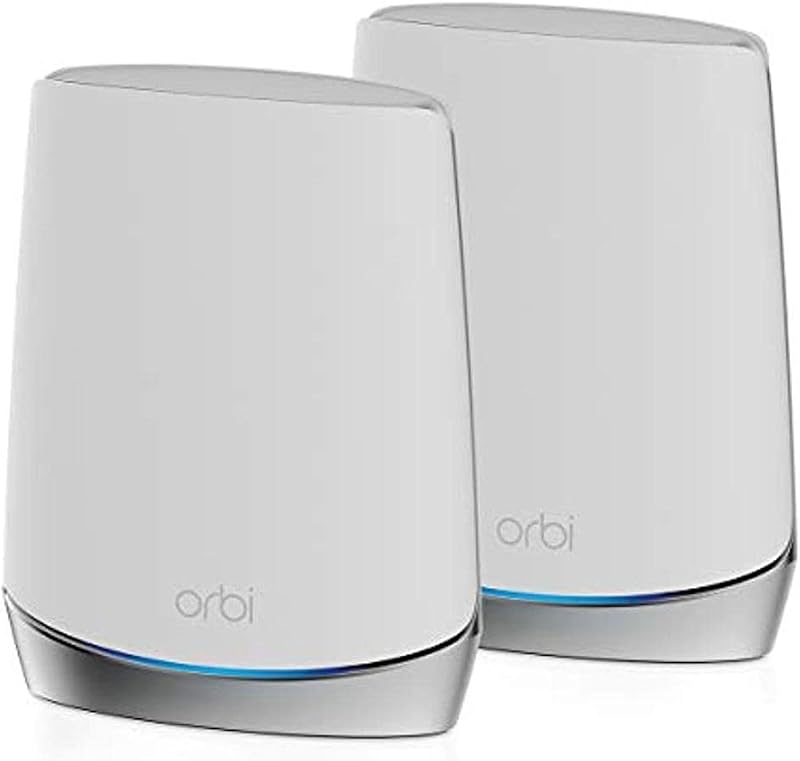
Pros
- Expansive 5,000 square foot coverage
- Five Gigabit Ethernet ports across two units
- Router and satellite system included
- Six internal antennas for broad reach
Cons
- Limited to 40 connected devices
- Lacks Wi-Fi 6E 6 GHz frequency band
- Ethernet ports max out at 1 Gbps
View Netgear Orbi RBK752 on Amazon
Who Should Buy Each One
Choose the Eero Pro 6E If
- You own modern smartphones, laptops, or tablets that can utilize the clean 6 GHz frequency band to avoid network congestion.
- You subscribe to an internet service plan exceeding 1 Gbps, requiring the integrated 2.5 Gb Ethernet port to maximize speed.
- You manage a dense smart home with over 40 connected lights, sensors, cameras, and appliances that demand a 100+ device capacity.
- You live in an apartment, townhome, or single-level layout under 2,000 square feet where a single compact gateway provides ample coverage.
Choose the Netgear Orbi RBK752 If
- You need to cover a sprawling, multi-story property up to 5,000 square feet without purchasing extra add-on nodes immediately.
- You have multiple stationary devices like smart TVs, desktop workstations, and gaming consoles that need wired Gigabit LAN connections in separate rooms.
- Your home internet plan tops out at 1 Gbps or 2 Gbps and your hardware relies primarily on standard Wi-Fi 6 or Wi-Fi 5 protocols.
- You want a system equipped with six internal antennas and an included 30-day trial of comprehensive gateway cybersecurity via NETGEAR Armor.
Final Verdict
For most shoppers prioritizing modern hardware standards and future-proof throughput, the eero Pro 6E is the smarter investment. By integrating Wi-Fi 6E connectivity, access to the low-latency 6 GHz band, a multi-gigabit 2.5 Gb Ethernet port, and capacity for over 100 simultaneous devices, it caters directly to modern device ecosystems. If your living space is roughly 2,000 square feet or you plan to build a custom modular network over time, the eero Pro 6E delivers superior peak performance and lower latency for modern connected gadgets.
The Netgear Orbi RBK752 remains the definitive winner for buyers who need expansive physical coverage and multiple wired ports right out of the box. Blanketing up to 5,000 square feet through its combined router and satellite hardware, it eliminates dead zones across sprawling multi-story residences where a single unit cannot reach. When your primary requirements are broad structural range, five distributed Gigabit LAN ports, and reliable AX4200 Wi-Fi 6 performance for up to 40 devices, the Orbi RBK752 is easily worth choosing.
FAQ
Does the Eero Pro 6E support Wi-Fi 6E on all connected devices?
No, the eero Pro 6E can only transmit over the 6 GHz band to client devices that specifically include Wi-Fi 6E hardware. However, the router is fully backward-compatible with older Wi-Fi generations, meaning standard Wi-Fi 6, Wi-Fi 5, and legacy devices will connect without issue to its 2.4 GHz and 5 GHz channels.
How many Ethernet ports do the Eero Pro 6E and Netgear Orbi RBK752 have?
The eero Pro 6E single unit features two physical network ports: one 2.5 Gb Ethernet port and one standard Gigabit Ethernet port. The Netgear Orbi RBK752 two-pack provides a total of six ports according to the listing specifications, featuring three Gigabit Ethernet ports on the main router and two Gigabit Ethernet ports on the satellite extender for local wired connections.
Can I expand the coverage of the Netgear Orbi RBK752 or Eero Pro 6E later?
Yes, both systems support physical network expansion. The eero Pro 6E can easily integrate into an existing eero network or expand by adding any subsequent eero router or beacon. The Netgear Orbi RBK752 listing states that coverage can be extended by up to 2,500 square feet with each additional Orbi satellite purchased separately.
Which router is better for internet plans over 1 Gbps?
The eero Pro 6E is better equipped for multi-gigabit broadband tiers because it supports internet plans up to 2.5 Gbps and includes a physical 2.5 Gb Ethernet port. The Netgear Orbi RBK752 supports internet service provider plans up to 2 Gbps, but its individual LAN ports are rated for Gigabit Ethernet speeds.
Do these routers require a monthly subscription to function?
Neither system requires an ongoing subscription for baseline routing, Wi-Fi coverage, or standard app management. Both can be configured and operated entirely without fees. However, both platforms offer optional paid subscriptions for enhanced network security and parental controls, with Netgear including a 30-day trial of NETGEAR Armor in the box.
Is the Eero Pro 6E or Netgear Orbi RBK752 better for smart home devices?
The eero Pro 6E is better suited for dense smart home installations because it is officially rated to handle 100+ connected devices simultaneously. The Netgear Orbi RBK752 listing rates its connection capacity at up to 40 devices, which may limit larger households with extensive arrays of smart switches, sensors, and cameras.


