The single deciding difference between the Blue Logitech Blue Yeti and the Rode NT-USB+ comes down to acoustic pickup flexibility versus integrated hardware audio processing. While the Blue Logitech Blue Yeti incorporates a proprietary three-capsule array capable of four switchable pickup patterns, the Rode NT-USB+ commits entirely to a single 1/2-inch tight cardioid condenser capsule powered by an internal ultra-low-noise Revolution Preamp and onboard APHEX digital signal processing. Choosing between them requires deciding whether your recording environment calls for physical multi-directional adaptability across multiple voices, or a focused single-speaker chain that treats and polishes your vocal tone before it ever reaches your recording software.
Broadcasters, podcast hosts holding in-person roundtable interviews, and creators capturing acoustic music or multi-participant conferences should select the Blue Logitech Blue Yeti for its direct hardware pattern switching. Solo voice-over artists, game streamers, remote educators, and audiobook narrators should choose the Rode NT-USB+ to capitalize on its high-gain preamp, hardware-level studio compression, and bundled 27-inch desktop boom arm.

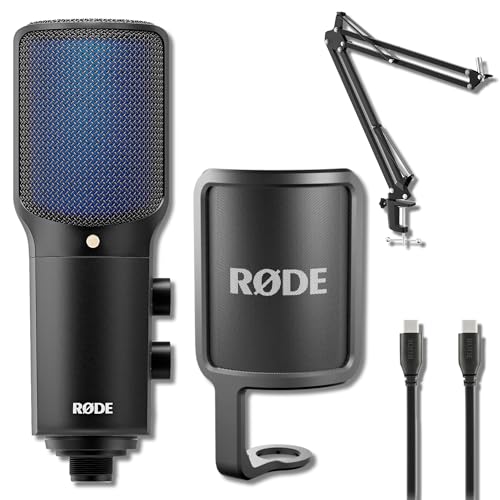
Blue Logitech Blue Yeti vs Rode NT-USB+ at a Glance
| Attribute | Blue Logitech Blue Yeti | Rode NT-USB+ |
|---|---|---|
| Capsule Configuration | Custom three-capsule condenser array | 1/2-inch studio condenser capsule |
| Polar Patterns | Cardioid, Omnidirectional, Bidirectional, Stereo | Tight Cardioid |
| Audio Processing | Blue VO!CE software-driven effects and modulation | Onboard APHEX DSP hardware with Revolution Preamp |
| Frequency Response | 20 Hz – 20,000 Hz | 20 Hz – 20,000 Hz |
| Internal Conversion | The listing does not specify | 24-bit / 48 kHz |
| Direct Hardware Controls | Mic gain, mute button, headphone volume, pattern dial | Headphone volume, mic-to-playback monitor mix dial |
| Connector Type | USB | USB Type-C |
| Included Mount | Integrated pivoting desktop stand | StreamEye BOOMARM1 27-inch aluminum desktop boom arm |
| Device Compatibility | PC, Mac | PC, Laptop, Smartphone |
| Best For | Multi-person interviews, music, and multi-pattern desktop use | Solo live streaming, podcasting, voiceover, and spoken narration |
Capsule Architecture and Polar Pattern Versatility
Microphone versatility begins at the capsule assembly, where physical hardware determines how acoustic energy is gathered from the surrounding room. The Blue Logitech Blue Yeti uses a custom tri-capsule array configured to produce four distinct polar patterns: cardioid, omnidirectional, bidirectional (figure-8), and stereo. Rotating the physical selector dial on the rear of the Yeti instantly alters the electrical phasing among these three capsules. Cardioid mode isolates a speaker directly in front of the grille; bidirectional mode captures sound equally from the front and rear while rejecting the sides; omnidirectional mode picks up ambient audio uniformly in a 360-degree radius; and stereo mode provides distinct left and right spatial separation suitable for ASMR or acoustic instruments.
By contrast, the Rode NT-USB+ avoids multi-capsule trade-offs by utilizing a dedicated 1/2-inch studio condenser capsule wired strictly for a tight cardioid polar pattern. In comparing the blue logitech blue yeti vs shure mv7 or assessing the Rode NT-USB+ polar pattern vs Blue Yeti, capsule dedication alters how room reflections behave. A single dedicated capsule can be tuned precisely for front-facing vocal intimacy, but it fundamentally restricts recording geometry. If two speakers sit opposite one another across a table, an NT-USB+ user must either share a tight frontal zone or purchase separate equipment, whereas a Yeti user switches to bidirectional mode on the fly.
The practical consequence is that the Yeti acts as a complete field kit in one chassis for varied capture scenarios, while the NT-USB+ demands that you bring your voice into its frontal axis. If you ever plan to record across-the-table interviews, multi-person panel discussions, or ambient acoustic environments without buying secondary gear, the hardware capsule architecture of the Yeti is indispensable.
Edge: Blue Logitech Blue Yeti, because its physical tri-capsule array allows four distinct pickup patterns that adapt instantly to multi-person and spatial recording sessions.
Audio Processing, Preamp Architecture, and Sound Quality
Capturing vocal nuances cleanly depends on signal conversion, preamp gain, and dynamic signal processing. The Rode NT-USB+ incorporates RØDE’s ultra-low-noise, high-gain Revolution Preamp paired with an internal 24-bit / 48 kHz analog-to-digital conversion stage. What separates the NT-USB+ from conventional USB microphones is its onboard APHEX digital signal processor. Rather than loading external CPU cycles or relying purely on desktop driver filters, the NT-USB+ processes compression, noise gating, a high-pass filter, and proprietary Aural Exciter and Big Bottom harmonics directly inside the microphone hardware via RØDE Connect, RØDE Central, or RØDE Reporter apps.
The Blue Logitech Blue Yeti relies instead on the Blue VO!CE software suite to modify vocal signals. While Blue VO!CE delivers broadcast vocal effects, pitch modulation, and HD audio samples, this digital manipulation occurs downstream on your host PC rather than inside the microphone body. Looking closely at the blue yeti vs shure mv7 ecosystem reveals that hardware-based processing provides zero round-trip latency and consistent voice coloring across any software platform, whereas host-based software processing requires active background utility management on your computer.
When evaluating Rode NT-USB+ vs Blue Yeti sound quality, the NT-USB+ yields a lower noise floor and a richer low-frequency presence straight out of the hardware. The Revolution Preamp provides substantial clean gain without introducing self-noise hiss, while the APHEX Big Bottom effect generates vocal resonance without clouding midrange intelligibility. The Yeti achieves clear, broadcast-quality audio with its 100 dB signal-to-noise ratio and 20 Hz to 20 kHz frequency range, but matching the polish of the NT-USB+ requires manually dialing in software filters inside the companion computer application.
Edge: Rode NT-USB+, due to its ultra-low-noise Revolution Preamp and onboard APHEX DSP that processes gating, compression, and harmonic enrichment at the hardware level.
Hardware Controls and Headphone Monitoring Mix
Live broadcasting and tracking demand immediate, tactile control over gain staging and headphone monitoring balance. The Blue Logitech Blue Yeti provides four distinct physical controls distributed across its front and rear panels: a front-mounted instant mute button with an LED indicator, a dedicated headphone volume rotary knob, a rear-mounted analog microphone gain dial, and the four-position polar pattern rotary selector. Having a dedicated physical gain knob on the microphone body makes it effortless to tame sudden volume spikes during gameplay or live streaming without opening computer control panels.
The Rode NT-USB+ approaches onboard adjustments from a studio monitoring perspective. Its physical controls consist of two side-mounted thumbwheels: one controls master headphone monitoring volume, while the other governs the direct mic-to-playback balance. This blend mix dial allows you to balance real-time zero-latency vocal feedback directly against incoming computer audio or gameplay sound. However, the NT-USB+ lacks a physical gain potentiometer on its chassis; adjusting the input gain of the Revolution Preamp requires entering the companion desktop or mobile software. It also lacks a physical hardware mute switch on the microphone body.
For broadcasters deciding between the Logitech Blue Yeti or Rode NT-USB+ for streaming, these control schemes create distinct operator experiences. The Yeti prioritizes rapid operational intervention through its analog gain pot and physical mute switch. The NT-USB+ prioritizes monitoring precision by letting you blend backing audio against vocal sidetone without touching software mixers, though it surrenders rapid gain management at the hardware boundary.
Edge: Blue Logitech Blue Yeti, as its physical mic gain dial and hardware mute button provide faster immediate control during live, unpredictable sessions.
Mounting, Mechanical Isolation, and Desk Ergonomics
Condenser microphones are exceptionally sensitive to structural vibrations, desk bumps, and typing clatter. The Blue Logitech Blue Yeti arrives mounted inside a heavy, U-shaped cast-metal desktop stand with side-tightening thumbscrews. This configuration allows the user to pivot the microphone to face the sound source directly. While sturdy, placing the Yeti directly on a desk surface leaves its sensitive tri-capsule array vulnerable to keyboard clicks, mouse movements, and mechanical vibrations transmitted through the furniture. Moving the Yeti to an aftermarket boom arm requires navigating its substantial weight and threading its base mounting point.
The Rode NT-USB+ listing specifically addresses mechanical isolation by bundling the StreamEye BOOMARM1 27-inch aluminum alloy desktop boom arm. Built with an integrated desk clamp mount and long-lasting external tension springs that adjust silently without creaking, this 27-inch arm elevates the microphone off the desk and positions the 1/2-inch studio condenser directly in front of the speaker’s mouth. Removing the microphone from the surface eliminates mechanical coupling and ensures the tight cardioid capsule remains in the optimal near-field vocal zone.
Examining studio setups in guides like the blue yeti vs shure sm7b or assessing typical desktop constraints shows that proper capsule placement is the single greatest determinant of recorded clarity. Because the NT-USB+ bundle includes a dedicated 27-inch aluminum boom arm, it solves mechanical transmission and acoustic proximity immediately out of the box, whereas the stock Yeti configuration relies on desktop placement that compromises isolation.
Edge: Rode NT-USB+, courtesy of the bundled StreamEye 27-inch aluminum boom arm that isolates the capsule from desk vibrations and simplifies overhead positioning.
Streaming and Podcasting Production Workflows
Modern production workflows vary dramatically depending on whether a creator produces solo broadcasts or collaborative content. When deciding whether to use the Logitech Blue Yeti or Rode NT-USB+ for podcasting, the format of your show dictates the superior tool. A podcaster conducting interviews with an in-studio guest can place the Blue Logitech Blue Yeti in bidirectional mode between two chairs, capturing both voices clearly with a single USB cable and avoiding the cost and complexity of a multi-mic audio interface setup. For creators who produce ASMR content, the Yeti’s stereo mode captures realistic spatial audio that a cardioid capsule cannot replicate.
Conversely, for solo streaming, game broadcasting, and voiceover tracking, the Rode NT-USB+ offers an uncompromising single-channel signal path. Its modern USB Type-C connector interfaces directly with personal computers, laptops, and smartphones, making it an adaptable choice for mobile content creation. The combination of 24-bit / 48 kHz digital conversion and zero-latency monitoring wired ahead of the digital path ensures that voiceover artists hear an uncolored, delay-free vocal sidetone even during heavy computational playback.
In comparing modern production gear like the blue logitech blue yeti vs shure mv7+, workflow simplicity matters as much as raw performance. The NT-USB+ streamlines solo production by baking compression and high-pass filtering directly into the recorded take, cutting out the need for post-production equalization. The Yeti delivers superior situational adaptability for group environments, but requires post-processing or active Blue VO!CE management to match the vocal punch of the NT-USB+.
Edge: Rode NT-USB+, because its modern USB Type-C interface, smartphone compatibility, and hardware-processed signal path streamline the solo streaming and voiceover workflow.
Pros and Cons
Blue Logitech Blue Yeti

Pros
- Four switchable polar pickup patterns
- Hardware microphone gain control
- Instant tactile mute button with LED
- Stable heavy-duty desktop pivoting stand
Cons
- Transmits desk vibrations on stock stand
- No onboard hardware DSP processing
View Blue Logitech Blue Yeti on Amazon
Rode NT-USB+

Pros
- Integrated APHEX hardware DSP processing
- Ultra-low-noise Revolution Preamp
- Bundled 27-inch aluminum desktop boom arm
- Dedicated headphone monitor blend mix control
- Modern USB-C smartphone compatibility
Cons
- Fixed cardioid pattern lacks interview versatility
- No physical gain knob or hardware mute
Who Should Buy Each One
Choose the Blue Logitech Blue Yeti If
- You conduct two-person interviews or group discussions across a single conference or studio table.
- You need physical multi-directional pattern switching between cardioid, omnidirectional, bidirectional, and stereo modes.
- You prioritize having tactile analog controls for microphone gain and an instant mute button right on the microphone body.
- You record ASMR, acoustic guitar, or ambient room audio that benefits from dedicated stereo spatial separation.
Choose the Rode NT-USB+ If
- You produce solo podcasts, live game streams, voiceovers, or audiobook narration in front of a computer monitor.
- You want broadcast vocal tone with compression, high-pass filtering, and APHEX processing applied at the hardware level.
- You require a complete setup out of the box with an included 27-inch desktop boom arm to eliminate surface desk bumps.
- You need mobile recording flexibility through USB Type-C connectivity to laptops, personal computers, and smartphones.
Final Verdict
Deciding between the Rode NT-USB+ vs Blue Logitech Blue Yeti ultimately hinges on your content format and production complexity. The Blue Logitech Blue Yeti remains a versatile desktop workhorse because of its tri-capsule array and four switchable polar patterns. It remains the superior option for educators running round-table classes, podcasters hosting in-person interviewees on opposite sides of a desk, and creators capturing stereo field audio. Its physical gain potentiometer and instant mute switch provide reliable, hands-on command over unexpected audio spikes without diving into software settings.
For solo content creators, streamers, and voiceover artists, however, the Rode NT-USB+ takes the lead. By pairing a high-end 1/2-inch studio cardioid condenser with the ultra-clean Revolution Preamp, 24-bit / 48 kHz conversion, and internal APHEX hardware processing, it produces polished vocal tracks that bypass post-production editing. Factor in the included StreamEye 27-inch aluminum boom arm and modern USB-C smartphone compatibility, and the NT-USB+ emerges as the more focused and modern vocal capture solution for single-mic workstations.
FAQ
Is the Rode NT-USB+ polar pattern flexible enough for two-person interviews?
The Rode NT-USB+ features a fixed tight cardioid polar pattern, meaning it rejects audio arriving from the rear and sides to focus strictly on sound directly in front of the grille. While two speakers can huddle together in front of the capsule, it is not engineered for across-the-table interviews. For two participants seated opposite each other, the Blue Logitech Blue Yeti in bidirectional mode is substantially better suited.
Can the Blue Logitech Blue Yeti run audio processing without software installed?
The Blue Logitech Blue Yeti functions as a plug-and-play USB microphone for basic recording without additional software, but its Blue VO!CE broadcast vocal effects, pitch modulation, and noise filters require the proprietary desktop software suite. Without the software running on your computer, the microphone delivers an unprocessed, raw condenser signal shaped only by your selected polar pattern and analog gain setting.
What does the blend mix control on the Rode NT-USB+ do?
The blend mix thumbwheel on the Rode NT-USB+ adjusts the balance between your direct, zero-latency microphone vocal monitoring and the playback audio coming from your computer or smartphone. This allows you to raise or lower your own voice in your headphones without altering your game volume, backing track, or audience audio levels.
Does the Blue Logitech Blue Yeti require a shock mount on a boom arm?
While the Blue Logitech Blue Yeti can thread directly onto standard mic stands or boom arms, its high acoustic sensitivity makes it susceptible to handling noise. Because it lacks internal mechanical suspension, mounting it to an arm without an external shock mount may still transmit spring vibration and stand adjustments into your recording.
Can either microphone connect directly to mobile devices?
The Rode NT-USB+ listing explicitly specifies compatibility with smartphones, laptops, and personal computers via its USB Type-C connectivity. The Blue Logitech Blue Yeti lists compatibility for PC and Mac personal computers using standard USB connectivity, meaning direct smartphone connection is not natively specified in its official listing data.
Which microphone handles room echo and ambient background noise better?
The Rode NT-USB+ manages background noise and room acoustic reflections more effectively in untreated spaces. Its tighter 1/2-inch cardioid pickup pattern, combined with the bundled 27-inch boom arm that brings the capsule close to your mouth and its onboard APHEX noise gate and high-pass filtering, suppresses background distractions far better than a desk-mounted multi-pattern condenser.
Is Blue Logitech Blue Yeti worth it compared to the NT-USB+ bundle?
The Blue Logitech Blue Yeti is well worth selecting if your primary requirement is acoustic flexibility across different room scenarios, multi-person interview setups, and stereo tracking. However, if your work consists exclusively of solo vocal production, the NT-USB+ bundle delivers greater overall value by including onboard DSP and a mechanical boom arm right in the box.


