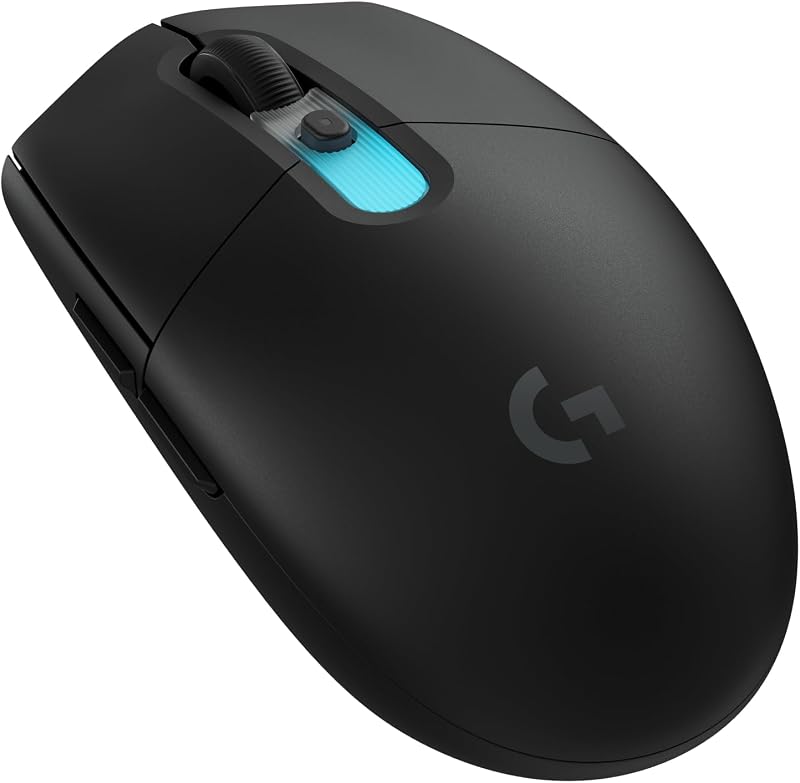
Hand contact dynamics define the fundamental divide between a claw grip mouse and a palm grip mouse. A claw grip mouse utilizes an arched finger posture where physical contact is concentrated at the fingertips and the rear hump, leaving a pocket of empty space beneath the center of the palm for rapid vertical micro-adjustments and snappy flick control. In contrast, a palm grip mouse uses an elongated, contoured shell designed to maintain continuous surface contact across the entire hand, anchoring the palm and fingers flat against the chassis to facilitate smooth, forearm-guided tracking.
Choose a claw grip mouse if you prioritize twitch aiming agility, rapid click actuation, and instantaneous micro-corrections in fast-paced competitive shooters. Choose a palm grip mouse if your priority is ergonomic comfort, reduced hand fatigue, and stable gliding performance over lengthy computer sessions.


Claw Grip Mouse vs Palm Grip Mouse at a Glance
| Feature | Claw Grip Mouse | Palm Grip Mouse |
|---|---|---|
| Primary Contact Points | Fingertips and lower palm base | Full palm, knuckle arch, and flat finger pads |
| Aiming Pivot Style | Fingertip micro-adjustments and wrist snaps | Forearm sweeping and elbow pivoting |
| Shell Profile | Symmetrical or rear-hump focused | Asymmetrical, contoured, elongated arch |
| Category Weight Spectrum | Ultra-light (from 40g) to medium (5 oz) | Moderate to heavy ergonomic builds |
| Sensor Tracking Ceilings | Up to 30,000 DPI and 750 IPS | High-resolution optical tracking |
| Polling Rate Capabilities | Up to 8000Hz report rates | Standard 1000Hz up to advanced tiers |
| Physical Strain Distribution | Higher tension in finger joints and tendons | Dispersed across the entire hand and arm |
| Best For | Fast-paced tactical aiming and flicking | Endurance tracking, ergonomic support, daily work |
Hand Contact and Grip Mechanics
The biomechanics of how your hand interacts with the mouse shell dictates your speed and control. In a claw grip mouse, your index and middle fingers arch upward in a talon-like formation, making contact with the primary buttons strictly at the tips. The base of your palm rests against the rear hump of the mouse to provide stability, leaving the center of your palm suspended in mid-air. For example, the Lamzu Inca utilizes a symmetrical high-back profile measuring 122 by 63 by 40 mm, an architecture engineered specifically to wedge against the base of the palm while leaving the fingers free to curl. Gamers comparing shell styles often weigh these rear-hump profiles against traditional shapes, as detailed in our logitech g pro x superlight 2 vs g703 analysis.
Conversely, a palm grip mouse provides uninterrupted physical support along the entire length of your hand. Your fingers rest completely flat against the primary left and right click plates, and your entire metacarpal area settles flush over the crest of the shell. When examining palm grip vs claw grip mouse characteristics, this full-contact orientation eliminates the pocket of space beneath the hand. Because there is no room inside the grip for your fingers to retract or extend, all horizontal and vertical movements must originate from your wrist, forearm, or elbow rather than your finger joints.
This structural variance changes the nature of your control. The claw grip grants individual finger autonomy, enabling rapid downward pulls to absorb sudden in-game weapon recoil. The palm grip trades that localized finger agility for stability, locking the hand into a single cohesive unit that glides predictably across the mouse pad.
Edge: Claw Grip Mouse provides greater manual dexterity through its open palm cavity and arched finger leverage.
Aiming Control and In-Game Precision
When selecting a claw grip or palm grip mouse for fps titles, the mechanical demands of your crosshair placement heavily influence the decision. A claw grip excels at instant target acquisition and micro-adjustments. When you need to make minute corrections to hit a target’s head at long range, your arched fingers can flex slightly inward or outward to manipulate the mouse without repositioning your entire forearm. Models optimized for this grip often include high-performance hardware, such as the PixArt PAW3950 optical sensor inside the Lamzu Inca, which supports tracking speeds up to 750 IPS and sensitivity levels up to 30,000 DPI.
Palm grip mice shine during scenarios requiring wide, stable, sweeping trajectories. In titles or roles that demand smooth horizontal tracking across large fields of view, a full palm contact ensures that your mouse remains completely planted. Because the entire weight of your hand presses evenly across the shell, accidental twitches and micro-jitters are naturally dampened. Competitive players evaluating aim stability frequently review these dynamic trade-offs in matchups like the razer deathadder v3 pro vs viper v3 pro, where palm stability is pitted directly against lower-profile speed.
The difference between these styles becomes most apparent during rapid directional switches. A claw grip enables abrupt directional changes because the fingertips can initiate movement fractions of a second before the arm catches up. A palm grip provides a grounded, locked-in feel that ensures crosshair placement remains level across wide horizontal sweeps.
Edge: Claw Grip Mouse delivers superior micro-adjustment agility for fast target acquisition in tactical shooters.
Ergonomics and Wrist Strain Prevention
Understanding claw grip vs palm grip mouse ergonomics is vital for maintaining physical health during prolonged computing sessions. The arched posture required by a claw grip mouse demands continuous flexion from the finger tendons and intrinsic hand muscles. Because your fingers remain bent at an acute angle, muscle tension remains elevated throughout intense play. When analyzing claw grip vs palm grip mouse wrist strain, claw grips historically introduced fatigue when applied to heavier hardware, although modern designs counteract this with featherweight construction. The Lamzu Inca, for instance, weighs just 40 grams, an ultra-lightweight profile explicitly designed to reduce wrist fatigue during high-intensity sessions.
Traditional palm grip mice approach strain prevention through structural distribution rather than pure weight reduction. By matching the natural resting curve of an open hand, a palm grip mouse eliminates the need for active muscular holding effort. The weight of your hand is sustained by the body of the mouse itself, dispersing physical contact across a wider surface area. This passive support keeps your wrist in a neutral posture and minimizes tension in the flexor digitorum muscles, making it easier to sustain multi-hour sessions without localized finger cramping. Shooters and hybrid users often consider this balance between contoured comfort and nimble utility when exploring designs like the razer basilisk v3 vs orochi v2.
However, claw grip mice with ergonomic inclinations also exist. The Bloody V7 incorporates a right-hand ergonomic profile and rubberized coating across its 5-ounce body, blending claw positioning with defined finger rests. Yet, when evaluated purely on continuous physiological relaxation, an arched finger posture will always demand more active muscular engagement than an open, supported hand.
Edge: Palm Grip Mouse minimizes joint and tendon tension by providing full, continuous structural support.
Shell Dimensions and Weight Dynamics
The physical dimensions of a mouse shell must align directly with the hand placement it seeks to facilitate. A claw grip mouse typically features a pronounced rear hump paired with tapered, concave waistlines that allow your thumb, ring finger, and pinky to establish a secure pinch. The Lamzu Inca exemplifies this geometry with its symmetrical high-back profile measuring 122 mm long and 63 mm wide, with a 40 mm height peak situated toward the rear. Its documentation notes that for hand lengths 18 cm or shorter, it supports extended palm, inward claw, and fingertip grips, whereas for hand lengths 18 cm or larger, it specializes strictly in claw and fingertip orientations.
Palm grip mice require a noticeably longer and broader physical footprint. If a palm shell is too short, your fingers will drape awkwardly over the front edge, inadvertently forcing your hand into an uncoordinated semi-claw posture. A dedicated palm chassis must support the entirety of your hand length, meaning these mice generally measure longer from nose to tail and incorporate an asymmetrical right-handed tilt. The height peak is situated near the center of the mouse to fit snugly into the center arch of your palm.
Weight characteristics also diverge significantly across these categories. Modern claw grip mice frequently prioritize minimalist, ultra-light engineering, dropping down to 40 grams to maximize flick acceleration. Palm grip mice tend to sit in moderate-to-heavy weight brackets because their larger surface area requires more material, and extra chassis mass can actually assist in maintaining steady, momentum-based arm glides across mouse mats, a factor highlighted in the glorious model d vs pulsar x2 comparison.
Edge: Claw Grip Mouse offers more aggressive weight reduction and precise hump placement for targeted hand stabilization.
Sensor Responsiveness and High Polling Performance
High-end sensor integration and communication frequency are critical when determining the right claw grip or palm grip mouse for gaming. Because a claw grip relies on rapid fingertip snaps, sensor responsiveness must be instantaneous to register swift movements accurately. The Lamzu Inca integrates a Nordic 52840 MCU and includes an 8K dongle supporting an 8000Hz polling rate in both 2.4GHz wireless and wired modes. At an 8K polling rate, data is transmitted to the PC every 0.125 milliseconds, significantly reducing input latency compared to standard 1000Hz mice and ensuring micro-movements are tracked without delay.
Performance on wired claw mice can also be tuned through dedicated software suites. The Bloody V7 optical mouse features adjustable report rates of 125, 250, 500, and 1000Hz through its Bloody 6 software, alongside CPI adjustments spanning from 100 to 12,000 to match its 3200 DPI optical sensor. This level of responsiveness customization allows users to fine-tune report frequencies to match their desktop monitor refresh rates and specific system constraints.
Palm grip mice also feature top-tier optical sensors, but the biomechanical nature of palm aiming makes extreme polling rates less perceptually distinct. Because palm aiming relies on sweeping arm movements that travel across larger surface areas, minor micro-stutters are less disruptive to tracking consistency than they are during sub-millimeter fingertip flicks. Gamers comparing swift wireless shapes often evaluate these performance ceilings in matchups like the glorious model o 2 vs pulsar x2.
Edge: Claw Grip Mouse maximizes the benefits of ultra-high polling rates and responsive optical tracking through rapid twitch inputs.
Long-Session Comfort and Daily Versatility
A comprehensive palm grip mouse review must consider real-world usability outside of high-pressure gaming scenarios. When working across productivity software, editing documents, or conducting everyday desktop navigation, maintaining an arched claw posture can feel unnecessarily rigid. A palm grip mouse allows you to rest your hand completely flat during downtime, transforming the mouse into a passive arm rest that minimizes operational tension over eight-hour workdays.
Claw grip mice can provide utility features for general desktop tasks, but the physical posture remains fundamentally active. The Bloody V7 includes next and previous side buttons designed to streamline webpage browsing for everyday internet users and office workers, alongside broad system compatibility spanning Windows, Mac OS X, and Linux platforms. Similarly, the Lamzu Inca features a TTC Gold dustproof encoder designed with a five-layer structure for dust resistance, alongside optical switches rated for 70 million clicks, ensuring long-term hardware reliability.
Despite these hardware conveniences, the physical posture of a claw grip mouse is tuned primarily for performance rather than passive relaxation. A palm grip mouse naturally absorbs the dead weight of the arm and hand, making it a far more versatile companion for users who split their computer time evenly between intense gaming and exhaustive productivity marathons.
Edge: Palm Grip Mouse provides unmatched passive comfort and natural hand positioning for all-day computer use.
Pros and Cons
Claw Grip Mouse
Pros
- Fast micro-adjustments and rapid flick control
- Arched finger position enables quicker click actuation
- Rear hump stabilizes palm base during rapid maneuvers
- Supports lightweight designs for minimal wrist strain
Cons
- Arched finger stance induces fatigue over extended sessions
- Minimal surface contact compared to full-shell designs
View Bloody V7 Ergonomic Claw Grip Gaming on Amazon
Palm Grip Mouse
Pros
- Full hand contact distributes pressure evenly
- Relaxed finger placement minimizes strain during long use
- Smooth control for sweeping arm-driven tracking movements
Cons
- Reduced agility for quick vertical micro-corrections
- Bulkier profile impedes rapid finger-based adjustments
Who Should Buy Each One
Choose the Claw Grip Mouse If

- You play competitive FPS titles where rapid micro-adjustments, vertical recoil management, and flick shots are critical.
- You prefer an arched finger posture that leaves open space under your palm for agile fingertip control.
- You prioritize ultra-lightweight engineering, such as the 40-gram shell of the Lamzu Inca.
- You want to utilize advanced performance features like 8000Hz polling rates for instantaneous input transmission.
Choose the Palm Grip Mouse If
- You prioritize physical comfort and want to minimize tendon tension and hand cramping across long sessions.
- You rely on smooth, forearm-driven sweeping movements rather than twitchy wrist and finger adjustments.
- You use your mouse heavily for work, browsing, and general desktop tasks where a relaxed resting grip is beneficial.
- You have larger hands and need an elongated, contoured shell that supports your entire hand length without overhang.
Final Verdict
For competitive gamers focused on fast-paced shooters and twitch-heavy gameplay, the claw grip mouse is the superior choice. By establishing contact at the fingertips and lower palm while leaving the center arch elevated, a claw mouse unlocks unmatched physical agility. This design allows you to make minute vertical corrections, execute precise recoil pulls, and snap to targets with speed. When paired with featherweight engineering, like the 40g frame of the Lamzu Inca, and advanced hardware like 8K polling rates, the claw grip delivers the highest mechanical ceiling for raw aiming performance.
However, the palm grip mouse remains the definitive recommendation for all-day comfort, ergonomic health, and broad daily utility. If your routine includes extensive office work, creative workflows, or tactical gaming that relies on smooth, broad arm tracking rather than erratic fingertip flicks, a contoured palm chassis is invaluable. By supporting the full surface area of your hand, a palm grip mouse disperses physical pressure and eliminates joint strain, making it the most sustainable and comfortable shape for endurance computing.
FAQ
Is a claw grip mouse worth it for competitive FPS gaming?
Yes, a claw grip mouse is worth it for competitive players because it grants direct fingertip control over vertical micro-adjustments and recoil. By anchoring the rear of the shell against the lower palm and arching the fingers, you can make precise, rapid adjustments that are physically impossible when your entire hand is resting flat on the chassis.
Is a palm grip mouse worth it for productivity and casual play?
Yes, a palm grip mouse is exceptionally well-suited for productivity and general desktop use. Its contoured shell supports the natural curve of the hand, distributing weight evenly across the palm and fingers to minimize muscle fatigue and wrist tension during long computer sessions.
Which shape is better in a claw grip or palm grip mouse for gaming?
The ideal shape depends on the genre of game you play. A claw grip mouse is superior for fast-paced shooters requiring rapid flick shots and quick vertical corrections. A palm grip mouse is better for titles that reward smooth, steady crosshair tracking and broad forearm sweeps across the mouse pad.
What is the difference in claw grip vs palm grip mouse wrist strain?
A claw grip mouse places higher tension on the flexor tendons and intrinsic muscles of the fingers because they remain actively arched during use. A palm grip mouse reduces localized finger tension by fully supporting the hand, though it shifts movement demands toward the forearm and elbow.
Can you use a palm grip on a claw grip mouse?
It depends on your hand size and the dimensions of the mouse. For instance, the Lamzu Inca listing notes that users with hand lengths of 18 cm or shorter can comfortably utilize an extended palm grip on its symmetrical 122 mm shell, whereas users with hands 18 cm or longer are restricted to claw and fingertip grips.
How do switches and encoders differ on specialized gaming mice?
Specialized gaming mice integrate components designed to withstand intense competitive use. As seen on the Lamzu Inca, models may incorporate optical switches rated for 70 million clicks to eliminate double-clicking issues, paired with dustproof hardware like the TTC Gold encoder to ensure smooth, reliable scroll wheel operation.
Does a claw grip mouse require specialized configuration software?
Most claw grip mice feature dedicated configuration drivers to customize their performance. The Lamzu Inca utilizes the LAMZU Aurora driver to manage DPI, polling rate, and debounce times, while the Bloody V7 uses Bloody 6 software to adjust report rates between 125Hz and 1000Hz and tune CPI settings from 100 to 12,000.