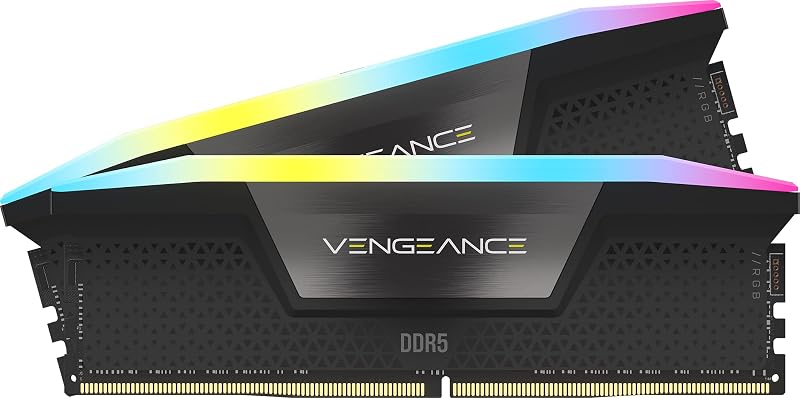
The single deciding factor between these two performance memory kits is overclocking ecosystem versatility: the Kingston Fury Beast DDR5 integrates both Intel XMP 3.0 and AMD EXPO overclocking profiles on a single module, whereas the G.Skill Flare X5 DDR5 6000 focuses entirely on AMD EXPO optimization for socket AM5 builds.
Builders putting together a dedicated AMD gaming rig with specific motherboard validation in mind should choose the G.Skill Flare X5 DDR5 6000. Enthusiasts who want cross-platform flexibility between Intel and AMD platforms or who require an explicitly labeled low-profile heatsink should pick the Kingston Fury Beast DDR5.


G.Skill Flare X5 DDR5 6000 vs Kingston Fury Beast DDR5 at a Glance
| Attribute | G.Skill Flare X5 DDR5 6000 | Kingston Fury Beast DDR5 |
|---|---|---|
| Part Number | F5-6000J3038F16GX2-FX5 | KF560C30BBEK2-32 |
| Total Capacity | 32 GB (2x16GB) | 32 GB (2x16GB) |
| Data Transfer Rate | 6000 MT/s | 6000 MT/s |
| CAS Latency | CL30 (30-38-38-96) | CL30 (Sub-timings not listed) |
| Operating Voltage | 1.35V | 1.35V |
| Overclocking Profiles | AMD EXPO, JEDEC Default | Intel XMP 3.0, AMD EXPO |
| Module Form Factor | 288-pin UDIMM | 288-pin DIMM |
| Error Correction Architecture | Non-ECC (On-die ECC not listed) | On-die ECC listed |
| Heat Spreader Profile | Matte Black | Low-profile design |
| Best For | Dedicated AMD AM5 desktop configurations | Flexible Intel and AMD desktop systems |
Overclocking Profiles and System Compatibility
Choosing DDR5 memory requires matching the internal profile on the module to the target processor and motherboard firmware. Memory overclocking profiles allow the motherboard UEFI to read pre-tested clock speeds, operating voltages, and primary latencies in a single automated step. Without these profiles, high-speed RAM defaults to standard baseline JEDEC speeds, leaving considerable throughput untapped. Selecting a memory kit that matches the platform ecosystem prevents manual parameter entry and ensures fast, stable boot cycles.
Examining Kingston Fury Beast vs G.Skill Flare X5 Intel compatibility reveals the core mechanical difference between these kits. The Fury Beast includes pre-programmed profiles for both Intel XMP 3.0 and AMD EXPO. This dual-profile implementation allows users to drop the 32GB kit into an Intel Core platform or an AMD Ryzen setup without profile conflicts. By contrast, the Flare X5 includes a standard JEDEC default SPD boot profile alongside a dedicated AMD EXPO profile. G.Skill specifies that the module targets AMD platforms, which means users seeking native Intel XMP 3.0 support will not find it configured here. Similar profile considerations appear when comparing the g.skill ripjaws s5 ddr5 vs kingston fury beast ddr5, where dedicated single-platform kits face multi-profile alternatives.
This difference translates directly into long-term system flexibility. If you build an AMD AM5 desktop today but decide to switch to an Intel motherboard tomorrow, the Fury Beast retains its one-click overclocking support across both environments. The Flare X5 requires manual configuration or relying on secondary motherboard translation layers if migrated outside its intended AMD sphere. For users comparing Flare X5 vs Fury Beast EXPO support directly on AMD hardware, both kits provide native EXPO integration, but the Kingston kit adds Intel readiness at no operational penalty.
Edge: Kingston Fury Beast DDR5 because it features both Intel XMP 3.0 and AMD EXPO profiles for unrestricted platform compatibility.
Memory Timings and Latency Performance
Memory performance is defined by raw bandwidth in megatransfers per second paired with column address strobe latency, which measures the clock cycle delay between a read command and the availability of the requested data. At 6000 MT/s, a lower CAS latency ensures lower overall memory access delay, which aids latency-sensitive gaming tasks and heavy computing loops. However, the secondary and tertiary timings also dictate how snappy the memory subsystem behaves under sustained load.
Looking at Flare X5 vs Fury Beast CL30 timings, G.Skill provides fully transparent latency parameters on the product packaging and technical listings. The Flare X5 features a rated primary timing sequence of CL30-38-38-96 operating at 1.35 volts. Kingston confirms the Fury Beast runs at CL30 at 1.35V with customizable profiles for speeds and timings, but the listing does not specify the remaining primary sub-timings like tRCD, tRP, and tRAS. This makes a direct component-level comparison difficult for enthusiasts who prefer knowing the complete timing chain prior to purchase, a subject frequently explored in any thorough G.Skill Flare X5 DDR5 6000 review.
In real-world use, both kits provide responsive 6000 MT/s operation at CL30, making them prime contenders for modern high-performance memory configurations. However, having verified factory numbers allows advanced users to verify memory controller compatibility and motherboard sub-timing auto-rules before entering the BIOS. The detailed specification sheet of the Flare X5 offers complete clarity on what the memory controller will receive upon loading the profile.
Edge: G.Skill Flare X5 DDR5 6000 because its fully published CL30-38-38-96 primary timing sequence removes guesswork for precision builders.
Motherboard Ecosystem and Chipset Validation
Motherboard compatibility lists, or Qualified Vendor Lists, guarantee that a specific memory kit has undergone testing on particular hardware chipsets. When manufacturers test and certify memory modules for designated chipset architectures, the likelihood of post-assembly memory training errors, failure to boot, or intermittent blue-screen errors drops substantially. Builders deciding between G.Skill Flare X5 or Kingston Fury Beast for AM5 must consider how each manufacturer specifies platform deployment.
G.Skill builds the Flare X5 explicitly for AMD desktop boards, listing support for AMD X870, AMD X670, AMD B850, AMD B840, AMD B650, and AMD A620 platforms. G.Skill further directs buyers to check their RAM Configurator tool and QVL databases for verified board-level testing. Kingston presents the Fury Beast as an all-round next-gen gaming platform solution compatible with AMD EXPO and Intel XMP 3.0 desktop boards, offering auto-overclocking features and broad desktop application, though the product listing does not provide an exhaustive line-by-line list of motherboards. Similar considerations arise when evaluating the g.skill flare x5 ddr5 6000 vs kingston fury renegade ddr5 across different chipset generations.
For builders assembling a dedicated AMD AM5 system on standard mid-range or high-tier chipsets like B650 or X670, G.Skill provides reassurance by validating against specific chipset classes. While the Fury Beast operates smoothly on AM5 platforms via its AMD EXPO profile, G.Skill prioritizes clear documentation for AMD-centric builders seeking a plug-and-play installation on modern AM5 boards.
Edge: G.Skill Flare X5 DDR5 6000 because of its detailed chipset validation list covering AMD 600-series and 800-series motherboards.
Gaming and Multitasking Bandwidth
Desktop gaming rigs and content creation systems demand rapid memory data transfer rates to keep modern processors fed with assets, geometry data, and textures. When evaluating G.Skill Flare X5 or Kingston Fury Beast for gaming, both products land in the ideal sweet spot for memory controllers by providing 6000 MT/s data rates across a 32GB total density supplied as two matched 16GB modules.
Running memory in a dual-channel 2x16GB configuration ensures maximum throughput for modern games, 4K livestreaming, and heavy rendering workloads. The Kingston Fury Beast highlights enhanced architectural features such as dual 32-bit subchannels to boost data efficiency, auto-overclocking capabilities, and reliable performance when pushing animation or 3D rendering projects. The Flare X5 matches this raw throughput directly, providing the exact same 6000 MT/s data rate at 1.35V. Performance in this category closely mirrors benchmarks found in a typical Kingston Fury Beast DDR5 review, as well as matchups like the g.skill trident z5 rgb ddr5 6000 vs kingston fury beast ddr5.
Because both kits operate at identical clock rates of 6000 MT/s, share the same CL30 latency class, and utilize 1.35V operating profiles, their baseline throughput in competitive titles and processor-intensive workloads is virtually indistinguishable. Neither module presents an architectural bottleneck over the other when paired with matching high-end hardware.
Edge: Tie, as both memory kits deliver identical 6000 MT/s transfer speeds and CL30 latency at 1.35 volts.
Physical Heat Spreader Design and Component Clearance
Large dual-tower air coolers and compact small form factor cases require careful attention to memory module dimensions. Modules equipped with tall decorative heat spreaders or elevated light bars can collide with cooler intake fans, forcing builders to raise the fan height or choose a different cooling solution entirely. A slim, low-profile heat spreader ensures broad mechanical clearance under bulky thermal hardware.
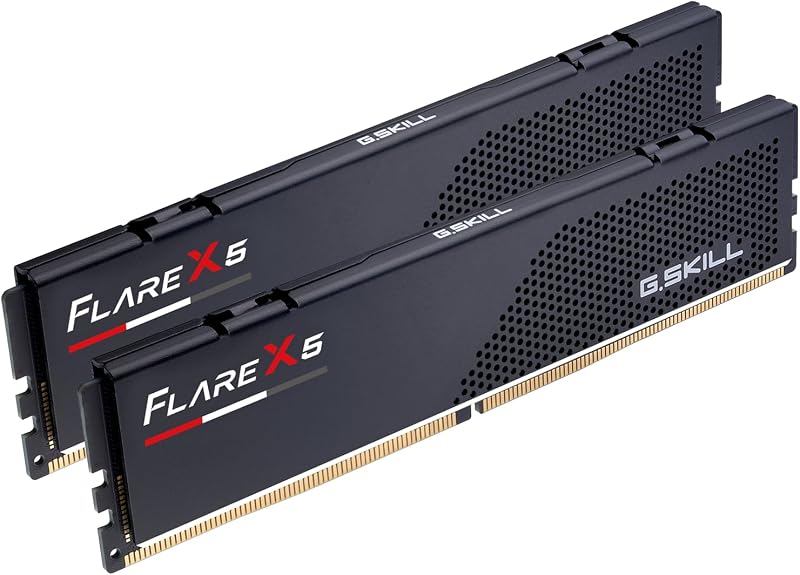
The Kingston Fury Beast DDR5 specifically advertises a low-profile heat spreader design engineered to maximize clearance beneath massive air coolers and within dense enclosures. This low-profile design aims to prevent clearance headaches while still offering metal heat dissipation for the memory chips. The G.Skill Flare X5 is built using a compact, stealthy matte black aluminum heat spreader without lighting diffusers, prioritizing a clean, functional footprint designed for desktop PC builds. These streamlined aesthetics are also prevalent in alternatives such as the g.skill trident z5 rgb ddr5 6000 vs kingston fury renegade ddr5.
While both modules avoid oversized RGB diffusers, the Fury Beast explicitly confirms low-profile dimensions in its primary feature set. Builders utilizing horizontal air coolers or building within space-constrained Mini-ITX cases gain guaranteed component peace of mind from Kingston’s designated low-profile format, whereas the Flare X5 relies on its standard compact matte black profile without an explicit low-profile designation.
Edge: Kingston Fury Beast DDR5 for explicitly specifying a low-profile heat spreader engineered to clear large CPU heatsinks.
Architecture, Reliability, and Error Correction
DDR5 memory represents a fundamental architectural shift from prior generations like DDR4, introducing localized power management and refined error correction directly on the silicon. When prospective buyers wonder is Kingston Fury Beast DDR5 worth it or is G.Skill Flare X5 DDR5 6000 worth it, investigating how each listing addresses error handling and memory channel architecture provides helpful insight.
The Fury Beast listing highlights next-generation platform features, including on-die ECC for improved overclocking stability and dual 32-bit subchannels that increase data handling efficiency. On-die ECC allows the memory chip to correct single-bit errors internally before data leaves the module, which aids stability when running elevated 6000 MT/s speeds at 1.35 volts. In contrast, the Flare X5 listing categorizes the product as Non-ECC DDR5 U-DIMM and does not explicitly highlight on-die ECC in its feature bullet points, focusing instead on strict warnings against mixing disparate memory kits and advising adherence to manufacturer QVL specifications. Those transitioning from older standards, such as those comparing the g.skill ripjaws v ddr4 3600 vs kingston fury beast ddr4, will find that DDR5 brings these internal reliability features to the forefront.
Both memory kits adhere to modern 288-pin desktop standards, but Kingston places greater emphasis on on-die stability mechanisms and subchannel efficiency in its technical documentation. For users running sustained 3D rendering, simulation tasks, or extended gaming sessions, the explicitly documented stability features on the Fury Beast provide added confidence.
Edge: Kingston Fury Beast DDR5 because its listing explicitly documents on-die ECC integration and dual 32-bit subchannel efficiency.
Pros and Cons
G.Skill Flare X5 DDR5 6000
Pros
- Dedicated AMD EXPO overclocking profile
- Fully published CL30-38-38-96 primary timings
- Validated across AMD 600 and 800 series chipsets
- Compact matte black aesthetic
Cons
- Lacks native Intel XMP profile
- On-die ECC not listed in specifications
View G.Skill Flare X5 DDR5 6000 on Amazon
Kingston Fury Beast DDR5

Pros
- Dual Intel XMP 3.0 and AMD EXPO profiles
- Low-profile heat spreader design
- Documented on-die ECC integration
- Dual 32-bit subchannels for efficiency
Cons
- Secondary primary timings not listed
- Specific motherboard chipset list not provided
View Kingston Fury Beast DDR5 on Amazon
Who Should Buy Each One
Choose the G.Skill Flare X5 DDR5 6000 If
- You are assembling a dedicated AMD AM5 desktop based on X870, X670, B850, B840, B650, or A620 chipsets.
- You want guaranteed, fully disclosed CL30-38-38-96 primary memory timings on the product packaging.
- You prefer a matte black, non-RGB heat spreader designed to blend cleanly into dark motherboard aesthetics.
- You do not plan on moving your memory modules to an Intel platform in the future.
Choose the Kingston Fury Beast DDR5 If
- You want a cross-platform memory kit equipped with both Intel XMP 3.0 and AMD EXPO overclocking profiles.
- You need a certified low-profile heat spreader to avoid physical interference with large CPU air cooler fans.
- You prioritize documented on-die ECC and dual 32-bit subchannel hardware specifications.
- You anticipate upgrading or switching between Intel and AMD motherboards over the lifespan of the kit.
Final Verdict
When weighing Kingston Fury Beast DDR5 vs G.Skill Flare X5 DDR5 6000, the Kingston Fury Beast DDR5 stands out as the superior pick for most desktop builders. Both kits match each other on raw transfer bandwidth with 6000 MT/s at CL30 and 1.35 volts, but the Fury Beast offers significant versatility by carrying both Intel XMP 3.0 and AMD EXPO profiles. Combined with its explicitly advertised low-profile heat spreader and highlighted on-die ECC architecture, it seamlessly adapts to virtually any modern desktop configuration without motherboard platform lock-in.
The G.Skill Flare X5 DDR5 6000 remains the preferred choice for builders focused strictly on AMD AM5 rigs. By detailing compatibility across AMD 600-series and 800-series chipsets and publishing its full CL30-38-38-96 timing sequence, the Flare X5 provides complete transparency for AMD builders who want a tuned, dedicated EXPO memory kit with no unnecessary secondary overhead.
FAQ
Does G.Skill Flare X5 DDR5 6000 work on Intel motherboards?
The Flare X5 includes an AMD EXPO profile and a default JEDEC profile, but the listing does not include Intel XMP 3.0 profiles. While it can physically slot into any 288-pin DDR5 desktop board, it will boot at standard JEDEC default SPD speeds on Intel systems unless the motherboard supports reading EXPO profiles or the user enters speed, voltage, and timing values manually in the BIOS.
Can Kingston Fury Beast DDR5 run AMD EXPO out of the box?
Yes, the Kingston Fury Beast DDR5 includes an AMD EXPO profile alongside Intel XMP 3.0. When installed on an AMD AM5 motherboard, users can enter the BIOS setup screen and select the EXPO profile to run the memory at its rated 6000 MT/s speed and CL30 latency without manual tuning.
What are the timing differences between Flare X5 and Fury Beast?
Both kits feature a CAS latency rating of CL30 at 6000 MT/s. G.Skill specifies its complete primary timing sequence as 30-38-38-96. The Kingston listing verifies the CL30 rating at 1.35V, but the listing does not specify the remaining sub-timings like tRCD, tRP, and tRAS.
Can you combine two separate 32GB kits to reach 64GB?
G.Skill explicitly warns against mixing memory kits, noting that memory modules are sold in matched pairs engineered to run together as a single set. Combining two separate kits, even of the identical model, frequently causes system instability, failure to boot, or inability to achieve the rated 6000 MT/s overclocking profile.
Why do these DDR5 memory kits boot at slower speeds on initial startup?
DDR5 memory kits boot at default JEDEC SPD speeds out of the box to guarantee hardware compatibility and allow access to the BIOS. To achieve the advertised 6000 MT/s speed, the user must enter the motherboard BIOS and manually enable the AMD EXPO or Intel XMP profile.
Which memory kit provides better physical clearance under CPU coolers?
The Kingston Fury Beast DDR5 explicitly advertises a low-profile heat spreader design specifically designed to prevent interference with CPU coolers and small form factor chassis. The Flare X5 also features a compact, non-RGB matte black design, but the Fury Beast is formally certified as low-profile in its product specifications.