Choosing between high-performance desktop memory kits often comes down to balancing system bandwidth against physical clearance inside your chassis. The primary operational difference between G.Skill Trident Z Neo DDR4 and Kingston Fury Beast DDR4 is that the Trident Z Neo delivers an aggressive 3600MHz operating speed in a high-capacity 32GB dual-channel set with tall RGB heat spreaders, whereas the Fury Beast runs at 3200MHz as a single 8GB module featuring a compact low-profile heat sink designed to squeeze beneath tight CPU air coolers.
Performance-focused desktop builders running liquid coolers or open motherboards should select the G.Skill kit to secure high-frequency bandwidth, while compact system builders working with bulky air coolers or modular upgrades should opt for the Kingston module to guarantee clearance.


G.Skill Trident Z Neo DDR4 vs Kingston Fury Beast DDR4 at a Glance
| Feature | G.Skill Trident Z Neo DDR4 | Kingston Fury Beast DDR4 |
|---|---|---|
| Operating Memory Speed | 3600 MHz | 3200 MHz |
| Tested CAS Latency | CL16 (16-19-19-39) | CL16 |
| Kit Configuration | 32 GB (2 x 16 GB Dual-Channel Kit) | 8 GB (1 x 8 GB Single Module) |
| Module Dimensions | 5.2 x 0.67 x 1.7 inches | Not listed (Low-profile design) |
| Operating Voltage | 1.35 Volts | 1.35 Volts |
| Overclocking Support | Intel XMP, JEDEC Default | Intel XMP, Plug N Play (2666 MHz) |
| Platform Optimization | Desktop PC & Gaming (QVL Validated) | Ready for AMD Ryzen & Intel XMP-ready |
| Aesthetics | Multicolor RGB Heat Spreader | Low-profile Heatsink Design |
| Best For | High-throughput gaming rigs and enthusiast platforms | Space-constrained cases and low-profile cooler builds |
Memory Speed and Frequency Scaling
Memory frequency dictates the raw bandwidth available to your processor, directly impacting memory-heavy rendering tasks, physics calculations, and frame delivery in modern simulation titles. Evaluating G.Skill Trident Z Neo DDR4 vs Kingston Fury Beast DDR4 speed reveals a direct frequency separation between the two factory specifications. The Trident Z Neo arrives rated for 3600MHz (3600MT/s), which aligns with the performance targets sought by enthusiasts seeking fast data exchange across system buses. Reaching this operating state requires engaging the memory overclock profile in the motherboard BIOS, as the hardware initially boots at JEDEC default SPD settings.
In contrast, the Kingston Fury Beast DDR4 lists a factory speed of 3200MHz alongside a Plug N Play automatic overclocking profile that engages at 2666MHz on supported architectures. The listing specifies that the Fury Beast family can reach speeds up to 3733MHz across broader product line variants, but this specific module is validated for 3200MHz operation at CL16 latency. For builders searching for a g.skill trident z neo ddr4 vs patriot viper steel ddr4 level of throughput, running at 3600MHz provides an immediate operational headroom advantage over a baseline 3200MHz stick.
Choosing G.Skill Trident Z Neo DDR4 or Kingston Fury Beast DDR4 for Ryzen rigs makes frequency scaling especially critical. AMD Ryzen processors feature an internal Infinity Fabric interconnect that operates in sync with memory clocks up to around 3600MHz. By delivering an out-of-the-box 3600MHz profile on compatible motherboards, the Trident Z Neo allows the memory controller to maintain a 1:1 clock ratio without requiring manual sub-timing adjustments. While the Fury Beast functions reliably on Ryzen platforms as stated by its manufacturer validation, its 3200MHz rating leaves potential processor interconnect bandwidth unused unless manually adjusted past factory specifications.
Edge: G.Skill Trident Z Neo DDR4 provides a higher 3600MHz rated speed out of the box to maximize throughput on modern desktop architectures.
Module Clearance and Physical Form Factor
Physical interference between memory heat spreaders and oversized CPU cooler heatsinks is one of the most frustrating obstacles during a PC assembly. Kingston Fury Beast DDR4 clearance is specifically engineered to resolve this concern by utilizing a low-profile heat spreader design. Although the manufacturer listing does not state the exact millimeter height, the low-profile designation ensures the module fits underneath dense fin stacks, low-profile horizontal coolers, and compact chassis layouts where vertical space above the motherboard is strictly limited.
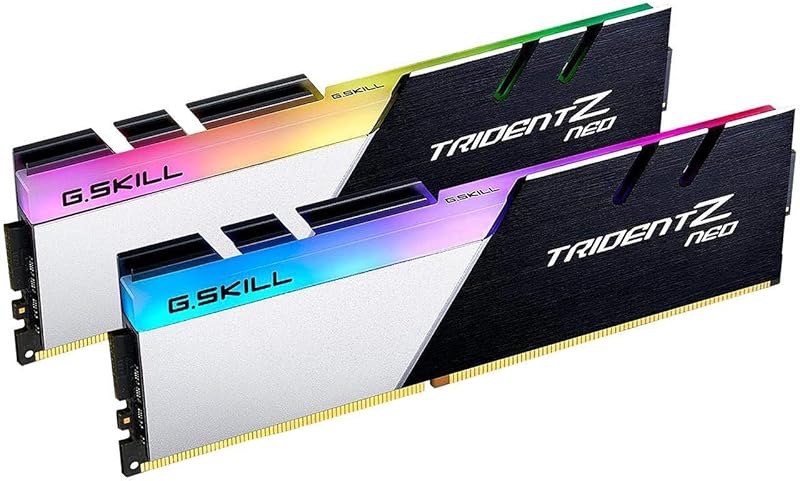
The G.Skill Trident Z Neo DDR4 measures 1.7 inches in height (approximately 43mm) along with a length of 5.2 inches and a width of 0.67 inches. This 1.7-inch vertical stature accommodates the integrated multicolor light diffuser and dual-tone aluminum heat fins. While this creates a striking presentation inside open-view chassis, that extra height frequently collides with the front intake fan of massive twin-tower air coolers. Builders considering this module must verify cooler bracket clearances or prepare to adjust front cooler fans upward, which can create secondary clearance issues against the chassis side panel.
When selecting memory for mini-ITX enclosures or workstations dominated by large air-cooling hardware, physical dimensions often outweigh raw speed advantages. A low-profile module avoids slot-blocking conflicts entirely, permitting clean airflow pathways around the central processor socket. Those cross-shopping slim options in guides like corsair vengeance lpx ddr4 3200 vs kingston fury beast ddr4 will recognize that the Fury Beast belongs to this functional low-clearance philosophy, whereas the Trident Z Neo prioritizes display aesthetics over universal cooler compatibility.
Edge: Kingston Fury Beast DDR4 wins on installation versatility thanks to its purpose-built low-profile heat spreader.
Timings, Latency, and Out-of-the-Box Overclocking Profiles
Clock speed represents only half of the performance equation; memory latency determines how quickly the module responds to individual read and write commands. The Trident Z Neo features tested timings of CL16-19-19-39 running at 1.35V. Combining a 3600MHz clock with a CAS latency of 16 produces an exceptional true latency response, transferring data cycles swiftly. Activating this performance tier requires enabling the pre-programmed Intel XMP memory overclock profile inside the motherboard firmware, as non-overclocked defaults rely on JEDEC safety profiles.
The Kingston Fury Beast lists a CAS latency of CL16 running at 1.35V for its 3200MHz profile. At equal CAS values of 16, a module running at 3600MHz yields a lower true latency than a 3200MHz module because the clock cycle duration is shorter. However, Kingston incorporates an automated Plug N Play feature that engages overclocking at 2666MHz on supported DDR4 chipsets without forcing the user into the BIOS to apply a profile manually. This simplifies operation for novice builders who want immediate operational stability without tweaking settings.
When deciding whether to choose G.Skill Trident Z Neo DDR4 or Kingston Fury Beast DDR4 for gaming, latency differences manifest during CPU-bound gaming scenarios where rapid asset streaming occurs. The tighter timing-to-frequency ratio on the Trident Z Neo keeps low-percent frame times steady in demanding titles. For users debating whether a high-performance profile is necessary, reviewing benchmarks against options like the g.skill ripjaws v ddr4 3600 vs kingston fury beast ddr4 confirms that higher frequency paired with balanced latency gives enthusiast systems measurable efficiency in computation-heavy workloads.
Edge: G.Skill Trident Z Neo DDR4 holds the advantage by pairing a CAS 16 latency with a higher 3600MHz frequency for lower real-world latency.
Capacity Configuration and Channel Architecture
The operational divide between a dual-module kit and an individual memory stick dramatically alters system bandwidth. The G.Skill Trident Z Neo package (model F4-3600C16D-32GTZNC) provides a matched 32GB kit comprised of two 16GB U-DIMM modules. Installing two matched modules across alternating motherboard memory slots engages dual-channel mode, doubling the communication bus width between the memory controller and the modules. G.Skill strictly notes in its product data that memory kits should never be mixed, as combining separate packages can trigger system instability or hardware failure.
The Kingston Fury Beast listing detailed here (model KF432C16BB/8) provides an individual 8GB single module. Operating a system on a single memory stick restricts the platform to single-channel mode, which limits overall data transfer bandwidth regardless of the module speed. Kingston notes that the Fury Beast family is sold in capacities ranging from single modules of 4GB up to 32GB, as well as multi-module kits, but purchasing this specific standalone unit means the system will operate with 8GB of total memory until a companion module is installed.
For modern operating systems, creative applications, and contemporary games, 8GB represents an entry-level capacity, whereas 32GB provides broad headroom for multitasking, streaming, and content production. Is G.Skill Trident Z Neo DDR4 worth it for users seeking a complete, high-capacity setup? The inclusion of two factory-matched 16GB sticks makes it an immediate all-in-one upgrade. Those weighing modular alternatives via g.skill trident z neo ddr4 vs crucial ballistix ddr4 evaluations know that purchasing an out-of-the-box dual-channel kit eliminates the configuration risks associated with manual module pairing.
Edge: G.Skill Trident Z Neo DDR4 delivers a complete 32GB dual-channel matched configuration that instantly unlocks maximum bus bandwidth.
Thermal Dissipation and Aesthetic Design
Operating desktop memory at 1.35V generates thermal load that must be transferred away from the integrated circuit chips to ensure long-term stability. The G.Skill Trident Z Neo utilizes a heavy aluminum heat spreader finished in a brushed aluminum and matte black dual-tone motif. Built into the spine of each module is a multi-zone translucent light bar providing multicolor illumination that interacts with motherboard RGB software. The solid construction contributes to the package weight of 5.3 ounces, providing substantial thermal mass for dissipating heat during extended gaming or video production sessions.
The Kingston Fury Beast DDR4 approaches thermal management through a restrained, functional black heatsink design without integrated lighting. The low-profile metal shield wraps tightly around the memory circuit board, keeping the physical footprint minimal while drawing heat away from the DRAM packages. For workstations, office desktop environments, or dark-themed chassis builds where illuminated components are undesirable, the Fury Beast offers an understated aesthetic that does not distract or conflict with surrounding hardware themes.
When assessing a Kingston Fury Beast DDR4 review against a G.Skill Trident Z Neo DDR4 review, the choice between these visual approaches comes down to personal setup requirements. Builders planning showcase builds with tempered-glass panels often prefer illuminated heatsinks, similar to options seen in the corsair vengeance rgb pro ddr4 vs kingston fury beast ddr4 matchup. Conversely, those building stealth configurations or working in compact enclosures appreciate the simple, non-illuminated metal spreader of the Fury Beast that leaves zero ambient light bleed.
Edge: Tie. G.Skill provides eye-catching multicolor illumination for showcase builds, while Kingston provides a discreet, stealthy heat spreader for minimalist hardware setups.
Pros and Cons
G.Skill Trident Z Neo DDR4
Pros
- Fast 3600MHz frequency with CL16 timings
- Complete 32GB dual-channel matched kit
- Multicolor RGB illumination on heat spreader
- Pre-configured Intel XMP overclocking profile
Cons
- 7-inch height may block large air coolers
- Requires manual BIOS profile activation
View G.Skill Trident Z Neo DDR4 on Amazon
Kingston Fury Beast DDR4

Pros
- Slim low-profile heat spreader design
- Plug N Play automatic overclocking at 2666MHz
- Officially ready for AMD Ryzen platforms
- Reliable 3200MHz CL16 operation at 1.35V
Cons
- Single 8GB module limits out-of-box bandwidth
- Lower maximum rated speed than 3600MHz
View Kingston Fury Beast DDR4 on Amazon
Who Should Buy Each One
Choose the G.Skill Trident Z Neo DDR4 If
- You want an out-of-the-box 3600MHz frequency optimized for the AMD Ryzen Infinity Fabric 1:1 ratio.
- You need a complete 32GB dual-channel memory configuration right away for gaming and heavy workloads.
- You have an open chassis or an AIO liquid cooler that provides at least 1.7 inches of RAM slot clearance.
- You want integrated multicolor lighting to complement an illuminated PC build.
Choose the Kingston Fury Beast DDR4 If
- You are assembling a system with a bulky dual-tower air cooler requiring low-profile memory modules.
- You need an individual 8GB module for a basic replacement or a compact secondary workstation.
- You prefer a simple, blacked-out aesthetic without any distracting RGB lighting.
- You want Plug N Play automated overclocking starting at 2666MHz without compulsory BIOS tuning.
Final Verdict
For most PC builders and gamers seeking a meaningful upgrade, the G.Skill Trident Z Neo DDR4 is the stronger overall choice. By delivering a pre-matched 32GB dual-channel configuration operating at 3600MHz with CL16 latency, it maximizes the memory bus bandwidth of modern desktop processors right out of the box. Its high-capacity layout, low true latency, and dedicated XMP tuning profiles make it a comprehensive solution that eliminates guesswork, provided your PC case and CPU cooler provide the necessary 1.7 inches of vertical clearance.
The Kingston Fury Beast DDR4 remains the smart pick for system builders restricted by compact dimensions or dual-tower heatsink overhangs. Its low-profile heat spreader guarantees fitment across challenging motherboard configurations where taller modules physically cannot sit. If you are building a small-form-factor rig, managing severe air cooler clearance constraints, or simply need a single low-profile replacement stick with hassle-free Plug N Play support, the Fury Beast delivers essential stability in a compact footprint.
FAQ
Does the G.Skill Trident Z Neo DDR4 fit under large air coolers?
The Trident Z Neo stands 1.7 inches tall (approximately 43mm) from base to top diffuser. While it clears liquid cooler radiator setups and standard stock coolers easily, large dual-tower air coolers often overhang the front memory slots and may interfere with modules of this height. Always verify your air cooler’s rated memory clearance specifications before installing.
Can I mix the Kingston Fury Beast DDR4 with my existing memory stick?
While the Kingston Fury Beast is sold as a single 8GB module, mixing memory modules from different production batches or different manufacturers can cause stability issues, boot loops, or reduced operational speeds. For predictable reliability and guaranteed dual-channel operation, installing matched modules sold together as a factory kit is always recommended.
Will the G.Skill Trident Z Neo DDR4 run at 3600MHz automatically when installed?
No, the G.Skill kit will initially boot at standard JEDEC default SPD speeds when first installed. To reach the advertised 3600MHz operating frequency and CL16-19-19-39 timings at 1.35V, you must enter your motherboard BIOS and enable the pre-configured Intel XMP overclocking profile on compatible hardware.
Is Kingston Fury Beast DDR4 worth it for an entry-level gaming build?
Yes, the Kingston Fury Beast is well suited for entry-level gaming setups where physical cooler clearance and reliable operation are paramount. Its 3200MHz XMP speed profile and 2666MHz Plug N Play support provide dependable performance across modern Intel and AMD Ryzen desktop platforms without requiring complex BIOS adjustments.
Does the Kingston Fury Beast DDR4 include RGB lighting?
The specific Fury Beast module discussed here (model KF432C16BB/8) features a low-profile black aluminum heatsink without RGB illumination. If you require multicolor lighting, the G.Skill Trident Z Neo includes an integrated multi-zone translucent light diffuser built into its upper spine.
Can the G.Skill Trident Z Neo DDR4 be used with Intel desktop processors?
Yes, although the Trident Z Neo series is explicitly engineered and QVL-tested for AMD platforms, it includes standard Intel XMP memory overclock profiles and functions reliably on compatible Intel desktop motherboards that support DDR4 memory and 3600MHz XMP profiles.


