Choosing between the Keychron Q1 and the Keychron V3 comes down to whether you prioritize a dense, heavy CNC aluminum chassis engineered with an acoustic double-gasket mounting system or prefer a traditional, spacious tenkeyless plastic frame with factory double-shot PBT keycaps. While both boards provide hot-swappable switches, dedicated rotary encoders, and open-source QMK and VIA programmability, their structural assemblies produce noticeably different acoustic profiles and desk ergonomics.
Typists who demand structural rigidity, acoustic sound dampening, and a compact 75 percent layout should select the Keychron Q1. Users who want standard navigation clusters, an uncompressed footprint, and tactile switches straight out of the box should choose the Keychron V3.
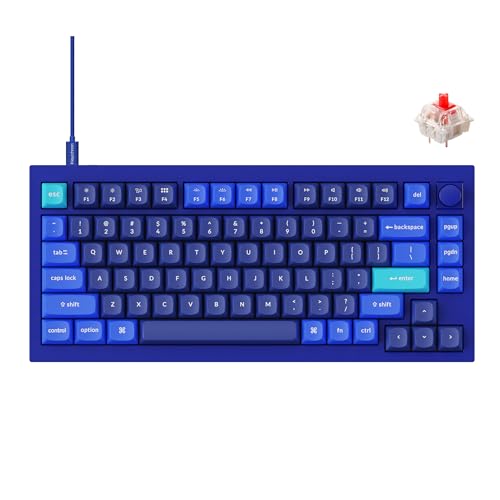

Keychron Q1 vs Keychron V3 at a Glance
| Feature | Keychron Q1 | Keychron V3 |
|---|---|---|
| Chassis Material | Full CNC machined aluminum | Polybutylene terephthalate plastic and silicone |
| Mounting Architecture | Double-gasket design with silicone pads | Tray mount with acoustic silicone pad |
| Form Factor | 75% compact layout | Tenkeyless (TKL / 80%) layout |
| Number of Keys | 84 keys | 87 keys |
| Stock Switches | Gateron G Pro Red (Linear) | Keychron K Pro Brown (Tactile) |
| Keycap Profile and Material | The listing does not specify | Double-shot PBT with OSA profile |
| Stabilizer Compatibility | Screw-in, supports third-party Cherry and Durock | Screw-in PCB stabilizers |
| Lighting Orientation | RGB backlighting | South-facing RGB backlighting |
| Physical Dimensions | The listing does not specify | 14.44″L x 5.53″W x 1.06″H |
| Firmware Support | QMK and VIA open-source programmable | QMK and VIA open-source programmable |
| Best For | Acoustic-focused typists wanting an aluminum compact body | Office and home desks wanting a classic TKL footprint |
Chassis Construction and Mounting Architecture
The primary engineering separation between these two keyboards lies in structural rigidity and internal vibration management. The Keychron Q1 utilizes a full aluminum CNC machined enclosure that adds significant physical mass to your desk setup. To prevent internal sound resonance common to metal bodies, the board incorporates a double-gasket design. This system pairs plate-mounted perimeter gaskets with internal silicone dampening pads seated between the upper and lower metal frames, allowing the typing surface to absorb bottom-out impact and isolate keystroke frequencies from the exterior casing.
By contrast, the Keychron V3 opts for a structural casing composed of polybutylene terephthalate polymer paired with an internal sound-absorbing acoustic silicone pad. Because plastic naturally dissipates certain higher frequency pings differently than rigid metals, the V3 does not utilize an articulated gasket suspension. Instead, it relies on its internal silicone layer and structural mounting posts to manage acoustics. Buyers analyzing the keychron q1 vs q3 ecosystem will recognize that Keychron reserves this dense metal double-gasket architecture exclusively for its premium enthusiast line.
In everyday use, the Keychron Q1 double gasket vs V3 comparison reveals a distinctly softer, more muted tactile bottom-out on the Q1. Typing on the Q1 yields a dampened sound signature free from hollow case reverberations. The V3 feels noticeably firmer under heavy keystrokes, providing solid structural stability without the cushioned micro-flex that the Q1 delivers through its suspended plate design.
Edge: Keychron Q1 for its robust CNC machined aluminum enclosure and superior double-gasket vibration isolation.
Form Factor and Desk Footprint
Desktop real estate and key grouping play a central role in deciding between these two models. The Keychron Q1 features a compressed 75 percent layout with 84 total keys. By nesting the directional arrow cluster directly beneath the Enter key and stacking navigation functions in a single vertical column along the right perimeter, the Q1 retains the full dedicated function row while trimming roughly two inches of horizontal chassis width. This compact profile creates a shorter reach for your mouse hand, which benefits posture during long computing blocks.
The Keychron V3 implements a standard tenkeyless 80 percent footprint housing 87 keys across two distinct chassis sections. Measuring 14.44 inches long, 5.53 inches wide, and 1.06 inches high, the V3 preserves standard mechanical key spacing and the traditional isolated three-by-three navigation cluster alongside an offset arrow island. For operators transitioning from full-sized workplace peripherals, the V3 requires zero muscle memory retraining. Those comparing compact performance boards via guides like the drunkdeer a75 vs keychron q1 he analysis will note that 75 percent boards favor minimalist desk setups, whereas TKL boards offer familiar enterprise ergonomics.
Choosing between the Keychron Q1 75 percent vs V3 TKL layouts comes down to muscle memory versus spatial efficiency. The Q1 saves valuable mouse-tracking surface but pushes the navigation cluster into a single vertical column that requires visual confirmation for some users. The V3 occupies more horizontal space, but its segregated layout allows instant, blind navigation of keys like Delete, Home, Page Up, and Page Down.
Edge: Keychron V3 for its standard tenkeyless spacing that requires zero layout adaptation.
Stock Switches and Typing Performance
Switch selection determines the immediate out-of-the-box acoustic and tactile feedback of both keyboards. The Keychron Q1 configuration under review comes factory-equipped with pre-lubed Gateron G Pro Red linear switches. These switches feature a smooth, uninterrupted downward key travel rated for up to 50 million keystrokes. Paired with the Q1’s internal silicone acoustic pads and double-gasket isolation, the linear reds glide smoothly to bottom-out without tactile resistance, generating a quiet, deep typing frequency suitable for quiet office environments.
Conversely, the Keychron V3 configuration arrives equipped with pre-lubed Keychron K Pro Brown mechanical switches. These tactile switches deliver a noticeable bump midway through keystroke descent, providing physical confirmation before actuation occurs. The K Pro Browns also carry a 50 million keystroke endurance rating. When assessing the Keychron Q1 or V3 for typing tasks such as writing long documentation or entering code, the V3’s tactile feedback helps prevent accidental key triggers, though its plastic housing and silicone pad yield a slightly higher acoustic pitch than the Q1.
Both models feature pre-lubed switches that eliminate the scratchy actuation feel found on unlubricated alternatives. However, the typing sensation on the Q1 feels inherently softer on the fingertips over multi-hour sessions due to the combination of light linear actuation and the underlying gasket mount, while the V3 provides firmer tactile feedback across a rigid base.
Edge: Keychron Q1 for typists seeking fluid linear switches on a cushioned plate, though the V3 remains superior for fans of out-of-the-box tactile resistance.
Gaming Responsiveness and Switch Flexibility
Both keyboards connect via a low-latency wired USB-C interface, ensuring consistent input transmission free from wireless battery depletion or RF interference. When evaluating the Keychron Q1 or V3 for gaming sessions, the internal switch architecture becomes the deciding operational factor. The linear Gateron G Pro Reds installed in the Q1 offer rapid double-tapping capability and smooth vertical tracking without mechanical reset delays, making them exceptionally responsive for rapid inputs in competitive gaming.
The tactile Keychron K Pro Browns inside the V3 provide distinct mechanical resistance that benefits tactical titles where deliberate ability triggering is crucial. However, neither board restricts you to its stock switches. Both keyboards incorporate hot-swappable PCB sockets compatible with virtually all standard 3-pin and 5-pin MX-style mechanical switches from manufacturers like Cherry, Gateron, Kailh, and Panda. Gamers who evaluate modern performance hardware like the steelseries apex pro tkl vs keychron q1 he or the razer huntsman v3 pro tkl vs keychron q1 he will appreciate that Keychron avoids proprietary optical or magnetic sockets, giving users complete freedom to swap switches without desoldering.
Because both units support identical wired USB-C polling rates and comprehensive switch interchangeability, the primary in-game differentiator remains physical form factor. The smaller footprint of the 75 percent Q1 allows gamers to position their primary keyboard and mouse closer together, significantly expanding available mouse-swiping area for low-sensitivity aim corrections.
Edge: Keychron Q1 for its rapid linear stock switches and compact chassis that maximizes mouse movement room.
Customization, Keycaps, and Software Ecosystem
Both keyboards feature an open-source firmware core that runs QMK and VIA compatibility natively. This allows you to open a web browser, connect your board, and instantaneously remap any key, create complex productivity macros, customize backlighting layers, and configure the integrated rotary encoder knob. The rotary knob on both units allows smooth volume adjustment or scrolling straight out of the box and can be programmed for specialized brush sizing or timeline scrubbing in media applications.
Despite their shared software brain, hardware modding possibilities diverge. The Keychron V3 ships with premium double-shot PBT keycaps molded in an ergonomic OSA profile, providing spherical fingertip contours and outstanding oil resistance that prevents key shine over extended usage. It also features south-facing RGB backlighting designed to illuminate legends cleanly without interfering with Cherry-profile keycaps. In contrast, the Q1 listing does not specify its stock keycap material or profile, but the Q1 offers superior structural modularity by supporting third-party screw-in stabilizers like Durock or Cherry, allowing keyboard builders to eliminate wire rattle completely. Additional modularity discussions can be referenced in comparisons like the keychron q1 vs k pro v2 breakdown.
The V3 also includes a dedicated hardware toggle switch to transition between macOS and Windows operating modes seamlessly, alongside dedicated replacement keycaps for system modifiers. While the Q1 similarly supports Mac, Windows, and Linux operating systems via firmware mapping, the V3 provides a more cohesive out-of-the-box keycap package for multi-OS users.
Edge: Tie. The V3 includes durable double-shot PBT OSA keycaps and south-facing LEDs, while the Q1 supports third-party stabilizer modifications on a fully disassembled aluminum chassis.
Pros and Cons
Keychron Q1

Pros
- Full CNC machined aluminum body
- Double-gasket acoustic mounting system
- Pre-lubed linear Gateron Red switches
- Supports third-party screw-in stabilizers
Cons
- Compressed single-column navigation keys
- The listing does not specify keycap material
Keychron V3

Pros
- Standard spacious tenkeyless 87-key layout
- Double-shot PBT keycaps in OSA profile
- South-facing RGB backlighting
- Dedicated hardware macOS and Windows toggle
Cons
- Plastic chassis lacks aluminum density
- Rigid tray-style mount without gasket flex
Who Should Buy Each One
Choose the Keychron Q1 If
- You want a heavy, premium CNC machined aluminum body that stays anchored to your desk.
- You prioritize typing acoustics and want a double-gasket mount to eliminate metal case pinging.
- You prefer a compact 75 percent layout to increase available mouse tracking space.
- You plan to install high-end third-party stabilizers like Durock or Cherry.
Choose the Keychron V3 If
- You prefer the traditional, uncompressed layout of an 87-key tenkeyless keyboard.
- You want factory-installed double-shot PBT keycaps in an ergonomic OSA profile.
- You prefer tactile switches with physical keystroke confirmation for typing and data entry.
- You need south-facing RGB backlighting for maximum aftermarket keycap compatibility.
Final Verdict
For most mechanical keyboard enthusiasts and dedicated desk workers, the Keychron Q1 emerges as the stronger long-term foundation. Its full CNC machined aluminum chassis, paired with a true double-gasket isolation structure and silicone acoustic buffers, delivers an acoustically refined and comfortable typing experience that plastic tray-mount boards simply cannot match. With its compact 84-key form factor, customizable rotary knob, and open-source VIA support, the Q1 acts as an enthusiast-grade mechanical base that can adapt to switch and stabilizer upgrades for years.
However, the Keychron V3 remains the ideal choice for operators who prefer standard tenkeyless spacing over compressed layouts. If you rely heavily on an isolated arrow bank and traditional navigation cluster for spreadsheet manipulation or daily programming, the V3 eliminates the spatial learning curve. Backed by durable double-shot PBT keycaps, tactile Keychron K Pro Brown switches, and identical QMK/VIA customization, the V3 delivers a fully customizable mechanical workstation setup without the sheer physical bulk of a solid metal chassis.
FAQ
Is Keychron V3 worth it compared to the Keychron Q1?
Yes, the Keychron V3 is well worth consideration for users who prefer standard tenkeyless dimensions, lighter overall weight, and factory double-shot PBT keycaps. While the Q1 provides superior aluminum build materials and gasket dampening, the V3 delivers the exact same QMK/VIA software programmability, hot-swappable PCB support, and rotary knob functionality in a traditional TKL design.
What does the Keychron Q1 double gasket design do?
The double-gasket design on the Keychron Q1 places silicone dampening pads between the upper and lower CNC aluminum chassis components, alongside perimeter gaskets on the internal plate. This arrangement prevents metal-on-metal contact, significantly reducing acoustic case ping and providing a softer, slightly flexible bottom-out feel when typing rapidly.
Can I use mechanical switches from other brands on both boards?
Yes, both the Keychron Q1 and Keychron V3 feature hot-swappable PCB sockets that accept virtually all standard 3-pin and 5-pin MX-style mechanical switches. You can easily remove the factory Gateron or Keychron switches and plug in switches from Cherry, Gateron, Kailh, or Panda without using a soldering iron.
Which keyboard is better for gaming, the Keychron Q1 or V3?
The Keychron Q1 holds an advantage for fast-paced gaming due to its pre-installed linear Gateron G Pro Red switches, which provide smooth, uninterrupted keystroke travel without a tactile reset bump. Additionally, the Q1’s compact 75 percent layout frees up horizontal desk space, allowing wider, low-sensitivity mouse sweeps during intense gameplay.
Does the Keychron V3 work on Mac computers?
Yes, the Keychron V3 includes native compatibility for both macOS and Windows systems. It comes equipped with a hardware toggle switch on the rear panel to change system profiles instantly, and includes customized Mac modifier keycaps that can be swapped using the included keycap puller.
What is the difference between the switches in this Keychron Q1 vs V3 comparison?
The Keychron Q1 in this comparison features pre-lubed Gateron G Pro Red linear switches, which offer smooth, consistent vertical actuation without physical feedback. The Keychron V3 features pre-lubed Keychron K Pro Brown tactile switches, which produce a slight mechanical bump midway through keystroke descent to signal that the input has registered.



