Choosing between the ASUS Nvidia RTX 4060 Ti and the MSI Nvidia RTX 4070 Ti comes down to a fundamental split between memory bandwidth headroom and physical chassis packaging. The decisive factor for most builders is that the RTX 4070 Ti pairs 12GB of high-speed GDDR6X memory across a 192-bit bus with higher clock speeds to handle heavy visual workloads, whereas the RTX 4060 Ti provides an 8GB GDDR6 pool inside a compact dual-slot profile built around low power draw and space efficiency.
Builders assembling a streamlined rig focused on high-refresh 1080p gaming should pick the RTX 4060 Ti. Gamers requiring substantial rendering throughput and memory overhead for maxed-out 1440p and entry 4K setups should choose the RTX 4070 Ti.


Nvidia RTX 4060 Ti vs Nvidia RTX 4070 Ti at a Glance
| Feature | ASUS Nvidia RTX 4060 Ti | MSI Nvidia RTX 4070 Ti |
|---|---|---|
| Graphics Coprocessor | NVIDIA GeForce RTX 4060 Ti | NVIDIA GeForce RTX 4070 Ti |
| VRAM Capacity | 8 GB | 12 GB |
| Memory Type | GDDR6 | GDDR6X |
| Memory Interface Width | Not listed | 192-bit |
| Boost Clock Speed | 2595 MHz (OC Mode) / 2565 MHz (Default) | 2745 MHz |
| Cooling Fan Setup | 2 Fans (Axial-tech) | 2 Fans |
| Card Dimensions (L x W) | 8.66″ L x 1.5″ W | 12.09″ L x 2.01″ W |
| Display Outputs | DisplayPort, HDMI, VGA | DisplayPort x 3 (v1.4a), HDMI 2.1a x 1 |
| Display Maximum Resolution | 3840×2160 | 4K |
| Best For | High-efficiency 1080p and compact builds | Demanding 1440p and entry 4K gaming |
Memory Capacity and VRAM Bandwidth
Video memory capacity and the bus width connecting it to the graphics core dictate how well a card handles dense assets, high-resolution textures, and modern ray tracing workloads. The RTX 4060 Ti vs 4070 Ti VRAM difference represents the most critical structural separation between these two graphics cards. Modern game engines load vast geometry tables, uncompressed surface maps, and complex lighting data directly into local video memory. When a card exhausts its memory buffer, it must cycle assets across the PCIe slot, resulting in micro-stutter, frame drops, and severe latency spikes during gameplay.
Looking at the RTX 4070 Ti 12GB vs 4060 Ti 8GB dynamic, the MSI card offers a fifty percent increase in total memory capacity alongside superior memory technology. The 4070 Ti utilizes 12GB of GDDR6X memory running over an explicit 192-bit interface, which delivers massive memory throughput. In contrast, the ASUS 4060 Ti relies on 8GB of standard GDDR6 memory. While 8GB remains functional for esports titles and standard asset packages, modern single-player releases easily exceed an 8GB allocation when running ultra presets or ray-traced reflections. Readers weighing the wider midrange landscape often study the nvidia rtx 4060 ti vs 4070 matchup, but jumping straight to the 4070 Ti provides a decisive leap in memory longevity.
The practical result of this hardware difference is stability in modern gaming environments. The 12GB GDDR6X configuration on the 4070 Ti gives the card enough breathing room to maintain smooth frame pacing when complex shader passes and ray tracing structures fill the buffer. The 8GB GDDR6 buffer on the 4060 Ti requires users to dial back texture fidelity or turn down ray tracing in demanding titles to avoid filling the memory pool completely. For long-term viability with next-generation game engines, the wider bus and larger pool on the 4070 Ti provide meaningful operational security.
Edge: MSI Nvidia RTX 4070 Ti provides a fifty percent larger memory allocation and significantly faster GDDR6X technology to prevent asset bottlenecking.
Clock Speeds and Core Compute Headroom
Core clock frequencies indicate the operational pace of the graphics processor, governing how rapidly vertex data, rasterization tasks, and compute instructions process through the execution pipeline. Both cards are built on Nvidia Ada Lovelace architecture, giving them access to 4th Generation Tensor Cores for AI processing and 3rd Generation RT Cores for spatial calculation. However, the operational ceiling differs between the two silicon tiers, impacting both pure rasterization workflows and artificial intelligence workloads.
The MSI RTX 4070 Ti comes configured with an aggressive boost clock speed of 2745 MHz right out of the box. By comparison, the ASUS RTX 4060 Ti OC Edition delivers a boost clock of 2595 MHz in OC mode and 2565 MHz in default mode. That clock speed delta gives the 4070 Ti an immediate advantage in clock-for-clock throughput. When evaluating the GeForce RTX 4060 Ti vs RTX 4070 Ti, the 4070 Ti processes geometry calculations, real-time physics, and shader shaders at a visibly higher tempo. When looking at adjacent alternatives like the nvidia rtx 4060 ti vs 4070 super, clock speeds and core density consistently determine the compute threshold.
In addition to standard compute execution, both models leverage DLSS 3 frame generation to multiply perceived frame rates. The listing for the 4060 Ti notes up to 4x performance gains with DLSS 3 compared to brute-force rendering, along with up to 2x ray tracing speed from its 3rd Gen RT cores. However, because DLSS 3 generates intermediate frames using hardware-level optical flow accelerators, having the faster base compute engine and higher clock frequency of the 4070 Ti ensures lower base input latency before interpolation occurs. The extra clock speed translates into a more responsive gaming experience across all titles.
Edge: MSI Nvidia RTX 4070 Ti leads with a higher 2745 MHz boost clock that drives faster compute cycles and lower baseline latency.
Target Resolution and Gaming Workloads
Target resolution dictates the processing load placed on the graphics pipeline, as stepping from 1080p to 1440p increases the pixel count by roughly 78 percent, and stepping to 4K quadruples the original pixel requirement. Choosing between the RTX 4060 Ti or 4070 Ti for 1440p represents one of the most common dilemmas for enthusiasts upgrading their monitors. While both cards support 4K visual output up to 3840×2160, the hardware inside each card determines whether that resolution can sustain high refresh rates during intense rendering sequences.
When analyzing RTX 4060 Ti vs 4070 Ti benchmarks across gaming communities, the 4060 Ti functions primarily as an ultra-high-refresh-rate card for 1080p displays, while serving as an entry-level option for moderate 1440p gaming. At 1080p, its 8GB GDDR6 pool is rarely overwhelmed, and its 2595 MHz boost clock produces fluid frame rates in competitive multiplayer shooters. However, when deciding between the RTX 4060 Ti or 4070 Ti for 4K, the 4060 Ti struggles to maintain playable frame rates without heavily relying on aggressive resolution upscaling. Anyone browsing options alongside the nvidia rtx 4060 ti vs 4070 ti super will notice that higher-tier cards are specifically engineered to prevent higher resolutions from collapsing render rates.
The RTX 4070 Ti excels across demanding 1440p workloads and delivers solid entry-tier 4K gaming performance. Its 12GB GDDR6X buffer and 192-bit memory interface easily absorb the high-resolution frame buffers required by modern games at 2560×1440. It powers high-refresh gaming monitors without forcing the user to compromise on post-processing effects or shadow detail. For players seeking a true 1440p maximum-settings experience or entry-level 4K gaming, the 4070 Ti possesses the raw execution horsepower required to keep frame delivery consistent.
Edge: MSI Nvidia RTX 4070 Ti dominates high-resolution workloads, making it the superior option for demanding 1440p and entry 4K setups.
Form Factor, Dimensions, and Case Clearance
Physical dimensions determine case compatibility, airflow dynamics, and the overall difficulty of installing a graphics card into a desktop chassis. Modern graphics cards have grown significantly in both length and thickness, making physical clearance a decisive purchasing factor. Installing a GPU that is too long can block front radiator fans, collide with hard drive cages, or overwhelm smaller computer enclosures.
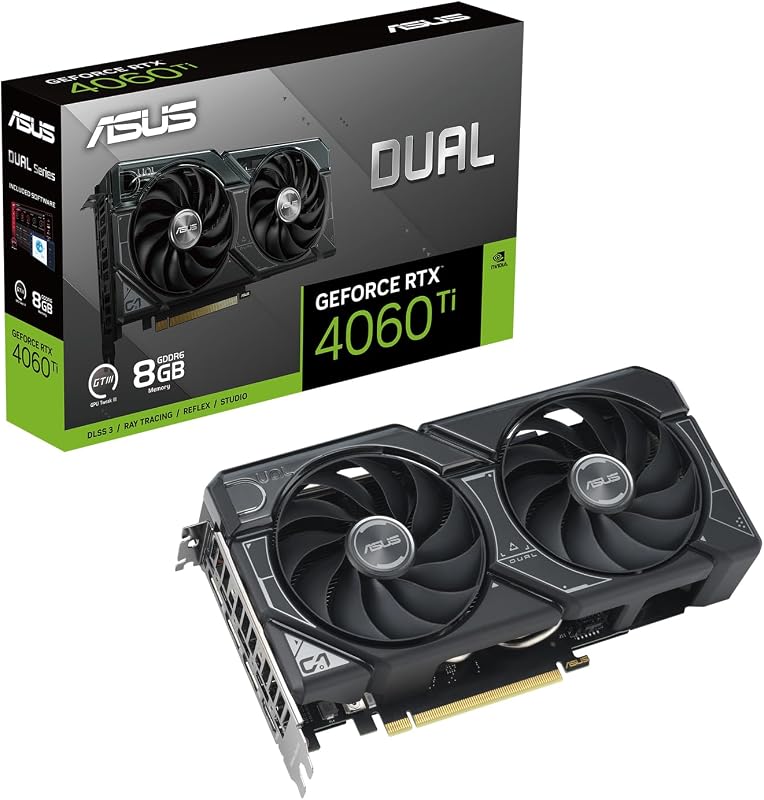
The ASUS RTX 4060 Ti features a remarkably compact form factor, measuring 8.66 inches long and 1.5 inches wide. This modest profile allows the card to slip easily into almost any standard ATX, micro-ATX, or small-form-factor Mini-ITX enclosure without running into cable clearance problems or requiring custom mounting brackets. For space-constrained PC builds or home theater enclosures, the 4060 Ti provides modern Ada Lovelace features in an accessible physical envelope. Builders evaluating compact graphics upgrades often cross-reference smaller units like the nvidia rtx 4060 vs 4070 ti to see just how much space they must surrender to move up a performance tier.
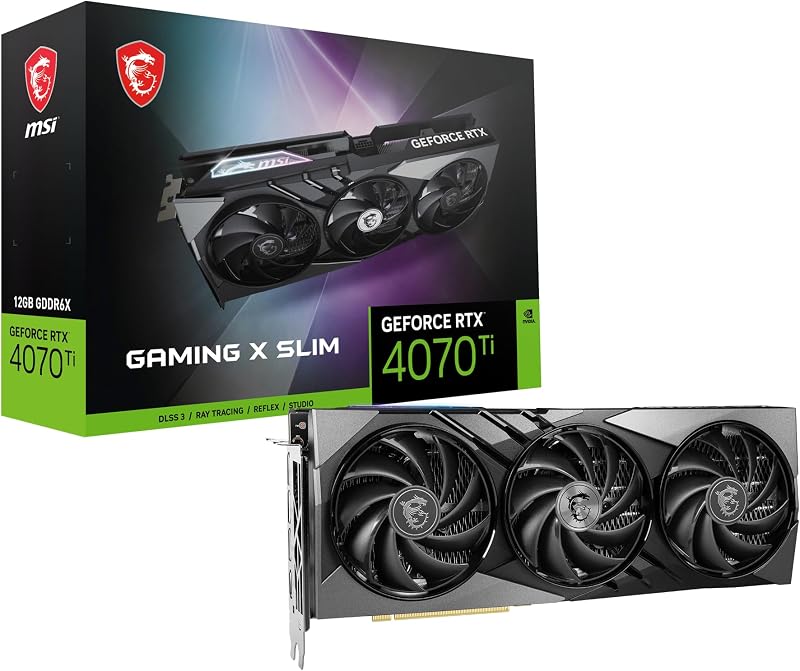
On the other hand, the MSI RTX 4070 Ti Gaming X Slim is substantially larger, measuring 12.09 inches long and 2.01 inches wide. While designated as a “Slim” model compared to some massive triple-slot alternatives, it remains over a foot long and exceeds two inches in thickness. This size demands a mid-tower or full-tower chassis with generous front-to-back clearance. Builders must measure their available space carefully before choosing the 4070 Ti, as its extra length eliminates it from consideration for many compact cases.
Edge: ASUS Nvidia RTX 4060 Ti easily wins on compatibility with its compact 8.66-inch length and slim 1.5-inch profile.
Thermal Design and Display Connectivity
Thermal management and physical display connections dictate how quiet a system runs under full load and how many monitors it can drive simultaneously. Effective heat dissipation keeps GPU clock frequencies elevated at peak boost states without triggering thermal throttling. At the same time, versatile video output ports ensure support for modern high-refresh gaming displays, secondary panels, and productivity setups.
The ASUS RTX 4060 Ti utilizes an Axial-tech dual-fan design engineered with a smaller fan hub that accommodates longer blades. It incorporates a specialized barrier ring around the perimeter to increase downward air pressure directly through the cooling fins. In terms of video connectivity, the listing notes DisplayPort, HDMI, and VGA interfaces (with listing details specifying three DisplayPort 1.4a outputs and one HDMI 2.1 port). This array provides solid multi-monitor versatility for standard desktop arrangements. Builders inspecting modern midrange setups often compare the thermal handling against models like the nvidia rtx 4060 vs 4070 super to assess overall balance.
The MSI RTX 4070 Ti Gaming X Slim incorporates a robust dual-fan cooling system built to disperse heat across an extended heatsink fin array. Its larger surface area allows it to shed thermal energy effectively during sustained compute loads. For monitor connectivity, the MSI card offers three DisplayPort 1.4a outputs and one HDMI 2.1a port. Both graphics cards provide top-tier digital display connectivity suitable for multi-monitor desktop environments and 4K displays, keeping them on even ground regarding monitor support.
Edge: Tie. Both cards feature engineered dual-fan cooling designs and multi-port digital display outputs that fit their respective power and thermal envelopes.
Pros and Cons
Nvidia RTX 4060 Ti
Pros
- Compact 8.66-inch card length
- Axial-tech fans with barrier rings
- Nvidia DLSS 3 frame generation
- 2595 MHz OC boost clock
Cons
- Limited 8GB GDDR6 memory
- Restricted 1440p and 4K headroom
View Nvidia RTX 4060 Ti on Amazon
Nvidia RTX 4070 Ti
Pros
- Spacious 12GB GDDR6X memory
- Fast 2745 MHz boost clock
- Wide 192-bit memory interface
- DisplayPort 1.4a and HDMI 2.1a outputs
Cons
- Long 12.09-inch physical footprint
- Requires large chassis clearance
View Nvidia RTX 4070 Ti on Amazon
Who Should Buy Each One
Choose the ASUS Nvidia RTX 4060 Ti If
- You use a small-form-factor or compact chassis with strictly limited front-to-back GPU clearance under nine inches.
- You game primarily at 1080p resolution and want smooth frame delivery with DLSS 3 frame generation.
- You prefer a graphics card with modest space requirements that fits standard dual-slot expansion brackets.
- You want modern Ada Lovelace ray tracing and 4th Gen Tensor Core technology without restructuring your entire PC case.
Choose the MSI Nvidia RTX 4070 Ti If
- You own a 1440p high-refresh gaming monitor or an entry-level 4K display and demand maximum visual settings.
- You want a larger 12GB GDDR6X video memory pool across a 192-bit interface to handle high-resolution texture packs.
- You have a mid-tower or full-tower desktop chassis that comfortably clears a 12.09-inch graphics card.
- You want an aggressive 2745 MHz boost clock speed to push peak frame rates in competitive and AAA titles.
Final Verdict
When assessing this matchup, the MSI RTX 4070 Ti stands as the clear performance leader for serious gaming rigs. By combining a generous 12GB GDDR6X frame buffer, a wide 192-bit interface, and a superior 2745 MHz boost clock, it easily outperforms the 4060 Ti in raw compute output and memory throughput. For gamers aiming to maximize modern single-player releases at 1440p or explore 4K gaming with ray tracing enabled, the 4070 Ti offers the technical headroom needed to prevent stuttering and maintain visual fidelity over years of upcoming game releases.
However, the ASUS RTX 4060 Ti remains an exceptionally practical choice for players operating within specific physical constraints. Its modest 8.66-inch length and dual-slot profile make it an effortless drop-in upgrade for compact systems that physically cannot accommodate a foot-long graphics card. If your display setup centers on high-refresh 1080p competitive gaming and you require an efficient, space-conscious card with full DLSS 3 support, the RTX 4060 Ti satisfies those requirements completely.
FAQ
Is RTX 4070 Ti worth it over the RTX 4060 Ti for 1440p gaming?
Yes. The RTX 4070 Ti is significantly better suited for 1440p gaming due to its 12GB GDDR6X memory configuration and higher 2745 MHz boost clock speed. The 8GB GDDR6 memory on the RTX 4060 Ti can experience memory capacity constraints when rendering complex ray-traced scenes and high-resolution textures at 1440p, making the 4070 Ti a far more stable long-term option for this resolution.
What is the RTX 4060 Ti vs 4070 Ti VRAM difference in practice?
The practical difference lies in memory capacity, speed, and bus width. The RTX 4070 Ti delivers 12GB of GDDR6X memory across a 192-bit interface, which moves substantial graphical data quickly. The RTX 4060 Ti provides 8GB of standard GDDR6 memory. The extra 4GB of VRAM and faster GDDR6X memory on the 4070 Ti prevent frame stuttering in modern games that exceed 8GB of texture and geometry allocation.
Can the RTX 4060 Ti handle 4K resolution?
The ASUS RTX 4060 Ti supports a maximum display resolution of 3840×2160 (4K), meaning it can drive 4K monitors, stream 4K media, and run lightweight or esports games at 4K. However, for demanding modern AAA titles, its 8GB GDDR6 pool and compute engine are primarily tuned for 1080p and moderate 1440p gaming, whereas the RTX 4070 Ti handles 4K gaming workloads with significantly higher stability.
How do the dimensions of these two graphics cards compare for small cases?
The ASUS RTX 4060 Ti measures 8.66 inches long and 1.5 inches wide, making it exceptionally compact and compatible with almost all small-form-factor and mini-ITX cases. The MSI RTX 4070 Ti Gaming X Slim is much larger at 12.09 inches long and 2.01 inches wide, requiring a mid-tower or full-tower enclosure with ample internal clearance.
Do both cards support Nvidia DLSS 3 frame generation?
Yes. Both graphics cards belong to the Nvidia GeForce RTX 40 Series and are built on the Ada Lovelace architecture. They feature 4th Generation Tensor Cores that support DLSS 3 frame generation, allowing both models to generate AI-interpolated frames to boost visible fluidity in supported gaming titles.
What display outputs are available on these two graphics cards?
The MSI RTX 4070 Ti provides three DisplayPort 1.4a connections and one HDMI 2.1a port. The ASUS RTX 4060 Ti listing specifies DisplayPort, HDMI, and VGA interfaces, with listing details highlighting three DisplayPort 1.4a outputs and one HDMI 2.1 connection. Both cards support modern multi-monitor setups and high-refresh gaming displays.