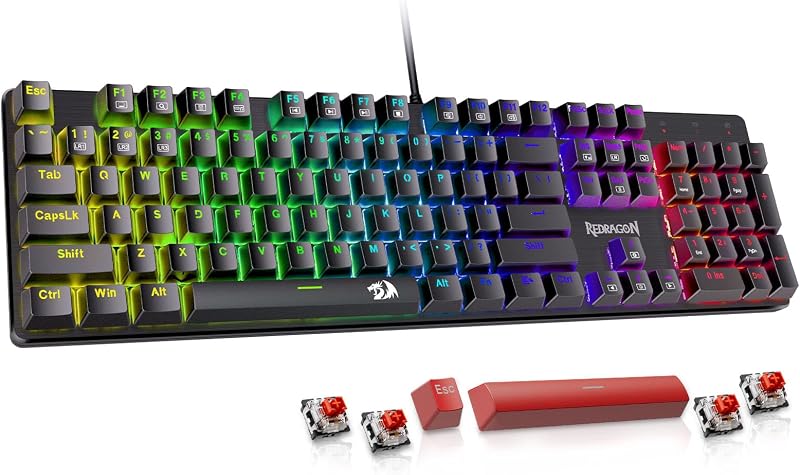
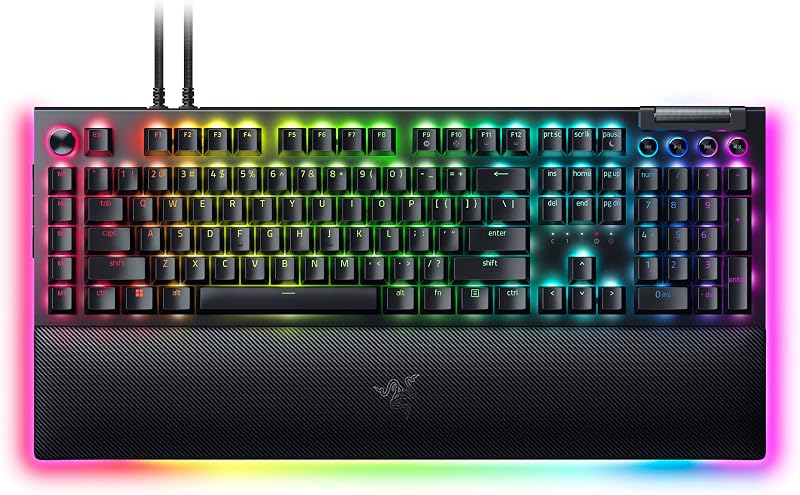
Choosing between the Razer Huntsman Mini and the Razer BlackWidow V4 Pro comes down to a fundamental clash between pure esports speed and complete desktop command. The Huntsman Mini focuses entirely on competitive agility with second-generation analog optical switches, Rapid Trigger resets, and a trimmed 61-key layout that maximizes room for sweeping mouse inputs. In contrast, the BlackWidow V4 Pro acts as a sprawling command center, combining 104 quiet linear mechanical switches with eight dedicated macro buttons, a programmable Command Dial, and a plush illuminated wrist rest.
Pick the Razer Huntsman Mini if you play fast-paced competitive shooters and demand customizable actuation depths paired with zero wasted desk real estate. Choose the Razer BlackWidow V4 Pro if you require extensive physical macro controls, a full numeric keypad, and plush ergonomics for deep battlestation immersion.


Razer Huntsman Mini vs Razer BlackWidow V4 Pro at a Glance
| Feature | Razer Huntsman Mini | Razer BlackWidow V4 Pro |
|---|---|---|
| Form Factor | Compact 60% (1 Section) | Full-Sized (7 Sections) |
| Key Count | 61 Keys | 104 Keys |
| Switch Type | Analog Optical Switches GEN-2 | Yellow Mechanical Switches (Linear & Silent) |
| Actuation Customization | 0.1 to 4.0 mm Adjustable with Rapid Trigger | Fixed Linear Execution |
| Switch Lifespan | 100 Million Keystrokes | Not listed |
| Keycap Material | Textured Doubleshot PBT | Doubleshot ABS with Extra-Thick Walls |
| Macro & Hardware Controls | Dual-Purpose Modifier Keys | Command Dial & 8 Dedicated Macro Keys |
| Wrist Rest | Not listed | Magnetic Plush Leatherette with Underglow |
| Lighting Configuration | Per-Key RGB Backlit | Chroma RGB Per-Key & 3-Side Underglow |
| Dimensions | Not listed | 18.36″L x 6.01″W x 1.73″H |
| Best For | Competitive FPS Movement & Small Desks | Full Battlestation Control & Macro Automation |
Switch Technology and Actuation Performance
The defining technical division in this matchup lies in the underlying switch architecture. When evaluating the Huntsman Mini vs BlackWidow V4 Pro switches, you are contrasting variable light-based detection against fixed mechanical contacts. The Huntsman Mini relies on Razer Analog Optical Switches Gen-2, which register key travel by reading how much light passes through the switch stem. This mechanism allows you to adjust the actuation point anywhere from a shallow 0.1 mm hair-trigger up to a deep 4.0 mm bottom-out. Furthermore, with Razer Huntsman Mini Rapid Trigger enabled, the switch resets the exact moment you begin lifting your finger, completely eliminating the static reset boundary found on traditional boards.
The BlackWidow V4 Pro takes a different approach by employing Razer Yellow Mechanical Switches designed for linear, silent operation. These traditional switches feature built-in sound dampeners to muffle bottom-out acoustics during late-night play or work calls. They deliver smooth, instant keypresses without a tactile bump, but they lack the dynamic travel-depth tracking offered by analog sensors. In our broader analysis of razer huntsman v3 pro vs blackwidow v4 pro hardware, mechanical contacts provide dependable consistency, yet they cannot mimic the ultra-responsive micro-adjustments native to light-based analog mechanisms.
For competitive shooters where rapid counter-strafing determines the outcome of a duel, the optical analog design provides a measurable practical edge. The Huntsman Mini incorporates Razer Snap Tap via a firmware update, prioritizing the latest input between two directional keys without forcing you to release the previous key first. When evaluating Razer analog optical vs mechanical switches, the mechanical Yellow switches feel remarkably smooth for standard typing and general play, but they remain locked to static physical trigger points. The optical assembly also extends durability, boasting a rated lifespan of 100 million keystrokes, whereas the BlackWidow listing does not specify a numerical keystroke rating.
Edge: Razer Huntsman Mini for its variable 0.1 to 4.0 mm actuation range, Rapid Trigger resets, and Snap Tap directional priority.
Form Factor and Desk Footprint
Desk management fundamentally separates these two devices and shapes how you position your hands during intense matches. The Huntsman Mini vs BlackWidow V4 Pro size difference is dramatic: the Huntsman Mini adopts an ultra-compact 60% form factor containing just 61 keys arranged in a single unified section. By discarding the numeric pad, navigation cluster, and dedicated function row, this layout frees up maximum surface area for aggressive, low-sensitivity mouse swipes. Players who angle their keyboards during tournaments will find the compact chassis effortless to pivot and position without knocking against wide mousepads.
The BlackWidow V4 Pro represents the opposite end of the physical spectrum. Measuring 18.36 inches long, 6.01 inches wide, and 1.73 inches high across seven dedicated hardware sections, it commands substantial real estate on your workstation. It provides 104 primary keys along with extra side columns and upper dials. For those who frequently swap between complex simulations, daily office productivity, and spreadsheet entry, having every function immediately accessible without holding secondary layer keys provides straightforward utility. If you are comparing smaller alternatives like the steelseries apex pro tkl vs razer huntsman v3 pro tkl, you will appreciate how much space even a tenkeyless design saves compared to this massive full-sized frame.
The trade-off between the two designs hinges on how you prioritize desk space versus standalone hardware. When deciding whether to choose the Razer Huntsman Mini or BlackWidow V4 Pro for competitive FPS, the compact footprint of the Huntsman Mini presents a massive operational advantage by keeping your hands closer together and clearing away obstacles. Conversely, if your desk is spacious and you dislike navigating multi-key shortcuts for basic navigation, the large footprint of the BlackWidow V4 Pro is an intentional design choice rather than an annoyance.
Edge: Razer Huntsman Mini for reclaiming critical desk space to enable wide, unimpeded mouse sweeps.
Dedicated Controls, Macro Keys, and Command Hardware
If your gaming library spans MMORPGs, complex strategy titles, or productivity tasks that thrive on hotkeys, the control layout is paramount. The BlackWidow V4 Pro functions as an elaborate input station thanks to its programmable Command Dial and eight dedicated macro keys. Five macro keys sit along the left edge of the keyboard for quick pinky actuation, while additional controls allow you to map essential macros, hotstrings, and interface commands directly to physical switches. The multi-function Command Dial further expands your workflow, enabling hardware toggles for brush sizes, track scrubbing, or volume control without reaching for an on-screen menu.
The Huntsman Mini eliminates all supplemental hardware keys in its pursuit of minimal dimensions. It features no volume rollers, no secondary control knobs, and no standalone macro banks. To compensate for the absent navigation keys, it introduces dual-purpose modifier keys where the bottom-right modifiers act as standard directional arrows when tapped briefly, functioning as traditional modifiers only when held down. While clever, this layout demands an adjustment period and cannot match the raw convenience of dedicated physical keys during chaotic gameplay.
Shoppers asking is BlackWidow V4 Pro worth it will find the answer in how heavily they lean on macro assignments. Having physical buttons dedicated to distinct spell rotations, grenade lineups, or discord mutes keeps your hand grounded on the home row without cycling through complex modifier layers. While a competitive FPS player rarely needs extra keys, role-playing enthusiasts and multi-taskers will feel restricted by the Huntsman Mini’s reliance on secondary key layers. If you want a small board with some arrow utility, comparing the razer huntsman v3 pro vs huntsman mini demonstrates how form factors alter physical controls.
Edge: Razer BlackWidow V4 Pro for its versatile Command Dial and eight dedicated macro buttons.
Keycap Construction and Enclosure Durability
Keycap texture, density, and wear resistance play a significant role in long-term satisfaction. The Huntsman Mini comes equipped with textured doubleshot PBT keycaps. Polybutylene terephthalate is renowned in keyboard manufacturing for its rigid structural integrity and natural resistance to skin oils. Because these keycaps are doubleshot, the legends will never rub off or fade over time. The textured finish also provides a tactile grip that prevents your fingertips from slipping during high-tension tournament rounds, while the enclosure itself is built from polybutylene terephthalate to maintain rigid durability.
The BlackWidow V4 Pro takes a different approach by utilizing doubleshot ABS keycaps engineered with extra-thick walls. Acrylonitrile butadiene styrene is naturally smoother to the touch and allows vivid RGB backlighting to shine through brilliantly. Razer enhances these caps with reinforced wall thickness to resist cracking under heavy finger strikes, and the doubleshot molding process ensures that the primary legends will never physically wear away. However, ABS plastic is fundamentally softer than PBT, meaning that heavily trafficked keys can eventually develop a shiny, smooth patina after months of intense use.
In any rigorous Razer Huntsman Mini review or Razer BlackWidow V4 Pro review, keycap material remains an essential checkpoint. The side-printed secondary legends on the Huntsman Mini also provide practical visual guidance for operating its 60% function layer without guessing which key controls what. For users who prefer a textured, long-lasting matte feel that resists shine indefinitely, the PBT set on the Huntsman Mini holds a clear materials advantage over the thick-walled ABS set on the BlackWidow. Those evaluating alternative desktop boards such as the razer huntsman mini vs corsair k70 rgb pro will find that PBT plastic is increasingly the benchmark for premium performance gear.
Edge: Razer Huntsman Mini for its dense, oil-resistant textured doubleshot PBT keycaps.
Ergonomics, Lighting Immersion, and Daily Comfort
Typing comfort and aesthetic integration can dramatically influence your gaming environment. The BlackWidow V4 Pro places strong emphasis on physical comfort by bundling a magnetic plush leatherette wrist rest. This padded cushion snaps directly to the front of the keyboard, elevating your wrists to reduce joint extension during long gaming sessions. Better yet, the wrist rest links directly to the keyboard’s power system to extend Chroma RGB lighting around the base, creating a striking three-sided underglow along with per-key illumination that turns your desk into a visual showcase.
The Huntsman Mini provides a stark, minimalist presentation. It features crisp per-key RGB backlighting, but it does not include a wrist rest in the package. Because the 60% chassis sits relatively high off the desk surface, users who rest their palms flat may experience fatigue during extended typing sessions unless they supply an aftermarket rest. Furthermore, the Huntsman Mini foregoes wrap-around underglow bars in order to keep the perimeter as slim and portable as possible for competitive transport.
Where the Huntsman Mini pulls back ground is in its onboard adjustment features. It includes an onboard LED array that visually communicates your exact actuation height and Rapid Trigger sensitivity on the fly. You can calibrate switch travel directly from the keyboard without keeping software running in the background. Nevertheless, for day-to-day comfort, wrist support, and rich ambient illumination, the BlackWidow V4 Pro provides a vastly more luxurious physical station. If low-profile ergonomics interest you instead, comparing the razer huntsman mini vs deathstalker v2 highlights how switch heights shape wrist alignment.
Edge: Razer BlackWidow V4 Pro for its plush magnetic wrist rest and panoramic three-sided Chroma underglow.
Pros and Cons
Razer Huntsman Mini

Pros
- Gen-2 analog optical switches
- Rapid Trigger and Snap Tap movement
- Adjustable 0.1 to 4.0 mm actuation
- Durable textured doubleshot PBT keycaps
- Compact 60% esports footprint
Cons
- Lacks dedicated macro keys and dial
- No included wrist rest
- Requires secondary layers for navigation
View Razer Huntsman Mini on Amazon
Razer BlackWidow V4 Pro
Pros
- Command Dial and 8 macro keys
- Magnetic plush leatherette wrist rest
- Quiet yellow linear mechanical switches
- 3-side underglow and per-key Chroma RGB
- Full 104-key desktop layout
Cons
- Bulky 18.36-inch desk footprint
- ABS keycaps prone to oil shine
- Lacks adjustable analog actuation
View Razer BlackWidow V4 Pro on Amazon
Who Should Buy Each One
Choose the Razer Huntsman Mini If
- You play competitive shooters like Valorant or CS2 and demand custom 0.1 to 4.0 mm actuation, Rapid Trigger resets, and Snap Tap directional priority.
- You play on low mouse sensitivity and need a compact 60% frame that clears maximum desk space for expansive mouse travel.
- You regularly attend LAN events or tournaments and need a portable 61-key keyboard that packs quickly into a backpack.
- You prefer textured doubleshot PBT keycaps that resist finger shine, oil buildup, and surface wear over years of practice.
Choose the Razer BlackWidow V4 Pro If
- You rely on extensive macro binds, custom hotkeys, and physical dial navigation for MMORPGs, productivity suites, or content editing.
- You want a full-sized 104-key desktop layout with a dedicated number pad, dedicated arrow keys, and quiet linear yellow switches.
- You demand built-in wrist support and enjoy the ergonomic comfort of a magnetic plush leatherette wrist rest.
- You want high-impact visual aesthetics featuring per-key Chroma lighting paired with dynamic three-sided chassis underglow.
Final Verdict
When deciding between the Razer Huntsman Mini or BlackWidow V4 Pro for gaming, your primary playstyle dictates the winner. For the vast majority of competitive FPS enthusiasts, the Razer Huntsman Mini emerges as the superior performance tool. Its Gen-2 analog optical switches, sub-millimeter Rapid Trigger sensitivity, Snap Tap directional input, and dense PBT keycaps are custom-tailored to help you move faster and react without input delay. By removing unnecessary keys, it transforms your mouse area into an unrestricted arena for low-DPI aiming precision.
However, the BlackWidow V4 Pro is undeniably the better choice if your gaming setup doubles as a complete command hub. If you frequently balance spreadsheet entries, video editing timelines, and complex MMO skill rotations, the eight dedicated macro buttons and multi-function Command Dial deliver unmatched convenience. Paired with quiet linear yellow switches, full 104-key navigation, and a cushioned leatherette wrist rest, the BlackWidow V4 Pro remains an exceptional option for gamers who value all-in-one control and ergonomic comfort over pure competitive minimalism.
FAQ
Can you use arrow keys on the Razer Huntsman Mini?
Yes. The Razer Huntsman Mini features dual-purpose modifier keys located in the bottom-right corner. When tapped quickly, these keys function as standard up, down, left, and right arrow keys. When held down, they perform their regular modifier functions like Shift, Control, or Menu, giving you essential navigation tools without expanding the 60% form factor.
What is the difference between Razer analog optical switches and yellow mechanical switches?
Razer Analog Optical Switches Gen-2 use light sensors to measure continuous key travel from 0.1 mm to 4.0 mm, allowing features like Rapid Trigger resets and variable actuation points. Razer Yellow Mechanical Switches are traditional physical switches featuring fixed linear actuation and built-in sound dampeners for smooth, silent operation without depth-tracking capabilities.
Does the Razer BlackWidow V4 Pro include a wrist rest?
Yes. The Razer BlackWidow V4 Pro includes a magnetic plush leatherette wrist rest in the box. In addition to providing ergonomic palm support during extended gaming sessions, the wrist rest integrates with the keyboard to route power to its three-sided Chroma RGB underglow illumination.
Can you adjust actuation on the Razer Huntsman Mini without software?
Yes. The Razer Huntsman Mini includes quick onboard adjustments that let you calibrate actuation depth and Rapid Trigger sensitivity directly on the hardware. It uses a built-in visual LED array along the top of the keys to indicate your current sensitivity tier, saving the profile directly to onboard memory without requiring background software.
Which keyboard is better for competitive FPS games?
The Razer Huntsman Mini is widely considered the superior choice for competitive FPS titles. Its compact 61-key frame frees up substantial room for wide mouse swipes, while Gen-2 analog optical switches support Rapid Trigger and Snap Tap to provide instant counter-strafing response times that traditional mechanical switches cannot match.
What keycap materials are used on these keyboards?
The Razer Huntsman Mini uses textured doubleshot PBT keycaps with side-printed secondary legends, offering high resistance to finger oils and surface wear. The Razer BlackWidow V4 Pro utilizes doubleshot ABS keycaps built with extra-thick walls to ensure durable legend retention and maximum RGB light transmission.