The core distinction separating the Razer Huntsman V3 Pro and the Razer BlackWidow V4 Pro is their underlying switch architecture and physical footprint: the Huntsman V3 Pro uses low-profile analog optical switches with dynamic Rapid Trigger and an 8000 Hz polling rate in a tenkeyless layout, whereas the BlackWidow V4 Pro utilizes traditional mechanical Yellow switches paired with a full-size frame, an eight-key dedicated macro array, and an assignable command dial.
Competitive esports players who need millisecond-level reset timing and maximal desk clearance for fast mouse swipes should select the Razer Huntsman V3 Pro, while desktop power users who prioritize dedicated hardware macros, streaming controls, and plush ergonomic wrist support should pick the Razer BlackWidow V4 Pro.


Razer Huntsman V3 Pro vs BlackWidow V4 Pro at a Glance
| Feature | Razer Huntsman V3 Pro | Razer BlackWidow V4 Pro |
|---|---|---|
| Switch Type | Razer Low-Profile Analog Optical (Linear) | Razer Yellow Mechanical (Linear & Silent) |
| Actuation Customization | Adjustable 0.1 mm to 2.8 mm with Rapid Trigger | Fixed mechanical actuation point |
| Polling Rate | True 8000 Hz HyperPolling | Not listed |
| Form Factor & Key Count | Tenkeyless (TKL), 87 Keys | Full-Size, 104 Keys (7 Sections) |
| Physical Dimensions | 14.11″L x 5.37″W x 0.73″H (19.5 mm front height) | 18.36″L x 6.01″W x 1.73″H |
| Keycap Construction | Doubleshot PBT keycaps | Doubleshot ABS keycaps (extra-thick walls) |
| Dedicated Macro Hardware | None (Fn shortcuts & onboard dial/LED indicator) | Programmable Command Dial + 8 dedicated macro keys |
| Wrist Rest | Not included (ergonomic low-profile front) | Magnetic plush leatherette with 3-side underglow |
| Switch Durability | 100 million keystrokes | Not listed |
| Best For | Competitive FPS and esports precision | Battlestation control, MMOs, and complex workflows |
Switch Performance and Rapid Trigger Technology
The primary battleground between these two flagship keyboards lies in the direct comparison of Razer analog optical vs mechanical yellow switches. The Razer Huntsman V3 Pro integrates low-profile analog optical switches that register inputs using light sensors rather than physical metal contacts. This optical mechanism allows the board to monitor the exact travel position of every individual key along its stroke. As a result, players can tune key actuation from a hair-trigger 0.1 mm down to 2.8 mm. More importantly, it powers Rapid Trigger technology, which resets the switch instantly the moment your finger starts releasing upward pressure, eliminating the physical reset point required by standard designs. For players exploring Hall effect and analog boards like those in our Razer Huntsman V3 Pro TKL vs DrunkDeer A75 comparison, this instant reset transforms movement mechanics.
By contrast, the Razer BlackWidow V4 Pro relies on Razer Yellow mechanical switches, which are traditional linear switches engineered for speed and quiet operation via built-in sound dampeners. While smooth, linear, and responsive for a standard mechanical switch, the Yellow switches operate on fixed actuation and reset heights. You must push past a set mechanical threshold to register a stroke and allow the spring to lift the stem past a fixed reset gate before another keypress can register. In fast-paced games requiring rapid direction switching or counter-strafing, traditional mechanical switches introduce inherent physical delays that analog sensors bypass entirely.
Evaluating Razer Rapid Trigger vs mechanical switches reveals that the Huntsman V3 Pro provides a tangible competitive advantage during repeated tap-firing, stutter-stepping, and rapid inputs. The BlackWidow V4 Pro offers a reliable, dampened mechanical keystroke that feels great for everyday typing and standard gaming, but it cannot alter its actuation sensitivity per profile or reset mid-stroke. Furthermore, the Huntsman V3 Pro switches are rated for a 100-million keystroke lifespan with individual switch lubrication and internal foam dampening, ensuring durability matches its speed.
Edge: Razer Huntsman V3 Pro for its customizable 0.1 mm to 2.8 mm actuation range and ultra-responsive Rapid Trigger reset mechanics.
Polling Rate and Input Latency
When analyzing Huntsman V3 Pro vs BlackWidow V4 Pro latency, data transmission speed between the keyboard and your PC defines input responsiveness. The Huntsman V3 Pro features True 8000 Hz HyperPolling, which samples inputs 8,000 times per second. This sends keystroke updates every 0.125 milliseconds, compared to standard 1000 Hz gaming keyboards that report once every millisecond. For competitive players running high-refresh-rate gaming monitors, this drastic reduction in transmission delay ensures that key inputs align closely with on-screen frame redraws. Readers weighing modern high-speed gaming decks against classic rivals can see similar polling trends highlighted in our Razer Huntsman V3 Pro vs Corsair K70 RGB Pro breakdown.
The BlackWidow V4 Pro operates over a standard wired USB connection, with the listing not specifying an ultra-high 8000 Hz polling rate. While standard wired polling is more than adequate for MMO raiding, tactical single-player adventures, and office typing, it does not achieve the near-instant transmission speed engineered into the Huntsman. In fast-paced competitive shooters, input latency is the sum of actuation depth, mechanical reset travel, internal controller scanning, and USB polling cadence.
The Huntsman V3 Pro further augments its polling throughput with advanced input processing firmware, including Razer Snap Tap, Snap Flex, Dynamic Keystroke, and Dual-Keypress Priority. Snap Tap, for instance, allows the keyboard to prioritize the latest input between two opposite directional keys without requiring the user to release the first key, enabling near-instant directional changes in tactical shooters. The BlackWidow V4 Pro does not feature these optical-specific movement algorithms, keeping its input pipeline bound to standard mechanical switch logic.
Edge: Razer Huntsman V3 Pro due to its 8000 Hz HyperPolling transmission and advanced firmware-level input priority systems.
Form Factor, Ergonomics, and Desk Space
The physical footprint of these keyboards reflects their fundamentally different design philosophies. The Razer Huntsman V3 Pro adopts a tournament-ready Tenkeyless (TKL) form factor with 87 keys, measuring 14.11 inches long, 5.37 inches wide, and just 0.73 inches high. Its low 19.5 mm front height promotes a neutral wrist posture without necessitating a bulky wrist rest, reducing vertical forearm strain during marathon sessions. Most importantly, eliminating the numeric keypad frees up significant desk surface, allowing competitive players who use low mouse sensitivities to make broad arm sweeps without striking the keyboard housing.
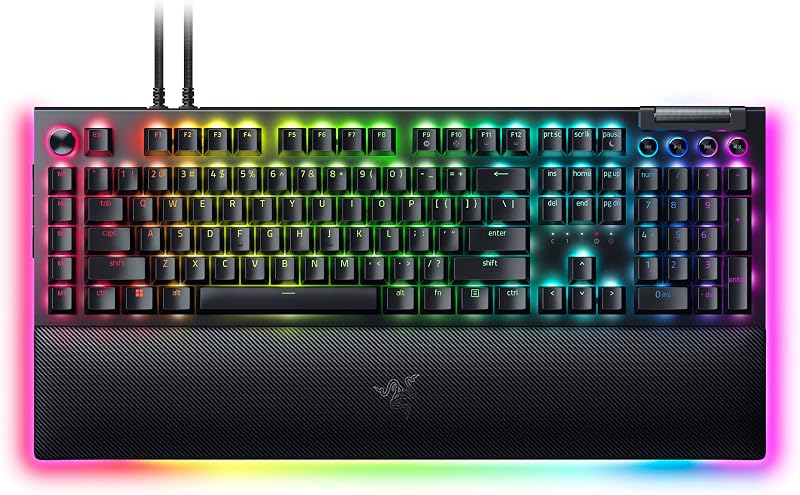
The Razer BlackWidow V4 Pro is an expansive full-size battlestation centerpiece measuring 18.36 inches long, 6.01 inches wide, and 1.73 inches high across 7 functional sections. It integrates 104 standard keys plus additional macro buttons, covering substantially more horizontal and vertical desk real estate. To offset its higher mechanical key switch profile, Razer includes a magnetic plush leatherette wrist rest that docks securely against the keyboard base, complete with integrated 3-side Chroma underglow that links visually with the chassis.
When deciding between the Huntsman V3 Pro or BlackWidow V4 Pro for FPS titles, the Huntsman V3 Pro is clearly optimized for competitive ergonomics and mouse mobility. Those seeking ultra-compact alternatives might also consider comparing smaller platforms as seen in our Razer Huntsman V3 Pro vs Huntsman Mini guide. Conversely, users who do not rely on expansive mouse swings and prefer an integrated cushioned wrist rest with a full numeric keypad will appreciate the planted comfort of the BlackWidow V4 Pro.
Edge: Razer Huntsman V3 Pro for competitive desk optimization; Razer BlackWidow V4 Pro for typing comfort and plush wrist support.
Hardware Controls, Macros, and Battlestation Features
Where the BlackWidow V4 Pro decisively pulls ahead is in its dedicated physical hardware suite. The keyboard features a programmable Razer Command Dial located at the top left corner, paired with 8 dedicated macro keys (5 standard macro keys along the left flank plus 3 side-mounted buttons). This configuration gives power users, content creators, and MMO players direct physical access to complex key strings, media playback, application switching, or custom canvas zooms without reaching for secondary modifier layers. For broader comparisons of dedicated control decks, check out our guide on the Razer Huntsman Mini vs BlackWidow V4 Pro.
The Huntsman V3 Pro takes an entirely different approach focused strictly on esports utility. It lacks dedicated macro buttons, an assignable command dial, and specialized media keys. Instead, it provides onboard adjustment capabilities managed through a multi-function digital dial, macro-style shortcut modifiers, and a built-in LED indicator array. This interface lets players adjust Rapid Trigger sensitivity thresholds and actuation distances on the fly directly on the hardware, saving competitive profiles into onboard memory without requiring Razer Synapse to remain open during tournament play.
If you require dedicated streaming buttons, custom productivity shortcuts, or automated rotation macros for complex gaming genres, the BlackWidow V4 Pro provides a robust, physically accessible command center. The Huntsman V3 Pro provides onboard switch tuning tools intended to optimize keystroke dynamics rather than execute complex multi-key software scripts.
Edge: Razer BlackWidow V4 Pro for its programmable Command Dial, 8 dedicated macro keys, and expansive peripheral integration.
Build Quality, Materials, and Keycaps
Both keyboards are engineered with premium materials, but their surface treatments and keycap compositions differ substantially. The Huntsman V3 Pro utilizes a brushed 5052 aluminum top plate anchored by internal sound dampening foam and individually lubricated switches. Crucially, the Huntsman V3 Pro comes equipped with doubleshot PBT keycaps. PBT plastic possesses a textured, dense surface that resists finger oils, preventing the unsightly shine and slick feel that develop on lesser plastics after intensive gaming sessions. For those evaluating competing metal-chassis analog keyboards, see our analysis in the Razer Huntsman V3 Pro TKL vs Keychron Q1 HE comparison.
The BlackWidow V4 Pro features doubleshot ABS keycaps engineered with extra-thick walls for enhanced structural durability and sharp legibility. While the doubleshot molding ensures the legends will never wear away, ABS plastic is inherently softer than PBT and tends to develop surface shine over long-term friction. The BlackWidow balances this by offering superior cosmetic immersion, incorporating full per-key lighting along with a dynamic 3-side chassis underglow that synchronizes with the magnetic wrist rest to illuminate the desktop surface.
Under the hood, the Huntsman V3 Pro incorporates individually lubricated optical stems and internal acoustic foam, resulting in a muted, clean keystroke signature free of metallic ping. The BlackWidow V4 Pro also features built-in sound dampeners alongside its Yellow linear switches to minimize clatter, but the inclusion of doubleshot PBT keycaps on the Huntsman gives it the durability advantage against surface wear and tactile degradation.
Edge: Razer Huntsman V3 Pro for its textured doubleshot PBT keycaps and 5052 aluminum build.
Pros and Cons
Razer Huntsman V3 Pro

Pros
- Low-profile analog optical switches
- Rapid Trigger with 0.1-2.8 mm actuation
- True 8000 Hz HyperPolling rate
- Durable doubleshot PBT keycaps
- Compact tournament-ready TKL layout
Cons
- No dedicated macro keys
- Lacks wrist rest in box
- Not water resistant
View Razer Huntsman V3 Pro on Amazon
Razer BlackWidow V4 Pro
Pros
- Programmable Command Dial
- 8 dedicated macro keys
- Plush magnetic underglow wrist rest
- Quiet yellow switches with dampeners
- Striking 3-side Chroma underglow
Cons
- Doubleshot ABS keycaps prone to shine
- Large footprint consumes desk space
- Fixed mechanical actuation points
View Razer BlackWidow V4 Pro on Amazon
Who Should Buy Each One
Choose the Razer Huntsman V3 Pro If
- You play competitive first-person shooters, tactical titles, and esports where Rapid Trigger and variable actuation provide an immediate performance edge.
- You need maximum desk space for expansive, low-sensitivity mouse swipes afforded by a compact tenkeyless footprint.
- You demand the lowest achievable transmission latency via an 8000 Hz polling rate and advanced directional movement firmware like Snap Tap.
- You prefer textured, oil-resistant doubleshot PBT keycaps and the lower ergonomic posture of a 19.5 mm low-profile front edge.
Choose the Razer BlackWidow V4 Pro If
- You manage complex productivity, streaming, or MMO gaming setups that benefit from 8 dedicated macro keys and a programmable Command Dial.
- You prefer a complete, full-size keyboard layout with an integrated numeric keypad for daily desktop computing and data entry.
- You want maximum desktop aesthetics powered by intense per-key RGB backlighting and synchronized 3-side underglow across the chassis and wrist rest.
- You prefer traditional quiet, linear mechanical key switches backed by a plush, magnetic leatherette wrist rest for cushioned typing comfort.
Final Verdict
Choosing between the Razer Huntsman V3 Pro and the Razer BlackWidow V4 Pro comes down to deciding whether your setup requires a focused esports performance tool or an expansive desktop control center. For pure gaming responsiveness, the Huntsman V3 Pro is the superior instrument. Its low-profile analog optical switches with Rapid Trigger, adjustable 0.1 mm to 2.8 mm actuation, 8000 Hz HyperPolling, and space-saving tenkeyless chassis remove the mechanical delays and physical boundaries that hold competitive gamers back. The inclusion of long-lasting doubleshot PBT keycaps and onboard hardware configuration makes it a razor-sharp choice for tournament play.
However, the BlackWidow V4 Pro remains the ultimate centerpiece for users whose daily computer use extends far beyond competitive FPS lobbies. Its 8 dedicated macro keys, assignable Command Dial, full-size 104-key layout, and plush underglow wrist rest provide unrivaled versatility for video editing, streaming setups, MMO gaming, and deep workstation management. If your primary goal is climbing the competitive ranks with zero input compromise, purchase the Huntsman V3 Pro; if you want comprehensive command over an entire battlestation environment, the BlackWidow V4 Pro earns its spot on your desk.
FAQ
Huntsman V3 Pro or BlackWidow V4 Pro for gaming: which is better overall?
The better keyboard depends entirely on the game genres you play. For competitive shooters, battle royales, and esports, the Huntsman V3 Pro is clearly superior due to its adjustable analog optical actuation, Rapid Trigger instant reset technology, and 8000 Hz polling rate. For MMOs, strategy titles, and general gaming where custom bindings, complex macros, and full-size media controls matter more than fractional-millisecond resets, the BlackWidow V4 Pro provides a more capable hardware layout.
Is Razer Huntsman V3 Pro worth it for competitive FPS titles?
Yes, the Razer Huntsman V3 Pro is worth it for competitive FPS players because its Rapid Trigger feature resets the switch the moment your finger begins traveling upward. This eliminates standard mechanical reset travel, making counter-strafing, jiggle-peeking, and micro-adjustments faster and more consistent. Combined with the desk space saved by its tenkeyless form factor, it directly benefits shooter mechanics.
Is Razer BlackWidow V4 Pro worth it for productivity and daily typing?
Yes, the BlackWidow V4 Pro offers outstanding value for power users and creators. Its programmable Command Dial can be mapped to functions like scrolling, track scrubbing, or brush sizing, while the 8 dedicated macro keys streamline complex hotkeys. Furthermore, the included magnetic plush leatherette wrist rest provides ergonomic support during extended typing sessions.
What is the difference between Razer analog optical vs mechanical yellow switches?
Razer Low-Profile Analog Optical switches use beams of light to measure the exact depth of every keypress, allowing variable actuation thresholds from 0.1 mm to 2.8 mm and rapid mid-stroke resets. Razer Yellow switches are traditional mechanical switches with physical metal contacts, fixed actuation points, built-in sound dampeners, and standard mechanical reset travel distances.
Does the Razer Huntsman V3 Pro include a wrist rest?
No, the Razer Huntsman V3 Pro low-profile model does not include a wrist rest. Instead, it features a slim 19.5 mm front height designed to keep your wrists in a natural, neutral posture flat against the desk without requiring additional cushioning.
Can you adjust Rapid Trigger settings on the Huntsman V3 Pro without Razer Synapse?
Yes, the Huntsman V3 Pro features quick onboard adjustment tools. By using a designated multi-function digital dial and onboard LED indicator array, users can modify actuation points and Rapid Trigger sensitivity directly on the physical keyboard and save adjustments straight to the onboard memory without keeping Synapse running.
What keycap material is used on the Razer BlackWidow V4 Pro?
The Razer BlackWidow V4 Pro comes equipped with doubleshot ABS keycaps featuring extra-thick walls for enhanced durability. While the dual-molding process prevents the key lettering from fading over time, ABS plastic can develop a smooth shine from prolonged skin contact, unlike the doubleshot PBT keycaps found on the Huntsman V3 Pro.


