The single difference that will decide the choice for most buyers comes down to speed and thermal architecture: the Seagate FireCuda 530 is a top-tier retail PCIe Gen4 drive built for high sustained throughput with an integrated heatsink, while the SK Hynix BC901 is a compact, entry-level OEM drive designed for basic solid-state replacement in standard M.2 slots.
Choose the Seagate FireCuda 530 if you need maximum transfer rates, extensive write endurance, and ready-to-use console cooling for heavy gaming or multimedia workloads. Choose the SK Hynix BC901 if you need a minimal, low-profile bare SSD to replace a failing boot drive or populate a tight secondary slot without paying for extra thermal hardware.
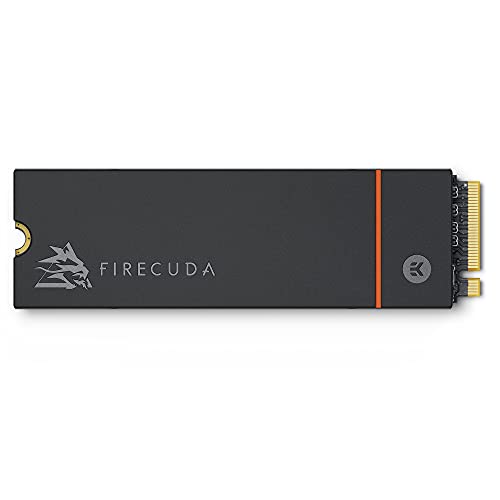

Seagate FireCuda 530 vs SK Hynix BC901 at a Glance
| Attribute | Seagate FireCuda 530 | SK Hynix BC901 |
|---|---|---|
| Digital Storage Capacity | 1 TB | 256 GB |
| Interface Specification | PCIe Gen4 x4 NVMe 1.4 | PCIe Gen 4×4 NVMe |
| Maximum Read Speed | Up to 7300 MB/s | Up to 3965 MB/s |
| Media Speed | 6000 MB/s | 3600 MB/s |
| Thermal Solution | Custom EKWB low-profile heatsink | None (bare drive) |
| Endurance and MTBF | 1275 TBW, 1.8M hours MTBF | Not listed |
| Form Factor | M.2 2280 | M.2 2242 (fits 2280 as is) |
| Warranty and Recovery | 5-year limited, 3-year Rescue Data Recovery | Not listed |
| Packaging | Retail packaging | Bulk packaging (drive only) |
| Best For | High-end gaming and sustained writes | Basic OEM boot drive replacement |
Read and Write Throughput
Sequential read and write speeds dictate how rapidly a solid-state drive transfers gigantic game installations, uncompressed video files, and system-level disk images. When comparing Seagate FireCuda 530 speed vs BC901 specifications, the raw throughput gap between these two PCIe Gen4 drives becomes immediately apparent. The FireCuda 530 pushes the PCIe Gen4 interface close to its theoretical saturation point, boasting rated sequential read speeds of up to 7300 MB/s and media speeds of 6000 MB/s. That level of bandwidth allows operating systems and game engines to pull massive asset packages from storage almost instantly, minimizing wait times and hitching during intensive read cycles.
In contrast, evaluating the SK Hynix BC901 performance reveals numbers firmly rooted in entry-tier Gen4 OEM territory. The listing states a peak read speed of 3965 MB/s and a media speed of 3600 MB/s. While this comfortably outpaces older SATA-based drives and basic PCIe Gen3 components, it delivers roughly half the data throughput of the FireCuda. If you frequently evaluate drives like the seagate firecuda 530 vs kingston kc3000, you know that flagship Gen4 controllers excel at high queue depths. The BC901 does not target those hyper-demanding benchmarks; its 3965 MB/s ceiling is geared toward routine office productivity, web browsing, and casual multimedia playback.
For demanding power users, this throughput difference is substantial. Transferring a 100GB installation file will finish dramatically faster on the FireCuda 530 because its controller and 3D TLC NAND are engineered to sustain maximum throughput. The BC901 handles everyday boot sequences without visible lag, but when placed under a heavy file-moving load, the gap in raw transfer speed becomes impossible to ignore.
Edge: Seagate FireCuda 530 delivers nearly double the maximum read and media speeds of the BC901.
Thermal Management and Heatsink Design
Thermal control is one of the most critical aspects of modern NVMe solid-state storage. High-speed PCIe Gen4 controllers generate intense heat when handling continuous read and write operations. Without sufficient heat dissipation, an NVMe SSD quickly reaches its critical thermal threshold and engages aggressive thermal throttling, severely cutting transfer rates to protect the underlying NAND flash and controller silicon from heat damage. Thermal dissipation is therefore an essential performance metric, not just an aesthetic feature.
The Seagate FireCuda 530 addresses thermal build-up directly with an included custom-built, low-profile heatsink engineered in partnership with EKWB. This aluminum heatsink envelops the drive to channel heat away from the controller and 3D TLC NAND, maintaining peak operating frequencies even during long gaming sessions or extended file backups. Because the heatsink is pre-installed and precisely engineered to fit tight clearance envelopes, it prevents thermal throttling without requiring third-party thermal pads or aftermarket cooling blocks. Similar cooling effectiveness is explored in our breakdown of the seagate firecuda 530 vs kingston fury renegade ssd.
On the other hand, the SK Hynix BC901 arrives in bulk packaging as a completely bare drive without any integrated heatsink or thermal spreader. The drive relies entirely on whatever native cooling your host system provides, such as a motherboard metal shield or laptop heat-pipe cover. If installed into a system or bay without passive cooling, extended write cycles could push component temperatures higher. For low-duty tasks, the lower 3965 MB/s transfer ceiling produces less operational heat than a flagship drive running wide open, but it lacks the thermal headroom provided by the FireCuda setup.
Edge: Seagate FireCuda 530 includes a custom EKWB-designed low-profile heatsink that prevents thermal throttling.
Storage Capacity and Installation Practicality
Capacity determines how freely you can install software, store large media libraries, and manage modern titles without playing storage Tetris. Modern operating systems, high-resolution textures, and production applications demand massive disk real estate. When choosing between the Seagate FireCuda 530 or SK Hynix BC901 for gaming, digital capacity is arguably the most decisive functional constraint a user will encounter.
The Seagate FireCuda 530 configuration evaluated here offers a full 1 TB of storage capacity. In practical terms, 1 TB provides ample space to hold an operating system, several 100GB-plus game installations, and extensive project files simultaneously. Gamers do not have to uninstall one title to play another, and content creators can work with large video caches directly on the drive. As shown in our comparison of the seagate firecuda 530 vs wd_black sn7100, a 1 TB drive has become the standard baseline for serious desktop and console installations.
In stark contrast, the SK Hynix BC901 is listed with a capacity of 256 GB. A 256 GB drive is severely constrained in modern computing environments. Once a 64-bit operating system, mandatory updates, and baseline applications are installed, a 256 GB drive often has less than 150 GB of usable space remaining. Fitting even a single blockbuster game alongside system files can easily max out the partition. The BC901 works well as a dedicated boot drive for basic office tasks, but it offers very little room for expansive installations or media storage.
Edge: Seagate FireCuda 530 provides four times the storage capacity of the BC901.
Console Compatibility and PS5 Expansion
Expanding the internal storage of the Sony PlayStation 5 requires adhering to strict physical and performance guidelines. The console requires an internal M.2 NVMe SSD that supports PCIe Gen4 x4, fits inside the specialized internal expansion bay, and features adequate thermal dissipation to withstand the console enclosed environment. When debating the Seagate FireCuda 530 or SK Hynix BC901 for PS5 use, these hardware criteria become paramount.
The Seagate FireCuda 530 was designed with direct console compatibility in mind. Its 7300 MB/s read speed exceeds the baseline performance recommendation specified by Sony, ensuring games load smoothly and transition sequences stream assets without hitches. Crucially, the custom EKWB heatsink adheres to the strict height and width limits of the PlayStation 5 drive bay, allowing it to drop into the slot without requiring modifications, separate thermal pads, or aftermarket covers. It delivers a seamless, plug-and-play storage upgrade directly out of the box.
The SK Hynix BC901 listing notes compatibility with the Sony PlayStation 5, but prospective console upgraders must take close note of its specifications. With a rated read speed of 3965 MB/s, it falls well below the 5500 MB/s read speed recommended by Sony for internal expansion drives. Furthermore, the BC901 ships as a bare drive without any heatsink, which conflicts with Sony requirement that an internal expansion drive must have effective heat dissipation. Adding to that, a 256 GB capacity provides virtually no expansion value when modern console games routinely exceed 80 GB each.
Edge: Seagate FireCuda 530 exceeds console speed recommendations and includes a fully compatible heatsink.
Endurance, Reliability, and Data Recovery
Solid-state drive reliability is measured through write endurance ratings, mean time between failures, and post-purchase recovery support. For professionals writing massive files daily or gamers repeatedly downloading multi-gigabyte patches, drive longevity is a primary consideration. Drive wear is a natural consequence of flash memory operations, making endurance specifications a core factor in long-term satisfaction.
In any rigorous Seagate FireCuda 530 review, the drive write endurance stands out as a headline specification. Built with 3D TLC NAND, the 1 TB model boasts an endurance rating of 1275 TBW (terabytes written) and an MTBF rating of 1.8 million hours. To put 1275 TBW in perspective, a user could write hundreds of gigabytes of data every single day for years without exhausting the flash cells. On top of that, Seagate bundles a five-year limited warranty and three years of Rescue Data Recovery Services, offering professional data retrieval if unexpected storage corruption happens. Similar long-term durability is highlighted in our look at the seagate firecuda 530 vs 520.
Examining the SK Hynix BC901 review details reveals an entirely different support model. Because the BC901 is an OEM component distributed through third parties in bulk packaging, the listing does not specify an official TBW endurance rating, an MTBF figure, or dedicated data recovery options. While SK Hynix NAND flash is reputable in factory-built prebuilts, buying an OEM drive without clear warranty terms or recovery services means accepting greater uncertainty regarding longevity and enterprise support.
Edge: Seagate FireCuda 530 features an exceptional 1275 TBW endurance rating, a five-year warranty, and data recovery services.
Form Factor, Packaging, and System Fit
Physical dimensions and packaging decide whether a drive will physically seat inside your specific hardware setup. The M.2 standard encompasses several physical lengths, most notably 2280 (22mm wide by 80mm long) and 2242 (22mm wide by 42mm long). Installation flexibility depends on whether your motherboard or laptop chassis accommodates tall cooling structures or requires ultra-thin bare boards.
The FireCuda 530 conforms to the standard M.2 2280 form factor, measuring 3.16 inches long, 0.87 inches wide, and 0.09 inches thick along its functional profile with the heatsink. While this form factor is universally supported on desktop motherboards and within the PS5 expansion slot, the pre-attached EKWB heatsink means it cannot be squeezed into ultra-slim laptops that only allow paper-thin, unshielded M.2 drives. If you are comparing hardware across generations like the seagate firecuda 530 vs crucial t705, physical clearance is always an essential pre-purchase check.
The SK Hynix BC901 presents an interesting physical configuration based on its listing specs. It is listed with an M.2 2242 form factor specification while noting dimensions of 22mm x 80mm x 2.38mm and indicating it fits 2280 slots as is. Because it is a bare drive without any heatsink, it features a very slim physical profile, allowing it to slide into space-constrained laptop bays where heatsinks cannot clear the enclosure. However, the listing explicitly notes that it ships in bulk packaging containing only the bare drive, meaning any mounting screws, standoffs, or thermal covers must be sourced separately. When asking is SK Hynix BC901 worth it, users must factor in whether their system requires extra mounting hardware.
Edge: Tie. The FireCuda 530 offers complete retail packaging with an integrated cooler, while the BC901 offers a slim bare-board profile for tight laptop slots.
Pros and Cons
Seagate FireCuda 530

Pros
- Up to 7300 MB/s read speeds
- Includes EKWB low-profile heatsink
- Generous 1 TB storage capacity
- Class-leading 1275 TBW endurance
- Includes 3-year Rescue Data Recovery
Cons
- Heatsink too thick for slim laptops
- Higher weight than bare OEM drives
View Seagate FireCuda 530 on Amazon
SK Hynix BC901

Pros
- Slim profile fits tight laptop bays
- Gen 4×4 NVMe interface compatibility
- Up to 3965 MB/s read throughput
- Fits standard 2280 slots
Cons
- Limited 256 GB digital storage
- Ships as bare drive without heatsink
- Endurance rating and warranty not listed
Who Should Buy Each One
Choose the Seagate FireCuda 530 If
- You need sustained 7300 MB/s read speeds for pro-level gaming and heavy media creation.
- You want a hassle-free, heatsink-equipped storage expansion designed for the PlayStation 5.
- You require a high 1 TB capacity to hold multiple large modern game installations.
- You value long-term data safety backed by 1275 TBW endurance and Rescue Data Recovery Services.
Choose the SK Hynix BC901 If
- You need an ultra-thin bare drive to replace an OEM boot disk inside a slim laptop.
- Your storage demands are limited to basic operating system files and everyday office tasks.
- You already possess an M.2 mounting screw and third-party cooling or an integrated motherboard shield.
- You are servicing a secondary PC or test bench where high capacity and peak speed are not needed.
Final Verdict
The Seagate FireCuda 530 is the decisive winner in this comparison for almost every standard consumer scenario. By delivering blistering read speeds up to 7300 MB/s, an integrated low-profile EKWB heatsink, 1 TB of storage capacity, and an extraordinary 1275 TBW endurance rating, it excels across every core performance metric. Whether you are expanding a PlayStation 5 console or outfitting a high-performance PC rig, the FireCuda 530 provides the speed, thermal stability, and peace of mind necessary for sustained, demanding computing.
The SK Hynix BC901 fills a very narrow, utilitarian role. With its 256 GB capacity, 3965 MB/s read throughput, and bare OEM bulk packaging, it cannot compete with a flagship gaming drive on performance or longevity. However, if your goal is simply to revive an older system, replace a failed primary drive in an ultra-thin laptop with zero clearance for a heatsink, or build a lightweight secondary terminal, the BC901 provides a functional PCIe Gen4 storage option.
FAQ
Can the SK Hynix BC901 be used inside a PlayStation 5 console?
While the product listing lists the SK Hynix BC901 as compatible with the Sony PlayStation 5, it is not ideal for this role. Its 3965 MB/s read speed falls short of Sony 5500 MB/s recommendation, it lacks an integrated heatsink, and its 256 GB capacity offers minimal usable space for modern console titles.
Does the Seagate FireCuda 530 heatsink fit the PS5 without modifications?
Yes, the custom low-profile heatsink engineered by EKWB and Seagate was specifically designed to fit within the internal M.2 expansion bay dimensions of the PlayStation 5, allowing it to drop in cleanly without removing or replacing any components.
What does bulk packaging mean for the SK Hynix BC901?
Bulk packaging means the drive ships without retail box presentation, documentation, or accessories. The package includes only the bare drive, so any necessary M.2 mounting screws, standoffs, or thermal pads must be purchased separately.
How do the FireCuda 530 vs BC901 specs compare for write endurance?
The Seagate FireCuda 530 provides a clearly defined, class-leading endurance rating of 1275 TBW with a 1.8 million hour MTBF and five years of warranty coverage. The SK Hynix BC901 listing does not specify its TBW endurance rating or MTBF figures.
Can you remove the heatsink from the Seagate FireCuda 530?
The Seagate FireCuda 530 comes with the custom EKWB heatsink pre-attached to maintain optimal thermal dissipation. It is designed to be installed as an integrated unit in desktop motherboards and console slots that have clearance for a heatsink.
Why is the read speed difference between these two drives so large?
Both models use the PCIe Gen4 interface, but they utilize different controllers and flash configurations. The FireCuda 530 uses a flagship Gen4 controller and 3D TLC NAND to reach up to 7300 MB/s, while the BC901 is an entry-level OEM drive capped at 3965 MB/s.


