The choice between the Seagate FireCuda 530 and the Kingston KC3000 centers on physical thermal hardware and verified write endurance versus low-profile clearance. Seagate equips its drive with a dedicated aluminum heatsink engineered by EKWB and advertises an industry-leading endurance rating, whereas Kingston prioritizes an ultra-thin graphene aluminum heat spreader designed to squeeze into tight notebook bays and cramped motherboard configurations.
Choose the FireCuda 530 if you demand verified high-endurance write cycling and integrated console cooling for heavy PlayStation 5 gaming or continuous content creation. Choose the KC3000 if you need a flexible drive with a minimal footprint that fits slim laptops without sacrificing PCIe 4.0 performance.
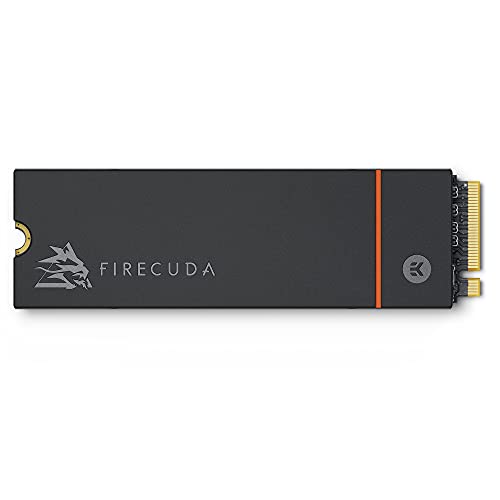

Seagate FireCuda 530 vs Kingston KC3000 at a Glance
| Feature | Seagate FireCuda 530 | Kingston KC3000 |
|---|---|---|
| Form Factor | M.2 2280 | M.2 2280 |
| Interface | PCIe Gen4 ×4 NVMe 1.4 | PCIe 4.0 NVMe |
| Listed Capacity | 1 TB | 1024 GB (up to 4096 GB available) |
| Advertised Read Speed | Up to 7300 MB/s | Not listed |
| Endurance Rating (TBW) | 1275 TBW | Not listed |
| Mean Time Between Failures | 1.8 Million Hours MTBF | Not listed |
| Thermal Dissipation | Custom EKWB low-profile heatsink | Graphene aluminum heat spreader |
| Console Compatibility | Sony PlayStation 5 verified | Not listed |
| Included Data Services | 3-Year Rescue Data Recovery | Not listed |
| Warranty Length | 5-year limited warranty | Not listed |
| Best For | High-endurance workloads and PS5 storage expansion | Space-constrained laptops and multi-slot PC builds |
Endurance and Long-Term Reliability
Solid-state drive longevity is dictated by Terabytes Written (TBW) and the underlying flash configuration. The Seagate FireCuda 530 provides explicit, heavy-duty durability figures directly on its specification sheet. Rated at 1275 TBW for the 1TB capacity and paired with a 1.8-million-hour Mean Time Between Failures (MTBF), this drive utilizes robust 3D TLC NAND designed to sustain relentless daily host writes. For creative professionals rendering high-bitrate video, moving massive databases, or repeatedly cycling game installations, having an explicitly stated, exceptionally high write tolerance protects against premature flash wear and operational degradation.
In contrast, the Kingston KC3000 listing highlights PCIe 4.0 NVMe architecture and high-performance operation across capacities up to 4096GB, but the product listing does not specify an exact TBW value or MTBF rating. While the KC3000 serves as a reliable modern SSD in general computing environments, the lack of published endurance metrics in the product data means enterprise-style write reliability cannot be verified against the FireCuda. When considering the kingston kc3000 vs teamgroup mp44, buyers often weigh explicit write thresholds carefully before assigning drives to heavy scratch-disk duty.
If your daily workflow involves continuous gigabyte writes, the FireCuda 530 TBW metric gives you measurable certainty. You know exactly how much data you can push through the 3D TLC NAND cells before exhausting the manufacturer write coverage. Kingston leaves these specific numbers unstated in its listing, making Seagate the unambiguous winner for endurance-conscious operators.
Edge: Seagate FireCuda 530 due to its class-leading 1275 TBW rating and 1.8-million-hour MTBF.
Thermal Management and Heatsink Architecture
Sustained PCIe 4.0 operation generates significant heat at the drive controller and flash interface. When an NVMe drive exceeds safe operational thermal limits, it initiates thermal throttling to avoid damage, drastically slashing read and write transfer rates. The FireCuda 530 addresses this challenge using a dedicated low-profile heatsink custom-engineered in collaboration with liquid-cooling specialist EKWB. This aluminum block surrounds the drive to dissipate high-density heat spikes during prolonged file transfers or demanding gaming sessions, helping the drive maintain peak throughput without external motherboard shrouds.
The KC3000 takes a radically different design approach, utilizing a low-profile graphene aluminum heat spreader. This wafer-thin foil-like layer uses graphene’s lateral thermal conductivity to disperse hot spots across the flash modules without adding meaningful vertical bulk. In airflow-managed desktop chassis or systems with integrated motherboard heatsinks, graphene works well to smooth out sudden thermal surges. A deeper look into thermal behavior can also be found in our kingston kc3000 vs fury renegade ssd comparison, which highlights how varied spreader layouts impact operational temps.
While the KC3000 thermal solution prevents excessive hot-spot buildup, it cannot match the physical thermal mass of the EKWB block. For systems that lack dedicated motherboard M.2 armor or active internal case airflow, the FireCuda 530 heatsink provides superior passive heat sinking to resist throttling under continuous saturation.
Edge: Seagate FireCuda 530 for its heavier, custom-engineered EKWB thermal heatsink.
System Clearance and Installation Flexibility
Physical dimensions dictate where an SSD can realistically be installed. The FireCuda 530 measures 3.16 inches long, 0.87 inches wide, and 0.09 inches thick, but its pre-installed EKWB heatsink adds distinct height to the module. While engineered to slip smoothly into desktop M.2 slots and the internal expansion bay of the PlayStation 5, this elevated profile prevents the drive from fitting into slim notebooks, ultrabooks, and ultra-compact small-form-factor (SFF) enclosures that require completely flat drives.
This is where the KC3000 holds a decisive mechanical advantage. Kingston specifically designs the KC3000 for desktop and laptop PCs by retaining a compact M.2 2280 form factor unencumbered by a thick thermal shell. The graphene aluminum heat spreader adds almost zero vertical thickness, allowing the drive to slot underneath existing laptop keyboard trays, low-clearance chassis frames, and motherboard thermal plates. Readers evaluating compact system configurations can explore the kingston kc3000 vs lexar nm790 analysis to see how physical dimensions affect dense builds.
If you are upgrading a laptop or a desktop motherboard that already features integrated screw-down heatsink covers, the KC3000 avoids the headaches of physical interference. The FireCuda heatsink cannot be easily removed without risking hardware damage, limiting its deployment strictly to roomy desktop bays and consoles.
Edge: Kingston KC3000 thanks to its slim graphene profile that fits standard laptop and tight desktop slots.
Transfer Speeds and Raw Performance
High-end PCIe Gen4 storage is defined by its ability to transfer vast volumes of data across the NVMe bus. The Seagate FireCuda 530 listing confirms exhilarating performance, specifying read speeds reaching up to 7300 MB/s alongside a listed media speed of 6000. Operating over PCIe Gen4 ×4 with NVMe 1.4 protocol compliance, Seagate promotes this drive as delivering up to double the speed of PCIe Gen3 drives and twelve times the speed of legacy SATA SSDs. This massive bandwidth minimizes application launch times, eliminates load bottlenecks, and rapidly populates game environments.
Kingston advertises the KC3000 as high-performance storage running on the PCIe 4.0 NVMe standard, targeting demanding computing environments on both desktop and laptop platforms. However, the official listing data does not specify exact sequential read or write speeds in megabytes per second. While the underlying PCIe 4.0 interface ensures modern high-speed transfer capability far exceeding SATA drives, shoppers evaluating raw documented speeds cannot compare verified transfer numbers directly from the KC3000 listing sheet.
Because the FireCuda 530 provides explicit verification of its up-to-7300 MB/s speed ceiling, users configuring top-tier workstations can verify throughput figures against hardware requirements. In any documented head-to-head evaluation of Kingston KC3000 speeds, the absence of verified listing numbers gives Seagate the transparent advantage.
Edge: Seagate FireCuda 530 due to documented sequential read speeds up to 7300 MB/s.
Gaming Console and Platform Compatibility
Console storage expansion is a primary driver for high-speed M.2 SSD adoption. Sony sets stringent physical and performance standards for PlayStation 5 internal expansion drives, demanding specific read performance thresholds and integrated cooling within precise millimetric clearances. The Seagate FireCuda 530 explicitly lists compatibility with the Sony PlayStation 5 alongside standard PC and Linux platforms. Its EKWB low-profile heatsink is factory-dimensioned to fit neatly inside the PS5 expansion slot without modification, making it a true plug-and-play solution.
The KC3000 listing mentions compatibility with desktop PCs and highlights its utility for laptops, but the provided product data does not list console compatibility or PlayStation 5 validation. While the KC3000 functions as a standard M.2 2280 NVMe drive, Sony recommends an active or passive heatsink that fills the M.2 expansion cavity to prevent thermal saturation. The graphene film on the KC3000 may not satisfy standard standalone thermal expectations in an enclosed console bay without an aftermarket heatsink.
For PC builders managing diverse hardware environments, storage choices often extend beyond internal SSDs into broader capacity management, as seen in our seagate barracuda 4tb vs toshiba n300 8tb storage guide. However, for direct console integration out of the box, Seagate delivers certified hardware readiness.
Edge: Seagate FireCuda 530 due to official Sony PlayStation 5 compatibility and an integrated console-ready heatsink.
Warranty and Data Protection Services
Storage devices hold irreplaceable personal assets, system images, and work projects, making manufacturer warranty and recovery support essential. Seagate packages the FireCuda 530 with a comprehensive protection ecosystem. The drive includes an explicit five-year limited warranty backed by three years of Rescue Data Recovery Services. If the drive experiences unexpected hardware failure or data corruption, Seagate provides in-lab data recovery support to retrieve lost files, a rare and valuable benefit for creative professionals.
The Kingston KC3000 listing does not specify the duration of its limited warranty or mention any bundled data recovery provisions. While Kingston is an established memory and storage brand, buyers relying solely on the listing data cannot confirm warranty length or post-purchase emergency recovery services. For users managing long-term archive setups, such as those weighing enterprise storage in the toshiba n300 8tb vs seagate exos x18 breakdown, safety nets represent major tangible value.
The presence of factory data recovery coverage sets the FireCuda apart from almost all standard consumer M.2 drives. Knowing that physical recovery services are included for three years offers genuine peace of mind that Kingston does not document in its product materials.
Edge: Seagate FireCuda 530 for its 5-year warranty and 3-year Rescue Data Recovery Services.
Pros and Cons
Seagate FireCuda 530

Pros
- Massive 1275 TBW write endurance rating
- Documented read speeds up to 7300 MB/s
- Factory-installed custom EKWB low-profile heatsink
- Includes three years Rescue Data Recovery Services
- Explicitly verified for Sony PlayStation 5
Cons
- Heatsink height incompatible with slim laptops
- Single-drive capacity restricted to 1TB listing
View Seagate FireCuda 530 on Amazon
Kingston KC3000

Pros
- Ultra-thin graphene aluminum heat spreader
- Designed for desktop and laptop PC bays
- Capacity options scale up to 4096GB
- PCIe 4.0 NVMe high-performance interface
Cons
- Listing omits exact read and write speeds
- Endurance TBW rating not specified in listing
- Lacks bundled data recovery protection
View Kingston KC3000 on Amazon
Who Should Buy Each One
Choose the Seagate FireCuda 530 If
- You want a verified plug-and-play internal SSD upgrade for the Sony PlayStation 5 that includes an EKWB heatsink.
- You subject your storage to heavy, sustained write operations and need a massive 1275 TBW endurance rating.
- You want guaranteed sequential transfer speeds reaching up to 7300 MB/s for pro-level content creation.
- You value added data security through three included years of Rescue Data Recovery Services.
Choose the Kingston KC3000 If
- You are upgrading an ultra-thin laptop or notebook where thick metal heatsinks will not fit.
- Your desktop motherboard already includes high-end integrated metal heatsink covers that require a bare or slim drive.
- You want a low-profile graphene aluminum heat spreader that keeps the drive lightweight and compact.
- You plan to scale to higher storage pools, with capacity options ranging up to 4096GB.
Final Verdict
In this high-endurance PCIe 4.0 SSD showdown, the Seagate FireCuda 530 emerges as the stronger overall package for high-demand desktop workstations and console gamers. Seagate backs the drive with unambiguous performance specifications: read speeds reaching up to 7300 MB/s, an exceptional 1275 TBW endurance rating on 3D TLC NAND, an EKWB-engineered thermal heatsink, and three years of complimentary Rescue Data Recovery Services. It delivers outstanding stability, heat control, and long-term write resilience.
The Kingston KC3000 remains the smarter choice when physical clearance is your defining constraint. Because its graphene aluminum heat spreader adds virtually no thickness, it seamlessly populates compact laptop bays and motherboards equipped with integrated armor where the FireCuda’s bulky heatsink cannot go. For ultra-compact PC builders and notebook users, the KC3000 offers streamlined Gen4 installation, while the FireCuda 530 wins on raw endurance, thermal hardware, and console readiness.
FAQ
FireCuda 530 or KC3000 for PS5 gaming?
The Seagate FireCuda 530 is the superior option for the PlayStation 5. The product listing explicitly lists Sony PlayStation 5 compatibility, and its low-profile EKWB heatsink is dimensioned to fit right into the console internal expansion slot. The Kingston KC3000 listing does not specify console support and features only a thin graphene spreader, which does not provide the heavy thermal mass recommended for the console’s enclosed slot.
What is the significance of the FireCuda 530 TBW rating?
The FireCuda 530 features a 1275 TBW (Terabytes Written) endurance rating for its 1TB capacity, backed by a 1.8-million-hour MTBF. This rating indicates that you can write up to 1275 terabytes of data to the drive over its lifetime before exhausting its write endurance limits. The Kingston KC3000 listing does not publish a comparable TBW figure.
Is Kingston KC3000 worth it for laptop users?
Yes, the Kingston KC3000 is exceptionally well-suited for laptops. Its slim graphene aluminum heat spreader provides heat dissipation without adding bulk, allowing it to slide into narrow internal laptop drive bays that cannot accommodate thick heatsinks like the one attached to the FireCuda 530.
What speeds can you expect from the Kingston KC3000 vs Seagate FireCuda 530?
The Seagate FireCuda 530 listing confirms read speeds up to 7300 MB/s and media speeds of 6000 across its PCIe Gen4 ×4 interface. The Kingston KC3000 listing highlights high-performance PCIe 4.0 NVMe transfer capabilities across capacities up to 4096GB, but it does not list exact sequential read or write megabyte-per-second ratings in its product data.
Does the Kingston KC3000 include data recovery services?
No, the Kingston KC3000 listing does not specify any bundled data recovery coverage. The Seagate FireCuda 530 explicitly includes three years of Rescue Data Recovery Services alongside its five-year limited warranty to assist in recovering data if hardware issues arise.
Can you remove the heatsink on the Seagate FireCuda 530?
The FireCuda 530 comes with a custom-engineered heatsink built by EKWB and Seagate that is securely mounted to the drive. Attempting to pry off or remove the factory heatsink can damage the underlying 3D TLC NAND chips or the circuit board, making it better suited for installations with ample clearance rather than bare M.2 slots.


