Choosing between the Synology DS1522+ and the UGREEN DXP2800 GT comes down to a fundamental trade-off between long-term multi-drive storage scalability and out-of-the-box high-speed network performance. While one unit prioritizes deep drive arrays and expandable business storage pools, the other delivers native multi-gigabit throughput and high-speed flash expansion in a compact footprint.
Select the Synology DS1522+ if your priority is managing large RAID storage arrays with extensive multi-drive expansion options across office workloads. Choose the UGREEN DXP2800 GT if your workflow demands high-speed direct-from-NAS file editing powered by integrated 10GbE networking and fast SSD storage options.
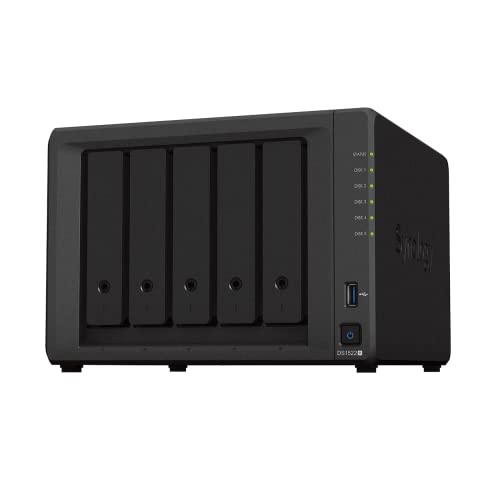

Synology DS1522+ vs UGREEN DXP2800 GT at a Glance
| Feature | Synology DS1522+ | UGREEN DXP2800 GT |
|---|---|---|
| Native Drive Bays | 5 Bays | 2 Bays |
| Expansion Potential | Up to 15 bays (via 2 DX517 units) | Not listed (Up to 80TB total capacity) |
| Processor | Not listed | AMD Ryzen Embedded R2514 (4C/8T, up to 3.70GHz) |
| System Memory | Not listed | 8GB DDR4 (Expandable to 64GB, ECC supported) |
| Network Ports | 4 x 1GbE (Optional 10GbE) | 1 x 10GbE |
| SSD Support | Not listed | 2 x M.2 SSD slots, U.2 NVMe SSD support in main bays |
| Operating System | Synology DiskStation Manager (DSM) | UGOS Pro |
| Warranty Coverage | 3 Years | 2 Years |
| Best For | Multi-drive capacity and office backup pools | Direct high-speed editing and home lab virtualization |
Drive Capacity and Storage Expansion
Storage architecture determines how well a network-attached storage enclosure adapts as your data library grows. The Synology DS1522+ provides five native drive bays in a desktop form factor, allowing users to deploy robust multi-disk redundancy schemes such as RAID 5 or RAID 6 from the start. For organizations that plan for aggressive growth over multiple years, Synology DS1522+ expansion capabilities shine through its ability to add up to 10 extra drive bays using two DX517 expansion units. This allows the system to scale to a maximum of 15 storage drives, making it a viable long-term foundation for expanding business archives and centralized office file sharing.
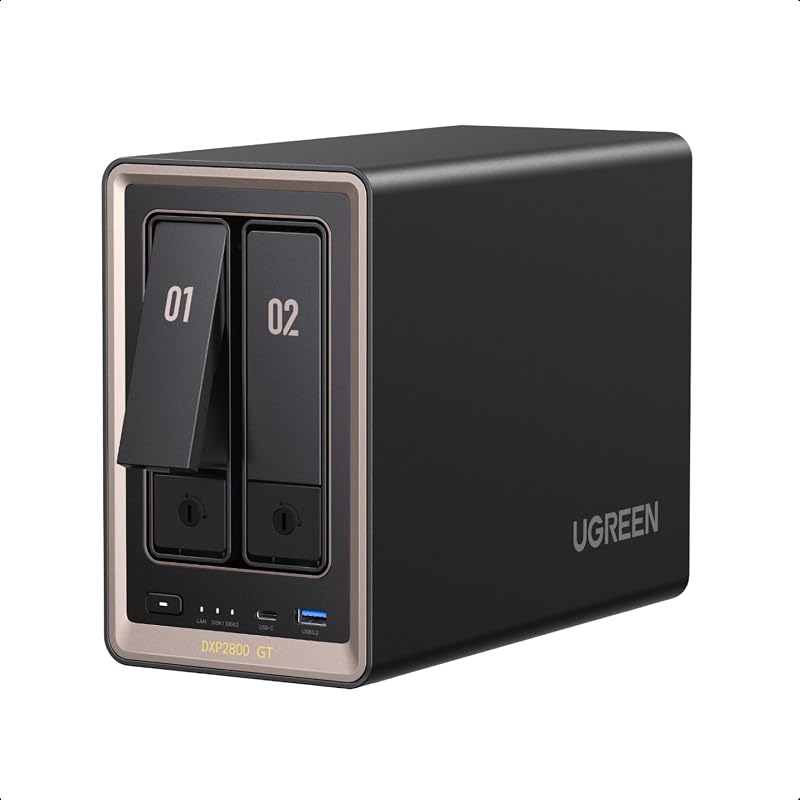
In contrast, the UGREEN DXP2800 GT operates with a more compact two-bay structure, focusing on individual drive density and modern solid-state drive protocols rather than sheer spindle count. The UGREEN DXP2800 GT specs confirm support for two SATA drives of up to 32TB each, but with a notable hardware twist: those same two bays are also compatible with enterprise-grade U.2 NVMe SSDs. Furthermore, the unit incorporates two M.2 SSD slots capable of handling up to 16TB of additional solid-state storage, allowing the compact chassis to reach an 80TB total capacity ceiling. While it lacks external multi-bay expansion chassis support, its inclusion of fast NVMe and U.2 storage accommodates users who prioritize rapid data access over expansive mechanical drive arrays.
For buyers evaluating the synology ds423+ vs ds1522+, the fifth bay on the DS1522+ provides substantial headroom for storage pools, giving it a distinct advantage over dual-bay units. If your daily workflow relies on massive archival vaults where having five to fifteen mechanical hard drives is mandatory for cost-effective capacity, the Synology enclosure easily outperforms the dual-bay ceiling of the UGREEN model.
Edge: Synology DS1522+ wins for its five native drive bays and massive expansion path supporting up to 15 total storage drives.
Networking Performance and Transfer Speeds
Network connectivity is the pipeline that dictates whether a storage server functions merely as a slow archival box or as an active working volume. In any head-to-head DS1522+ vs DXP2800 GT 10GbE evaluation, networking hardware reveals vastly different design philosophies. The UGREEN DXP2800 GT comes equipped directly from the factory with a high-speed 10GbE network port. This multi-gigabit interface is engineered specifically for bandwidth-heavy demands, allowing creators and freelancers to transfer large batches of footage and perform direct-from-NAS editing without encountering the typical gigabit bottleneck.
On the other side of the matchup, the Synology DS1522+ incorporates four 1GbE network ports. These four gigabit ports provide extensive flexibility for network failover, load balancing, and multi-client office integration where several team members access files simultaneously across isolated subnets. The listing highlights sequential throughput reaching up to 736 MB/s read and 796 MB/s write speeds, but unlocking those higher transfer rates requires purchasing an optional 10GbE network upgrade module. Out of the box, individual client data transfers remain limited to standard 1GbE speeds unless link aggregation is configured or the expansion card is added.
When analyzing the synology ds923+ vs ugreen dxp2800 gt, integrated high-speed networking represents a major point of friction for buyers who do not want to install extra hardware cards. The UGREEN DXP2800 GT transfer speed benefits instantly from the built-in 10GbE port, eliminating the friction and extra steps of upgrading network adapters just to edit high-resolution media across the local network.
Edge: UGREEN DXP2800 GT wins by delivering built-in 10GbE networking straight out of the box without requiring optional upgrade modules.
Processor Architecture and Memory Scalability
The processing engine and system memory dictate how smoothly an enclosure manages background services, heavy file encryption, and multi-tenant virtualization. The UGREEN DXP2800 GT specs present an impressive computing package, powered by an AMD Ryzen Embedded R2514 processor featuring 4 cores, 8 threads, and boost clock speeds reaching up to 3.70GHz. It comes equipped with 8GB of DDR4 RAM that can be expanded up to 64GB. Crucially, the platform supports an ECC RAM upgrade, which detects and corrects data errors during long-term computing tasks, though the listing clarifies that the pre-installed 8GB memory module is non-ECC.
The product listing for the Synology DS1522+ does not specify its processor model, core architecture, or baseline memory configuration. While the unit advertises strong sequential file operations and broad capabilities for data protection, virtualization, and surveillance solutions, the absence of published chip and RAM specifications in the listing leaves technical details unconfirmed. Users comparing the synology ds1522+ vs qnap ts-464 often observe that hardware transparency is critical when planning containerized server tasks.
When deciding whether to choose the Synology DS1522+ or UGREEN DXP2800 GT for home lab deployments, hardware visibility matters. The verified quad-core, eight-thread Ryzen processor and the certified 64GB memory ceiling on the DXP2800 GT provide clear assurance for running resource-intensive virtual machines and Docker containers that demand substantial computational muscle.
Edge: UGREEN DXP2800 GT wins thanks to its verified AMD Ryzen Embedded R2514 processor and massive 64GB ECC-capable memory expansion.
Software Ecosystem, Virtualization, and Application Support
Software stability and application availability transform raw server hardware into a dependable working platform. Synology DiskStation Manager represents one of the most mature operating systems in the network storage industry. Any comprehensive Synology DS1522+ review emphasizes the strength of its integrated data protection suites, built-in virtualization tools, and centralized photo and file management applications. Synology has refined its management environment over decades, ensuring seamless client backups and low-maintenance file deployment across mixed environments containing desktops, laptops, servers, iPhones, and Android devices.
The UGREEN DXP2800 GT is powered by UGOS Pro, a modern operating system that merges an intuitive user interface with advanced management features. In addition to universal file management, global search, and automated backup routines, UGOS Pro supports containerized workflows via Docker, virtual machines, and SAN Manager. Media enthusiasts can easily expand the server with applications like Plex, Emby, Jellyfin, and smart home automation platforms, making it highly versatile for creative setups and media streaming.
While UGOS Pro is feature-packed and tailored for home lab enthusiasts, Synology DiskStation Manager remains the industry benchmark for corporate reliability and data consistency. Shoppers browsing a synology ds1522+ vs ugreen dxp4800 plus comparison often note that Synology’s refined enterprise software delivers peace of mind for multi-user production environments that cannot afford administrative friction.
Edge: Synology DS1522+ wins for its proven, production-grade operating system and mature application ecosystem.
Surveillance and Data Security Protocols
Securing sensitive information and monitoring physical spaces are core responsibilities for a centralized network server. The Synology DS1522+ listing specifies built-in surveillance solutions alongside comprehensive data protection technologies, allowing users to consolidate IP camera feeds and deploy strict file recovery tools within their primary storage pool. Synology also backs the DS1522+ with a 3-year hardware warranty, underscoring its intended deployment as a dependable business-grade hub.
The UGREEN DXP2800 GT tackles physical and digital security with a strong suite of integrated consumer tools. Its built-in Surveillance Center connects directly to compatible ONVIF and RTSP IP cameras, enabling users to record 24/7 footage, view live streams, and review security events locally without cloud dependencies. To safeguard digital assets, the DXP2800 GT features an integrated Security Manager alongside multi-layer encryption protocols, including TLS/SSL, RSA, AES, and SHA-512. It carries a 2-year manufacturer warranty.
Both devices excel in protecting user assets through different methods. Synology leverages an established, enterprise-tested surveillance platform and a longer three-year warranty, while UGREEN emphasizes transparent multi-layer cryptographic protocols and subscription-free local camera management via open ONVIF/RTSP standards. Because both systems deliver robust local protection without relying on third-party cloud services, their security capabilities are evenly balanced.
Edge: Tie. Both units offer capable local surveillance management and advanced data security tools.
Pros and Cons
Synology DS1522+

Pros
- 5 native drive bays expandable to 15
- Up to 796 MB/s sequential write throughput
- Four 1GbE network ports for flexible aggregation
- Longer 3-year hardware warranty coverage
Cons
- 10GbE connectivity requires an optional module
- Processor model and baseline RAM unlisted
View Synology DS1522+ on Amazon
UGREEN DXP2800 GT
Pros
- Built-in 10GbE network connectivity out of the box
- AMD Ryzen Embedded R2514 4-core processor
- Memory expandable to 64GB with ECC support
- Dual M.2 SSD slots and U.2 NVMe support
Cons
- Limited to 2 primary drive bays
- Pre-installed 8GB memory module is non-ECC
View UGREEN DXP2800 GT on Amazon
Who Should Buy Each One
Choose the Synology DS1522+ If
- You need five native drive bays to build multi-disk RAID arrays with robust fault tolerance.
- You plan to scale your capacity across up to 15 drives using dual DX517 expansion units.
- You manage a multi-user office network that benefits from four 1GbE ports and link aggregation.
- You prefer an established, production-proven software platform backed by a 3-year warranty.
Choose the UGREEN DXP2800 GT If
- You require native 10GbE network speeds right out of the box for direct video editing.
- You want high-speed solid-state storage utilizing dual M.2 slots and U.2 NVMe drive compatibility.
- You run intensive Docker containers and virtual machines requiring an AMD Ryzen R2514 processor.
- You plan to expand system memory up to 64GB with optional ECC error correction.
Final Verdict
For most users who prioritize long-term storage capacity, deep drive redundancy, and rock-solid software stability, the Synology DS1522+ is the superior long-term investment. Its five native bays provide immediate flexibility for establishing resilient multi-drive arrays, while its ability to expand up to 15 drives guarantees that growing businesses will not outgrow the enclosure. Backed by Synology’s refined data management tools, extensive backup suites, and a 3-year warranty, the DS1522+ remains the standard for dependable office storage.
However, when asking is UGREEN DXP2800 GT worth it for modern content creators, the answer is an emphatic yes. The DXP2800 GT delivers out-of-the-box 10GbE connectivity, a powerful 4-core/8-thread AMD Ryzen Embedded R2514 processor, and memory expansion up to 64GB with ECC support-hardware specs that make it an unmatched compact workstation companion. If your primary goal is editing video directly over the network or operating a fast home lab virtualization node in a dual-bay footprint, the UGREEN DXP2800 GT is the definitive choice.
FAQ
Can the Synology DS1522+ connect to 10GbE networks?
Yes, the Synology DS1522+ can connect to 10GbE networks, but it does not include 10GbE connectivity out of the box. The unit comes standard with four 1GbE network ports and features an expansion slot for an optional 10GbE module to tackle bandwidth-heavy applications.
Is the pre-installed memory in the UGREEN DXP2800 GT ECC RAM?
No, the pre-installed 8GB DDR4 RAM in the UGREEN DXP2800 GT is non-ECC memory. While the system fully supports ECC RAM upgrades to detect and correct memory errors during long-term operation, achieving ECC functionality requires replacing the pre-installed RAM with compatible ECC modules.
How much total storage capacity does the UGREEN DXP2800 GT support?
The UGREEN DXP2800 GT supports up to 80TB of total storage capacity. This is achieved by combining two SATA drives up to 32TB each (or compatible U.2 NVMe SSDs in the same bays) with up to 16TB across its two dedicated M.2 SSD slots.
Which model is better: Synology DS1522+ or UGREEN DXP2800 GT for video editing?
The UGREEN DXP2800 GT is better equipped for direct video editing out of the box because it includes a built-in 10GbE port, an AMD Ryzen Embedded R2514 processor, and fast M.2/U.2 SSD options. The Synology DS1522+ can also handle video editing workflows, but requires an optional 10GbE network upgrade module to achieve comparable transfer speeds.
How many security cameras can connect to the UGREEN DXP2800 GT?
The listing does not specify a maximum camera limit, but confirms that the built-in Surveillance Center supports compatible ONVIF and RTSP IP cameras. Users can monitor live feeds, record 24/7 security footage, and store all recordings locally without external cloud fees.
Can I expand the storage capacity of the Synology DS1522+ later?
Yes, the Synology DS1522+ offers extensive expansion capabilities. In addition to its five native drive bays, you can connect up to two DX517 expansion units to add 10 extra bays, supporting a maximum configuration of 15 storage drives.