The single technical difference that decides the choice between WiFi 6E and WiFi 7 is how each generation manages channel bandwidth and radio aggregation. While WiFi 6E unlocked the uncrowded 6 GHz frequency band at channel widths up to 160 MHz for single-band transmission, WiFi 7 expands the spectrum to 320 MHz channels and introduces Multi-Link Operation (MLO), which allows compatible clients to send and receive data across multiple frequency bands simultaneously.
Choose WiFi 6E if you have a standard gigabit internet connection and want clean, interference-free wireless coverage for current-generation devices without replacing existing network hardware. Choose WiFi 7 if you subscribe to a multi-gigabit broadband tier, run latency-sensitive applications like competitive gaming or virtual reality, and own flagship client devices built to exploit next-generation wireless performance.


WiFi 6E vs WiFi 7 at a Glance
| Feature | WiFi 6E | WiFi 7 |
|---|---|---|
| Wireless Generation Standard | 802.11ax (Extended to 6 GHz) | 802.11be (Extremely High Throughput) |
| Maximum Channel Width | 160 MHz | 320 MHz |
| Modulation Scheme | 1024-QAM | 4096-QAM (4K-QAM) |
| Multi-Link Operation (MLO) | Not supported | Supported |
| Top 6 GHz Band Link Rate | 2402 Mbps (HE160) | 5760 Mbps |
| Wired LAN and WAN Speeds | 10/100/1000 Mbps Gigabit | 2.5 Gbps Multi-Gigabit |
| Installed System Memory | 512 MB RAM | Up to 1 GB RAM |
| Best For | Gigabit home networks and mesh backhaul | Multi-gigabit internet plans and low-latency gaming |
Throughput and Channel Width Capabilities
Raw wireless throughput is dictated by channel width, modulation density, and the number of spatial streams operating on a given radio band. In a WiFi 6E vs WiFi 7 channel width comparison, the newer standard introduces a decisive leap forward. WiFi 6E tops out at 160 MHz channels on both the 5 GHz and 6 GHz bands. WiFi 7 doubles the available channel width on the 6 GHz band to 320 MHz. Doubling the pipe size directly doubles the theoretical data transfer rate for client devices capable of handling that bandwidth. Furthermore, WiFi 7 steps up signal modulation from 1024-QAM to 4096-QAM (4K-QAM), packing 20 percent more data into every single transmission cycle.
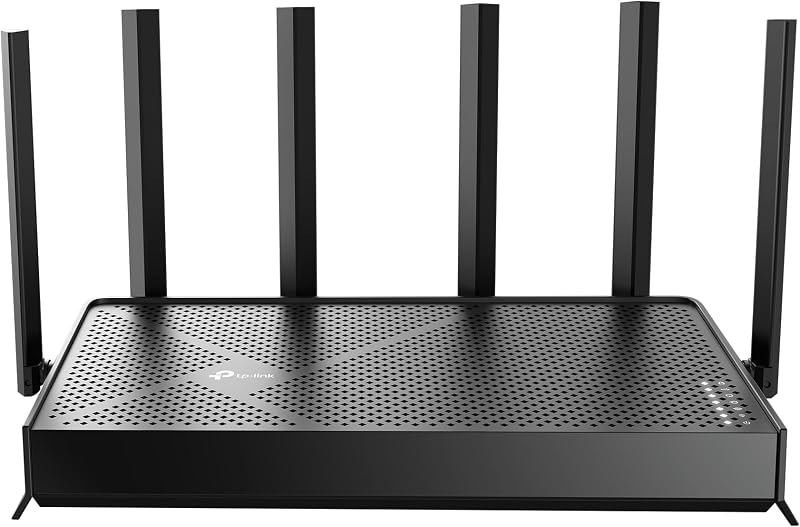
Looking at real-world hardware listings highlights this performance gap. The standalone TP-Link AXE5400 Tri-Band WiFi 6E Router provides maximum link rates of 2402 Mbps on its 6 GHz band, 2402 Mbps on its 5 GHz band, and 574 Mbps on the 2.4 GHz band. By contrast, the TP-Link Tri-Band BE9300 WiFi 7 Router leverages 320 MHz channels and 4K-QAM to achieve up to 5760 Mbps on its 6 GHz band, 2880 Mbps on 5 GHz, and 574 Mbps on 2.4 GHz. This WiFi 6E vs WiFi 7 speed difference gives the newer platform more than double the headroom on high-frequency spectrum, making multi-gigabit local transfers a tangible reality rather than an abstract specification.
When measuring generational speed leaps, network administrators often evaluate whether adding new spectrum justifies hardware changes, similar to the comparisons found in our tp-link archer ax55 vs axe75 breakdown. However, while 6E primarily opened fresh, interference-free airspace for 160 MHz connections, WiFi 7 transforms that airspace into an ultra-wide highway. For local file servers, rapid system backups, and sustained high-bitrate media streaming, the throughput capacity of 320 MHz channels provides unmatched speed.
Edge: WiFi 7 delivers more than double the peak single-band throughput thanks to 320 MHz channel width and denser 4K-QAM modulation.
Multi-Link Operation and Latency Performance
Latency and packet consistency represent the next major battleground between these wireless generations. Under WiFi 6E, client devices must choose a single band-2.4 GHz, 5 GHz, or 6 GHz-and transmit all packets across that chosen radio. Even though a router may feature true tri-band hardware, a client cannot actively switch bands mid-transmission without disconnecting or negotiating a handoff. If local radio interference, physical movement, or network congestion stalls packets on that single channel, the client experiences jitter, elevated ping times, and momentary throughput drops.
The introduction of WiFi 7 MLO vs WiFi 6E architectural limits completely rewrites wireless traffic management. Multi-Link Operation enables a compatible client to establish concurrent links across multiple frequency bands simultaneously. For example, a laptop or smartphone can bundle a 5 GHz channel and a 6 GHz channel together. Packets flow across both streams at once, aggregating overall bandwidth or dynamically balancing traffic onto the clearest frequency at any millisecond. Even dual-band hardware like the TP-Link BE6500 Dual-Band WiFi 7 Router incorporates MLO across 5 GHz (up to 5764 Mbps across 6 streams) and 2.4 GHz (up to 688 Mbps) to ensure rock-solid connection reliability.
For shoppers deciding between WiFi 6E or WiFi 7 for gaming, MLO represents the most compelling upgrade feature. Competitive multiplayer games, virtual reality streaming, and live interactive video calls depend heavily on low buffer bloat and zero packet loss. Deploying multi-band aggregation mirrors advanced protocol evolutions seen in modular systems like the eero 6+ vs max 7, giving WiFi 7 a distinct edge in keeping real-world ping consistently low even when other household devices saturate the network.
Edge: WiFi 7 wins decisively due to Multi-Link Operation, which aggregates separate wireless bands to crush latency spikes and prevent packet drops.
Wired Port Speeds and Multi-Gigabit Networking
Wireless link speeds are fundamentally constrained by the physical ethernet ports that connect a router to your broadband modem and local network switches. If a router advertises several thousand megabits per second over the air but only features 1 Gbps ethernet ports, internet throughput to any single client will bottleneck at roughly 940 Mbps after protocol overhead. When analyzing hardware specifications between these two standards, wired interface capability emerges as a critical divide.
Mainstream WiFi 6E equipment was engineered primarily around gigabit internet tiers. The TP-Link Deco XE75 AXE5400 Tri-Band WiFi 6E System features 10/100/1000 Mbps LAN ports across its nodes. While perfectly matched for standard gigabit fiber or cable subscriptions, these ports prevent the system from passing multi-gigabit speeds directly from modern internet service providers offering 1.2 Gbps, 2 Gbps, or 2.5 Gbps tiers. Similarly, the Archer AXE75 relies on traditional gigabit infrastructure to manage its local client connections.
WiFi 7 networking equipment eliminates this wired bottleneck by integrating multi-gigabit ports as standard hardware. The Archer BE400 comes equipped with one 2.5 Gbps WAN/LAN port, one dedicated 2.5 Gbps LAN port, and three 1 Gbps LAN ports. Stepping up further, the Archer BE550 incorporates a full suite of multi-gigabit connectivity, providing one 2.5 Gbps WAN port and four 2.5 Gbps LAN ports. Port allocation challenges are common when scaling modern network backbones, a factor highlighted in standalone router assessments like our netgear nighthawk rax50 vs rs300 guide. For households investing in broadband service above 1 Gbps, WiFi 7 hardware provides the physical throughput required to support it.
Edge: WiFi 7 takes the lead with dedicated 2.5 Gbps WAN and LAN ports that prevent high-speed fiber internet from bottlenecking at the router.
Whole-Home Coverage and Mesh Architecture
Signal reach and multi-room coverage require evaluating how effectively each platform overcomes physical barriers like walls and floors. The 6 GHz frequency band shared by both WiFi 6E and tri-band WiFi 7 routers uses shorter wavelengths than 5 GHz and 2.4 GHz. While this shorter wavelength delivers clean air and pristine bandwidth, it attenuates faster over distance and struggles to penetrate solid materials. Consequently, whole-home coverage relies on robust mesh deployment and antenna design.
In this arena, multi-pack WiFi 6E systems offer exceptional turnkey coverage for larger homes. The Deco XE75 3-pack covers up to 7,200 square feet and manages connections for up to 200 devices. By default, the Deco XE75 system dedicates its clean 6 GHz band as a dedicated wireless backhaul between nodes, insulating inter-node communication from legacy client interference while delivering seamless roaming powered by AI-driven mesh algorithms. If preferred, users can switch the 6 GHz radio to client access mode to connect compatible devices directly.
WiFi 7 routers handle broad coverage through high-gain antenna arrays and EasyMesh compatibility. The Archer BE400 uses six external fixed antennas and beamforming to cover up to 2,400 square feet for 90 devices, backed by 1 GB of RAM to maintain connection stability under heavy loads. The Archer BE550 uses six strategically positioned internal antennas and proprietary optimization technology to blanket homes in signal. Both WiFi 7 units support EasyMesh to integrate with compatible routers, range extenders, and powerline adapters. However, the BE400 listing explicitly notes that it is not compatible with proprietary mesh ecosystems like Deco. Whole-home multi-unit planning often requires balancing coverage packages against single-point power, as detailed in our analysis of the netgear orbi rbk752 vs 970.
Edge: WiFi 6E wins for whole-home coverage due to complete out-of-the-box 3-pack mesh systems that blanket up to 7,200 square feet using dedicated 6 GHz backhaul.
Hardware Readiness and Ecosystem Compatibility
A cutting-edge wireless router cannot deliver next-generation benefits unless the connected client devices possess matching hardware radios. Understanding device readiness is essential when answering whether a WiFi 7 router worth upgrade from 6E makes practical sense for your household today. While both wireless standards maintain full backward compatibility with older protocols (including 802.11ac, 802.11n, 802.11g, and 802.11b), their advanced feature sets remain locked behind client-side radio support.
WiFi 6E has reached full market maturity. Hundreds of contemporary laptops, desktop network cards, tablets, and smartphones released over the past several years feature native 6E compatibility. These devices connect immediately to the pristine 6 GHz band offered by routers like the Archer AXE75 and Deco XE75, successfully bypassing congested 2.4 GHz and 5 GHz bands without requiring software workarounds or specialized hardware configurations.
WiFi 7 client adoption is accelerating rapidly among premium devices, but remains limited to newer flagship hardware. Listing specifications identify compatible WiFi 7 clients such as the iPhone 16 Pro, Samsung Galaxy S24 Ultra, Google Pixel 9, and PS5 Pro. When these specific devices connect to a router like the Archer BE400 or Archer BE550, they unlock MLO, Multi-RUs, and 4K-QAM modulation. However, connecting older WiFi 6 or WiFi 5 devices to a WiFi 7 router simply causes the router to operate in backward-compatibility mode for those clients, yielding standard transmission rates. Assessing this device readiness parallels the hardware upgrade questions raised in our netgear orbi 970 vs asus zenwifi xt9 comparison.
Edge: WiFi 6E takes the advantage for immediate real-world utility due to its mature, broadly established client device ecosystem.
Pros and Cons
WiFi 6E
Pros
- Dedicated 6 GHz band eliminates legacy interference
- Consistent tri-band architecture across models
- Reliable aggregate wireless throughput up to 5400 Mbps
- Established compatibility across modern devices
Cons
- Lacks Multi-Link Operation band aggregation
- Narrower 160 MHz maximum channel width
- Limited to standard 1 Gbps wired ports
View TP-Link Deco XE75 AXE5400 Tri-Band WiFi on Amazon
WiFi 7
Pros
- Multi-Link Operation transfers data across bands simultaneously
- Wider 320 MHz channels and 4K-QAM modulation
- Ultra-fast multi-gigabit wired performance with 2.5G ports
- Significantly higher maximum speeds up to 9300 Mbps
Cons
- Select base models omit dedicated 6 GHz band
- Requires latest flagship devices for full feature support
View TP-Link BE6500 Dual-Band WiFi 7 Router on Amazon
Who Should Buy Each One
Choose the WiFi 6E If

- Your home broadband plan is 1 Gbps or lower, making standard gigabit ethernet ports more than sufficient for your needs.
- You need expansive, multi-story coverage right away using a 3-pack mesh system like the Deco XE75 that covers up to 7,200 square feet.
- Your household devices primarily consist of WiFi 6 and WiFi 6E laptops, tablets, and smartphones that cannot utilize 320 MHz channels or MLO.
- You want a stable tri-band network that uses the 6 GHz band as a dedicated, interference-free backhaul between mesh nodes.
Choose the WiFi 7 If
- You subscribe to a multi-gigabit internet tier and require 2.5 Gbps WAN and LAN ports to feed unthrottled bandwidth to your devices.
- You own flagship client devices like the iPhone 16 Pro, Samsung Galaxy S24 Ultra, Google Pixel 9, or PS5 Pro.
- You participate in competitive online gaming or virtual reality where Multi-Link Operation (MLO) significantly reduces latency and packet loss.
- You want a future-ready network setup backed by 4K-QAM modulation, 320 MHz channel support, and up to 1 GB of system RAM.
Final Verdict
For the vast majority of households operating on standard gigabit internet connections, WiFi 6E represents the most practical and sensible networking standard. Hardware systems like the Deco XE75 provide massive whole-home coverage, intuitive app control, and robust HomeShield network security while eliminating legacy wireless interference via the 6 GHz band. Because standard gigabit broadband cannot saturate the 2402 Mbps link rates of WiFi 6E, an upgrade past this generation will yield negligible speed improvements for everyday web browsing, 4K streaming, and remote productivity across existing client hardware.
However, WiFi 7 is the decisive winner for enthusiasts, competitive gamers, and households equipped with multi-gigabit fiber connections. Routers like the Archer BE550 and Archer BE400 remove legacy bottlenecks by incorporating native 2.5 Gbps wired ports, expansive 320 MHz channels, and revolutionary Multi-Link Operation that transmits across multiple bands at once. If your home network demands maximum wireless throughput and the lowest possible latency on cutting-edge hardware, investing in WiFi 7 delivers an uncompromising, future-proof platform built to lead the next decade of wireless computing.
FAQ
Can a WiFi 6E device connect to a WiFi 7 router?
Yes. WiFi 7 routers are fully backward compatible with all prior wireless generations, including 802.11ax (WiFi 6 and WiFi 6E), 802.11ac (WiFi 5), and older legacy protocols. A WiFi 6E device will connect seamlessly to the 2.4 GHz, 5 GHz, or 6 GHz band on a tri-band WiFi 7 router. However, that client will communicate using WiFi 6E protocols, meaning it will be limited to 160 MHz channel widths and 1024-QAM without Multi-Link Operation support.
What is the real-world speed difference between WiFi 6E and WiFi 7?
The speed difference is substantial when using compatible WiFi 7 client hardware on the 6 GHz band. WiFi 6E achieves theoretical top speeds of 2402 Mbps using 160 MHz channels and 1024-QAM modulation. In contrast, tri-band WiFi 7 routers like the Archer BE550 achieve link rates up to 5760 Mbps on the 6 GHz band by utilizing 320 MHz channels and 4K-QAM. This allows WiFi 7 to transfer data more than twice as fast as WiFi 6E under optimal signal conditions.
Does WiFi 7 improve gaming latency compared to WiFi 6E?
Yes. WiFi 7 improves latency primarily through Multi-Link Operation (MLO). On a WiFi 6E router, a gaming PC or console communicates over a single wireless band; if that band encounters interference, packets stall. With WiFi 7 MLO, devices can send packets simultaneously across multiple frequency bands or dynamically switch to the fastest path without disconnecting. This dramatically reduces jitter, buffer bloat, and sudden ping spikes during competitive gaming.
Do all WiFi 7 routers feature the 6 GHz frequency band?
No. While the WiFi 7 specification supports 6 GHz, manufacturers produce both dual-band and tri-band WiFi 7 routers. For example, the Archer BE400 is a dual-band WiFi 7 router that operates strictly on the 2.4 GHz and 5 GHz bands, offering 6.5 Gbps total bandwidth without a 6 GHz radio. If you want access to 320 MHz channels on the 6 GHz band, you must choose a tri-band WiFi 7 model like the Archer BE550.
Is a WiFi 7 router worth the upgrade from a WiFi 6E system?
Upgrading from WiFi 6E to WiFi 7 is worth it if you have an internet plan faster than 1 Gbps, require 2.5 Gbps ethernet ports for local network storage, or regularly use compatible devices like the iPhone 16 Pro, Samsung Galaxy S24 Ultra, or PS5 Pro. If your internet speed is capped at 1 Gbps and your current devices run smoothly on 6E, upgrading will offer minimal noticeable difference in day-to-day performance.
Can you combine Deco mesh nodes with EasyMesh WiFi 7 routers?
No. As noted in the TP-Link Archer BE400 product specifications, EasyMesh-compatible routers are not compatible with proprietary mesh ecosystems like TP-Link Deco. If you currently own a Deco XE75 system, expanding your mesh requires adding additional Deco nodes rather than an Archer EasyMesh router.