The single deciding factor when choosing between a modern smart lock vs keypad lock comes down to network connectivity versus offline simplicity. A connected lock ties your front door directly to your smartphone, home automation routines, and biometric recognition, while an electronic push-button lock completely divorces door security from the internet, relying exclusively on physical push-buttons and offline access codes.
Choose a smart lock if you want remote access tracking, instant biometric unlocking, and integration with voice assistants or smart doorbells. Choose a keypad lock if you prefer a self-contained deadbolt that requires no wireless setup, changes batteries only once a year, and eliminates all network vulnerabilities.


Smart Lock vs Keypad Lock at a Glance
| Feature | Smart Lock | Keypad Lock |
|---|---|---|
| Network Connectivity | Built-in Wi-Fi (No bridge required) | Offline (No connectivity protocol) |
| Access Methods | Fingerprint, mobile app, keypad, voice, Apple Watch, physical key | Push-button PIN codes, physical key |
| Code Capacity | Not listed | 20 user codes, 1 single-use temporary code |
| Power Source | 8 AA batteries (included) | 4 AA batteries (not included) |
| Estimated Battery Life | Around 8 months | Up to 365 days |
| Weather Resistance | IP53 waterproof rating | IP54 weather resistance |
| Operating Temperature | -22°F to 158°F (-30°C to 70°C) | Not listed |
| Door Hole Compatibility | Bores under 54mm (with removable spacer) | 2-1/8 inch (54mm) only; not compatible with 38mm |
| Security Certifications | BHMA Grade 3 certified (>100,000 cycles) | Solid cylinder, anti-peeping code protection |
| Best For | Connected households, families, and remote management | Offline reliability, rental properties, and utility doors |
Connectivity and Remote Management
The defining operational difference between an electronic keypad lock vs wifi smart lock lies in how they communicate with the outside world. Modern Wi-Fi deadbolts integrate radio modules directly into the lock body. This design allows the deadbolt to communicate through your home router without an external wall plug or hub. In practice, this enables real-time access management, immediate push notifications when someone unlocks the door, and a detailed event history log accessible from any location.
As seen in connected hardware like the eufy Security Smart Lock C220, built-in Wi-Fi links your entry point directly to companion apps and third-party controllers, including Amazon Alexa, Google Assistant, and the Apple Watch. This level of smart functionality lets you check deadbolt status while away, lock up using smart speaker routines, or synchronize door actions with exterior video doorbells. Homeowners comparing comprehensive smart ecosystems often look at architectural lock lineups like schlage vs yale to evaluate similar integrated networking setups.
In contrast, a traditional push-button lock like the TEEHO TE001 Keyless Entry Deadbolt operates on an air-gapped system with no wireless protocols whatsoever. Because there is no Bluetooth, Z-Wave, Zigbee, or Wi-Fi module, the lock cannot be controlled remotely, cannot send alerts to your smartphone, and does not record timestamps of when family members arrive. What you sacrifice in real-time visibility, however, you gain in isolation: an offline deadbolt cannot suffer from network dropouts, firmware synchronization glitches, or unauthorized remote access attempts over the web.
Edge: Smart Lock, because built-in Wi-Fi gives homeowners complete remote control, audit logging, and automated voice ecosystem integration from anywhere.
Unlocking Methods and Everyday Convenience
Everyday convenience comes down to how effortlessly you can pass through the entryway when carrying groceries, managing pets, or returning home after dark. A multi-access deadbolt changes your daily routine by expanding entry choices beyond memorized digits. When choosing a smart lock or keypad lock for front door installations, the variety of entry options dictates how smoothly household members and guests come and go.
Evaluating a fingerprint smart lock vs keypad reveals an obvious speed advantage for biometric hardware. The eufy C220 features a built-in fingerprint reader powered by self-learning AI that refines recognition precision every time you touch the sensor, opening the latch in under one to one-and-a-half seconds. Combined with mobile app toggles, Apple Watch controls, hands-free voice commands, an integrated keypad, and traditional keyed entry, it provides six distinct access paths. This eliminates lockouts even if you forget a PIN code or leave your phone inside.
Standalone deadbolts like the TEEHO TE001 focus strictly on manual digits. This hardware allows up to 20 unique family access codes alongside a dedicated one-time PIN code designed for visitors or service technicians, which deletes itself immediately after a single use. The keypad features physical tactile buttons with backlighting and an anti-peeping function that lets users type random digits before or after the real code to prevent onlookers from stealing combinations. While dependable, entering a four-to-ten-digit code every single time takes more physical effort and focus than pressing a thumb against a biometric reader.
Edge: Smart Lock, offering six separate unlocking methods including sub-second fingerprint recognition and voice controls compared to simple button combinations.
Battery Life and Power Maintenance
Motorized deadbolts rely on internal battery power to throw the bolt, illuminate buttons, and power sensors. However, wireless transmitters consume continuous background energy while listening for network commands, making keypad door lock battery life a critical factor when planning your home maintenance schedule. How often you are willing to swap out cells should weigh heavily into your purchasing decision.
The TEEHO TE001 demonstrates the major energy advantage of an offline system. Powered by just 4 AA batteries, its low-drain electrical circuit lasts up to 365 days under regular residential use. Because there are no active radios searching for Wi-Fi beacons or syncing server tokens, power consumption remains negligible until someone presses a button. When power finally drops below 15 percent, an obvious red LED warning light alerts you to swap the cells before the mechanism fails.
By comparison, maintaining an active 2.4 GHz Wi-Fi link inside a smart deadbolt requires substantially more power. The eufy Security Smart Lock C220 in Nickel requires 8 AA batteries to operate-double the cell capacity of the offline model-and provides an estimated operational window of around 8 months depending on daily cycling frequency. While eufy includes all eight batteries in the package and sends low-battery notifications straight to your phone screen, you will still replace twice as many batteries 50 percent more frequently throughout the life of the lock.
Edge: Keypad Lock, which delivers a full year of operation on only 4 AA batteries compared to an 8-battery compartment that depletes in roughly 8 months.
Physical Security, Build Durability, and Weather Resistance
Exterior hardware must withstand both mechanical force and outdoor weather. When shopping for a smart lock vs keypad deadbolt, you must assess structural certification, internal tamper detection, and ingress protection against rain and extreme temperatures. A lock that fails under inclement weather compromises home security regardless of its digital features.
The eufy C220 carries an official BHMA Grade 3 certification, having passed endurance testing exceeding 100,000 locking and unlocking cycles. It also incorporates an integrated audible alarm that triggers whenever an unusual entry attempt or forced impact occurs. The lock exterior handles temperature extremes ranging from -22°F to 158°F (-30°C to 70°C) and carries an IP53 waterproof rating, meaning it resists light sprays and dust ingress, though it requires some shelter from heavy, driving rainstorms.
The TEEHO TE001 takes a structural approach centered on hardened metal. Built around a sturdy aluminum alloy chassis with a solid cylinder, it provides a rugged exterior designed for entry doors, garages, and exposed gates. It earns an IP54 weather-resistance rating, offering superior protection against splashing water and airborne dust compared to IP53 enclosures. While it lacks internal electronic sirens or BHMA grade disclosures in its technical sheet, its anti-peeping PIN protection and robust mechanical cylinder deliver dependable physical defense against forced entry.
Edge: Tie, as the smart lock delivers verified BHMA Grade 3 cycle testing and tamper alarms, while the keypad lock offers a sturdier IP54 weather rating and a heavy aluminum alloy body.
Door Compatibility, Handing Calibration, and Installation
A secure deadbolt is useless if it fails to align with your door’s existing pre-drilled holes. Installation requirements, spindle thickness, and automatic latch calibration determine whether an upgrade requires fifteen minutes with a screwdriver or extensive drilling and chiseling into the door jamb.
Door hole compatibility provides a meaningful differentiator here. The eufy C220 fits standard US and Canadian residential deadbolt preparations, easily fitting door bores under 54mm simply by removing an included modular spacer. This design makes it versatile for older doors or custom interior entries that lack standard modern cutouts. It installs in roughly 15 minutes without any power drilling required, utilizing standard mounting plates and an included keyed-different cylinder mechanism with two keys. When installing smart hardware alongside other connected appliances, users familiar with guides like august vs level smart lock appreciate when a lock preserves factory door preparations.
The TEEHO TE001 in Satin Nickel is engineered exclusively for standard 2-1/8 inch (54mm) door bores. The manufacturer explicitly notes that it is incompatible with 38mm holes, limiting its use on certain non-standard or older doors unless you widen the bore manually using an impact driver or hole saw, as discussed in tool guides like dewalt dcf787 vs dcf888. However, the TE001 excels in its mechanical calibration: it features an automatic door-handing detection sequence executed by resetting the lock during initial setup, ensuring the motor extends the deadbolt smoothly whether installed on a left-handed or right-handed door. It includes standard SC1 keyway backup keys and custom auto-lock timers adjustable from 10 to 99 seconds.
Edge: Smart Lock, thanks to its removable spacer that accommodates bore diameters under 54mm without requiring structural door modifications.
Pros and Cons
Smart Lock
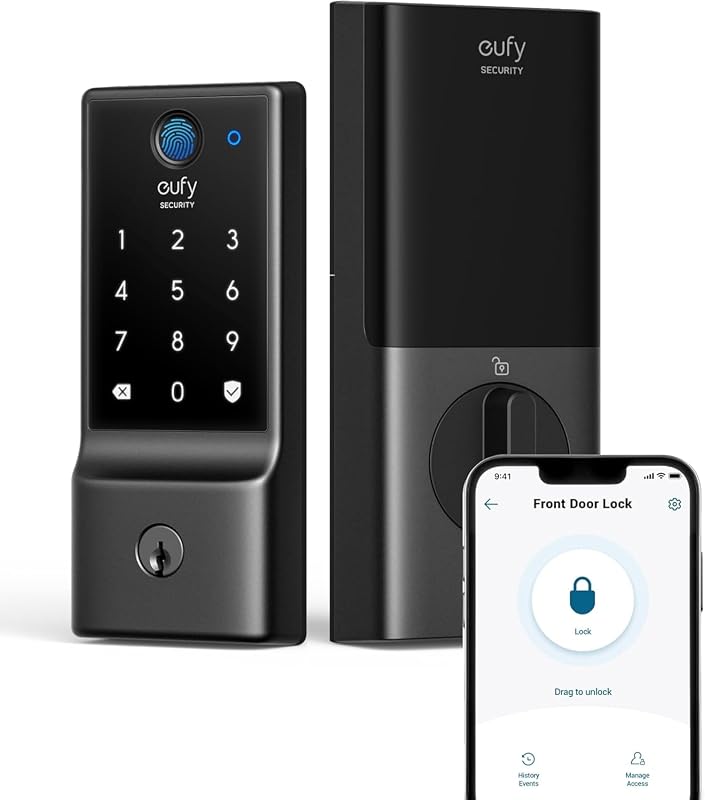
Pros
- 6 versatile ways to unlock
- Built-in Wi-Fi without separate bridges
- Self-learning AI fingerprint sensor
- Fits door holes under 54mm with spacer
Cons
- Requires 8 AA batteries to operate
- Shorter 8-month battery life
View eufy Security Smart Lock C220 Fingerprint on Amazon
Keypad Lock
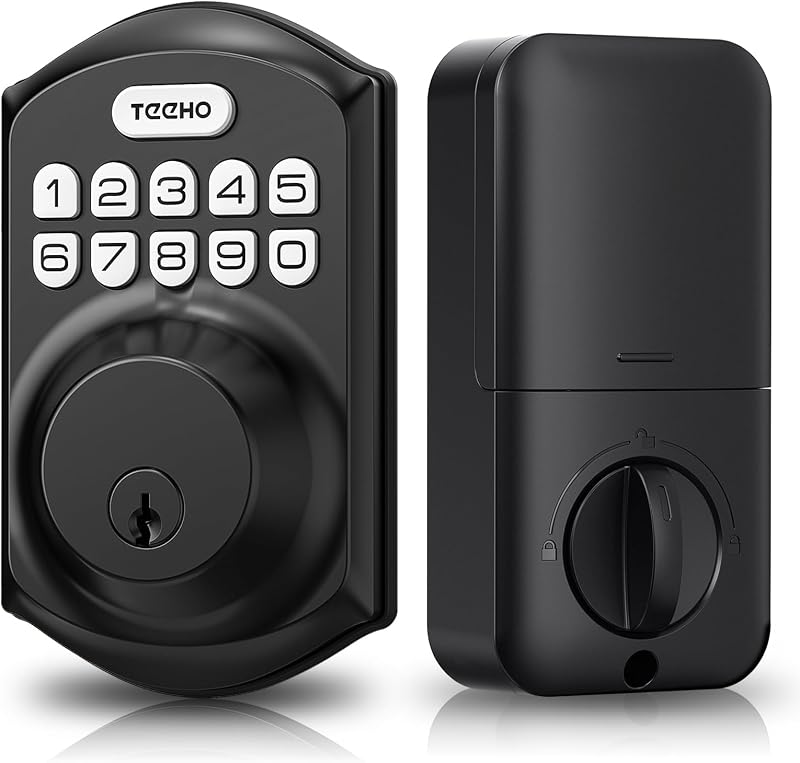
Pros
- Up to 365 days of battery runtime
- Operates on only 4 AA batteries
- Zero wireless network hacking exposure
- Higher IP54 weather resistance rating
Cons
- No remote app monitoring or alerts
- Strictly incompatible with 38mm door holes
View TEEHO TE001 Keyless Entry Deadbolt on Amazon
Who Should Buy Each One
Choose the Smart Lock If
- You want lightning-fast, key-free entry via a self-learning AI fingerprint scanner that unlocks in under 1.5 seconds.
- You need remote monitoring to check deadbolt status, review event histories, and receive unexpected entry alerts through built-in Wi-Fi.
- You actively use Amazon Alexa or Google Assistant and want to integrate your door lock into smart home routines alongside video doorbells.
- Your door features an older or non-standard borehole under 54mm that benefits from a removable mounting spacer.
Choose the Keypad Lock If
- You want a deadbolt with up to 365 days of battery life running on just 4 standard AA batteries.
- You prioritize an air-gapped system that operates entirely offline without wireless network vulnerabilities or app accounts.
- You manage an outbuilding, garage, rental property, or utility door where visitors only need simple push-button PINs or single-use guest codes.
- You live in an exposed weather zone where an IP54-rated aluminum alloy housing provides better resistance against splashing water.
Final Verdict
For most primary residences, the smart lock wins the matchup. Upgrading to a connected deadbolt fundamentally improves daily entry habits by combining sub-second biometric scanning, remote app control, and real-time security alerts without requiring external Wi-Fi bridges. As demonstrated in any comprehensive smart lock review, the ability to grant immediate access from anywhere, lock the door with your voice, and eliminate keys with an AI fingerprint sensor far outweighs the chore of replacing its eight AA batteries every eight months.
On the other hand, the electronic keypad deadbolt remains the superior choice for homeowners, landlords, and minimalists who demand dependable simplicity. If you do not want your door tied to cloud services, smartphone apps, or network maintenance, a standalone deadbolt delivers excellent security. With a full year of runtime on four batteries, anti-peeping digit scramblers, single-use guest codes, and robust IP54 weatherproofing, an offline keypad lock provides unbeatable low-maintenance utility wherever wireless connectivity is unnecessary.
FAQ
Is a smart lock worth it compared to a basic keypad deadbolt?
A smart lock is worth the investment if you value remote access, biometric entry, and real-time activity tracking. While a standard keypad deadbolt requires you to manually punch in a code every time, a smart deadbolt offers instant fingerprint scanning, smartphone app controls, and notifications when family members arrive. If you simply want keyless convenience without digital features, a basic keypad deadbolt accomplishes that at a lower maintenance overhead.
How does keypad door lock battery life compare to a Wi-Fi smart deadbolt?
Standalone keypad locks offer significantly better battery life than Wi-Fi smart locks. Because offline keypad deadbolts have no internal radios searching for wireless signals, 4 AA batteries can last up to 365 days. A Wi-Fi smart lock requires continuous energy to stay connected to your home router, typically draining an 8-AA battery pack within around 8 months depending on daily usage.
Can a keypad deadbolt be hacked over the internet?
No, a standalone electronic keypad lock cannot be hacked over the internet because it features zero wireless connectivity protocols. Without Wi-Fi, Bluetooth, or Z-Wave radios, the lock operates on an isolated local circuit. The only way to bypass it electronically is by guessing or observing the physical passcode, which is mitigated by built-in anti-peeping digit masking.
What happens if the batteries die while you are locked outside?
Both smart locks and electronic keypad locks include physical backup keys to ensure you never get locked out due to depleted batteries. The eufy C220 includes two physical keys, while the TEEHO TE001 includes two standard SC1 backup keys. Additionally, both lock styles feature low-battery indicators-either through app alerts or exterior red flashing lights-well before the cells completely lose power.
Which lock is better for rental properties or Airbnb hosts?
The choice depends on whether you manage the property locally or remotely. A Wi-Fi smart lock is superior for remote hosts because you can generate guest access, view check-in event logs, and verify lock status from anywhere via an app. An offline keypad deadbolt is better for hands-off long-term rentals where you want maximum battery runtime, no tenant network setup calls, and the ability to issue single-use or permanent codes directly on the keypad.
Does a fingerprint smart lock work reliably in freezing weather?
Quality fingerprint smart locks are engineered to handle harsh outdoor conditions. For instance, the eufy C220 operates in temperatures ranging from -22°F to 158°F (-30°C to 70°C) and utilizes an IP53 waterproof housing. Its self-learning AI sensor adapts to your print over time, though heavy ice, snow, or excessive moisture on your finger should be wiped away before scanning for optimal recognition speed.
Related reading: petsafe smart feed vs petlibro granary.


