The decisive difference between the G.Skill Trident Z5 RGB DDR5 6000 and the Kingston Fury Beast DDR5 comes down to latency tuning versus physical clearance and aesthetic illumination. Kingston equips its kit with tight CL30 timings and a low-profile heat spreader suited for air coolers, whereas G.Skill prioritizes visual presentation with an elevated RGB light bar running at looser CL36 timings.
Builders assembling compact or air-cooled setups where memory clearance and lowest first-word latency are vital should choose the Kingston Fury Beast DDR5. Those constructing panoramic showcase chassis who prioritize dramatic lighting and sculpted aluminum styling should opt for the G.Skill Trident Z5 RGB DDR5 6000.


G.Skill Trident Z5 RGB DDR5 6000 vs Kingston Fury Beast DDR5 at a Glance
| Feature | G.Skill Trident Z5 RGB DDR5 6000 | Kingston Fury Beast DDR5 |
|---|---|---|
| Kit Capacity | 32 GB (2 x 16 GB) | 32 GB (2 x 16 GB) |
| Data Transfer Rate | 6000 MT/s | 6000 MT/s |
| CAS Latency | CL36 (36-36-36-96) | CL30 |
| Operating Voltage | 1.35V | 1.35V |
| Overclocking Profiles | Intel XMP 3.0 & AMD EXPO | Intel XMP 3.0 & AMD EXPO |
| Form Factor | 288-pin UDIMM | 288-pin DIMM |
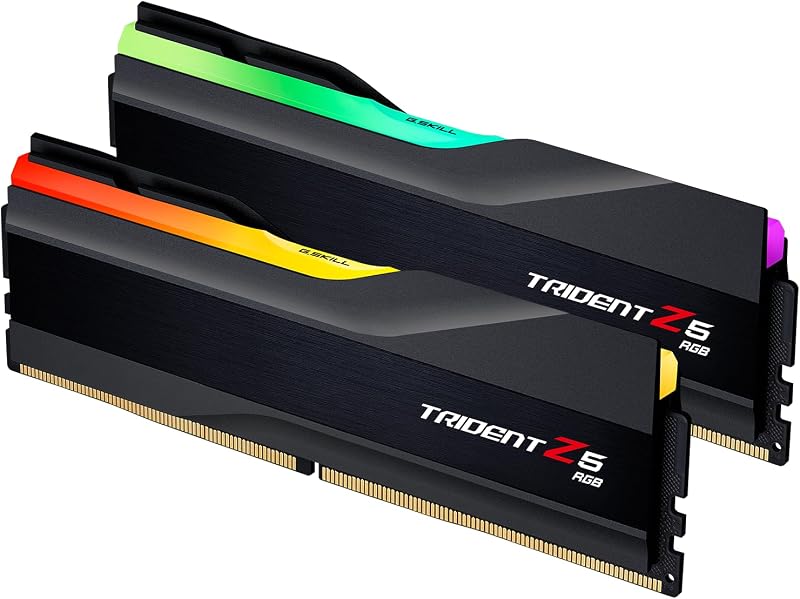
| Heat Spreader Design | Sculpted matte black with RGB light bar | Low-profile aluminum heat spreader |
| Error Correction | Non-ECC (Standard DDR5 on-die) | On-die ECC listed |
| Platform Support Listed | Intel Z890/Z790/Z690/B860/B760/B660, AMD X870/X670/B850/B840/B650/A620 | Compatible desktop platforms |
| Best For | Tempered glass showcase gaming builds | Compact rigs and maximum memory responsiveness |
CAS Latency and Memory Timings
CAS latency dictates how many clock cycles pass between a read command sent to the memory module and the moment data begins transferring. In this Kingston Fury Beast DDR5 CL30 vs G.Skill CL36 showdown, timing differences play a meaningful role in system responsiveness. Both memory kits operate at a baseline transfer speed of 6000 MT/s, meaning each clock cycle takes roughly 0.333 nanoseconds. With the Kingston kit configured at CL30, its absolute first-word access latency comes out to 10.0 nanoseconds. In comparison, the G.Skill Trident Z5 RGB DDR5 6000 CAS latency of 36 yields an absolute latency of 12.0 nanoseconds, forcing the memory controller to wait two full nanoseconds longer per initial column access.
The G.Skill listing specifies full primary timings of 36-36-36-96, showing a symmetrical timing profile across Row Address to Column Address Delay and Row Precharge operations. The Kingston listing highlights CL30 along with automatic overclocking stability, but does not specify the remaining tRCD, tRP, and tRAS timing parameters. For power users evaluating a corsair dominator titanium ddr5 vs g.skill trident z5 rgb ddr5 6000 match, tight primary timings can offer measurable benefits in CPU-bound gaming scenarios, frame-time pacing, and memory-sensitive synthetic benchmarks.
When running games that stress the system memory subsystem with constant asset streaming, the 10.0ns response time of the Kingston module gives it a definitive mathematical advantage over G.Skill’s 12.0ns rating. While the 6000 MT/s bandwidth remains identical across both kits, the reduced cycle penalty on the Kingston kit translates directly to sharper memory turnaround during random memory accesses.
Edge: Kingston Fury Beast DDR5 because its CL30 rating provides a lower 10-nanosecond first-word response time compared to the CL36 rating on the G.Skill kit.
Form Factor and Cooler Clearance
Physical module dimensions determine whether a dual-channel memory kit fits comfortably beneath large dual-tower air coolers or inside small-form-factor desktop enclosures. The Kingston Fury Beast DDR5 explicitly utilizes a low-profile heat spreader design engineered to maximize clearance beneath protruding fin stacks and cooling fans. This low-slung profile ensures builders do not have to mount cooling fans awkwardly higher on their heatsinks, preserving proper case door closure and clean airflow direction inside standard mid-tower and compact cases.
In contrast, the Trident Z5 RGB vs Kingston Fury Beast height clearance dynamic leans heavily against the G.Skill kit when space is tight. To accommodate its translucent top light bar and swooping aluminum fins, the G.Skill Trident Z5 RGB DDR5 6000 features a noticeably taller module structure. Similar to what builders encounter when comparing a g.skill ripjaws s5 ddr5 vs kingston fury beast ddr5 configuration, tall memory modules often collide directly with the front intake fan of massive 140mm or 120mm air coolers, requiring builders to either shift the fan upward or swap to an all-in-one liquid cooler.
If your desktop setup utilizes a liquid cooler with an unobstructed CPU socket zone, the added height of the G.Skill modules creates no mechanical issues. However, for builders who rely on traditional twin-tower air coolers or high-density micro-ATX layouts, physical clearance is a strict go or no-go parameter where Kingston provides stress-free component layout.
Edge: Kingston Fury Beast DDR5 thanks to its low-profile heat spreader that eliminates clearance conflicts with large air coolers.
Overclocking Profiles and Platform Support
Achieving the rated 6000 MT/s transfer rate on either memory kit requires enabling an overclocking profile in the motherboard BIOS. Both products eliminate guesswork by featuring dual-profile capability. The G.Skill Trident Z5 RGB 6000 Intel XMP 3.0 profile pairs alongside AMD EXPO, allowing builders to load pre-tested profiles regardless of whether they construct an Intel Core or AMD Ryzen desktop. G.Skill specifies wide platform support in its listing, including Intel Z890, Z790, Z690, B860, B760, and B660 motherboards, as well as AMD X870, X670, B850, B840, B650, and A620 platforms.
The Kingston Fury Beast DDR5 6000MHz AMD EXPO and Intel XMP 3.0 integration provides equivalent platform versatility, allowing seamless one-click configuration in modern BIOS menus. Kingston also highlights auto-overclocking functionality, which helps systems initialize safely without intricate manual timing calibration. As outlined in a g.skill flare x5 ddr5 6000 vs kingston fury beast ddr5 evaluation, memory running at 6000 MT/s hits the optimal sweet spot for AMD AM5 memory controllers, maintaining a 1:1 ratio between the memory clock and memory controller clock for minimal overall system latency.
Both kits require a single 1.35V operating level to maintain their 6000 MT/s rated speed, moving beyond the baseline DDR5 JEDEC voltage of 1.1V. Because both G.Skill and Kingston have baked both XMP 3.0 and EXPO tables into their onboard SPD chips, switching between processor platforms in future upgrades will not invalidate your memory kit’s automated tuning profiles.
Edge: Tie because both kits offer dual Intel XMP 3.0 and AMD EXPO profiles running at an identical 1.35V operating voltage.
Heat Spreader Aesthetics and Build Styling
Visual styling is the area where these two memory kits diverge completely. The G.Skill Trident Z5 RGB DDR5 6000 is intentionally designed as a centerpiece component for glass-walled PC builds. It combines an aggressive, dual-texture matte black aluminum heat spreader with an integrated translucent light bar running along the top ridge. The customizable RGB illumination diffuses evenly across the spine of the module, integrating with major motherboard lighting software to synchronize with case fans, graphics cards, and internal strip lighting.
By comparison, the Kingston Fury Beast DDR5 emphasizes functional minimalism. Its black aluminum heat spreader features embossed geometric accents and clean branding, but completely lacks internal illumination. Those looking at a g.skill trident z5 rgb ddr5 6000 vs kingston fury renegade ddr5 matchup will observe that while higher-tier illuminated kits exist, this specific Kingston Beast model is built for stealth, workstation environments, or systems that avoid internal lighting clutter.
Aesthetic preferences remain subjective, but when building an enthusiast showcase system, the Trident Z5 RGB adds genuine visual value. Its sleek matte black frame contrasts cleanly with high-end motherboards while supplying dynamic illumination that the stealth-focused Kingston module cannot match.
Edge: G.Skill Trident Z5 RGB DDR5 6000 due to its sculpted aluminum heat spreader and integrated RGB lighting diffuser.
Gaming Performance and Architecture Features
When asking whether to pick G.Skill Trident Z5 RGB or Kingston Fury Beast for gaming, evaluating subchannel architecture and internal memory handling becomes essential. DDR5 fundamentally redesigns internal data routing compared to legacy DDR4 standards by splitting each 64-bit data channel into two independent 32-bit subchannels. Kingston explicitly details this architectural advantage in its listing, explaining how dual 32-bit subchannels boost efficiency while on-die ECC handles internal bit flips inside the memory dies to improve stability during heavy computational tasks like 4K streaming and gaming.
G.Skill designates its module as a non-ECC UDIMM, which refers to the absence of side-band motherboard-level ECC, though it still utilizes the native on-die ECC intrinsic to all standard DDR5 memory chips. G.Skill strongly emphasizes kit matching, reminding users that their 32GB kit is sold as a factory-matched pair designed to prevent instability or boot failure that occurs when mixing independent memory kits. In our g.skill flare x5 ddr5 6000 vs kingston fury renegade ddr5 analysis, strict factory binning is a crucial requirement for achieving advertised speeds without memory errors.
For high-refresh-rate gaming, memory latency directly impacts 1% low frame rates and frame-time consistency. The tighter CL30 timing on the Kingston Fury Beast produces fewer micro-stutters in bottlenecked CPU scenarios compared to the CL36 timing on the G.Skill kit. While both provide the robust 6000 MT/s throughput required by modern games, Kingston’s tighter cycle timing yields superior overall gaming efficiency.
Edge: Kingston Fury Beast DDR5 because tighter CL30 latency delivers smoother frame pacing and superior gaming responsiveness.
Pros and Cons
G.Skill Trident Z5 RGB DDR5 6000
Pros
- Vibrant integrated RGB lighting diffuser
- Dual Intel XMP 3.0 and AMD EXPO support
- Broad verified motherboard platform support
- Matte black aluminum heat spreader finish
Cons
- Looser CL36-36-36-96 primary timings
- Taller profile creates air cooler interference
View G.Skill Trident Z5 RGB DDR5 6000 on Amazon
Kingston Fury Beast DDR5

Pros
- Tight CL30 primary latency at 6000MT/s
- Compact low-profile heat spreader clearance
- Dual profile support for Intel and AMD
- On-die ECC and dual 32-bit subchannels
Cons
- No RGB lighting accents
- Listing does not detail full secondary timings
View Kingston Fury Beast DDR5 on Amazon
Who Should Buy Each One
Choose the G.Skill Trident Z5 RGB DDR5 6000 If
- You are building an enthusiast showcase desktop with a panoramic tempered glass window.
- Your system uses an all-in-one liquid cooler where memory module height clearance is not an obstacle.
- You want vibrant, synchronized RGB illumination that complements your case fans and motherboard.
- You prioritize verified compatibility across specific Intel Z890/Z790 and AMD X870/X670 motherboard tiers.
Choose the Kingston Fury Beast DDR5 If
- You are installing a massive dual-tower air cooler that requires a low-profile memory heat spreader.
- You demand the fastest memory access times available at 6000 MT/s with CL30 primary latency.
- You prefer a clean, blackout aesthetic without distracting interior lighting inside your PC case.
- You run CPU-intensive gaming loads where 1% low frame rates benefit from shorter nanosecond timings.
Final Verdict
For most desktop builders, the Kingston Fury Beast DDR5 is the smarter, more practical choice. Its combination of tight CL30 primary latency and a low-profile heat spreader addresses the two most critical physical and performance variables in PC assembly. Operating with an ultra-responsive 10-nanosecond access time while effortlessly clearing large heatsinks ensures superior gaming frame pacing and painless hardware compatibility across both Intel and AMD builds.
The G.Skill Trident Z5 RGB DDR5 6000 remains a compelling alternative for builders who refuse to compromise on visual flair. If your rig utilizes liquid cooling and sits on your desk as a lighted visual centerpiece, the sweeping matte black heat spreaders and vivid RGB diffusion of the Trident Z5 make it well worth accepting slightly looser CL36 timings.
FAQ
Can I use the Kingston Fury Beast DDR5 on both AMD and Intel motherboards?
Yes. The Kingston Fury Beast DDR5 features both Intel XMP 3.0 and AMD EXPO overclocking profiles stored directly on its SPD chip. You can enable the rated 6000 MT/s speed on compatible Intel Core platforms or AMD AM5 Ryzen systems with a single toggle in your motherboard BIOS.
Does the G.Skill Trident Z5 RGB DDR5 6000 fit beneath large dual-tower air coolers?
Due to its taller heat spreader and integrated RGB light diffuser, the G.Skill Trident Z5 RGB DDR5 6000 can cause physical clearance issues with low-hanging dual-tower CPU air coolers. You may need to raise the cooler’s front intake fan upward or choose an AIO liquid cooler to prevent mechanical interference.
Is Kingston Fury Beast DDR5 worth it over higher-latency RGB kits?
If you value frame-rate stability and cooler compatibility over internal system lighting, the Kingston Fury Beast DDR5 is well worth it. Its CL30 rating provides an access latency of 10.0 nanoseconds compared to 12.0 nanoseconds on CL36 kits, offering measurable benefits in gaming responsiveness and 1% low frame consistency.
Do both memory kits operate at standard JEDEC speeds out of the box?
Yes. Both the G.Skill Trident Z5 RGB DDR5 6000 and the Kingston Fury Beast DDR5 initialize at baseline JEDEC default speeds upon first boot. To reach the advertised 6000 MT/s data rate and primary latencies, you must enter your BIOS setup and enable either the Intel XMP 3.0 or AMD EXPO profile.
Can I mix two separate 32GB kits of G.Skill Trident Z5 to get 64GB?
G.Skill explicitly advises against mixing separate memory kits, even if they share the identical model number. Memory kits are sold as factory-tested, matched pairs. Combining two separate kits can overload the processor memory controller, causing boot failures, inability to enable XMP or EXPO, or severe system instability.
Does the Kingston Fury Beast DDR5 include RGB lighting?
No. The specific Kingston Fury Beast DDR5 model featured in this comparison utilizes a non-illuminated, low-profile aluminum heat spreader designed specifically for stealth styling and compact component clearance.


