The single deciding factor between these two memory kits is the balance between raw clock frequency and physical design simplicity: the TeamGroup T-Force Delta RGB DDR5 delivers high-octane 7200 MHz transfer rates alongside vibrant RGB light bars, while the Crucial Pro DDR5 prioritizes restrained thermal efficiency at 6000 MHz with a low-profile, non-illuminated heat sink.
Choose Crucial Pro if you require a single 16 GB module with a low physical footprint and standard operating voltages for a clean, compact workstation. Choose TeamGroup T-Force Delta RGB if you want an enthusiast-grade 32 GB dual-channel setup designed to extract maximum frame rates and visual flair out of modern desktop platforms.

Crucial Pro DDR5 vs TeamGroup T-Force Delta RGB DDR5 at a Glance
| Feature | Crucial Pro DDR5 | TeamGroup T-Force Delta RGB DDR5 |
|---|---|---|
| Memory Technology | DDR5 UDIMM | DDR5 DIMM |
| Data Transfer Rate | 6000 MHz (PC5-48000) | 7200 MHz (PC5-57600) |
| Kit Capacity & Quantity | 16 GB (1 x 16 GB) | 32 GB (2 x 16 GB) |
| CAS Latency | CL36 | CL34 |
| Operating Voltage | 1.35 V | 1.4 V |
| Lighting | None (Matte Black Spreader) | Integrated RGB LEDs |
| Chipset Optimization | Standard DDR5 platforms | Intel 600 / 700 Series (XMP 3.0) |
| Additional Features | Unbuffered, Lightweight | On-die ECC, Power Management IC (PMIC), A-DIE |
| Best For | Low-profile, zero-interference productivity builds | High-framerate gaming rigs and enthusiast setups |
Clock Frequency and Data Transfer Rates
Operating frequency defines the maximum theoretical bandwidth a memory kit can feed to your processor, directly impacting memory-heavy rendering tasks and competitive gaming frame rates. In this head-to-head matchup, the TeamGroup T-Force Delta RGB 7200MHz vs Crucial Pro 6000MHz showdown shows a massive 1200 MHz gulf in rated capability. TeamGroup equips its module with PC5-57600 transfer rates, allowing the memory to push 7200 MT/s when enabled via XMP 3.0 on compatible platforms. For users seeking absolute peak throughput in memory-bound scenarios, this frequency tier delivers a tangible uplift in data-shuffling speed across system buses.
Conversely, the Crucial Pro operates at a conservative 6000 MHz (PC5-48000), a speed considered the baseline sweet spot for modern desktop DDR5 stability. While this Crucial Pro DDR5 overclocking speed is fully certified for reliable daily performance, it cannot match the raw throughput achieved by TeamGroup’s A-DIE chips. The trade-off is predictability: 6000 MHz functions out of the box with near-universal compatibility across memory controllers, whereas pushing up to 7200 MHz requires a motherboard and memory controller capable of handling elevated signaling frequencies without stability hiccups. If you are comparing performance tiers, our analysis of kingston fury renegade ddr5 vs crucial pro ddr5 highlights a similar dynamic between extreme and standard frequencies.
For high-refresh gaming and compressed file rendering, the extra 1200 MHz provided by the Delta RGB provides a decisive edge in continuous memory reads and writes, making it the superior pick for pure performance enthusiasts.
Edge: TeamGroup T-Force Delta RGB DDR5 provides significantly higher data transfer rates with a 7200 MHz ceiling versus Crucial’s 6000 MHz speed.
CAS Latency and Timing Efficiency
Clock speed only tells half the story of memory performance; Column Address Strobe (CAS) latency dictates how many clock cycles the module takes to access specific data columns. In any detailed TeamGroup T-Force Delta RGB DDR5 review, timing figures stand out because higher transfer speeds often force looser timings. TeamGroup circumvents this penalty by pairing its 7200 MHz frequency with a remarkably low CL34 latency rating. This combination yields exceptional absolute response times, ensuring instructions are retrieved with minimal internal wait states.
Crucial Pro features a CAS latency of 36 while operating at a lower 6000 MHz frequency. Because nanosecond delay is calculated using both cycle speed and CAS count, a CL36 module at 6000 MHz experiences longer actual waiting intervals than a CL34 module at 7200 MHz. In real-world computing, lower absolute latency reduces micro-stutter in open-world titles and speeds up transactional database queries. Enthusiasts comparing memory architectures often note these margins when evaluating options like the g.skill ripjaws s5 ddr5 vs teamgroup t-force delta rgb ddr5, where timing discipline separates regular memory from high-performance kits.
The TeamGroup T-Force Delta RGB DDR5 latency configuration proves that high frequency does not have to come at the expense of responsive timings, offering superior memory cycle responsiveness across the board.
Edge: TeamGroup T-Force Delta RGB DDR5 wins decisively by coupling a tighter CL34 latency with a much higher operational clock speed.
Kit Capacity and Channel Configuration
The physical structure of your memory installation determines both multitasking headroom and accessible memory bus channels. Crucial ships this specific Pro module as a single 16 GB unit (1 x 16 GB). While DDR5 introduces dual 32-bit subchannels on a single DIMM, running a solitary module still leaves your motherboard’s second memory channel unpopulated, cutting potential CPU memory interface bandwidth in half compared to a dual-module arrangement. This makes the single module ideal primarily as an expansion stick or a basic entry point for office machines.
In contrast, TeamGroup provides a packaged 32 GB kit containing two 16 GB DIMMs (2 x 16 GB). Installing this kit immediately populates two DIMM slots, enabling true symmetric dual-channel operation across four total 32-bit subchannels. When evaluating Crucial Pro DDR5 or TeamGroup T-Force Delta RGB DDR5 for gaming, this distinction is critical. Modern game engines frequently consume upwards of 16 GB of system RAM while simultaneously executing background streaming tools and operating system tasks, making 32 GB the recommended configuration for avoiding pagefile thrashing. Similar configuration considerations arise when comparing the kingston fury beast ddr5 vs crucial pro ddr5.
Crucial Pro DDR5 gaming performance will naturally be throttled in complex titles if deployed as a single stick, whereas Delta RGB arrives ready out of the box with the capacity and configuration required for heavyweight workloads.
Edge: TeamGroup T-Force Delta RGB DDR5 takes the victory by providing a complete 32 GB dual-module kit that enables full multi-channel bandwidth immediately.
Operating Voltage and Power Management
Power consumption and thermal output are closely linked to memory voltage, dictating how hard your system’s cooling must work to maintain stability. The Crucial Pro is configured to run its 6000 MHz profile at 1.35 volts. Operating at 1.35V keeps electrical leakage low and generates moderate heat, which helps the memory remain cool even inside compact chassis with minimal airflow. This conservative power profile makes the Crucial Pro an easy fit for systems prioritizing quiet operation and thermal moderation.
On the other hand, the TeamGroup T-Force Delta RGB DDR5 specs indicate an operational voltage of 1.4 volts to sustain its aggressive 7200 MHz CL34 performance tier. While an extra 0.05 volts seems minor on paper, DDR5 modules house their own onboard Power Management Integrated Circuits (PMIC), which regulate input voltage directly on the PCB. TeamGroup explicitly includes advanced PMIC engineering alongside on-die ECC to ensure stable current distribution under heavy computing loads. Similar high-voltage thermal characteristics can be seen on performance-focused RAM such as in the kingston fury renegade ddr5 vs teamgroup t-force delta rgb ddr5 comparison.
Because higher voltage invariably results in greater thermal dissipation, Delta RGB requires active airflow across its heat spreader during intense sessions, giving the lower-voltage Crucial stick an advantage in thermal ease of use.
Edge: Crucial Pro DDR5 holds the edge here due to its lower 1.35V requirement, generating less overall heat inside the chassis.
Aesthetic Design and Physical Clearance
Component dimensions and visual presentation frequently make or break a PC assembly, particularly when factoring in large CPU air coolers. Crucial Pro features a minimalist, matte black low-profile heat spreader that completely omits lighting elements. Its low vertical height ensures zero interference with sprawling dual-tower heatsinks or compact mini-ITX liquid cooling tubing. For professionals assembling stealth workstations or enterprise office rigs, Crucial’s clean lines avoid visual distractions while ensuring effortless hardware clearance. Readers investigating compact builds often explore low-profile options like those found in the g.skill ripjaws s5 ddr5 vs crucial pro ddr5 comparison.
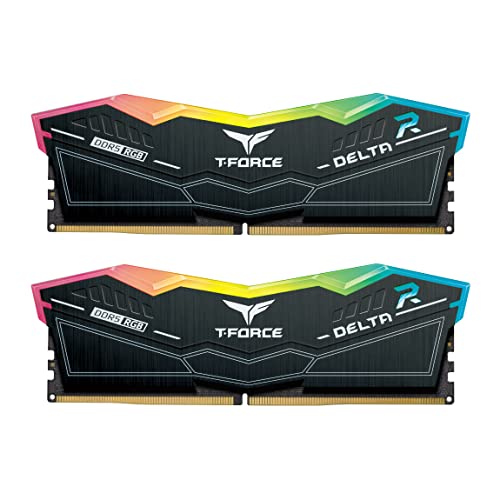
TeamGroup takes an entirely different design philosophy with the Delta RGB. The memory features an aggressive geometric heat spreader topped with an ultra-wide, 120-degree luminous RGB light bar. The integrated LEDs produce vibrant light diffusion that syncs with modern motherboard lighting software, creating an impressive focal point inside glass-paneled cases. However, this tall light diffuser adds noticeable vertical height to each DIMM. If you use a wide air cooler with low fan cutouts, the top edge of the Delta RGB module may collide with the cooling fins or force you to mount your front cooler fan awkwardly high.
While visual appeal is subjective, Crucial Pro provides superior functional versatility by guaranteeing complete clearance across virtually every desktop CPU cooler on the market.
Edge: Crucial Pro DDR5 wins for superior hardware compatibility thanks to its compact, low-profile heat spreader that never interferes with CPU air coolers.
Pros and Cons
Crucial Pro DDR5

Pros
- Lower 1.35V operating voltage
- Low-profile stealth black spreader
- Stable 6000 MHz operating speed
- Universal motherboard clearance
Cons
- Single 16GB stick limits bandwidth
- Slower CL36 response timing
View Crucial Pro DDR5 on Amazon
TeamGroup T-Force Delta RGB DDR5

Pros
- Blistering 7200 MHz transfer rate
- Tighter CL34 column address latency
- Complete 32GB dual-module package
- Dynamic onboard LED illumination
- Dedicated on-die power management IC
Cons
- Higher 1.4V operational requirement
- Taller profile requires cooler clearance
View TeamGroup T-Force Delta RGB DDR5 on Amazon
Who Should Buy Each One
Choose the Crucial Pro DDR5 If
- You utilize a large dual-tower air cooler and require low-profile RAM with zero clearance conflicts.
- You are building a clean, non-RGB professional workstation or minimalist stealth desktop.
- You want a reliable 6000 MHz module that operates at a modest 1.35V to minimize heat buildup in compact cases.
- You only need a single 16 GB stick to upgrade an existing system or handle basic computing tasks.
Choose the TeamGroup T-Force Delta RGB DDR5 If
- You demand extreme memory speeds up to 7200 MHz to maximize frame rates on Intel 600/700 series platforms.
- You want a complete 32 GB dual-channel kit (2 x 16 GB) ready for demanding gaming and creative workloads.
- Your build features a panoramic glass chassis where vivid, wide-angle RGB lighting enhances the aesthetic.
- You prioritize low latency with CL34 timings backed by specialized power management circuitry.
Final Verdict
For most desktop gamers and creative enthusiasts, TeamGroup T-Force Delta RGB DDR5 emerges as the clear winner. By pairing a blisteringly fast 7200 MHz clock rate with tighter CL34 timings, this dual-channel 32 GB kit provides superior memory bandwidth, lower latency, and double the capacity out of the box compared to Crucial’s single module. Backed by dedicated power management ICs and eye-catching lighting, the Delta RGB kit delivers the exact performance profile required to push high-end graphics cards and modern processors to their upper limits.
Crucial Pro DDR5 remains the smarter alternative when physical clearance, thermal simplicity, or understated styling take precedence. Its modest 1.35V profile generates minimal heat, and its slim, non-illuminated black heat spreader fits easily beneath bulky CPU cooling towers without blocking fan mounts. If your system prioritizes zero-headache compatibility and you do not require extreme clock speeds, Crucial offers dependable computing in a tidy, unobtrusive package.
FAQ
Does Crucial Pro DDR5 feature integrated RGB lighting?
No, Crucial Pro DDR5 does not include any RGB lighting elements. It is engineered with an understated, low-profile black aluminum heat spreader designed specifically for stealth desktop builds, professional workstations, and installations requiring a clean, non-illuminated aesthetic.
Can you pair a Crucial Pro module with a TeamGroup Delta RGB module in the same system?
While physically possible because both share the standard 288-pin DDR5 form factor, mixing these modules is strongly discouraged. Crucial Pro operates at 6000 MHz with CL36 timings at 1.35V, whereas TeamGroup Delta RGB runs at 7200 MHz with CL34 timings at 1.4V. Pairing them will force both sticks to downclock to the slowest common denominator or cause severe boot instability.
What motherboards support the TeamGroup T-Force Delta RGB 7200MHz memory profile?
According to the product specifications, the 7200 MHz XMP 3.0 profile is designed for systems utilizing modern Intel 600 and 700 series chipsets. To achieve stable 7200 MHz operation, you must pair the memory with a compatible motherboard and a processor with an integrated memory controller capable of handling high DDR5 signaling rates.
Is TeamGroup T-Force Delta RGB DDR5 worth it over standard 6000MHz memory?
If you run memory-sensitive gaming titles, high-resolution video rendering, or large data simulations, the jump to 7200 MHz alongside tighter CL34 timings delivers measurable performance benefits. When evaluating if is TeamGroup T-Force Delta RGB DDR5 worth it, the decision hinges on whether your motherboard supports the higher frequency and whether your system can leverage the extra memory bandwidth.
Why does Crucial Pro DDR5 run at 1.35V while TeamGroup uses 1.4V?
Memory frequency scaling requires additional electrical power to maintain signal integrity at higher clock cycles. Crucial Pro operates at a standard 6000 MHz speed, which requires only 1.35 volts. TeamGroup pushes its frequency to an aggressive 7200 MHz, necessitating 1.4 volts alongside onboard power management ICs to ensure continuous operational stability.
Does the single 16GB Crucial Pro module run in dual-channel mode?
A single DDR5 module operates across two internal 32-bit subchannels, but it does not enable true dual-channel motherboard operation. To achieve full dual-channel performance across four 32-bit subchannels, you must install two matching modules, which is why TeamGroup’s 2x16GB kit provides an inherent architectural advantage over a single Crucial stick.