The single deciding factor between the Asus TUF VG27AQ and the Acer Nitro XV272U is how you balance motion clarity against color reproduction and workstation connectivity. Asus prioritizes competitive tracking by equipping the VG27AQ with proprietary Extreme Low Motion Blur Sync (ELMB Sync) and a 165Hz refresh ceiling, whereas Acer builds the Nitro XV272U for visual richness with wide DCI-P3 color coverage, factory-calibrated Delta E<2 accuracy, DisplayHDR400 certification, and a four-port USB 3.0 hub.
Fast-paced competitive esports players who demand reduced trailing and simultaneous backlight strobing should buy the Asus TUF VG27AQ. Creatives, hybrid workers, and immersive gamers who value accurate color gamuts and desktop peripheral convenience should choose the Acer Nitro XV272U instead.

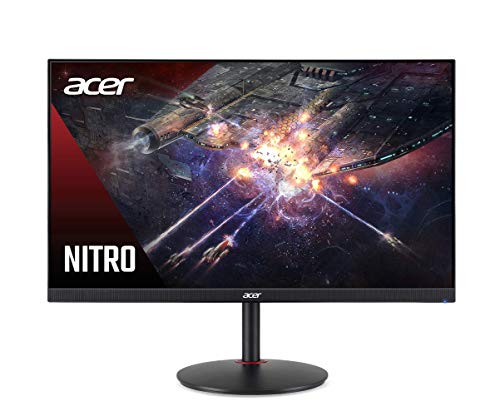
Asus TUF VG27AQ vs Acer Nitro XV272U at a Glance
| Feature | Asus TUF VG27AQ | Acer Nitro XV272U |
|---|---|---|
| Screen Size & Resolution | 27 inches, 2560 x 1440 (WQHD) | 27 inches, 2560 x 1440 (WQHD) |
| Panel Type & Finish | IPS, Matte | IPS, Glossy |
| Maximum Refresh Rate | 165Hz (supports 144Hz, 155Hz OC) | 144Hz |
| Response Time & Blur Tech | 1ms MPRT, ELMB Sync | 1ms VRB, Visual Response Boost |
| Adaptive Sync | G-SYNC Compatible | AMD Radeon FreeSync, G-SYNC Compatible |
| Luminance & HDR | 350 cd/m², HDR10 support | 400 cd/m² peak (350 native), DisplayHDR400 |
| Color Gamut & Accuracy | Color Gamut 99 | DCI-P3, Delta E<2, 1.07 Billion colors |
| Video Inputs | 1 x DisplayPort 1.2, 1 x HDMI 2.0 | 1 x DisplayPort, 2 x HDMI 2.0 |
| USB Connectivity | Not listed (No USB hub) | 4 x USB 3.0 Ports (upstream included) |
| Stand Ergonomics | Height, tilt, swivel, pivot adjustments | Space-saving desk stand (full range not listed) |
| Integrated Audio | Stereo speakers included | 2 speakers (2W per speaker) |
| Power Consumption | 65 watts | Not listed (27 volts operating) |
| Best For | Competitive FPS and fast motion gaming | Color-critical work and mixed gaming setups |
Motion Clarity and Refresh Rate Performance
When tracking fast-moving targets across a 1440p canvas, refresh rates and motion blur reduction methods dictate visual clarity. An in-depth evaluation of the gigabyte m27q2 vs asus tuf vg27aq landscape highlights how Asus has built its reputation on dedicated motion engineering. In this matchup, the Asus VG27AQ features a native 144Hz refresh rate that overclocks to 155Hz and reaches a maximum display ceiling of 165Hz over DisplayPort. Against this, the Acer Nitro XV272U maxes out at a standard 144Hz. Comparing the Acer XV272U refresh rate vs VG27AQ reveals that Asus provides an extra 21 frames per second at full speed, delivering tighter input response and smoother viewport panning during intense gameplay.
Motion clarity differences become even more pronounced when analyzing the proprietary blur-reduction systems. The Acer Nitro XV272U relies on 1ms Visual Response Boost (VRB) alongside standard AMD Radeon FreeSync and G-SYNC compatibility. Like most traditional strobing systems, activating standard strobing on the XV272U generally requires disabling variable refresh rate synchronization. In contrast, any serious Asus TUF VG27AQ review must center on its Extreme Low Motion Blur Sync (ELMB Sync) system. ELMB Sync enables black frame insertion simultaneously with variable refresh rate synchronization, eliminating screen tearing and motion smearing at the same time.
In practice, assessing the Asus VG27AQ vs Acer XV272U motion blur reveals a noticeable advantage for Asus. While both monitors feature a 1ms response rating-MPRT on the Asus and VRB on the Acer-the Asus display maintains exceptional motion definition without introducing screen tearing when frame rates fluctuate. Competitive players who find standard IPS motion smearing distracting will notice cleaner crosshair tracking and crisper target silhouettes on the VG27AQ.
Edge: Asus TUF VG27AQ due to its higher 165Hz ceiling and unique ELMB Sync technology that combines backlight strobing with variable refresh synchronization.
Color Reproduction and Visual Accuracy
Display panels built for mixed use require high fidelity, wide color gamuts, and precise factory calibration. In the discussion of Asus VG27AQ vs Acer XV272U color accuracy, Acer holds a distinct technical edge based on manufacturer specifications. The Acer Nitro XV272U ships with support for the wide DCI-P3 color space, factory-rated Delta E<2 calibration, and 1.07 billion displayable colors via 8-bit+FRC processing. These specifications ensure that color gradations remain smooth without harsh banding in photographic gradients or saturated game environments.
By comparison, the Asus TUF VG27AQ specification sheet identifies a Color Gamut rating of 99, providing standard sRGB-level coverage designed for everyday fidelity rather than wide-gamut mastery. It reproduces 16.7 million colors across its 8-bit IPS panel, matching standard gaming requirements but lacking the professional color grading headroom provided by Acer. Readers examining alternative wide-gamut monitors like the msi mag 275qpf e21 vs acer nitro xv272u will recognize that Acer explicitly tunes the XV272U for color precision right out of the box.
Panel brightness and screen finish also differentiate the viewing experience between these two displays. The Acer Nitro XV272U achieves a peak brightness of 400 cd/m² (350 cd/m² native) backed by VESA Certified DisplayHDR400 compliance, pairing with a glossy panel finish that maximizes perceived color vibrancy and contrast punch. The Asus TUF VG27AQ caps out at 350 cd/m² native brightness with a standard matte anti-glare finish and a 1,000:1 contrast ratio. While the matte finish of the Asus handles ambient light reflections better, the Acer produces richer color saturation and brighter highlights in controlled lighting.
Edge: Acer Nitro XV272U because of its calibrated Delta E<2 accuracy, 1.07 billion color reproduction, DCI-P3 gamut support, and brighter 400 cd/m² peak output.
Connectivity and Peripheral Management
The layout and variety of ports on a monitor determine how easily it integrates into multi-device desks and cable-managed setups. Looking at the Acer Nitro XV272U vs Asus TUF VG27AQ port selections reveals substantial functional differences. Acer outfits the XV272U with one DisplayPort, two HDMI 2.0 ports, and an integrated four-port USB 3.0 hub, even bundling both HDMI and USB upstream cables in the box. This built-in hub allows users to connect wired peripherals like keyboards, mice, flash drives, and external audio gear directly to the monitor, freeing up rear ports on their PC tower.
Conversely, the Asus TUF VG27AQ offers a stripped-down input layout consisting of one DisplayPort 1.2 and one HDMI 2.0 port, with no integrated USB ports or downstream passthrough functionality. Gamers connecting both a PC and a modern home console to the VG27AQ will find their inputs completely filled. If you switch between work laptops and gaming rigs, the lack of a USB hub means routing peripherals directly to your computer or running an external desktop switcher.
For users comparing workstation versatility across models such as the samsung odyssey g7 27 vs acer nitro xv272u, the integrated connectivity of the XV272U simplifies desk wire routing considerably. Having four USB 3.0 ports directly beneath the panel edge makes the Acer display far more accommodating for content creators, productivity multitaskers, and hybrid office workers who constantly plug in external accessories.
Edge: Acer Nitro XV272U due to its integrated four-port USB 3.0 hub and dual HDMI 2.0 inputs.
Stand Ergonomics and Physical Build Quality
Physical adjustability directly impacts neck comfort and posture during extended gaming sessions and long workdays. The Asus TUF VG27AQ features an advanced mechanical stand equipped with full four-way ergonomic adjustments: height adjustment, tilt, swivel, and full 90-degree pivot into vertical portrait orientation. These adjustments allow the monitor to adapt to virtually any desk height or seating arrangement without requiring a third-party monitor arm. Its heavy-duty 12.8-pound construction and substantial 19.96-inch base depth provide rock-solid stability during aggressive mouse movement.
The Acer Nitro XV272U features a lighter physical footprint, weighing in at 10.8 pounds with an overall depth of 9.2 inches. While the Acer listing highlights a space-saving zero-frame design intended for multi-monitor arrays, it does not explicitly specify full height, swivel, or portrait pivot capabilities in its primary data. Buyers who need to rotate their screen vertically for coding or reading documents will find the Asus stand ready out of the box, whereas the Acer may require an aftermarket VESA mounting solution if extensive adjustment is needed.
Both monitors incorporate specialized eye-care technologies to prevent strain over prolonged viewing periods. Asus includes TÜV Rhineland-certified Flicker-free and Low Blue Light backlights under the ASUS Eye Care umbrella. Acer counters with its VisionCare suite, utilizing flicker-less operation, low dimming technology, and a ComfyView anti-glare display treatment. As noted in comparisons like the dell s2725dsm vs asus tuf vg27aq, robust ergonomic adjustability remains a major asset for Asus in desk setup flexibility.
Edge: Asus TUF VG27AQ thanks to its comprehensive stand adjustments offering height, tilt, swivel, and vertical pivot support.
Gaming Features and Dark-Scene Visibility
Competitive multiplayer games demand clear visibility in shadows and quick tactical target acquisition. The Asus TUF VG27AQ incorporates proprietary Shadow Boost technology, which dynamically brightens dark areas in game scenes without overexposing already-bright highlights. This feature gives players a tactical advantage in titles with low-light environments, helping to expose opponents camping in dim corners. Asus also bundles a 3-month Adobe Creative Cloud membership, providing supplementary creative value despite the display’s gaming-centric hardware profile.
Acer approaches in-game visuals with broad compatibility enhancements. The Nitro XV272U is certified for AMD Radeon FreeSync and G-SYNC compatibility, ensuring tear-free rendering across diverse graphics hardware. It also incorporates dual 2-watt integrated stereo speakers, offering a slight step up over the single unspecified internal speaker unit on the Asus VG27AQ for everyday alert sounds or background video streaming. Buyers reading an Acer Nitro XV272U review will note its zero-frame bezel layout, which minimizes the physical border gap when placing two or three displays side by side.
When asking which monitor is better, Asus VG27AQ or Acer XV272U for gaming, the answer depends heavily on gaming genre. For immersive single-player RPGs, open-world adventures, and vibrant strategy games, the Acer Nitro XV272U leverages DisplayHDR400 and high color saturation to produce engaging visual depth. However, for tactical shooters, competitive battle royales, and fast-twitch action titles, the Asus Shadow Boost tool, lower input latency, and ELMB Sync system provide greater practical utility on the battlefield, making it a compelling alternative against screens like the lg 27gs75q-b vs asus tuf vg27aq.
Edge: Asus TUF VG27AQ for its Shadow Boost visibility tuning and competitive gaming feature set.
Pros and Cons
Asus TUF VG27AQ

Pros
- 165Hz maximum refresh rate
- ELMB Sync enables strobing with VRR
- Full four-way ergonomic stand
- Shadow Boost dark area enhancement
Cons
- No integrated USB hub
- Higher 65-watt power consumption
View Asus TUF VG27AQ on Amazon
Acer Nitro XV272U

Pros
- Wide DCI-P3 color coverage
- Factory calibrated Delta E under 2
- Integrated four-port USB 3.0 hub
- Peak brightness reaches 400 cd/m²
Cons
- Maximum refresh rate capped at 144Hz
- Cannot combine blur reduction with FreeSync
View Acer Nitro XV272U on Amazon
Who Should Buy Each One
Choose the Asus TUF VG27AQ If
- You play competitive first-person shooters and need the sharper motion clarity of 165Hz and ELMB Sync.
- You need complete mechanical stand adjustability, including full vertical portrait rotation and height tuning.
- You want tactical visibility enhancements like Shadow Boost to illuminate dark corners in games.
- You prefer a matte screen finish to diffuse direct light and prevent room reflections.
Choose the Acer Nitro XV272U If
- You perform photo editing, digital art, or video production that requires wide DCI-P3 coverage and Delta E<2 accuracy.
- You want a built-in four-port USB 3.0 hub to streamline desktop cable management and connect peripherals.
- You connect multiple gaming consoles or secondary systems using two HDMI 2.0 ports alongside DisplayPort.
- You prefer higher peak luminance and DisplayHDR400 certification for brighter highlight reproduction.
Final Verdict
For dedicated competitive gamers, the Asus TUF VG27AQ is the superior monitor. Its 165Hz maximum refresh ceiling and innovative ELMB Sync technology solve the long-standing compromise between motion blur reduction and screen tearing. When combined with a fully articulated ergonomic stand, Shadow Boost image enhancement, and a glare-resistant matte screen, the VG27AQ provides an exceptional hardware package designed to optimize performance in fast-moving action titles.
However, the Acer Nitro XV272U emerges as the stronger choice for hybrid gamers, content creators, and productivity users. With factory-calibrated Delta E<2 color accuracy, DCI-P3 wide gamut coverage, 1.07 billion colors, DisplayHDR400 brightness, and an integrated four-port USB 3.0 hub, it delivers far greater utility outside of pure esports tracking. If your desk demands a display that transitions seamlessly between creative work, daily computing, and immersive gaming, the Acer Nitro XV272U is the display to buy.
FAQ
Can the Asus TUF VG27AQ run ELMB and adaptive sync at the same time?
Yes. The defining feature of the Asus TUF VG27AQ is its ELMB Sync technology, which allows the monitor to engage backlight strobing to eliminate motion blur while simultaneously using G-SYNC Compatible variable refresh rates to prevent screen tearing.
Does the Acer Nitro XV272U have an integrated USB hub?
Yes. The Acer Nitro XV272U includes a built-in hub featuring four USB 3.0 downstream ports along with an included upstream cable, allowing you to connect peripherals directly through the back of the monitor.
Which monitor has better color accuracy for creative work?
The Acer Nitro XV272U provides superior color accuracy. It features wide DCI-P3 color space support, 1.07 billion colors, and a factory-verified Delta E<2 calibration, whereas the Asus TUF VG27AQ specifies standard Color Gamut 99 coverage with 16.7 million colors.
What is the refresh rate difference between these two monitors?
The Acer Nitro XV272U operates at a native maximum refresh rate of 144Hz. The Asus TUF VG27AQ operates natively at 144Hz, supports a 155Hz overclocked state, and can reach a maximum ceiling of 165Hz over DisplayPort.
Are both displays compatible with Nvidia graphics cards?
Yes. Both the Asus TUF VG27AQ and the Acer Nitro XV272U feature official G-SYNC Compatible certification to ensure tear-free gaming when paired with compatible Nvidia GeForce GPUs.
What are the audio speaker differences between the VG27AQ and XV272U?
The Acer Nitro XV272U includes dual integrated stereo speakers rated at 2 watts per speaker. The Asus TUF VG27AQ also includes built-in speakers, though the listing does not specify their individual wattage output.
How do the screen finishes differ between the two monitors?
The Asus TUF VG27AQ utilizes a matte anti-glare finish designed to scatter ambient reflections in bright rooms. In contrast, the Acer Nitro XV272U listing specifies a glossy panel finish designed to increase visual clarity and contrast punch.


