Choosing between the Alienware AW3423DW and the Alienware AW2725DF comes down to a decisive trade-off between panoramic visual immersion and tournament-grade frame rates. The AW3423DW centers its experience around a wide 34.18-inch curved ultrawide form factor designed to pull your peripheral vision directly into open worlds and simulation cockpits, whereas the AW2725DF strips away physical breadth in favor of a flat 26.7-inch display boasting an incredible 360Hz refresh rate and near-instantaneous pixel transitions for hardcore competitive play.
Gamers who prioritize cinematic single-player campaigns, flight simulators, and expansive desktop workspace will find the Alienware AW3423DW to be their ideal setup. Competitive esports competitors seeking absolute motion clarity, lightning-fast tracking, and low-latency input should invest in the Alienware AW2725DF instead.


Alienware AW3423DW vs AW2725DF at a Glance
| Feature | Alienware AW3423DW | Alienware AW2725DF |
|---|---|---|
| Screen Size and Curvature | 34.18 inches, 1800R Curved | 26.7 inches, Flat |
| Native Resolution | 3440 x 1440 | 2560 x 1440 |
| Aspect Ratio | 21:9 | 16:10 |
| Refresh Rate | 175Hz | 360Hz |
| Gray-to-Gray Response Time | 0.1 ms | 0.03 ms |
| Display Technology | Quantum Dot OLED (QD-OLED) | Quantum Dot OLED (QD-OLED) |
| Contrast Ratio | 1,000,000:1 | 1,500,000:1 (Infinite) |
| Variable Refresh Tech | NVIDIA G-SYNC ULTIMATE | AMD FreeSync Premium Pro, VESA AdaptiveSync |
| Stand Adjustability | Height, tilt, swivel | Height, tilt, swivel, pivot |
| Power Consumption | 200 watts maximum | 27.6 watts |
| Best For | Immersive solo gaming and widescreen workflows | Fast-paced competitive esports tournaments |
Refresh Rate and Motion Clarity
Motion clarity defines how clearly in-game targets remain visible during fast camera sweeps and violent mouse flicks. A display operating at a standard refresh rate shows noticeable frame persistence, creating blur that can obscure opposing player models or critical environmental hazards. High refresh rates combine with low pixel response times to refresh the screen picture so rapidly that movement appears indistinguishable from natural vision.
When comparing the alienware aw3423dwf vs aw2725df and the flagship AW3423DW, the refresh rate gulf stands out immediately. The AW3423DW operates at a capable 175Hz refresh rate paired with a true 0.1ms gray-to-gray response time, which delivers fluid motion that easily surpasses traditional LCD gaming panels. However, the AW2725DF pushes performance into elite territory by offering a 360Hz refresh rate and an ultra-low 0.03ms gray-to-gray minimum response time. In an head-to-head comparison of alienware aw3423dw 175hz vs aw2725df 360hz performance, the 360Hz panel refreshes more than twice as many times each second, virtually eliminating blurring and ghosting during rapid target tracking.
For shoppers deciding between the alienware aw3423dw or aw2725df for esports, this difference in motion resolution translates directly into gameplay execution. While 175Hz provides plenty of smoothness for casual gaming, flight simulators, and story-driven role-playing games, the aw3423dw vs aw2725df motion clarity advantage decisively favors the 360Hz model in fast-paced first-person shooters where tracking micro-movements determines match outcomes.
Edge: Alienware AW2725DF because its blistering 360Hz refresh rate and 0.03ms response time provide vastly superior motion sharpness for competitive titles.
Display Dimensions, Curvature, and Field of View
The physical footprint and aspect ratio of a monitor establish how much content you can view without panning the in-game camera. Ultrawide formats expand your horizontal visual perspective, adding peripheral vision that enhances environmental awareness and cinematic presence. In contrast, standard widescreen formats maintain a compact visual cone, allowing competitive players to monitor their entire field of view, including mini-maps and ammunition counters, without turning their heads.
The AW3423DW features an expansive 34.18-inch diagonal panel with a 21:9 ultrawide aspect ratio and an 1800R curvature. This physical curve wraps around your field of vision, pulling you directly into virtual cockpits and expansive landscapes. In our broader analysis of the alienware aw3423dwf vs aw3423dw, the panoramic canvas of the 3440×1440 resolution provides substantial utility not only for cinematic gaming but also for multitasking across multiple open application windows side-by-side.
By comparison, the AW2725DF utilizes a flat 26.7-inch panel with a 2560×1440 resolution and a listing-specified 16:10 aspect ratio. Because the screen is flat and physically more compact, your eyes can comfortably take in the entire display surface from normal viewing distances. When evaluating the alienware aw3423dw or aw2725df for gaming, the AW3423DW delivers an unmatched sense of grand scale, whereas the smaller AW2725DF prevents tactical fatigue during prolonged competitive gaming sessions.
Edge: Alienware AW3423DW because its 34.18-inch 1800R curved ultrawide screen delivers far greater immersion and peripheral field of view.
Color Reproduction and Visual Dynamic Range
OLED displays achieve perfect black levels by switching individual pixels off completely, generating incredible contrast ratios that bring dark scenes to life without the backlight bleed or glowing halos typical of conventional displays. Quantum Dot OLED (QD-OLED) technology builds upon traditional OLED foundations by using quantum dot layers to emit purer primary colors, boosting overall color volume and delivering higher peak luminance highlights.
Both displays utilize QD-OLED technology to deliver exceptional visual fidelity. The AW3423DW delivers a 1,000,000:1 contrast ratio, support for 1.07 billion colors, 250 cd/m2 typical brightness, and a peak brightness of 1000 cd/m2. It also includes a specialized Creator Mode tailored for color-critical work, giving users direct control to switch between native DCI-P3 and sRGB color profiles while fine-tuning gamma settings. Detailed examination in any thorough alienware aw3423dw review highlights these capabilities as a boon for hybrid users who edit video and photos alongside gaming.
The AW2725DF matches that visual excellence with its own Quantum Dot OLED panel, boasting an infinite 1.5 million:1 contrast ratio, VESA DisplayHDR True Black 400 certification, and a peak brightness listed at 1000 cd/m2. For color precision, the AW2725DF specifies 99.3% DCI-P3 color gamut coverage and factory-calibrated Delta E<2 accuracy. Comparing this visual output against other modern displays, as seen in the alienware aw3423dw vs lg 32gs95ue, proves that both of these Alienware QD-OLED options represent the pinnacle of vibrant contrast and highlight intensity.
Edge: Tie because both monitors employ premium QD-OLED panels delivering identical 1000 cd/m2 peak luminance, true black levels, and professional-grade color accuracy.
Adaptive Sync Support and Competitive Gaming Features
Variable refresh rate (VRR) technology synchronizes the monitor refresh cycle directly to the frame output of your graphics card, eliminating screen tearing and stuttering without introducing the input lag associated with traditional V-Sync. For competitive gamers, having certified synchronization across extreme frame fluctuations ensures that gunfights remain predictable and responsive.
Under the hood, these two monitors take divergent approaches to synchronization hardware. The AW3423DW incorporates dedicated NVIDIA G-SYNC ULTIMATE hardware processing, providing ultra-low latency tear-free performance and native HDR handling across its entire variable refresh range up to 175Hz. This integrated processor guarantees reliable frame synchronization for NVIDIA GeForce graphics card owners, though it introduces specific hardware overhead inside the display casing.
The AW2725DF embraces open standards, featuring AMD FreeSync Premium Pro and VESA AdaptiveSync certifications. This open approach ensures smooth, artifact-free performance across both AMD Radeon and NVIDIA GeForce platforms without requiring proprietary processing silicon. Furthermore, the AW2725DF includes integrated AlienVision visual overlays, which offer hardware-level assists to enhance visibility in dark game environments. As highlighted in comparisons like the alienware aw2725df vs lg 32gs95ue, the AW2725DF provides flexible platform integration alongside dedicated gamer-centric software enhancements.
Edge: Alienware AW2725DF because its dual FreeSync Premium Pro and VESA AdaptiveSync certifications provide broader hardware compatibility alongside dedicated AlienVision overlays.
Physical Ergonomics, Desk Footprint, and Energy Efficiency
The physical engineering of a display dictates how comfortably it integrates into your gaming station. Larger ultrawide displays demand deep desktops and robust mounting surfaces, while compact monitors free up valuable workspace for wide mousepads, low-DPI arm movements, and multi-monitor configurations. Power efficiency is another key consideration, as high-performance display panels draw noticeable energy during marathon gaming sessions.
The AW3423DW features Alienware Legend 2.0 industrial design finished in Lunar Light, complete with stadium loop AlienFX lighting and 360-degree ventilation. Its physical footprint measures 32.1 inches wide, 12 inches deep, and 20.7 inches high, weighing in at a substantial 21.8 pounds. The included stand offers height adjustment, tilt, and swivel, but lacks pivot orientation due to the ultrawide curved shape. In terms of power, the AW3423DW lists a maximum power consumption rating of 200 watts.
The AW2725DF takes a leaner approach, constructed in black with a minimal hexagonal base designed specifically to preserve open desktop surface for expansive mouse maneuvering. Measuring 23.98 inches wide, 9.59 inches deep, and 15.99 inches high with a lighter weight of 13.9 pounds, it fits effortlessly onto compact desks. Its stand offers superior ergonomic flexibility by providing height, tilt, swivel, and full pivot adjustability for vertical portrait viewing. Energy efficiency is another major triumph, drawing just 27.6 watts during operation. In evaluating whether the alienware aw2725df vs samsung odyssey oled g8 represents an efficient desk setup, the AW2725DF stands out for its lightweight footprint and minimal power consumption.
Edge: Alienware AW2725DF because it consumes dramatically less electrical power, incorporates portrait pivot ergonomics, and requires far less desk space.
Pros and Cons
Alienware AW3423DW

Pros
- Curved 34.18-inch 1800R ultrawide immersion
- Panoramic 3440×1440 UWQHD resolution
- Hardware NVIDIA G-SYNC ULTIMATE module
- Dedicated Creator Mode for sRGB and DCI-P3
Cons
- Higher 200W maximum power draw
- Stand lacks portrait pivot adjustment
- Capped at 175Hz refresh rate
View Alienware AW3423DW on Amazon
Who Should Buy Each One
Choose the Alienware AW3423DW If
- You primarily play story-driven RPGs, flight simulators, open-world adventures, and racing games that benefit from an 1800R curved panoramic view.
- You want a wide 3440×1440 desktop workspace that allows you to manage multiple full-sized windows side by side without needing a secondary display.
- You own an NVIDIA graphics card and want the benefits of a dedicated NVIDIA G-SYNC ULTIMATE hardware processor.
- You need Creator Mode functionality to switch seamlessly between calibrated sRGB and DCI-P3 color spaces for photo and video editing tasks.
Choose the Alienware AW2725DF If
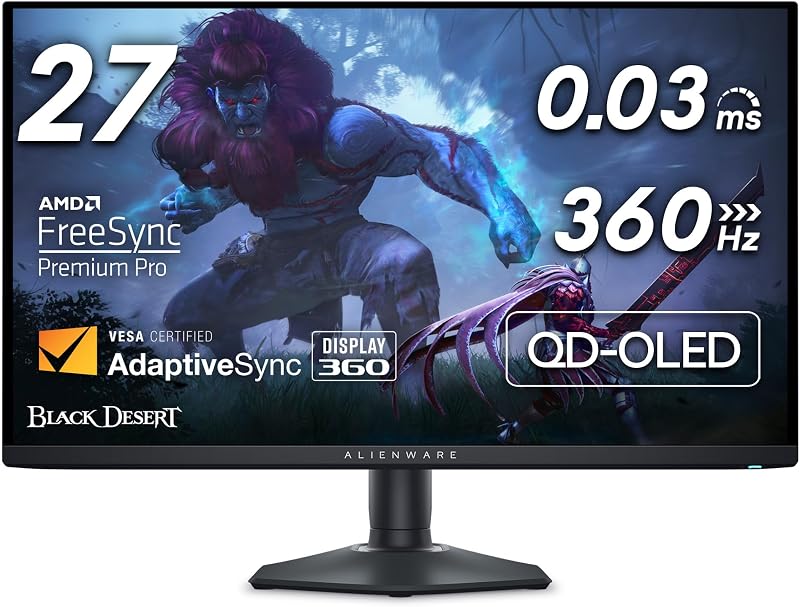
- You compete in high-stakes first-person shooters and esports titles where a 360Hz refresh rate and 0.03ms response time grant a distinct tracking edge.
- You prefer a flat 26.7-inch display that keeps all visual elements within your central field of vision without turning your head.
- You require a fully articulated monitor stand capable of 90-degree portrait pivot for vertical reading, coding, or stream chat management.
- You want an energy-efficient display setup with a compact hexagonal base that preserves maximum mousepad room on your desk.
Final Verdict
For most competitive players and tournament gamers, the Alienware AW2725DF is the superior pick. Its industry-leading 360Hz refresh rate, near-instant 0.03ms pixel transitions, VESA DisplayHDR True Black 400 certification, and nimble desk footprint make it a formidable weapon for fast-paced gaming. When asking if the alienware aw2725df review feedback holds true and whether this high-speed monitor is worth it, its unmatched motion clarity and highly efficient 27.6-watt power draw make the answer a definitive yes for competitive setups.
However, the Alienware AW3423DW remains the reigning champion for gamers who prioritize atmosphere, scale, and graphical grandeur over pure frame rates. If your gaming library revolves around vast open worlds, intricate simulators, and cinematic epics, the 34.18-inch 1800R curved QD-OLED panel wraps your visual senses in deep black levels and vibrant quantum dot color in a way no 27-inch panel can replicate. When deciding between the alienware aw2725df vs aw3423dw, choose the AW3423DW for unmatched visual immersion, and select the AW2725DF to dominate high-speed esports.
FAQ
Can the Alienware AW3423DW run at 360Hz?
No, the Alienware AW3423DW has a maximum native refresh rate of 175Hz at its native 3440×1440 resolution. If you require refresh rates up to 360Hz for competitive gaming, the Alienware AW2725DF is specifically engineered to hit that target.
Does the Alienware AW2725DF support portrait mode orientation?
Yes, the Alienware AW2725DF comes with a fully adjustable stand that includes height, tilt, swivel, and portrait pivot adjustments. This allows you to rotate the 26.7-inch panel 90 degrees into a vertical orientation, unlike the AW3423DW which does not support vertical pivot.
Which monitor consumes less electrical power during operation?
The Alienware AW2725DF is significantly more energy efficient, listing an operational power consumption of just 27.6 watts. In comparison, the Alienware AW3423DW lists a maximum power consumption of 200 watts due to its larger panel size, internal hardware, and G-SYNC ULTIMATE module.
Is the Alienware AW3423DW better for competitive esports than the AW2725DF?
No, the AW2725DF is better suited for competitive esports. Its 360Hz refresh rate, 0.03ms response time, and compact 26.7-inch flat panel allow players to keep all vital visual information in their direct line of sight while tracking moving targets with minimal blur.
What color spaces do these monitors support for creative work?
The Alienware AW3423DW features a dedicated Creator Mode allowing users to select between native DCI-P3 and standard sRGB color spaces with adjustable gamma settings. The Alienware AW2725DF offers 99.3% DCI-P3 color coverage with factory-calibrated Delta E<2 accuracy.
Do both monitors feature curved screens?
No, only the Alienware AW3423DW features a curved display, utilizing an 1800R curvature across its 34.18-inch ultrawide canvas. The Alienware AW2725DF features a traditional flat 26.7-inch screen favored by many competitive esports players.