Choosing between these two tenkeyless mechanical keyboards boils down to a fundamental choice between cutting-edge competitive speed and relaxed, wireless ergonomics. The Logitech G Pro X TKL prioritizes pure input velocity with magnetic Hall-Effect switches and Rapid Trigger responsiveness, while the Logitech G715 focuses on wire-free convenience, physical tactile feedback, and plush desktop comfort.
Pick the Logitech G Pro X TKL if you play competitive first-person shooters where adjustable actuation points and instantaneous key resets deliver a direct performance advantage. Pick the Logitech G715 if you want a clean wireless setup with multi-device Bluetooth flexibility, dedicated tactile switches, and an included cloud-shaped palm rest for all-day typing comfort.

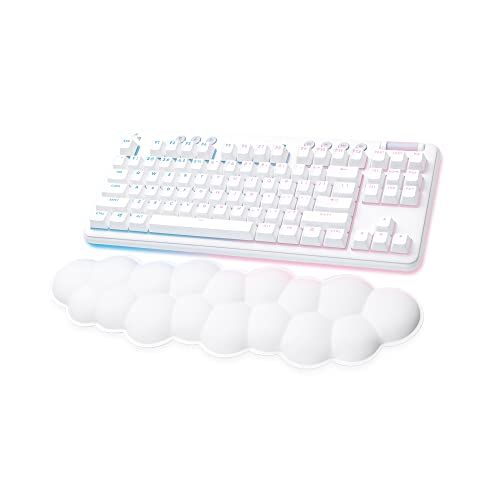
Logitech G Pro X TKL vs Logitech G715 at a Glance
| Feature | Logitech G Pro X TKL | Logitech G715 |
|---|---|---|
| Switch Architecture | Magnetic Analog (Hall-Effect) | Mechanical Tactile (GX Brown) |
| Actuation Force | 35g | Not listed |
| Rapid Trigger Mode | Yes (Dynamic key reset) | No |
| Customizable Actuation | Yes (Per-key via software or FN keys) | No (Fixed mechanical actuation) |
| Connectivity | Wired (Detachable USB-C / USB-A) | LIGHTSPEED Wireless, Bluetooth, USB-C Wired |
| Battery Life | Wired USB power | 25 to 30 gaming hours (Full lighting) |
| Palm Rest | Not included | Cloud-shaped palm rest included |
| Keycaps | Dual-shot PBT | Not listed |
| Platform Compatibility | Windows 10 | Windows 10, MacOS, ChromeOS |
| Best For | Competitive FPS and esports gaming | Ergonomic casual play and wireless setups |
Switch Technology and Input Responsiveness
The core difference in responsiveness comes down to how each keyboard detects a keystroke. The G Pro X TKL uses magnetic analog Hall-Effect switches that register inputs using electromagnetic sensors rather than standard physical metal contacts. This design enables a featherlight 35g actuation force, making the keyboard extraordinarily responsive to the slightest fingertip pressure. Because the sensors measure continuous magnetic depth rather than relying on a static metal leaf contact, you can customize the exact actuation depth for every individual key inside Logitech G HUB. Crucially, it introduces Rapid Trigger functionality, which resets a switch the split second you begin moving your finger upward rather than forcing you to wait for the key to cross a fixed physical reset point. In fast-paced games where rapid counter-strafing, jiggle-peeking, and micro-adjustments dictate the outcome of a gunfight, these magnetic logitech g pro x tkl vs g915 tkl comparisons highlight how analog sensing eliminates physical mechanical delay.
In contrast, the G715 relies on traditional mechanical GX Brown tactile switches. These mechanical switches feature an internal bump that provides distinct physical resistance and tactile feedback right at the point of actuation. While this tactile bump offers satisfying physical confirmation that prevents accidental inputs during typing or slower-paced games, the switch mechanism is entirely fixed. The key must travel to a predetermined depth to trigger, and it must travel upward past a fixed reset point before you can press it a second time. When comparing the logitech g pro x tkl vs g413 alongside standard mechanical boards, the G715 delivers that classic, reliable physical feel, but it cannot offer dynamic reactivation on key release.
For high-level competitive gaming, this difference is substantial. With logitech g pro x tkl switches, dynamic resets allow instantaneous direction changes in tactical shooters without having to lift your finger completely off the keycaps. The G715 delivers predictable mechanical keystrokes that excel in general gaming and typing, but its switches cannot match the microsecond reset times of magnetic sensors. Deciding between the logitech g pro x tkl or g715 for gaming comes down to whether your library demands absolute actuation speed or traditional tactile reassurance.
Edge: Logitech G Pro X TKL because its magnetic Hall-Effect switches offer dynamic Rapid Trigger resets, a light 35g actuation force, and customizable travel depth that physical tactile switches cannot replicate.
Connectivity, Battery Life, and Desk Setup
How a keyboard connects to your computer dictates both desk ergonomics and overall operational convenience. The G715 is engineered around wireless freedom, offering both ultra-responsive LIGHTSPEED 2.4GHz wireless and Bluetooth connectivity, alongside a wired USB-C mode. LIGHTSPEED technology delivers tournament-grade transmission speeds without the clutter of a physical cable stretching across your mousepad. Additionally, the G715 receiver supports dual syncing, allowing you to pair both this wireless mechanical keyboard and a compatible G705 wireless gaming mouse to a single USB receiver, freeing up a valuable port on your desktop or laptop. Its internal rechargeable battery delivers between 25 and 30 gaming hours with full RGB lighting enabled, providing several days of untethered play before requiring a recharge via the included USB-C to USB-A cable.
The G Pro X TKL takes a strictly focused, tournament-oriented approach by utilizing a permanent wired connection through a detachable USB-C to USB-A cable. Running on continuous USB power eliminates battery degradation, removes the risk of sudden mid-match power drops, and avoids any potential wireless signal interference in crowded tournament environments. However, having a persistent cord running across your desk reduces flexibility when positioning your keyboard at extreme tilt angles, a practice common among competitive shooter players who need extra room for wide mouse swipes.
When weighing logitech g915 tkl vs g715 wireless options against wired tournament boards, wire management becomes a decisive factor. The logitech g715 vs logitech g pro x tkl debate reveals an obvious trade-off between clean, cable-free versatility and zero-maintenance wired power. The G715 lets you switch effortlessly between a desktop gaming PC via LIGHTSPEED and a work laptop via Bluetooth, whereas the G Pro X TKL remains permanently tied to a single machine through its USB-C port.
Edge: Logitech G715 because it provides multi-device LIGHTSPEED wireless and Bluetooth connectivity, single-dongle mouse pairing, and a rechargeable battery that clears desk clutter.
Ergonomics, Comfort, and Aesthetic Design
Ergonomics and physical design shape how comfortable you feel during prolonged gaming or work sessions. The G715 is part of Logitech’s Aurora Collection, distinguished by its dreamy White Mist finish, rounded contours, and soft perimeter underglow lighting that complements its per-key RGB illumination. A standout inclusion in the G715 box is the cloud-shaped palm rest, designed to support your wrists and encourage a neutral angle during extended play. Combined with adjustable typing feet on the base, the G715 actively mitigates wrist fatigue. Furthermore, the G715 allows aesthetic customization through swappable top plates and keycap sets in colorways such as Pink Dawn and Green Flash (sold separately), letting you change the keyboard look over time.
The G Pro X TKL embraces an understated, utilitarian aesthetic geared purely toward competitive utility. Built in a stealth black plastic chassis measuring 14.06 inches long, 5.91 inches wide, and 1.5 inches high, it provides a clean, compact footprint that saves mousepad space. However, it does not include a wrist rest or palm support in the box. Players who prefer wrist cushioning must supply an aftermarket rest or rely on hovering typing mechanics, which can increase strain during long gaming marathons.
For shoppers wondering is logitech g715 worth it for daily use, the ergonomic package provides immediate value. Examining the logitech g715 vs mx keys s highlights how dedicated wrist support elevates typing comfort on higher-profile mechanical decks. While the black chassis of the G Pro X TKL fits seamlessly into aggressive esports battle stations, the G715 offers far superior out-of-the-box ergonomic comfort and customizable desktop aesthetics.
Edge: Logitech G715 because the included cloud-shaped palm rest, adjustable typing angles, and customizable perimeter aesthetics provide superior long-session comfort.
Software Customization, Key Layering, and On-the-Fly Tuning
Both keyboards interface with Logitech G HUB software to personalize lighting and key functionality, but the depth of operational control differs drastically between them. The G Pro X TKL features KEYCONTROL technology, a deep customization suite that grants comprehensive command over every individual key. Using KEYCONTROL, players can map complex multi-action combos and assign multiple command layers to single keys. More importantly, the G Pro X TKL allows on-the-fly hardware tuning: using onboard FN key shortcuts, you can calibrate actuation points and adjust Rapid Trigger switch travel instantly without needing Logitech G HUB open or running in the background. This capability is critical for tournament players competing on locked-down stage PCs where downloading third-party software is strictly prohibited.
The G715 handles lighting and standard key mapping through G HUB with a focus on ambiance and simplicity. Its LIGHTSYNC engine features four responsive Play Mood animations that dynamically reflect your play state across 16.8 million colors, alongside customizable perimeter halo lighting. However, because the G715 uses conventional mechanical switches, there are no actuation parameters or travel sensitivities to adjust. Key programming is restricted to standard reassignment and basic macro building without the deep multi-layered command structures offered by KEYCONTROL.
Operating system versatility is another key distinction. The G Pro X TKL listing specifies compatibility with Windows 10 and Windows PC environments. The G715 listing extends native compatibility across Windows 10, MacOS, and ChromeOS, making it substantially more practical for users who swap between a Windows gaming rig and an Apple or Chromebook workstation. Still, any thorough logitech g pro x tkl review must recognize the pure competitive utility of driver-free switch tuning.
Edge: Logitech G Pro X TKL because KEYCONTROL multi-layer macro mapping and driver-free FN switch tuning provide deeper, tournament-ready control.
Build Quality, Materials, and Long-Term Durability
Material choices directly influence keycap wear, surface shine, and physical switch longevity over millions of actuations. The G Pro X TKL comes equipped with dual-shot PBT keycaps straight out of the box. PBT plastic is denser and far more durable than standard plastics, resisting the greasy shine and surface smoothing that heavy fingertip friction causes over time. The dual-shot molding process ensures legends are molded directly into the structure of the keycap, preventing the lettering from ever fading or chipping away. Furthermore, because Hall-Effect magnetic switches rely on contactless sensors rather than physical metal leaves rubbing together, there are fewer moving wear points to degrade under intense competitive use.
The G715 features a sturdy plastic enclosure and satisfying mechanical tactile switches, but its listing data does not specify dual-shot PBT keycap construction. While its modular design lets you swap the top plate and keycaps using separately sold Aurora Collection accessories, the stock keycaps do not carry the explicit PBT durability rating found on its competitive counterpart. Standard mechanical switches also rely on physical leaf contacts inside every switch housing, which face typical mechanical wear over years of aggressive tapping.
Both models feature dedicated media controls, including a tactile volume roller and control keys that let you manage playback without alt-tabbing away from your game. Examining the logitech g413 vs g715 illustrates how premium dedicated media rollers improve user experience across gaming keyboards. However, the combination of non-contact magnetic switches and factory dual-shot PBT keycaps gives the G Pro X TKL a distinct durability advantage under heavy, repetitive gaming loads.
Edge: Logitech G Pro X TKL because its dual-shot PBT keycaps and non-contact magnetic switches offer superior resistance against physical wear and legend fading.
Pros and Cons
Logitech G Pro X TKL

Pros
- Magnetic Hall-Effect analog switches
- Rapid Trigger dynamic key reset
- Customizable actuation with 35g force
- Durable dual-shot PBT keycaps
- KEYCONTROL multi-layer key programming
Cons
- Wired-only USB operation
- No included palm rest
View Logitech G Pro X TKL on Amazon
Logitech G715

Pros
- LIGHTSPEED wireless and Bluetooth connectivity
- Plush cloud-shaped palm rest included
- Up to 30-hour rechargeable battery
- Dual sync mouse receiver pairing
- Compatible with Windows, Mac, ChromeOS
Cons
- Fixed mechanical actuation points
- Lacks Rapid Trigger technology
Who Should Buy Each One
Choose the Logitech G Pro X TKL If
- You play competitive first-person shooters where Rapid Trigger functionality and customizable actuation points provide a concrete mechanical advantage.
- You want featherlight 35g magnetic analog switches that eliminate physical leaf contact delay and wear.
- You demand durable dual-shot PBT keycaps that resist surface shine and keep legends crisp through intense competitive play.
- You travel to gaming events and need to adjust switch actuation on the fly using FN key modes without installing software.
Choose the Logitech G715 If
- You want a clean, cord-free desk powered by low-latency LIGHTSPEED wireless and Bluetooth multi-device pairing.
- You prioritize wrist health and all-day typing comfort with an included cloud-shaped palm rest and adjustable height feet.
- You prefer the classic, physical bump of GX Brown mechanical tactile switches for typing and casual gaming.
- You use multiple operating systems including MacOS or ChromeOS alongside your Windows gaming PC.
Final Verdict
For gamers dedicated to tactical shooters and fast-paced competitive esports, the Logitech G Pro X TKL is the clear victor. Its magnetic Hall-Effect switch architecture, sub-millimeter Rapid Trigger reset speeds, and featherlight 35g actuation force deliver an objective mechanical speed advantage that traditional mechanical switches cannot replicate. Backed by dual-shot PBT keycaps, KEYCONTROL multi-layer programming, and driver-free hardware switch tuning, it stands as an uncompromising performance tool built specifically to help you play at your absolute peak.
However, the Logitech G715 is the superior choice for anyone who values everyday ergonomic comfort, versatile wireless connectivity, and distinctive desktop aesthetics over microsecond input advantages. With its included cloud-soft palm rest, 25 to 30 hours of wireless battery life, multi-device Bluetooth capability, and cross-platform support for Mac and ChromeOS, it delivers a comfortable and charming gaming experience. Choose the G Pro X TKL when victory depends on raw actuation speed; choose the G715 when your priority is a comfortable, cord-free sanctuary on your desk.
FAQ
What is Rapid Trigger on the Logitech G Pro X TKL?
Rapid Trigger is an advanced feature enabled by magnetic Hall-Effect switches that dynamically resets a key the instant you start lifting your finger, without waiting for the switch to cross a fixed mechanical reset point. This allows immediate key reactivation, enabling faster counter-strafing, stopping, and directional adjustments in competitive PC gaming.
Does the Logitech G715 come with a wrist rest?
Yes, the Logitech G715 includes a cloud-shaped palm rest in the box. It is designed to cradle your wrists and promote a comfortable hand position during long gaming and typing sessions.
Can the Logitech G Pro X TKL be used wirelessly?
No, the Logitech G Pro X TKL is a strictly wired gaming keyboard. It draws power continuously through a detachable USB-C to USB-A cable, ensuring zero battery maintenance and completely eliminating wireless signal latency or interference.
How long does the battery last on the Logitech G715?
The Logitech G715 provides between 25 and 30 gaming hours of battery life on a single charge with full RGB backlighting active. It recharges via an included USB-C to USB-A cable and can be used while charging.
Can you adjust the actuation points on the Logitech G715?
No, the Logitech G715 uses traditional GX Brown mechanical tactile switches with fixed physical actuation points. Customizable actuation depth and travel tuning are exclusive to the magnetic Hall-Effect switches found on the Logitech G Pro X TKL.
Can the Logitech G715 connect to a Mac or Chromebook?
Yes, the Logitech G715 supports Windows 10, MacOS, and ChromeOS via its LIGHTSPEED wireless receiver, Bluetooth, or wired USB connection. The Logitech G Pro X TKL listing specifies compatibility with Windows operating systems.
Are the keycaps on the Logitech G Pro X TKL made of PBT?
Yes, the Logitech G Pro X TKL comes equipped from the factory with dual-shot PBT keycaps, which offer enhanced resistance against surface wear, finger oil shine, and legend fading compared to standard keycap materials.


