The fundamental dividing line between these two mice is control layout complexity versus streamlined twitch agility. The Logitech G703 provides a clean, six-button ergonomic shell optimized for rapid target acquisition in competitive shooters, while the Logitech G604 supplies a sprawling fifteen-control layout engineered to handle intricate macro rotations and complex strategic commands.
Choose the Logitech G703 if you demand a lighter chassis, tactile rubber side grips, and continuous wireless charging support for high-speed action. Select the Logitech G604 if you require multi-genre versatility, a six-button thumb grid, dual-mode Bluetooth connectivity, and months of battery endurance without needing a charging cable.

Logitech G703 vs Logitech G604 at a Glance
| Feature | Logitech G703 | Logitech G604 |
|---|---|---|
| Sensor Model | PMW3366 Optical | HERO 16K (Upgradable to HERO 25K) |
| Maximum Sensitivity | 12,000 DPI | 25,600 DPI |
| Programmable Controls | 6 Buttons | 15 Controls |
| Connectivity Options | LIGHTSPEED Wireless, Wired USB | LIGHTSPEED Wireless, Bluetooth |
| Battery Configuration | Internal Rechargeable Lithium Polymer | 1 AA Battery |
| Maximum Battery Runtime | Continuous via POWERPLAY | Up to 240 Hours (LIGHTSPEED) / 5.5 Months (Bluetooth) |
| Report Rate | 1000 Hz (1 ms) | 1000 Hz (1 ms LIGHTSPEED) / 88-133 Hz (Bluetooth) |
| Scroll Wheel Style | Standard Notched Wheel | Dual-Mode Hyper-Fast Metal Wheel |
| Weight | 107 grams | Not listed |
| RGB Lighting | Customizable Brilliant RGB (16.8M Colors) | Not listed |
| Best For | Fast-Paced First-Person Shooters | MMO, MOBA, and Productivity Multi-Tasking |
Programmable Controls and Button Configuration
Button architecture determines how much control you can offload from your keyboard directly onto your mouse hand. In competitive shooters where quick reactions matter most, an uncluttered layout prevents accidental actuations during intense mouse sweeps. In complex role-playing games or productivity setups, having immediate access to a dozen distinct keybindings reduces hand fatigue and speeds up command execution across the board. When examining logitech g502 x plus vs g703, input density is often the main differentiator, and that same principle applies when comparing the G703 to multi-button alternatives.
The G703 keeps its layout focused and streamlined with six programmable buttons. This includes the primary left and right clicks, a clickable scroll wheel, a top DPI cycle button, and two prominent side thumb buttons. Logitech integrates advanced button tensioning featuring metal springs beneath the primary switches, which keeps the left and right buttons primed for rapid actuation while lowering the physical force required to register a click. The result is a crisp, uniform tactile response that aids twitch shooting and rapid-fire tapping in first-person titles.
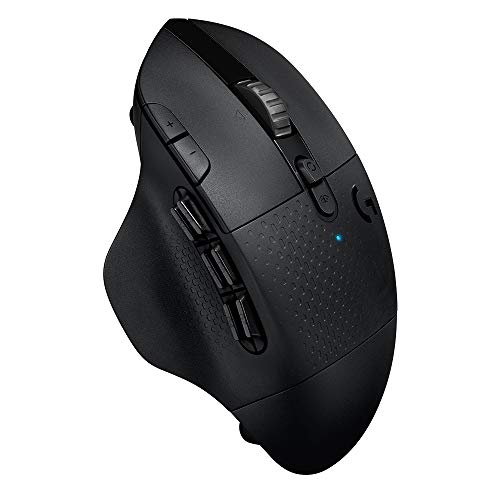
The G604 takes the opposite approach, transforming your right hand into a command hub with 15 programmable controls. The standout feature is its sculpted thumb bank housing six individually contoured buttons arranged in two rows of three. Above, the durable metal scroll wheel introduces programmable tilt inputs alongside standard clicks, allowing for horizontal panning or quick key assignment. Through Logitech G HUB software, every single input can be mapped to custom macros, system commands, or complex multi-key combinations. When evaluating the G703 vs G604 programmable buttons, the G604 provides far deeper customization for tactical execution.
Choosing between a focused layout and a control matrix involves a functional trade-off. The G703 eliminates misclicks by keeping the side panels clean, leaving ample room for a secure grip during abrupt arm movements. The G604 requires deliberate finger placement to distinguish between the six thumb switches, but it completely eliminates the need to reach across your keyboard for inventory slots, spell rotations, or voice chat toggles. Deciding whether you want the Logitech G703 or G604 for MMO gameplay comes down to how heavily your playstyle relies on instant macro execution.
Edge: Logitech G604 delivers vastly superior control density with fifteen customizable inputs and a six-button thumb array.
Battery Architecture and Power Management
A wireless gaming mouse is only as dependable as its power source. Downtime during critical gaming sessions breaks focus, and power systems dictate how you maintain your hardware over weeks and months of heavy use. Some players prefer internal rechargeable cells that top up via cables or charging surfaces, while others prefer disposable or rechargeable AA cells that can be swapped out in seconds without tethering the peripheral to a desk.
The G703 uses an internal Lithium Polymer rechargeable battery pack that operates in harmony with modern desktop setups. For tethered charging, the mouse includes a 1.8-meter data and charging cable that seamlessly converts the unit into a wired mouse while replenishing the cell. Its true strength lies in its compatibility with the Logitech POWERPLAY wireless charging system. When paired with a POWERPLAY mat, the mouse charges continuously through electromagnetic resonance while in use and while resting, effectively removing manual charging from your routine entirely. In an in-depth Logitech G703 Lightspeed review, this set-and-forget ecosystem represents a massive quality-of-life advantage.
The G604 abandons internal rechargeable packs in favor of a single AA battery configuration. By utilizing the ultra-efficient HERO sensor architecture, the G604 squeezes up to 240 hours of continuous high-performance gaming out of a single alkaline or rechargeable AA cell when running in 1 ms LIGHTSPEED wireless mode. When toggled into standard Bluetooth mode for general productivity, the listing specifies endurance extending up to 5.5 months. Comparing logitech g703 vs mx master 3s shows how different power philosophies suit different routines, and the G604 mirrors that productivity-first endurance while retaining competition-grade performance.
Evaluating G703 vs G604 battery life exposes distinct design priorities. The G703 requires periodic wired connection or the purchase of a specialized wireless charging surface to achieve indefinite runtime. The G604 operates untethered for hundreds of gaming hours on an inexpensive AA battery, but it cannot be plugged in with a cable if your battery runs out mid-match. If you hate keeping cables on your desk and want a mouse that stays powered for months without intervention, the G604 provides exceptional autonomy.
Edge: Logitech G604 takes the lead for standalone longevity with up to 240 gaming hours on a single AA battery.
Sensor Architecture and Tracking Precision
Sensor quality dictates tracking consistency, cursor authority, and physical translation across mouse pads. Competitive play demands zero hardware acceleration, predictive smoothing, or pixel filtering, ensuring that a physical flick of three inches correlates to the exact same on-screen displacement every time. Sensor specifications define how fast you can whip your arm across a wide desk pad before the optical tracking engine loses tracking integrity.
The G703 is outfitted with the PMW3366 gaming optical sensor, an optical engine widely recognized among esports enthusiasts for its raw tracking fidelity. The PMW3366 offers a sensitivity spectrum spanning 200 to 12,000 DPI. Throughout this entire range, the sensor operates with zero smoothing, filtering, or artificial acceleration. Communicating over a 1000 Hz USB polling rate, it updates cursor positioning every single millisecond. The tracking feel is immediate and connected, giving competitive shooter enthusiasts the direct physical-to-digital parity required for precise twitch aiming.
The G604 utilizes Logitech’s proprietary HERO optical tracking engine. Originally launched as a HERO 16K unit, the listing confirms this hardware receives a complimentary software update via Logitech G HUB to elevate its tracking ceiling to the HERO 25K standard. This upgrade expands the sensitivity threshold from 100 all the way to 25,600 DPI, accompanied by a maximum tracking velocity exceeding 400 inches per second (IPS). Like the PMW3366, it achieves 1:1 tracking fidelity without smoothing, filtering, or acceleration across its entire sensitivity range, while consuming a fraction of the operating power.
In practical competitive environments, both tracking engines deliver flawless cursor translation without spin-outs or jitter. However, the HERO sensor inside the G604 provides a significantly wider DPI dynamic range and higher maximum tracking velocity. While very few gamers play above 3,200 DPI, the higher tracking headroom and superior energy efficiency make the HERO sensor a technically superior optical package compared to the older PMW3366 engine inside this G703 revision.
Edge: Logitech G604 edges ahead with its upgraded HERO 25K sensor offering 25,600 DPI and over 400 IPS velocity tracking.
Wireless Connectivity and Multi-Device Flexibility
Modern gaming setups frequently bridge the gap between dedicated desktop gaming rigs and portable work systems. Wireless latency used to be an obstacle for serious competitive gaming, but modern wireless protocols now match or exceed traditional wired connections. However, how a mouse negotiates multiple devices can make or break its utility outside of pure gaming sessions.
The G703 relies exclusively on Logitech’s proprietary LIGHTSPEED wireless protocol for cord-free operation. Communicating through a dedicated USB transceiver, LIGHTSPEED achieves a 1 ms report rate that matches standard wired esports peripherals. The listing indicates a wireless operating range of 5.0 meters. When wireless operation is not needed, you can plug in the included 1.8-meter cable to establish a direct wired connection for zero-interference transmission and recharging. However, the mouse lacks Bluetooth hardware, meaning it cannot pair directly with tablets, thin laptops, or secondary workstations without moving the physical USB receiver.
The G604 is built with dual wireless connectivity modes to maximize flexibility across diverse operating environments. Gamers can engage the 1 ms LIGHTSPEED wireless protocol for low-latency tournament gaming or tap a dedicated button to switch into Bluetooth mode. In Bluetooth operation, the report rate adjusts between 88 and 133 Hz (7.5 to 11.25 ms response time) to conserve power while providing seamless navigation on secondary computers, laptops, or Mac hardware. The G604 also boasts an extended wireless range of up to 10.0 meters. Comparing logitech mx master 3s vs g604 highlights how the G604 incorporates productivity multi-device switching into a dedicated gaming chassis.
For gamers who balance a high-powered gaming PC alongside a work laptop on the same desk, the G604 offers vastly superior multi-system agility. A single button press switches control from your gaming desktop on LIGHTSPEED to your work laptop over Bluetooth. The G703 requires moving its USB dongle or plugging in the wired charging cable whenever you transition between machines, limiting its flexibility in multi-device offices.
Edge: Logitech G604 wins decisively with dual LIGHTSPEED and Bluetooth modes alongside a 10-meter wireless reach.
Scroll Wheel Mechanics and Navigation
The scroll wheel serves as both an essential weapon-switching interface in first-person shooters and a primary navigation tool for reading documentation, scrolling web pages, and scrubbing media timelines. Wheel construction, stepping resistance, and secondary mechanical modes dramatically influence how a mouse handles outside of combat scenarios.
The G703 features a traditional, stepped gaming scroll wheel wrapped in textured rubber. It utilizes clear mechanical tactile detents that provide defined feedback with every notch of rotation. This tactile indexing is vital in titles like Counter-Strike or Apex Legends, where rolling past an intended weapon slot or misfiring a bunny-hop keybind can lose a round. The wheel click is solid, requiring intentional force that prevents accidental depression when flicking the wheel mid-firefight. It does not offer horizontal tilt or uninhibited free-spinning modes, remaining strictly dedicated to defined, stepped inputs.
The G604 incorporates Logitech’s dual-mode hyper-fast scroll wheel crafted from durable metal. A mechanical toggle switch directly behind the wheel lets you alternate between distinct ratcheted scrolling and an uninhibited, frictionless free-spin mode. In free-spin mode, a quick flick of your finger sends the metal wheel spinning continuously through thousands of spreadsheet rows or lengthy code repositories. Furthermore, the G604 wheel features horizontal tilt actuation, granting two additional programmable inputs directly from your index finger. Those examining logitech mx anywhere 3s vs g604 often note that this hyper-fast scrolling mechanism bridges the gap between gaming speed and office efficiency.
The mechanical versatility of the G604 wheel makes it a vastly more capable tool for users who combine gaming with daily computer tasks. While the G703 provides dependable ratcheting for tactical gear selection, the G604 provides that exact same ratcheted control when desired, while unlocking hyper-fast scrolling and horizontal tilt inputs whenever you need them.
Edge: Logitech G604 takes the category with its dual-mode metal scroll wheel featuring frictionless hyper-scrolling and tilt inputs.
Ergonomics, Chassis Weight, and Grip Build
Physical comfort and chassis weight directly influence muscle fatigue and aim stability over extended gaming marathons. The shape of a mouse dictates how your hand rests during palm, claw, or fingertip grip styles, while outer materials govern your control when hands become sweaty during competitive pressure. Comparing mouse agility, such as looking at logitech g pro x superlight 2 vs g703, demonstrates how physical dimensions and mass dictate twitch performance.
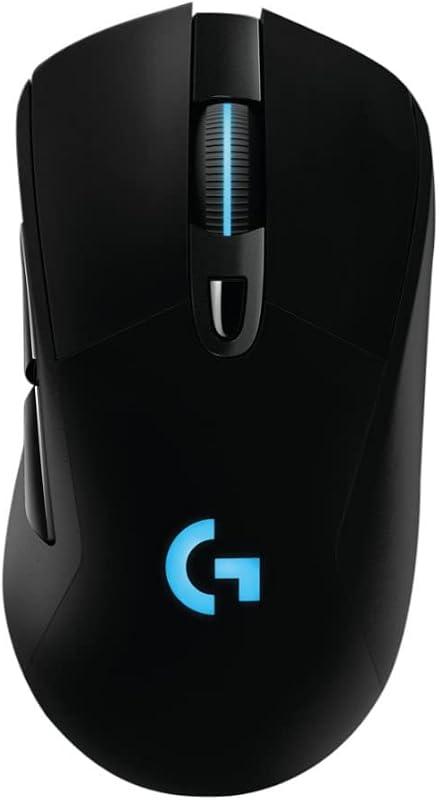
The G703 features an ergonomically sculpted chassis weighing in at 107 grams. Designed to mold naturally into the palm, it features smooth, sweeping contours that support both palm and relaxed claw grips. To ensure uncompromised handling during rapid resets and lift-off repositioning, Logitech equips the G703 with double-injected rubber grips along both the left and right flanks. These rubber side panels provide immediate tactile security, ensuring the mouse never slips from your grasp during fast, high-acceleration maneuvers. Additionally, the G703 incorporates brilliant RGB lighting across the scroll wheel and palm logo, customizable through a palette of 16.8 million colors to personalize your desktop aesthetic.
The G604 adopts a wider, heavily sculpted right-handed profile tailored for prolonged comfort and thumb support. A wide thumb rest extends along the lower left edge of the chassis, preventing your thumb from dragging across the mouse pad while keeping it situated right beneath the six-button thumb grid. The shell is constructed from durable matte materials with metal accents on the scroll wheel. However, because it houses a complex internal switch matrix, a metal wheel assembly, and a physical AA battery chamber, it carries a heavier, more substantial presence on the pad. The listing does not specify its exact weight, but its dense multi-switch construction is clearly built for stability rather than low-inertia flicking.
For competitive shooters, the 107-gram weight and grippy rubber sides of the G703 make it far more nimble when lifting, centering, and flicking across a wide mouse pad. The G604 provides superior resting comfort for marathon sessions where your palm remains stationary, but its sheer density and lack of rubberized side panels make it less suited for high-speed twitch adjustments. Deciding between the Logitech G703 or G604 for FPS titles heavily favors the G703’s lighter, grippier body.
Edge: Logitech G703 wins for competitive ergonomics thanks to its 107g lightweight frame and integrated rubber side grips.
Pros and Cons
Logitech G703
Pros
- Works with POWERPLAY wireless charging
- Lightweight 107g body with rubber grips
- Advanced metal spring button tensioning
- Supports wired and wireless modes
- Customizable 16.8M color RGB lighting
Cons
- Only 6 programmable buttons
- Lacks Bluetooth wireless connectivity
- Lower 12,000 DPI sensor limit
Logitech G604

Pros
- 15 programmable controls with thumb bank
- Up to 240 hours on one AA
- Dual LIGHTSPEED and Bluetooth modes
- Dual-mode hyper-fast metal scroll wheel
- HERO sensor reaches 25,600 DPI
Cons
- Cannot operate in wired mode
- Incompatible with POWERPLAY charging
- No RGB lighting features
Who Should Buy Each One
Choose the Logitech G703 If
- You primarily play competitive first-person shooters that demand rapid twitch aiming, quick mouse resets, and a lighter 107g shell.
- You own or plan to purchase the Logitech POWERPLAY system to enjoy continuous wireless charging without ever plugging in a cable.
- You want tactile rubber side grips and customizable 16.8-million-color RGB lighting integrated into your mouse.
- You value the security of a physical 1.8-meter charging cable for zero-latency wired data transmission whenever necessary.
Choose the Logitech G604 If
- You play MMOs, MOBAs, or complex strategy games requiring a dedicated six-button thumb bank for instant macro execution.
- You juggle multiple computers and need seamless toggling between 1 ms LIGHTSPEED wireless and Bluetooth connectivity.
- You prefer massive battery independence, achieving up to 240 gaming hours or 5.5 months of use from a single AA cell.
- You spend extensive time navigating large spreadsheets, web feeds, or creative timelines using a hyper-fast metal scroll wheel.
Final Verdict
For most competitive action gamers, the Logitech G703 remains the superior weapon of choice. Its ergonomic right-handed shape, double-injected rubber side grips, responsive button tensioning, and 107-gram lightweight construction are tailored specifically for high-speed precision. When integrated with the POWERPLAY wireless charging ecosystem, it eliminates battery maintenance completely, allowing you to focus entirely on game mechanics, aim consistency, and fast-paced competitive play.
However, when asking if the Logitech G604 is worth it, the answer is an emphatic yes for players whose gaming library stretches into MMOs, real-time strategy, and demanding productivity workflows. With 15 programmable controls, a dual-mode hyper-fast scroll wheel, dual LIGHTSPEED and Bluetooth pairing, and up to 240 hours of continuous wireless gaming on a single AA battery, the G604 offers unmatched tactical utility. If your priority is deep macro customization and versatile multi-system productivity, the G604 is the definitive champion.
FAQ
Can the Logitech G604 charge using the Logitech POWERPLAY wireless charging mat?
No, the G604 cannot charge via the POWERPLAY mat. The G604 is powered exclusively by a single replaceable AA battery and lacks the internal resonance hardware and magnetic puck interface required to receive power from the POWERPLAY wireless charging surface.
Does the Logitech G703 support Bluetooth connections?
No, the G703 does not support Bluetooth. It operates wirelessly solely via Logitech’s proprietary 1 ms LIGHTSPEED USB receiver, or in tethered wired mode using the included 1.8-meter micro-USB data and charging cable.
Which mouse is better for competitive FPS games like Counter-Strike or Valorant?
The G703 is significantly better suited for competitive first-person shooters. Its 107-gram weight, double-injected rubber side grips, streamlined six-button layout, and spring-tensioned primary switches make it far more agile and dependable during rapid flick shots than the heavier, multi-button G604.
Can I use the Logitech G604 on multiple computers simultaneously?
The G604 features dual connectivity with LIGHTSPEED wireless and Bluetooth. You can leave the LIGHTSPEED USB transceiver plugged into your primary gaming rig and pair the mouse via Bluetooth to a second system, toggling control between the two machines by pressing the connectivity selector button on top of the mouse.
Does the Logitech G604 include customizable RGB lighting?
No, the G604 does not feature customizable RGB lighting. Logitech omitted RGB illumination on the G604 to maximize power efficiency, allowing the mouse to achieve up to 240 hours of LIGHTSPEED gaming and up to 5.5 months of Bluetooth battery life on a single AA cell.
Can the Logitech G703 be used while the charging cable is plugged in?
Yes, the G703 functions as a fully operational wired mouse when connected via its 1.8-meter charging cable. The cable transmits both power and active data, allowing you to continue playing uninterrupted without needing the wireless transceiver active while replenishing the battery.