Choosing between the Razer DeathAdder V3 and the Razer Viper V3 Pro comes down to whether your aiming technique benefits more from an asymmetrical ergonomic contour designed for palm stability or an ultra-low-latency symmetrical profile bundled with true 8000 Hz wireless hardware. While both mice target top-tier competitive play with sub-56-gram chassis weights, the physical geometry and sensor packages dictate very different handling experiences in hand.
Gamers who prefer full-contact palm or relaxed claw grips and want extended stamina will naturally gravitate toward the DeathAdder V3. Conversely, competitive players who rely on fingertip micro-adjustments, play on specialized glass pads, or demand true 8000 Hz wireless polling right out of the box will get superior performance from the Viper V3 Pro.


Razer DeathAdder V3 vs Razer Viper V3 Pro at a Glance
| Attribute | Razer DeathAdder V3 | Razer Viper V3 Pro |
|---|---|---|
| Chassis Weight | 55 g | 54 g |
| Shape Profile | Ergonomic asymmetrical with smooth-touch texture | Symmetrical esports chassis |
| Optical Sensor | Focus X 26K Optical Sensor | Focus Pro 35K Optical Sensor Gen-2 |
| Maximum Sensitivity | 26,000 DPI | 35,000 DPI |
| Tracking Accuracy | 99.6% resolution accuracy | Not listed |
| Surface Compatibility | Not listed | Tracks on glass and wider variety of surfaces |
| Maximum Polling Rate | Up to 8000 Hz (requires separate dongle purchase) | Up to 8000 Hz (HyperPolling dongle included) |
| Switch Type & Durability | Optical Switches Gen-3 (90 million clicks) | Optical Switches Gen-3 (90 million clicks) |
| Battery Life | Up to 100 hours | Up to 95 hours |
| Programmable Controls | 8 programmable controls | 8 buttons |
| Best For | Ergonomic palm grip and long endurance | Ultra-low-latency esports and multi-surface tracking |
Shape, Ergonomics, and Grip Profiles
The fundamental distinction between these two competitive pointers is physical architecture. In any comparative analysis of the DeathAdder V3 vs Viper V3 Pro shape, chassis geometry immediately dictates how your hand contacts the surface and distributes downward pressure during intense firefights. The DeathAdder V3 features an asymmetrical, ergonomic silhouette engineered alongside esports athletes to follow the natural biomechanics of the hand. Its flared left side, elevated palm arch, and dedicated thumb ledge guide the fingers into a relaxed posture, minimizing hand fatigue across prolonged practice blocks. The exterior is treated with a specialized smooth-touch texture that maintains tactile friction without abrasive texturing, giving palm-grip enthusiasts a reliable hold.
In contrast, the Viper V3 Pro utilizes a streamlined, symmetrical design built specifically around rapid flick mechanics and neutral finger placement. While the technical specifications designate a right-handed orientation with primary side buttons on the left, the profile itself avoids aggressive contours. This flatter, centrally balanced shell allows claw and fingertip grip players to reposition their fingers dynamically without fighting pre-shaped thumb grooves or palm swells. Shoppers exploring a broader razer deathadder v3 vs viper v2 pro comparison will recognize that Razer continues to refine this neutral silhouette to ensure that fast adjustments feel completely unobstructed by the mouse shell.
If you anchor the base of your palm completely against your peripheral, the contoured back of the DeathAdder prevents muscle strain and provides a steady anchor for sweeping horizontal tracking. On the other hand, players who initiate aim adjustments from the wrist and fingers will find the lower, flatter profile of the Viper significantly less intrusive when pulling the mouse downward into the palm during vertical recoil compensation.
Edge: Razer DeathAdder V3 delivers noticeably superior physical comfort and joint support for players who favor full-palm or hybrid ergonomic grips.
Sensor Performance and Surface Compatibility
Sensor capability represents the second major divide between these two gaming mice. The DeathAdder V3 incorporates the Focus X 26K Optical Sensor, which operates with a maximum sensitivity of 26,000 DPI and a proven 99.6% resolution accuracy. This sensor provides flawless, pixel-precise translation on standard cloth and hard composite gaming surfaces. For the vast majority of tactical shooters, this tracking engine offers more than enough headroom, ensuring that micro-flicks and rapid swipes translate into in-game movement without skipping or smoothing artifacts.
Stepping up to the Viper V3 Pro introduces the Focus Pro 35K Optical Sensor Gen-2, which elevates operational limits across the board. Boasting an industry-leading 35,000 DPI ceiling, this upgraded component integrates intelligent tracking algorithms and fine-grained 1-DPI step adjustments. This level of granularity allows competitive players to port their exact legacy sensitivity profiles between different engines without rounding errors. More crucially, the Gen-2 Focus Pro sensor is explicitly validated to track across a wider variety of surfaces, including transparent and frosted glass mousepads that frequently disrupt lesser optical arrays.
When looking at the Razer DeathAdder V3 vs Viper V3 Pro sensor matchup, the Viper V3 Pro holds a distinct technical advantage for enthusiasts utilizing modern specialized mouse surfaces. While both tracking engines interface with the Razer Synapse App and recommend disabling Windows pointer precision for optimal raw input, the Viper V3 Pro provides advanced calibration options that cater to top-flight competitive environments where gear consistency across unpredictable tournament desk setups is mandatory.
Edge: Razer Viper V3 Pro wins with higher peak sensitivity, 1-DPI step tuning, and reliable tracking compatibility on glass surfaces.
Polling Rate and Wireless Connectivity
Wireless signal throughput determines how frequently mouse movement data and button state changes reach your PC. When analyzing the DeathAdder V3 vs Viper V3 Pro polling rate, both mice take advantage of Razer HyperSpeed Wireless protocols engineered to maintain stability in environments dense with competing radio frequencies. Furthermore, both utilize Gen-3 Optical Mouse Switches offering a blistering 0.2 ms actuation time with zero debounce delay and a 90-million click lifespan, entirely eliminating the risk of mechanical double-clicking.
The critical difference lies in what comes packaged inside the retail box. The Viper V3 Pro includes the dedicated Razer HyperPolling Wireless Dongle out of the box, unlocking true 8000 Hz polling capabilities immediately. At 8000 Hz, the Viper sends tracking packets to your computer every 0.125 milliseconds-eight times faster than traditional 1000 Hz peripherals. This dramatic reduction in transmission latency matches high-refresh-rate gaming monitors, creating near-instant cursor response on screen.
The DeathAdder V3 is theoretically upgradeable to the same 8000 Hz polling threshold, but it does not ship with the required high-speed adapter. Instead, running the mouse at ultra-high polling rates requires tracking down and purchasing the Razer HyperPolling Wireless Dongle as an add-on accessory. For buyers comparing options like the razer deathadder v3 pro vs viper v3 pro, having true native high-frequency wireless out of the box makes the Viper a significantly more complete high-performance package.
Edge: Razer Viper V3 Pro takes the lead by including the native 8000 Hz HyperPolling dongle in the box rather than requiring an aftermarket accessory.
Weight and Chassis Balance
In competitive first-person shooters, peripheral mass directly impacts swipe acceleration, stopping power, and physical fatigue over long practice sessions. The DeathAdder V3 clocks in at an impressive 55 grams, making it one of the lightest full-featured ergonomic gaming mice available. Razer accomplished this low weight while retaining an enclosed, non-perforated shell. The internal architecture features a mass-centralized design that balances the center of gravity directly beneath the primary optical sensor, which keeps the front and rear ends from dipping unevenly during aggressive vertical swipes.
The Viper V3 Pro comes in slightly lighter at 54 grams, shaving off a single gram while maintaining a rigid, fully enclosed chassis. In actual competitive usage, a 1-gram disparity is imperceptible to the human hand. However, the distribution of that mass across the smaller, lower-profile footprint gives the Viper a noticeably nimbler feel. Players evaluating whether to choose the razer deathadder v3 vs v3 pro or a symmetrical competitor will find that the symmetrical balance of the Viper V3 Pro facilitates fast wrist flicks and sudden directional reversals with minimal muscular resistance.
Both mice offer exceptional balance without loose internal weight or rattling components, but the subjective feeling of weight is altered by grip shape. The DeathAdder spreads its 55 grams across a larger contact area over the entire hand, whereas the 54 grams of the Viper V3 Pro feels hyper-concentrated beneath the fingertips, reinforcing its appeal for twitch-heavy aiming styles.
Edge: Tie. A single gram separates these designs, with both offering impeccable mass centralization and rigid ultralight builds.
Battery Life and Power Management
Maintaining high wireless performance without frequent downtime is critical for tournament competitors and daily ranked players alike. The DeathAdder V3 holds the advantage in pure battery capacity, providing up to 100 hours of continuous high-performance gameplay on a full charge. Recharging is handled through a standard USB Type-C port on the front nose of the chassis, allowing users to keep playing while tethered to a flexible cable if a battery warning occurs during a competitive match.
The Viper V3 Pro advertises up to 95 hours of competitive gameplay per charge. While five hours less than its ergonomic stablemate, this rating applies when operating under standard wireless conditions. It is important to note that operating the Viper V3 Pro at its maximum native 8000 Hz polling rate significantly increases transmission frequency, drawing substantially more power from the internal lithium-ion battery and reducing operational intervals between charges. The same power drain applies to the DeathAdder V3 if upgraded with the separate HyperPolling dongle.
If uninterrupted wireless longevity at baseline 1000 Hz operation is your primary metric, the DeathAdder V3 delivers better long-term endurance. Both peripherals integrate power-saving routines accessible through Razer Synapse, allowing users to adjust sleep timers and low-power modes to squeeze out every drop of operational life during long gaming weekends.
Edge: Razer DeathAdder V3 edges ahead with a 100-hour maximum runtime compared to the 95-hour ceiling of the Viper.
Competitive FPS Suitability and Control
Determining whether to deploy the Razer DeathAdder V3 or Viper V3 Pro for FPS titles depends entirely on whether your game library prioritizes steady tracking or lightning-fast micro-corrections. In tactical shooters like Counter-Strike 2 or Valorant, crosshair placement, smooth corner checking, and horizontal stability dominate engagements. The sculpted right-hand shell of the DeathAdder locks your palm into a static orientation, reducing inadvertent hand tremors and providing a steady platform for recoil management and holding narrow defensive angles.
In contrast, fast-paced arena shooters and dynamic battle royale titles demand erratic target acquisition, vertical tracking, and instant target switching. The lower, symmetrical shell of the Viper V3 Pro allows fingers to shift leverage instantaneously, empowering rapid 180-degree turnarounds and precise micro-adjustments that are harder to execute when the hand is molded into a fixed ergonomic pocket. Those who follow comprehensive razer deathadder v3 pro vs viper v2 pro discussions will note that competitive duelists consistently choose symmetrical layouts for twitch-heavy play.
Both devices feature 8 programmable controls configured through Synapse, enabling quick access to utility bindings, melee commands, or sensitivity toggles. However, the Viper V3 Pro’s superior surface tracking on glass pads and native high-speed polling create an undeniable competitive advantage for players competing at the highest tiers of fast-paced first-person shooters.
Edge: Razer Viper V3 Pro wins for pure esports twitch aiming, rapid flick control, and uncompromised surface versatility.
Pros and Cons
Razer DeathAdder V3
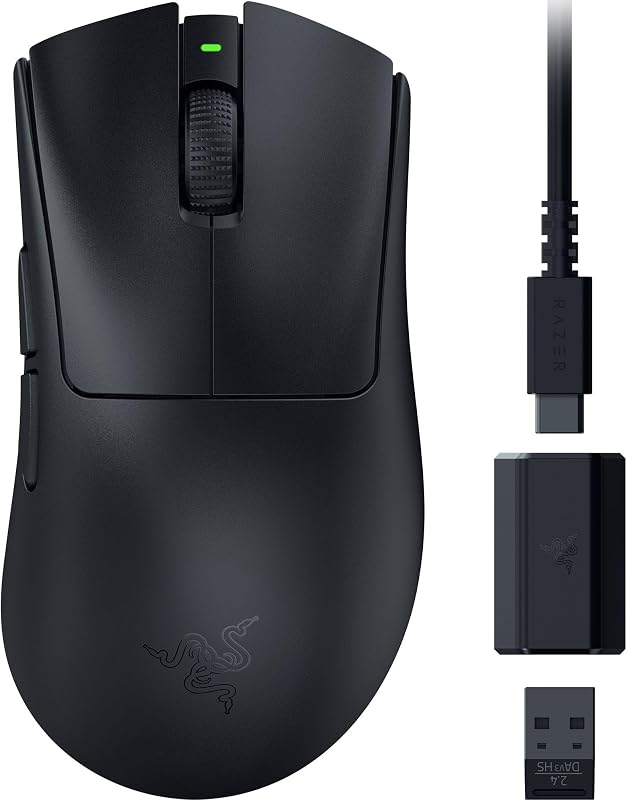
Pros
- Natural ergonomic contour with smooth-touch finish
- Up to 100 hours of battery life
- Lightweight 55g mass-centralized chassis
- Focus X 26K sensor with 99.6% accuracy
- Reliable Gen-3 optical switches
Cons
- Requires separate dongle purchase for 8000 Hz polling
- Sensor lacks glass surface tracking support
View Razer DeathAdder V3 on Amazon
Razer Viper V3 Pro
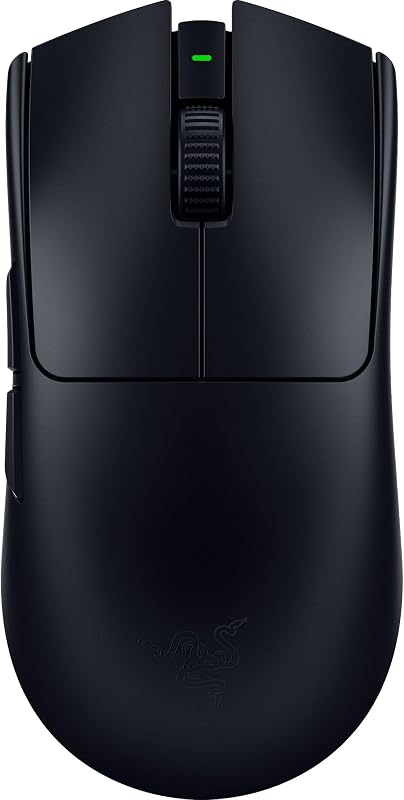
Pros
- Included dongle provides native 8000 Hz HyperPolling
- Focus Pro 35K Gen-2 sensor tracks on glass
- Granular 1-DPI step adjustments
- Ultralight 54g symmetrical esports chassis
- Zero debounce delay with Gen-3 optical switches
Cons
- Slightly lower battery life at 95 hours
- Less palm support for ergonomic grip styles
View Razer Viper V3 Pro on Amazon
Who Should Buy Each One
Choose the DeathAdder V3 If
- You use a palm or relaxed claw grip and need ergonomic contours to avoid wrist strain during long sessions.
- You prefer maximum wireless longevity, with up to 100 hours of continuous gameplay between charges.
- You play tactical shooters where crosshair placement and steady horizontal tracking are more valuable than rapid micro-flicks.
- You want a lightweight 55g build but prefer the tactile comfort of a smooth-touch ergonomic shell.
Choose the Viper V3 Pro If
- You want true 8000 Hz HyperPolling wireless capabilities immediately without having to purchase a separate dongle.
- You play on hard glass mousepads and need a sensor engine explicitly optimized for non-standard surfaces.
- Your aiming style relies on fingertip adjustments or aggressive claw grips that require a flat, symmetrical chassis.
- You demand the Focus Pro 35K Gen-2 optical sensor with granular 1-DPI step adjustments for exact sensitivity matching.
Final Verdict
Taking a comprehensive look at the Razer Viper V3 Pro review metrics alongside the DeathAdder V3 specifications reveals two peripherals built for distinct subsets of the gaming community. For the dedicated competitive gamer seeking every technological advantage, asking is Viper V3 Pro worth it yields a resounding yes. By packaging native 8000 Hz wireless hardware in the box alongside the Focus Pro 35K Gen-2 optical sensor and a versatile 54g symmetrical body, Razer created an elite tournament weapon that justifies its positioning. If your playstyle revolves around high-speed flicks, vertical tracking, or modern glass mousepads, the Viper V3 Pro is the definitive pick.
Conversely, gamers wondering is DeathAdder V3 worth it will find immense value if their priority is physical health, grip comfort, and dependable endurance. The DeathAdder V3 provides top-tier tracking through its Focus X 26K sensor, lightning-fast 0.2 ms optical switches, and a 100-hour battery life inside an ergonomic 55g shell that supports the hand better than any symmetrical pointer can. Unless you actively require native 8000 Hz polling or plan to game on glass, the ergonomic stability of the DeathAdder V3 will serve the vast majority of players with unmatched daily comfort, making it a compelling alternative to bulkier options featured in our razer deathadder v3 pro vs basilisk v3 pro guide.
FAQ
What is the main difference in the DeathAdder V3 vs Viper V3 Pro shape?
The DeathAdder V3 features an asymmetrical, ergonomic right-handed shape with an elevated palm arch and sculpted thumb groove, making it ideal for palm and relaxed claw grips. The Viper V3 Pro features a flatter, symmetrical chassis optimized for neutral hand placement, rapid fingertip micro-adjustments, and aggressive claw grips.
Does the Razer DeathAdder V3 include the 8000 Hz dongle in the box?
No, the DeathAdder V3 listing specifies that while the mouse is upgradeable to true 8000 Hz polling rates, doing so requires purchasing the Razer HyperPolling Wireless Dongle separately. The Viper V3 Pro includes the HyperPolling Wireless Dongle directly in the package.
Can the Razer Viper V3 Pro track on glass mousepads?
Yes, the Viper V3 Pro is equipped with the Focus Pro 35K Optical Sensor Gen-2, which is explicitly engineered to track reliably across a wider variety of surfaces, including transparent and tempered glass gaming pads. The listing for the DeathAdder V3 does not specify glass tracking capability.
Razer DeathAdder V3 or Viper V3 Pro for FPS: which is better?
For tactical shooters like Counter-Strike 2 where steady tracking and crosshair stability are essential, the ergonomic DeathAdder V3 provides excellent palm support. For fast-paced, high-mobility shooters where quick vertical corrections and snap flicks are critical, the Viper V3 Pro offers better agility, surface compatibility, and lower input latency via native 8000 Hz polling.
How does battery life compare between the two models?
The DeathAdder V3 provides up to 100 hours of continuous gameplay per charge over USB-C, while the Viper V3 Pro offers up to 95 hours under standard wireless operating conditions. Note that utilizing 8000 Hz polling on either mouse will increase power consumption and reduce battery runtime.
Do both mice use the same optical switch technology?
Yes, both models feature Razer Gen-3 Optical Mouse Switches rated for 90 million clicks. These switches utilize light-based actuation to achieve a 0.2 ms response time with zero debounce delay, completely avoiding the mechanical double-clicking issues found in traditional switch designs.


