The single deciding difference between the Razer DeathAdder V3 and the Razer Basilisk V3 is weight versus utility: the DeathAdder V3 provides a stripped-down, 55-gram wireless frame built strictly for competitive speed, while the Basilisk V3 delivers an ergonomic wired command center loaded with 11 programmable buttons, a dual-mode tilt wheel, and full RGB lighting.
Competitive esports players who need rapid target tracking and cable-free movement should choose the DeathAdder V3, whereas gamers who prioritize hand support, extensive macro controls, and versatile scrolling should select the Basilisk V3.


Razer DeathAdder V3 vs Razer Basilisk V3 at a Glance
| Feature | Razer DeathAdder V3 | Razer Basilisk V3 |
|---|---|---|
| Connectivity | HyperSpeed Wireless (USB-C Rechargeable) | Corded USB (5.0m range listed) |
| Weight | 55g Ultra Lightweight | Not listed |
| Sensor | Focus X 26K Optical Sensor (26,000 DPI, 99.6% accuracy) | Optical Sensor (26,000 DPI max sensitivity) |
| Optical Switches | Gen-3 Optical (90M clicks, 0.2ms actuation) | Gen-2 Optical (70M clicks, 0.2ms actuation) |
| Programmable Controls | 8 programmable controls | 11 programmable buttons (including multi-function trigger) |
| Scroll Wheel | Standard tactile scroll wheel | Razer HyperScroll Tilt Wheel (free-spin and tactile modes) |
| Ergonomic Form Factor | Right-handed smooth-touch esports shape | Right-handed iconic shape with thumb rest |
| Lighting | Not listed | 11 Razer Chroma RGB zones with underglow |
| Battery Life | Up to 100 hours | Corded electric (not applicable) |
| Best For | Fast-paced competitive esports and FPS | Custom macro gaming, productivity, and palm comfort |
Weight and Physical Handling
In high-stakes gaming, mouse mass directly dictates how quickly you can initiate a flick and how abruptly you can bring your crosshair to a dead stop. When assessing the DeathAdder V3 vs Basilisk V3 weight, the DeathAdder V3 establishes an immediate advantage for reflex-heavy titles. Engineered with a mass-centralized layout that weighs just 55 grams, it allows your hand and wrist to glide across a mousepad with minimal kinetic friction. This featherlight construction helps eliminate forearm strain during marathon scrims and makes micro-adjustments feel nearly weightless.
The Basilisk V3 takes an entirely different approach to desk handling. While the listing does not specify the exact gram weight for the Basilisk V3, its feature-rich design includes an integrated thumb rest, a multi-part mechanical tilt wheel, and internal RGB illumination zones that naturally add physical heft. Rather than encouraging lightning-fast twitches, the Basilisk V3 provides an anchored, stable feel. Players who compare alternative esports mice in our razer deathadder v3 vs viper v3 pro breakdown understand that extra physical mass creates deliberate tracking rather than sudden acceleration.
Choosing between them on physical handling comes down to whether you prefer total agility or grounded stability. The DeathAdder V3 lets you reset your mouse position repeatedly without inertia fighting your movements. By contrast, the Basilisk V3 stays firmly planted on your desk, giving players who struggle with shaky hands a sense of measured control over their crosshair path.
Edge: Razer DeathAdder V3 for its ultra-lightweight 55-gram balanced architecture that maximizes swipe velocity and minimizes fatigue.
Ergonomics, Shape, and Grip Style
The physical contours of your mouse determine your posture and endurance over several hours of continuous use. Examining DeathAdder V3 vs Basilisk V3 ergonomics reveals two distinct philosophies for right-handed players. The DeathAdder V3 refines Razer’s classic esports shape with the help of professional players, presenting a streamlined arch coated in a smooth-touch texture. This finish provides high traction without abrasive rubber side grips, making it comfortable for claw grips, hybrid grips, and aggressive palm grips that demand quick repositions.
The Basilisk V3 is built around an iconic ergonomic silhouette featuring a broad, flared thumb rest along the left flank. This wing cradles the thumb entirely, preventing it from dragging across the mousepad and encouraging a completely relaxed hand placement. When considering the Razer Basilisk V3 or DeathAdder V3 for palm grip, gamers who prefer resting their entire palm and fingers flat against the chassis will find the Basilisk V3 exceptionally supportive. Similar comfort considerations arise when evaluating the razer deathadder v3 vs v3 pro, where pure competitive contours prioritize hand mobility over resting support.
If you constantly reposition your hand, pick up the mouse to re-center, or execute wide sweeping motions, the sleek edges of the DeathAdder V3 will never snag or restrict your fingers. If you prefer to settle into a static, comfortable hold where every digit has a dedicated resting groove, the Basilisk V3 offers superior structural support for your desk setup.
Edge: Razer Basilisk V3 for its dedicated thumb shelf and deeply sculpted contours that deliver unmatched long-session comfort.
Buttons, Macros, and Control Layout
Input flexibility determines how much complex software functionality you can control directly from your right hand. The Basilisk V3 is a macro powerhouse, sporting 10+1 programmable buttons strategically positioned around its exterior. Among these inputs is Razer’s acclaimed multi-function trigger located forward of the thumb rest, allowing users to execute split-second actions like push-to-talk communication, tactical pings, or temporary DPI shifts without altering their grip posture. This abundance of inputs makes the mouse an indispensable tool for MMOs, action RPGs, and detailed productivity software.
The DeathAdder V3 keeps its configuration focused strictly on essential inputs, offering 8 programmable controls. Rather than cluttering the sides with complex triggers or secondary paddles, it keeps the thumb area clean to avoid unintended actuations during violent mouse sweeps. As we observed when comparing the razer deathadder v3 pro vs basilisk v3, limiting physical buttons on an esports mouse prevents accidental clicks when gripping the frame tightly during clutch gunfights.
Gamers deciding whether the Razer DeathAdder V3 or Basilisk V3 for gaming suits their routine must assess their specific genre demands. If your keybind rotation requires dedicated buttons for inventory slots, voice channels, and skill rotations, the Basilisk V3 is built specifically to accommodate you. If you primarily bind primary fire, alternate fire, jump, and crouch, the streamlined layout of the DeathAdder V3 removes all unnecessary obstacles.
Edge: Razer Basilisk V3 for its extensive 11-button layout and versatile multi-function thumb trigger.
Scroll Wheel Versatility and Lighting
The scroll wheel is often an afterthought on stripped-down gaming hardware, but the Basilisk V3 elevates it to a centerpiece feature. Equipped with the Razer HyperScroll Tilt Wheel, the Basilisk V3 can switch between a tactile cycling mode-ideal for switching weapons or paging through discrete skill bars-and a free-spinning mode that glides smoothly through long documents or endless web feeds. Furthermore, the wheel tilts left and right, adding two additional programmable inputs directly under your index finger.
The DeathAdder V3 adheres strictly to competitive norms by utilizing a standard, well-tensioned tactile scroll wheel. It skips tilt inputs and free-wheeling mechanisms to keep the internal componentry as light and durable as possible. When assessing multi-use hardware like the models in our razer deathadder v3 pro vs basilisk v3 pro overview, mechanical scroll complexity always trades off against weight reduction.
Aesthetics also mark a stark divide between these two peripherals. The Basilisk V3 showcases 11 customizable Razer Chroma RGB lighting zones, complete with full underglow that illuminates your mousepad and syncs dynamically with over 150 Chroma-integrated games. The DeathAdder V3 listing mentions no RGB lighting, focusing its engineering entirely on weight reduction and battery conservation. For an eye-catching desktop battlestation, the Basilisk V3 stands out prominently.
Edge: Razer Basilisk V3 for its multi-mode tilt wheel functionality and vibrant 11-zone Chroma RGB underglow.
Connectivity, Sensor Accuracy, and Switch Durability
Under the shell, internal hardware dictates click responsiveness, tracking reliability, and freedom of movement. The DeathAdder V3 provides complete wireless freedom through Razer HyperSpeed Wireless, backed by a rechargeable USB Type-C connection that delivers up to 100 hours of continuous gameplay. Furthermore, competitive enthusiasts can upgrade the DeathAdder V3 to true 8000 Hz polling rates using the Razer HyperPolling Wireless Dongle. It also integrates third-generation Optical Mouse Switches rated for 90 million clicks with a 0.2 ms actuation speed and no debounce delay, paired with the Focus X 26K Optical Sensor that tracks with 99.6% resolution accuracy across a 26,000 DPI range.
The Basilisk V3 operates as a corded electric peripheral via standard USB, listing a 5.0-meter range for flexible cable management. Because it stays tethered, you never have to monitor battery percentages or plug in a charging cable mid-session. Its internals feature second-generation Razer Optical Mouse Switches rated for 70 million clicks at a blistering 0.2 ms response time without double-clicking, alongside an optical sensor that reaches a matching 26,000 DPI maximum sensitivity. Similar sensor and switch refinements can be examined in our razer deathadder v3 pro vs viper v3 pro analysis.
Both mice offer zero double-clicking issues and instantaneous optical actuation, but the DeathAdder V3 holds the technical advantage. Its Gen-3 switches offer 20 million more clicks of rated lifespan, its Focus X sensor provides documented 99.6% tracking precision, and its wireless design eliminates the desk drag inherent to a corded setup.
Edge: Razer DeathAdder V3 for its wire-free HyperSpeed connectivity, 100-hour battery life, 8000 Hz polling upgradeability, and 90-million-click Gen-3 optical switches.
Pros and Cons
Razer DeathAdder V3
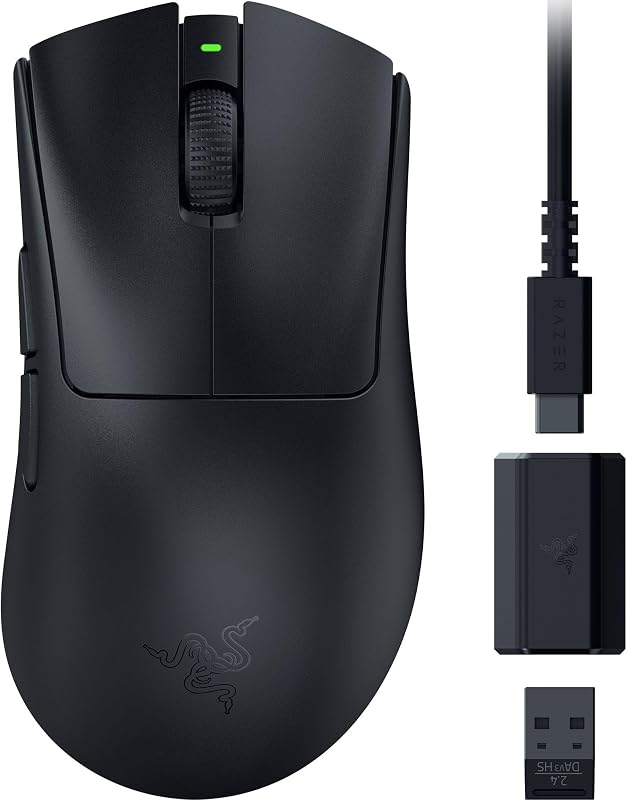
Pros
- Ultra-lightweight 55g mass-centralized frame
- Up to 100 hours wireless battery life
- Gen-3 optical switches rated for 90M clicks
- Focus X 26K sensor with 99.6% accuracy
- Upgradeable to 8000 Hz polling rate
Cons
- Only 8 programmable inputs
- No free-spin or tilt scroll wheel
- No integrated RGB lighting listed
View Razer DeathAdder V3 on Amazon
Razer Basilisk V3

Pros
- 11 programmable buttons including multi-function trigger
- Dual-mode HyperScroll tilt wheel
- Iconic ergonomic shape with thumb rest
- 11 Razer Chroma RGB zones with underglow
- Zero battery charging required
Cons
- Heavier full-featured body with weight not listed
- Tethered corded electric USB connection
- Older Gen-2 optical switches rated for 70M clicks
View Razer Basilisk V3 on Amazon
Who Should Buy Each One
Choose the Razer DeathAdder V3 If
- You play fast-paced competitive shooters and want a 55-gram featherweight frame for lightning-fast flicks and crosshair corrections.
- You require wire-free movement backed by up to 100 hours of battery life and support for ultra-high 8000 Hz polling rates.
- You want high-durability internal components, specifically Gen-3 optical switches rated for 90 million clicks and the Focus X 26K sensor.
- You favor a clean, smooth-touch ergonomic shape without bulky thumb rests or excessive extra buttons getting in your way.
Choose the Razer Basilisk V3 If
- You want extensive control mapping across 11 programmable buttons, including a dedicated multi-function thumb trigger.
- You spend considerable time browsing, editing, or working, and need the dual-mode HyperScroll wheel with free-spin and side-tilt inputs.
- You prefer a relaxing palm grip that completely supports your thumb with an integrated ergonomic rest.
- You love custom battlestation aesthetics and want 11 customizable Razer Chroma RGB lighting zones with complete underglow.
Final Verdict
In this head-to-head matchup, the DeathAdder V3 emerges as the undisputed champion for raw esports performance. If you are debating the Razer DeathAdder V3 or Basilisk V3 for FPS titles, the combination of a 55-gram mass-centralized build, HyperSpeed wireless connectivity, and 90-million-click Gen-3 optical switches makes the DeathAdder V3 significantly faster and less fatiguing in high-intensity matches. It strips away non-essential elements to deliver a pure, high-performance tracking tool that lets your reflexes translate directly to the screen.
However, when evaluating whether the Basilisk V3 is worth it, gamers who view their PC as a versatile station for mixed gaming genres, media consumption, and daily work will find the Basilisk V3 far more practical. Its comfortable thumb rest, 11 programmable inputs, free-spinning tilt wheel, and rich Chroma RGB lighting create a complete desktop command center. Choose the DeathAdder V3 to climb competitive leaderboards; pick the Basilisk V3 if you want ultimate comfort and macro customization at your desk.
FAQ
Which mouse is better for competitive FPS gaming?
The Razer DeathAdder V3 is significantly better suited for competitive FPS titles. Its 55-gram ultra-lightweight chassis allows for faster acceleration and easier stopping control during flick shots, while its wireless design removes cable resistance. Furthermore, its clean button layout prevents accidental misclicks during intense skirmishes.
Can the Razer DeathAdder V3 be used while charging?
Yes, the Razer DeathAdder V3 features a USB Type-C rechargeable design that allows you to plug in the mouse and continue playing while the internal battery replenishes, ensuring you never face downtime during important gaming sessions.
What is the difference between the optical switches on these two mice?
The DeathAdder V3 features Razer Gen-3 Optical Mouse Switches rated for up to 90 million clicks, whereas the Basilisk V3 uses Gen-2 Optical Mouse Switches rated for up to 70 million clicks. Both switches actuate at a rapid 0.2 ms speed without debounce delay and prevent accidental double-clicking.
Does the Razer Basilisk V3 need to be charged?
No, the Razer Basilisk V3 is a corded electric gaming mouse that draws continuous power directly from your PC or laptop via its standard USB connection, meaning it never requires battery charging or battery replacements.
How does the scroll wheel differ between the DeathAdder V3 and Basilisk V3?
The Basilisk V3 features the advanced Razer HyperScroll Tilt Wheel, which offers tactile cycling mode for weapons, free-spinning mode for fast navigation, and horizontal tilt inputs. The DeathAdder V3 utilizes a standard tactile scroll wheel designed strictly for lightweight reliability.
Is the Razer Basilisk V3 or DeathAdder V3 better for palm grip?
The Razer Basilisk V3 is generally favored for traditional palm grip users because of its wide ergonomic base and sculpted thumb rest that cradles your hand. However, the DeathAdder V3 also accommodates palm grip exceptionally well for players who prefer a clean, traditional arch without a wide thumb shelf.


