The primary difference separating the Logitech MX Brio from the Elgato Facecam is how each camera treats video data and user control: the MX Brio prioritizes maximum resolution with an automated 4K feed engineered for collaborative workspaces, whereas the Facecam focuses on low-latency, uncompressed 1080p capture backed by extensive DSLR-style manual settings.
Choose the Logitech MX Brio if you need an ultra-sharp 4K image with built-in beamforming microphones and physical desk-sharing tools for corporate meetings. Choose the Elgato Facecam if you prioritize high-framerate uncompressed capture and fine sensor adjustments for live broadcasting or content creation.


Logitech MX Brio vs Elgato Facecam at a Glance
| Feature | Logitech MX Brio | Elgato Facecam |
|---|---|---|
| Video Resolution | 4K Ultra HD | 1080p Full HD |
| Sensor Type | Other | CMOS |
| Lens Aperture | f/4.0 | f/1.5 – f/2.8 |
| Focus Modes | Autofocus | Autofocus, Manual |
| Video Capture Format | MP4 | Uncompressed (USB 3.0), MP4 (USB 2.0) |
| HDR Video Support | Not listed | 1080p30 HDR |
| Integrated Audio | Dual beamforming microphones | Not listed |
| Software Ecosystem | Logitech Sync, RightSight | Camera Hub |
| Privacy Cover | Lens dial shutter | Easy-slide shutter |
| Best For | Executive meetings and desk presentations | Streaming setups and content creators |
Video Resolution and Image Sharpness
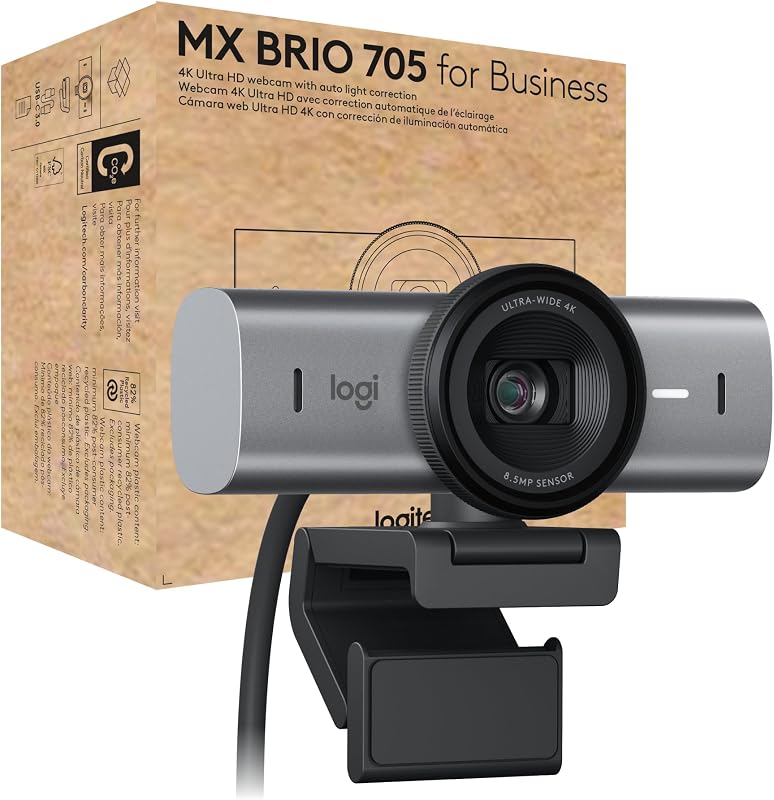
Resolution dictates the raw clarity and pixel density a camera feeds into your computer screen. The Logitech MX Brio captures video at 4K Ultra HD resolution, delivering four times the pixel count of a standard high-definition webcam. In professional calls, this heightened resolution renders fine facial features, fabric textures, and presentation materials with clinical precision. Logitech pairs this resolution with its largest image sensor yet and a custom-designed lens, allowing the camera to produce an authentic image that resists pixelation even when cropped digitally during a call.
In contrast, the Elgato Facecam outputs native 1080p Full HD video backed by a 2.1-megapixel CMOS sensor. While 1080p provides fewer raw pixels than 4K, Elgato routes that data differently than conventional webcams. When comparing the logitech brio 4k vs elgato facecam, the Facecam stands apart by supporting uncompressed video feeds over USB 3.0 at 1080p60, 1080p30, 720p60, and 720p30. Transmitting uncompressed footage eliminates the digital artifacts and motion smearing typical of compressed streams, ensuring crisp edges during rapid head movements. The MX Brio captures in standard MP4 format, leaning on automated AI image enhancements to polish skin tones.
Deciding between the logitech mx brio 4k vs elgato facecam 1080p comes down to whether you value raw pixel volume or uncompressed frame fidelity. The MX Brio produces sharper, higher-density still frames and wide shots, making it ideal for viewing on large 4K computer monitors. The Facecam provides pristine, artifact-free 60 frames per second motion that fits seamlessly into live production pipelines without encoding delay.
Edge: Logitech MX Brio provides significantly higher pixel resolution with its native 4K output for ultra-clear video feeds.
Optics, Aperture, and Low-Light Exposure
Optical hardware determines how much natural light reaches the camera sensor before digital processing intervenes. A wide optical aperture captures more physical light, which prevents software from introducing grainy digital noise when ambient room lighting drops. The Elgato Facecam features an impressive lens with a maximum aperture of f/2.8 and a minimum aperture of f/1.5. An f/1.5 aperture is unusually bright for a desktop webcam, enabling the sensor to gather substantial light in dimly lit gaming rooms or evening home offices.
The Facecam also integrates dedicated high dynamic range capture at 1080p30. This HDR mode helps overcome high-contrast environments, such as setups positioned in front of bright windows or high-output computer monitors, by preserving highlights while lifting shadow details. In head-to-head evaluations like the logitech brio 4k vs elgato facecam mk.2, this optical throughput and dynamic range give Elgato a major advantage in uncontrolled ambient environments.
The Logitech MX Brio is equipped with an f/4.0 aperture (with both minimum and maximum aperture listed at 4 f_stop). An f/4.0 aperture is considerably smaller than Elgato’s f/1.5 opening, meaning less physical light passes through the glass. To compensate, the MX Brio relies on AI-powered image enhancement and automated white balance to maintain natural skin tones. While Logitech’s software algorithm works hard to balance the picture, the hardware foundation of the Facecam lets in substantially more natural illumination.
Edge: Elgato Facecam dominates optical light gathering thanks to its wide f/1.5 to f/2.8 lens and integrated HDR processing.
Software Customization and Manual Settings
Software control determines whether a webcam behaves like a point-and-shoot camera or a configurable studio tool. The Facecam integrates directly into Elgato Camera Hub, software engineered specifically to provide adjustments akin to those found on professional DSLR cameras. In any thorough elgato facecam review, this granular control is a focal point. Users can fine-tune their video feed, switch between autofocus and manual focus, tweak exposure parameters, and rely on built-in face detection to keep key areas balanced. For creators comparing setups against hardware like the logitech mx brio vs elgato cam link 4k, having predictable manual overrides prevents frustrating automatic exposure shifts mid-broadcast.
Logitech approaches camera software from an enterprise-first perspective. The MX Brio supports Logitech Sync, allowing IT departments to remotely update, monitor, and configure webcams across entire corporate fleets. The camera also incorporates a secure boot design that prevents unauthorized firmware tampering. For individual users, the MX Brio focuses on hands-off automation, featuring responsive autofocus, automatic shooting modes, and automated white balance adjustments that track faces in changing light.
While an everyday logitech mx brio review will praise its zero-effort setup for business professionals, power users may find the automated approach limiting. The Facecam caters directly to enthusiasts who want absolute command over their shutter, focus, and framing, while the MX Brio is engineered for effortless corporate deployment where consistency is prioritized over manual fiddling.
Edge: Elgato Facecam wins for users needing granular DSLR-style manual adjustments, while MX Brio focuses on hands-off enterprise automation.
Desk Presentation and Automated Framing
Modern remote work often requires showing physical objects, documents, or sketches during live discussions. The MX Brio addresses this with logitech mx brio show mode. By tilting the camera downward toward the desk surface, the webcam automatically activates Show Mode, flipping the visual orientation so meeting participants can read documents or inspect prototypes right-side up. This hardware-driven feature transforms the camera into an interactive document scanner without requiring extra desktop arms or manual image rotation.
Complementing Show Mode is Logitech’s RightSight auto-framing technology. As you adjust your posture or move in your workspace, the MX Brio dynamically crops and centers the 4K sensor on your face. When assessing the elgato facecam mk2 vs mx brio for collaboration, these mechanical and framing features clearly set Logitech apart. Furthermore, the MX Brio carries official certifications for Microsoft Teams, Zoom, and Google Meet, ensuring guaranteed stability within enterprise ecosystems.
The Elgato Facecam listing highlights face detection, but it lacks dynamic auto-framing and offers no automated desk-presentation modes. Deciding between the logitech mx brio or elgato facecam for zoom calls heavily favors Logitech. The Brio is tailored from the ground up to improve presentation dynamics and engagement during collaborative business meetings.
Edge: Logitech MX Brio takes this category with Show Mode desk sharing, RightSight auto-framing, and official business certifications.
Audio Performance and Integrated Microphones
The audio setup of a webcam determines whether it can serve as a standalone communications hub or requires supplemental peripherals. The Logitech MX Brio comes equipped with integrated dual beamforming microphones. These microphones actively suppress distracting background noise while focusing on the speaker’s vocal frequencies, ensuring voice pickup remains clear even if you move around your desk during a call. For remote professionals seeking a clean workstation without extra audio gear, the MX Brio functions as a complete audiovisual solution.
The Elgato Facecam listing does not specify a built-in microphone. This omission aligns with Elgato’s target audience of video creators and streamers, who virtually always use dedicated USB or XLR microphones. As noted in classic webcam evaluations such as the logitech c920 vs elgato facecam, relying on a camera without integrated audio means you must supply an external microphone to communicate at all.
If you are evaluating whether the product is logitech mx brio worth it based on convenience, the built-in microphone array adds massive practical value. It eliminates the need to clutter your desk with separate audio hardware, cables, and software inputs. The Facecam assumes you already have a broadcast-ready audio pipeline in place.
Edge: Logitech MX Brio wins clearly by integrating dual beamforming noise-reducing microphones, whereas the Facecam listing includes no audio capture hardware.
Build Quality, Privacy Hardware, and Portability
Physical construction affects mounting stability, durability, and daily security. The Logitech MX Brio features a premium modern professional design constructed with solid milled, low-carbon aluminum. Logitech also prioritizes sustainability, utilizing a minimum of 82% post-consumer recycled plastic in its plastic components. Weighing 6.1 ounces, the MX Brio has a reassuring heft that sits firmly atop computer monitors. For privacy, it features an integrated dial shutter: turning the knurled ring around the lens mechanically closes the shutter, providing clear physical confirmation that the camera cannot see you.
The Elgato Facecam opts for an ultra-compact form factor, weighing just 0.09 kg (approximately 3.17 ounces) with dimensions of 0.63 inches deep by 0.36 inches wide by 0.39 inches high. For privacy, the Facecam includes an easy-slide shutter that glides across the front glass element. Deciding between the logitech mx brio or elgato facecam for streaming rigs often involves considering mounting weight on lightweight monitor arms, where the Facecam’s compact footprint is an asset.
Both webcams execute physical privacy protection exceptionally well, avoiding clumsy clip-on caps that are easily misplaced. While the Facecam is lighter and easier to fit into tight streaming rigs, the MX Brio offers a more substantial milled aluminum construction that looks and feels elevated in executive office environments.
Edge: Tie. Logitech MX Brio provides premium milled aluminum construction, while Elgato Facecam offers a lighter, highly compact form factor, and both provide physical privacy covers.
Pros and Cons
Logitech MX Brio
Pros
- Native 4K Ultra HD video resolution
- Dual beamforming noise-reducing microphones
- Innovative Show Mode for desk presentations
- Solid milled aluminum housing construction
Cons
- Fixed f/4.0 lens aperture
- Lacks uncompressed raw video output
View Logitech MX Brio on Amazon
Elgato Facecam

Pros
- Uncompressed 1080p60 capture over USB 3.0
- Bright f/1.5 to f/2.8 variable lens aperture
- High dynamic range HDR mode at 1080p30
- DSLR-like manual controls via Camera Hub
Cons
- No integrated microphone included in listing
- Caps resolution at 1080p Full HD
Who Should Buy Each One
Choose the Logitech MX Brio If
- You need native 4K Ultra HD video resolution for razor-sharp executive video calls and large display presentations.
- You frequently present physical sketches, hardware, or documents on your desk and want automated desk leveling via Show Mode.
- You require an all-in-one unit with dual beamforming microphones certified for Zoom, Microsoft Teams, and Google Meet.
- Your IT organization needs remote fleet management capabilities via Logitech Sync and secure boot architecture.
Choose the Elgato Facecam If
- You stream live video to platforms like Twitch or YouTube and demand low-latency, uncompressed 1080p60 video over USB 3.0.
- You work in varied or challenging lighting conditions that benefit from a wide f/1.5 aperture and dedicated 1080p30 HDR capture.
- You want DSLR-style manual software control over focus, exposure, and white balance via Elgato Camera Hub.
- You already own a dedicated microphone setup and prefer a lightweight, compact webcam without redundant internal audio hardware.
Final Verdict
For the vast majority of business professionals, remote team leaders, and hybrid workers, the Logitech MX Brio is the superior all-around choice. Its combination of native 4K resolution, dual noise-reducing beamforming microphones, RightSight auto-framing, and the ingenious Show Mode makes it an effortless collaboration hub. Because it comes certified for Zoom, Microsoft Teams, and Google Meet, it integrates seamlessly into corporate workflows without requiring extra audio equipment or tedious manual configuration.
On the other hand, the Elgato Facecam is the definitive pick for content creators, live broadcasters, and technical streamers who demand granular control over their video feed. With uncompressed 1080p60 throughput over USB 3.0, a wide f/1.5 aperture, dedicated HDR mode, and deep manual customization in Camera Hub, it behaves more like a dedicated camera sensor than an ordinary webcam. If you already have an external microphone and want pristine, low-latency video you can calibrate to perfection, the Facecam is the right tool for your setup.
FAQ
Does the Elgato Facecam have a built-in microphone?
The Elgato Facecam product listing does not specify a built-in microphone. Unlike standard office webcams, it is designed primarily for streamers and video creators who typically use dedicated USB or XLR microphones for their audio needs.
Can the Logitech MX Brio record uncompressed video?
The Logitech MX Brio listing specifies MP4 video capture rather than uncompressed video output. While it delivers high-resolution 4K video with AI image enhancement, it encodes the stream rather than passing raw, uncompressed frames over USB.
How does Logitech MX Brio Show Mode work?
Show Mode allows you to tilt the MX Brio downward toward your desk to display physical documents, drawings, or products. The camera automatically flips and levels the image so remote participants can read and view your desktop workspace right-side up.
Does the Elgato Facecam support 4K resolution?
No, the Elgato Facecam operates at a maximum resolution of 1080p Full HD with a 2.1-megapixel effective still resolution. Instead of 4K, it focuses on delivering uncompressed 1080p footage at up to 60 frames per second and 1080p30 HDR.
Is the Logitech MX Brio certified for Zoom and Microsoft Teams?
Yes, the Logitech MX Brio is officially certified for Zoom, Microsoft Teams, and Google Meet, and it is also compatible with Windows, macOS, and ChromeOS devices.
Can I adjust the focus manually on both webcams?
The Elgato Facecam listing explicitly supports both autofocus and manual focus adjustments through its Camera Hub software. In contrast, the Logitech MX Brio specifications list autofocus operation without manual focus controls.
Do both webcams feature physical privacy covers?
Yes, both webcams include physical privacy protection. The Logitech MX Brio integrates a rotating lens dial shutter built directly into the camera ring, while the Elgato Facecam features an easy-slide shutter to physically block the lens.


