The single technical difference that decides the choice for most buyers is the divide between dedicated workstation horsepower and 2-in-1 convertible versatility. The Dell XPS 16 functions as a heavy-duty creative powerhouse built around dedicated NVIDIA GeForce RTX graphics and a pixel-dense 4K OLED display, whereas the HP Envy x360 15 prioritizes physical adaptation by pairing an edge-to-edge touchscreen with a 360-degree folding hinge for multiple usage modes.
Creative professionals, 3D artists, and software developers who require substantial rendering capabilities should select the Dell XPS 16. Students, mobile presenters, and casual power users seeking touch-first note taking and laptop-to-tablet flexibility should choose the HP Envy x360 15.

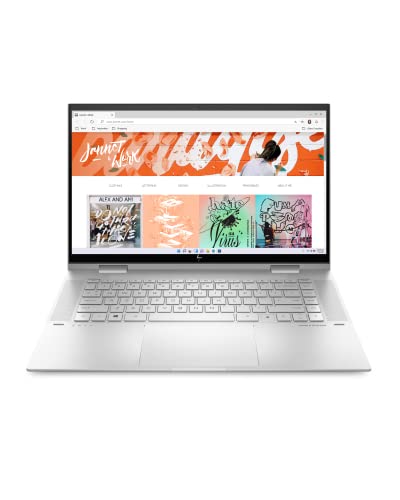
Dell XPS 16 vs HP Envy x360 15 at a Glance
| Feature | Dell XPS 16 | HP Envy x360 15 |
|---|---|---|
| Form Factor | Standard Clamshell | Convertible 2-in-1 |
| Display | 16.3-inch 4K OLED Touch (3840×2400), 120Hz | 15.0-inch FHD Touch (Edge-to-Edge) |
| Processor | Intel Core Ultra 9-285H (16 Cores, up to 5.4GHz) | 12th Gen Intel Core i7-1260P |
| Graphics Coprocessor | NVIDIA GeForce RTX 5060 (8GB GDDR7) | Intel Iris Xe Graphics |
| System Memory | 32GB LPDDR5X | 16GB DDR4 SDRAM |
| Storage Capacity | 1TB PCIe NVMe SSD | 1TB SSD |
| Battery & Charging | 6-cell 99Whr, 130W Type-C Supply | HP Fast Charge (0 to 50% in ~30 min) |
| Connectivity | Wi-Fi 7, Bluetooth 5.4, 3x Thunderbolt 4, SD Reader | Bluetooth, HDMI, USB Ports |
| Chassis Dimensions & Weight | 14.15 x 9.5 x 0.75 inches; Weight not listed | 4.0 pounds; Dimensions not listed |
| Operating System | Windows 11 Pro | Windows 11 Home |
| Best For | Heavy Creative Workflows & 3D Tasks | Everyday Versatility & Flexible Note-Taking |
Processing Power and Graphical Performance
Raw system execution determines how smoothly each machine handles resource-heavy applications, multi-layered timelines, and simulation workloads. The XPS 16 houses a high-tier Intel Core Ultra 9-285H processor configured with 16 physical cores, 16 threads, 6 performance cores, a 24MB cache, and maximum turbo frequencies reaching 5.4GHz. This processing platform operates alongside dedicated NVIDIA GeForce RTX 5060 graphics powered by 8GB of fast GDDR7 video memory. Such dedicated silicon takes full command of render pipelines, hardware ray tracing, video encoding, and graphical simulations that quickly choke mainstream hardware.
By comparison, the Envy x360 15 runs on an Intel Core i7-1260P processor supported by integrated Intel Iris Xe Graphics. While the 12th Gen Intel Core processor dynamically routes computing tasks across performance and efficiency threads to keep office productivity smooth, it lacks a discrete graphics coprocessor. The integrated Iris Xe chip shares system resources and DDR4 memory rather than leveraging independent GDDR7 VRAM. In our analysis of performance-tier notebooks like the dell xps 16 vs hp omen 16, dedicated GPUs establish a distinct performance ceiling that integrated graphics cannot match.
When evaluating the dell xps 16 rtx graphics for intense digital creation, the dedicated hardware acceleration drastically reduces processing times. Users debating the dell xps 16 or hp envy x360 15 for video editing will find that rendering complex multi-stream 4K footage demands the discrete VRAM and higher core count of the XPS 16. The hp envy x360 convertible performance is perfectly tuned for general productivity, web navigation, office suites, and streaming, but it stalls under heavy graphics loads.
Edge: Dell XPS 16, thanks to its 16-core Intel Core Ultra 9 chip and dedicated 8GB GDDR7 RTX 5060 graphics processor.
Display Quality and Visual Precision
Display panels serve as the primary window into your projects, making color fidelity, sharpness, and motion smoothness critical for content creators. The XPS 16 delivers a 16.3-inch OLED touchscreen boasting a native 4K resolution of 3840×2400 pixels and a fluid 120Hz refresh rate. OLED panel architecture allows individual pixels to produce true blacks with infinite contrast ratios, while the high pixel density ensures pinpoint sharpness when retouching high-resolution photography, grading color in film projects, or working with fine vector lines.
The Envy x360 15 features an edge-to-edge 15-inch touchscreen running at standard Full HD (FHD) resolution. While the edge-to-edge glass maximizes usable screen real estate and supports smooth direct touch interaction, its standard resolution provides fewer pixels per inch than Dell’s panel. The listing does not specify a high refresh rate or color gamut coverage for the HP, indicating an industry-standard 60Hz panel suited for web browsing, reading documents, and typical entertainment viewing. Similar trade-offs appear in comparisons like the dell xps 15 vs hp envy x360 15, where standard touch screens trade pixel density for everyday utility.
Comparing the dell xps 16 oled vs hp envy touchscreen reveals distinct operational boundaries. The 120Hz refresh rate on the XPS 16 produces responsive, tear-free scrolling and cursor tracking, which significantly reduces visual fatigue during marathon editing sessions. For users reading a dell xps 16 review to evaluate visual precision, the combination of 4K resolution and OLED contrast provides unmatched clarity, whereas HP’s FHD panel focuses strictly on standard visibility and responsive touch control.
Edge: Dell XPS 16, due to its larger 16.3-inch 4K OLED display, 3840×2400 resolution, and smooth 120Hz refresh rate.
Form Factor and Ergonomic Flexibility
Chassis engineering defines where and how a machine can be deployed throughout a busy workday. The Envy x360 15 features a specialized 360-degree geared hinge that completely transforms the physical operating mode of the PC. Users can transition smoothly from a standard clamshell setup to a propped tent mode for presentations, a stand mode for watching video content, or folded entirely flat into a large tablet for hands-on pen interaction and drawing. Weighing 4.0 pounds in a Natural Silver aluminum chassis, it offers functional versatility across classroom desks, boardroom tables, and collaborative work surfaces.
The XPS 16 adheres to a traditional high-end clamshell form factor, measuring 14.15 inches long, 9.5 inches wide, and 0.75 inches thick in a sleek Platinum finish. While its display includes touch functionality for quick on-screen taps, selections, and gestures, the hinge does not fold back past normal viewing angles. It is designed to sit securely on a desk or workstation mat rather than being held like a digital canvas or folded back for casual handheld tablet navigation. Other portable convertible alternatives, such as the machine analyzed in our dell xps 16 vs hp spectre x360 14 breakdown, illustrate how much physical utility a rotating hinge adds to daily life.
For shoppers deciding between the dell xps 16 or hp envy x360 15 for college, the ergonomic adaptability of HP’s convertible body often proves invaluable. Taking handwritten notes, annotating shared course slides, or collaborating in tight lecture seats is far more natural when a laptop folds into tablet or tent orientations. The fixed clamshell chassis of the XPS 16 is robust and engineered for stationary performance, but it simply cannot match the multi-mode utility of a true convertible.
Edge: HP Envy x360 15, owing to its flexible 360-degree convertible hinge that seamlessly transitions between laptop, tent, stand, and tablet modes.
Memory, System Storage, and Architecture
Memory capacity and storage interfaces establish how many simultaneous tasks a machine can sustain without caching data to slower drives. The XPS 16 comes heavily equipped with 32GB of onboard LPDDR5X RAM alongside a fast 1TB PCIe NVMe solid-state drive. The high-speed LPDDR5X memory standard ensures wide data bandwidth, which prevents bottlenecks when managing heavy virtual machines, scrubbing large video timelines, or opening hundreds of browser tabs and database windows simultaneously. It also arrives preloaded with Windows 11 Pro-64, giving professional users access to built-in enterprise device management and advanced data encryption tools.
The Envy x360 15 arrives with 16GB of system memory and a generous 1TB SSD for local storage. The 16GB memory footprint is well-balanced for contemporary multi-tasking, office workflows, media streaming, and moderate photo tweaks, but the underlying RAM architecture utilizes older DDR4 SDRAM. It runs Windows 11 Home, which includes redesigned Start and productivity features along with built-in HP utility suites like HP Audio Switch, HP BIOS Protection, and HP Command Center, as highlighted in any comprehensive hp envy x360 15 review. Readers reviewing similar balance points in our dell inspiron 14 plus vs hp envy x360 15 comparison will note that 16GB remains the modern sweet spot for mainstream productivity.
The operational gap between 16GB and 32GB becomes evident as projects scale. Creative applications like video editors, graphic design suites, and local development environments easily consume beyond 16GB of RAM. By doubling the memory capacity and utilizing modern LPDDR5X technology, the Dell system provides significantly more headroom for sustained, heavy multitasking without performance degradation.
Edge: Dell XPS 16, providing double the RAM capacity at 32GB LPDDR5X and Windows 11 Pro out of the box.
Port Connectivity and Wireless Standards
Connecting high-speed external peripherals, multi-monitor arrays, and memory cards requires modern interface standards. The XPS 16 is built for high-throughput studio setups, featuring three high-bandwidth Thunderbolt 4 ports, an integrated SD card reader, and a 3.5mm headphone/microphone combo jack. For external visual output, video signals travel directly through the versatile Thunderbolt 4 ports. On the wireless front, Dell equips the laptop with cutting-edge Wi-Fi 7 (802.11be) and Bluetooth 5.4, delivering expansive wireless bandwidth, low latency, and stable pairing with advanced wireless gear.
The Envy x360 15 takes a broader legacy approach to physical connectivity. The listing confirms broad compatibility with external displays, keyboards, mice, storage devices, and printers through dedicated HDMI, USB, and Bluetooth connections. Having a dedicated HDMI port allows users to plug directly into projectors, television screens, and conference room monitors without hunting for USB-C dongles. However, the listing does not specify Thunderbolt certification, and the exact Wi-Fi generation is not listed, making it less specialized for cutting-edge wireless networks. For users comparing peripheral ecosystems across brands, such as in our dell xps 14 vs hp spectre x360 14 evaluation, port selection dictates how many accessories you must carry.
Dell’s inclusion of an integrated full-size SD card reader is a major functional perk for photographers and videographers who constantly transfer camera footage. Combined with three 40Gbps Thunderbolt 4 channels and cutting-edge Wi-Fi 7 networking, the XPS 16 offers a modern high-speed interface profile, while HP focuses on everyday plug-and-play simplicity with HDMI and standard USB.
Edge: Dell XPS 16, thanks to three Thunderbolt 4 ports, a built-in SD card reader, and state-of-the-art Wi-Fi 7 with Bluetooth 5.4.
Battery Capacity and Charging Capabilities
Unplugged stamina and rapid charging capabilities govern how effectively a laptop operates outside of stationary desk spaces. The XPS 16 packs an expansive 6-cell 99Whr battery inside its Platinum chassis, supported by a 130W power supply utilizing Type-C power-in. A 99Whr capacity sits right at the maximum legal threshold allowed on commercial flights, providing a substantial reservoir of power to feed its 16-core processor, high-brightness 4K OLED panel, and dedicated RTX graphics card.
The Envy x360 15 takes a different approach centered around rapid downtime recovery. While the listing does not specify the battery’s total watt-hour capacity, it highlights HP Fast Charge technology, which powers the notebook from 0 to 50% charge in approximately 30 minutes. Operating on a 45-volt architecture with a lower-draw FHD screen and integrated graphics, the HP does not demand the sheer electrical wattage required by a dedicated mobile workstation. When examining battery expectations in portable comparisons like our dell xps 15 vs hp spectre x360 14 breakdown, charging speed often rivals raw capacity in everyday convenience.
When analyzing dell xps 16 battery life, users must account for the heavy energy demands of a 120Hz 4K OLED screen and a discrete GPU. While the 99Whr pack provides massive physical capacity, driving workstation components drains energy steadily. Conversely, the fast-recovery design of HP Fast Charge allows students and remote workers to quickly top off during a short break. However, Dell’s concrete 99Whr specification gives buyers a verified, industry-leading battery size.
Edge: Dell XPS 16, providing a massive, verified 6-cell 99Whr battery alongside a high-output 130W Type-C adapter.
Pros and Cons
Dell XPS 16
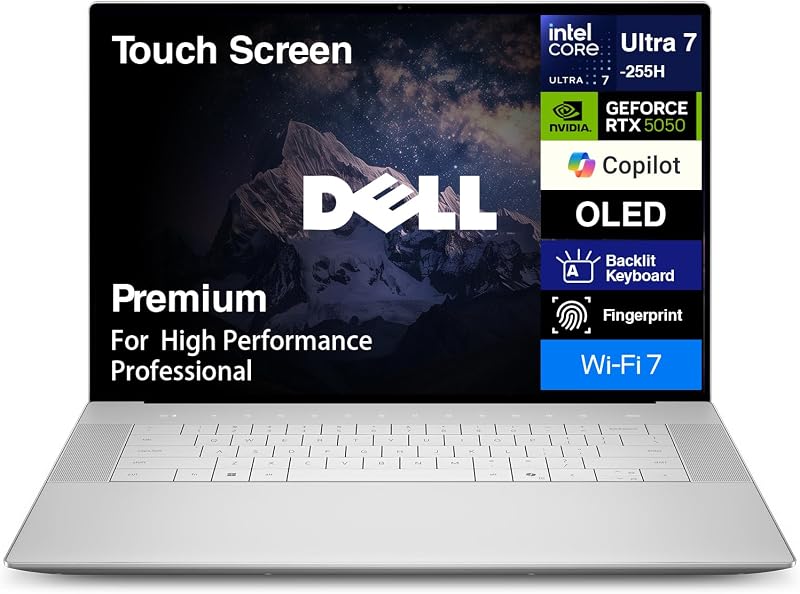
Pros
- NVIDIA GeForce RTX 5060 dedicated graphics
- 3-inch 4K OLED 120Hz touchscreen
- 32GB high-speed LPDDR5X memory
- Three high-bandwidth Thunderbolt 4 ports
- Large 99Whr battery capacity
Cons
- Fixed standard clamshell form factor
- Listing omits carry weight
HP Envy x360 15

Pros
- Flexible 360-degree convertible hinge
- HP Fast Charge reaches 50% in 30 minutes
- Manageable 4-pound chassis weight
- Full-size 1TB solid-state drive
Cons
- Integrated Intel Iris Xe graphics only
- Lower FHD display resolution
- Battery capacity not listed in watt-hours
View HP Envy x360 15 on Amazon
Who Should Buy Each One
Choose the Dell XPS 16 If
- You edit high-resolution 4K video, render 3D assets, or run GPU-accelerated creative applications that require dedicated NVIDIA GeForce RTX 5060 graphics.
- Your workflow demands exceptional visual accuracy, infinite contrast, and smooth motion from a 16.3-inch 4K OLED display with a 120Hz refresh rate.
- You manage massive multitasking sessions and virtual environments that benefit from 32GB of high-speed LPDDR5X memory and Windows 11 Pro.
- You transfer camera media directly via an integrated SD card reader and rely on modern Wi-Fi 7 and Thunderbolt 4 connectivity.
Choose the HP Envy x360 15 If
- You want a versatile 2-in-1 convertible form factor that folds 360 degrees for tablet note-taking, sketching, and media presentations.
- Your computing routine consists of everyday business productivity, online classes, streaming video, and general multitasking via Intel Iris Xe Graphics.
- You value rapid battery recovery, utilizing HP Fast Charge to replenish up to 50% battery capacity in roughly 30 minutes.
- You prefer standard built-in HDMI and USB ports to connect everyday peripherals and external displays without requiring specialized adapters.
Final Verdict
For demanding computing needs and creative workflows, the Dell XPS 16 is the clear superior choice. It outperforms the convertible alternative across nearly every core hardware specification, offering a powerful 16-core Intel Core Ultra 9-285H processor, a dedicated NVIDIA GeForce RTX 5060 graphics coprocessor, 32GB of LPDDR5X RAM, and a verified 99Whr battery. Coupled with a breathtaking 16.3-inch 4K OLED 120Hz touchscreen, cutting-edge Wi-Fi 7, and triple Thunderbolt 4 connectivity, it operates as a comprehensive, top-tier workstation for professionals who prioritize uncompromised visual fidelity and graphical rendering.
On the other hand, the HP Envy x360 15 wins when physical flexibility, classroom ergonomics, and convertible convenience take precedence. If you do not require a dedicated GPU for rendering or gaming, the Envy x360 delivers an adaptable 2-in-1 design that transforms from a traditional laptop into a lightweight tablet or presentation tent in seconds. When asking is hp envy x360 15 worth it, buyers who need a reliable touchscreen machine for college notes, office suites, web collaboration, and swift 30-minute top-ups will find the Envy x360 15 an exceptionally functional daily companion.
FAQ
Does the HP Envy x360 15 support dedicated graphics for gaming?
No, the HP Envy x360 15 relies entirely on integrated Intel Iris Xe Graphics. While it handles casual gaming, media streaming, and everyday office multitasking efficiently, it does not feature a discrete graphics coprocessor for demanding AAA modern gaming or complex 3D graphical workflows.
Can the Dell XPS 16 fold backwards into a tablet?
No, the Dell XPS 16 uses a traditional clamshell chassis. Although its 16.3-inch 4K OLED panel supports touch interaction, the hinge mechanism is built for standard laptop viewing angles and does not rotate 360 degrees into a tablet or tent orientation.
Which laptop is better for creative media production and video editing?
The Dell XPS 16 is far superior for video editing and creative production. It pairs a dedicated NVIDIA GeForce RTX 5060 GPU with 8GB of GDDR7 VRAM, a 16-core Intel Core Ultra 9 processor, 32GB of LPDDR5X RAM, and a 4K OLED display running at 120Hz, providing the rendering muscle and color fidelity required for heavy timelines.
How do the screen resolutions differ between these two models?
The Dell XPS 16 features a high-density 16.3-inch 4K OLED panel with a native resolution of 3840×2400 pixels and a 120Hz refresh rate. The HP Envy x360 15 features an edge-to-edge 15-inch display running at Full HD (FHD) resolution, designed for standard sharpness and direct touch control.
What operating systems come pre-installed on these laptops?
The Dell XPS 16 comes pre-installed with Windows 11 Pro-64, offering professional security and enterprise network management tools. The HP Envy x360 15 comes pre-installed with Windows 11 Home, which includes standard consumer productivity features alongside built-in HP management utilities.
What external ports are available on each laptop?
The Dell XPS 16 provides three Thunderbolt 4 ports, an SD card reader, and a 3.5mm headphone/microphone audio jack. The HP Envy x360 15 offers compatibility with external displays and accessories via dedicated HDMI, USB, and Bluetooth connections.


