The single deciding factor between these two flagship machines comes down to visual fidelity versus raw graphic horsepower: one prioritizes an ultra-sharp 4K OLED touchscreen for creative accuracy, while the other packs an NVIDIA GeForce RTX 5070 graphics card and a 240Hz panel built for blistering gaming frame rates.
Creative professionals and media specialists who demand top-tier pixel density, touch navigation, and extended battery hardware should choose the Dell XPS 16. Competitive players, esports enthusiasts, and heavy 3D renderers who require maximum graphical compute and advanced cooling headroom should opt for the HP Omen 16.


Dell XPS 16 vs HP Omen 16 at a Glance
| Attribute | Dell XPS 16 | HP Omen 16 |
|---|---|---|
| Processor (CPU) | Intel Core Ultra 9 285H (16 cores, 16 threads, up to 5.4GHz) | Intel Core Ultra 9 285H (16 cores, 16 threads, up to 5.4GHz) |
| Graphics Coprocessor (GPU) | NVIDIA GeForce RTX 5060 (8GB GDDR7) | NVIDIA GeForce RTX 5070 (8GB GDDR7) |
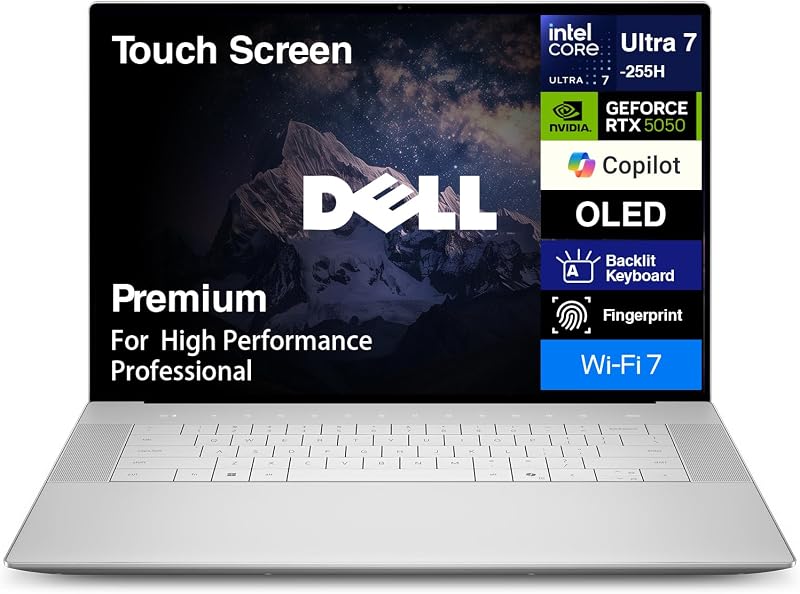
| Display Size and Type | 16.3-inch 4K OLED Touchscreen | 16-inch WQXGA Non-Touch |
| Native Screen Resolution | 3840 x 2400 pixels | 2560 x 1600 pixels |
| Refresh Rate | 120Hz | 240Hz |
| System Memory (RAM) | 32GB LPDDR5X (Onboard) | 32GB DDR5 SODIMM |
| Internal Storage | 1TB PCIe NVMe SSD | 1TB PCIe M.2 SSD |
| Battery and Charging | 6-cell 99Whr battery, 130W Type-C adapter | HP Fast Charge (50% in ~30 min), AC smart pin (Whr not listed) |
| Chassis Dimensions and Weight | 14.15 x 9.5 x 0.75 inches, Platinum (Weight not listed) | 14.07 x 10.89 x 0.89 inches, 5.35 lbs, Black |
| Wireless Connectivity | Wi-Fi 7 (802.11be), Bluetooth 5.4 | Wi-Fi 6, Bluetooth 5.4 |
| Operating System | Windows 11 Pro | Windows 11 Home |
| Best For | Creative professionals and studio visual workloads | Dedicated AAA gaming and competitive esports |
Graphics and Gaming Muscle
Dedicated graphics processors dictate sustained rendering capability, hardware ray tracing speeds, and the overall frame rates you can push in modern software. In this match-up, both machines implement NVIDIA GeForce RTX 50-series laptop GPUs with modern GDDR7 memory, yet they occupy distinctly different tiers of graphics capability. The Dell XPS 16 carries an NVIDIA GeForce RTX 5060 with 8GB of GDDR7 memory. In contrast, the HP Omen 16 steps up to an NVIDIA GeForce RTX 5070 with 8GB of GDDR7 memory based on NVIDIA’s Blackwell architecture, supporting advanced features like DLSS 4 with Multi Frame Generation. When evaluating the Dell XPS 16 vs HP Omen 16 specs, this graphical separation defines how comfortably each system tackles compute-heavy tasks.
When deciding between the Dell XPS 16 or HP Omen 16 for gaming, the graphics chip differences translate immediately to real-world frame rates and thermal stability. While the RTX 5060 in the Dell hardware easily powers mainstream titles and accelerates creative software, the HP Omen 16 RTX 5070 performance provides substantial extra rasterization power, deeper ray tracing capacity, and the headroom needed to sustain higher frame rates at native resolution. Furthermore, the HP machine matches its GPU with a blistering 240Hz refresh rate panel, compared to the 120Hz ceiling on the Dell device. This higher refresh rate on the Omen allows rapid motion and fast-twitch competitive titles to display with supreme fluid motion that a 120Hz panel cannot match.
The graphics configuration also alters how each machine handles multi-tasking and display scaling. Dell configures dual graphics with seamless switching between the integrated Intel graphics and the dedicated RTX 5060, conserving power during mundane desktop sessions. The HP Omen 16 relies on dedicated graphics execution designed to run uninhibited via performance tuning profiles. For gamers seeking high visual fidelity alongside maximum frames per second, the RTX 5070 provides a noticeable performance ceiling jump that outclasses the RTX 5060 under continuous stress.
Edge: HP Omen 16 delivers a more capable RTX 5070 graphics processor and a 240Hz refresh rate that vastly outperform the RTX 5060 in demanding 3D gaming.
Display Quality and Creative Workflow
The screen is your primary interface, determining everything from color evaluation in post-production to micro-contrast during detailed editing sessions. Here, the Dell XPS 16 OLED display establishes an entirely different standard of visual quality. Dell equips its system with a 16.3-inch 4K OLED touchscreen operating at an expansive 3840 x 2400 resolution in a productivity-friendly 16:10 aspect ratio. OLED technology produces per-pixel lighting, resulting in deep, true blacks, infinite contrast, and vibrant color representation that standard LED-backlit panels cannot reproduce. With touch support integrated directly into the glass, navigating timelines and manipulating canvases feels immediate and intuitive.
On the other side, the HP Omen 16 features a 16-inch WQXGA non-touch display running at 2560 x 1600 resolution. While this 2.5K resolution is sharp and well-suited for a 16-inch canvas, it lacks the sheer pixel density and ultra-fine text rendering found on the Dell machine’s 4K panel. However, the Omen screen targets motion clarity rather than extreme pixel density, delivering a 240Hz refresh rate that minimizes motion blur during fast gameplay. For everyday content consumption and gaming, the Omen panel is fast and crisp, but it cannot match the ink-like contrast or touch functionality of Dell’s OLED glass. In creative showdowns like the dell xps 16 vs hp envy x360 15, high-end display panels frequently make or break the purchasing decision.
Choosing the Dell XPS 16 or HP Omen 16 for video editing highlights the value of the Dell laptop’s display panel. The 3840 x 2400 resolution allows video editors to view native 4K footage with room left over for editing toolbars and timelines, without requiring aggressive downscaling. Dell also bundles a full-size SD card reader right into the chassis, allowing photographers and videographers to ingest high-bitrate footage directly from cameras without digging for an external dongle. The HP Omen lacks an integrated SD card slot, meaning creative professionals must rely on external USB adapters for memory card transfers.
Edge: Dell XPS 16 dominates display quality with a breathtaking 4K OLED touchscreen, higher pixel density, and an integrated SD card reader for seamless studio workflows.
Thermal Management and Sustained Power
High-performance components like the Intel Core Ultra 9 285H processor generate significant thermal energy that must be expelled to avoid performance throttling. HP focuses heavily on thermal engineering with its OMEN Tempest Cooling Evolved system. The Omen 16 chassis integrates HP’s new Cryo Compound thermal interface, adds an extra heat pipe to both the CPU and GPU, and packs a higher density of fan blades. According to HP’s specifications, these enhancements allow the laptop to operate 12% quieter and 19% cooler generation-over-generation. Shoppers evaluating whether an dell inspiron 14 plus vs hp omen 16 offers enough thermal headroom will find that HP’s dedicated gaming chassis is tuned specifically for sustained thermal loads.
HP pairs this advanced cooling hardware with fine-grained software controls in the OMEN Gaming Hub. Users can engage Unleashed Mode, a proprietary feature that lets you manually clock system performance beyond stock limits without entering the BIOS. This thermal architecture allows the RTX 5070 and Core Ultra 9 processor to maintain elevated power envelopes over long gaming marathons. In any serious HP Omen 16 review, thermal stability under continuous heavy render cycles consistently stands out as a core design priority for HP’s gaming division.
Dell addresses heat dissipation through a modern internal architecture engineered into a significantly slimmer 0.75-inch chassis. While Dell’s internal structure supports smooth, stable operation for daily productivity and creative exports, the ultra-slim aluminum profile naturally operates under tighter thermal boundaries. The XPS 16 is powered by a 130W Type-C power adapter, which prioritizes clean universal charging over massive wattage delivery. When pushed to maximum compute limits over several continuous hours, the HP Omen 16 cooling suite and its larger internal volume provide superior thermal dissipation and higher sustained boost behavior.
Edge: HP Omen 16 wins on sustained cooling thanks to its Tempest Cooling system, dual-component extra heat pipes, Cryo Compound, and Unleashed Mode overclocking.
Portability, Form Factor, and Battery Hardware
A 16-inch laptop must strike a delicate balance between screen real estate and real-world portability. The Dell XPS 16 measures 14.15 inches long, 9.5 inches wide, and just 0.75 inches thick, wrapped in a sleek Platinum finish. Its slim profile slips effortlessly into standard backpack compartments and messenger bags. While the listing does not specify the exact total weight of the Dell unit, its ultra-thin dimensions and streamlined unibody frame give it an unmistakably premium, executive feel compared to standard desktop replacement machines. Readers reviewing alternatives such as the dell xps 16 vs hp spectre x360 14 often seek out the XPS 16 specifically because it maximizes screen size while preserving a remarkably slim footprint.
The HP Omen 16 takes a bulkier approach to support its high-wattage graphics and cooling pipes. Finished in Shadow Black, it measures 14.07 inches long, 10.89 inches wide, and 0.89 inches thick, weighing in at a substantial 5.35 pounds. That extra thickness and nearly eleven-inch depth make the Omen noticeably more cumbersome to carry on a daily commute or deploy on cramped coffee shop tables. However, the Omen counters its physical heft with practical charging convenience: HP Fast Charge restores the battery from flat to 50% capacity in approximately 30 minutes via its dedicated AC smart pin adapter, minimizing downtime near a wall outlet.
Battery capacity and mobile networking strongly favor Dell’s machine. The XPS 16 integrates an enormous 6-cell 99Whr battery-the maximum legal size permitted on commercial airline flights-ensuring substantial off-plug operational time for creative applications and browsing. Furthermore, Dell equips the XPS 16 with bleeding-edge Wi-Fi 7 (802.11be) and Bluetooth 5.4 wireless hardware. The HP Omen 16 relies on previous-generation Wi-Fi 6 alongside Bluetooth 5.4, and the listing does not specify its internal battery watt-hour rating. For travelers who value slender design, massive battery reserves, and cutting-edge wireless speed, Dell offers the superior mobile package.
Edge: Dell XPS 16 takes the portability crown with its ultra-slim 0.75-inch frame, massive 99Whr battery, and cutting-edge Wi-Fi 7 wireless connectivity.
Connectivity, Keyboard, and Peripheral Ergonomics
Physical ports and everyday input devices govern how smoothly a laptop fits into your workstation setup. Dell takes a minimalist, future-focused approach to external connectivity. The XPS 16 includes three Thunderbolt 4 ports, a 3.5mm headphone/microphone audio combo jack, and an integrated SD card reader. Every Thunderbolt 4 port supports ultra-high-speed data transfers, external display output, and Type-C power delivery. Users who dock into comprehensive single-cable Thunderbolt hubs will appreciate this clean design, although connecting legacy USB thumb drives or standard HDMI monitors requires dongles. As seen in comparisons like the dell xps 16 vs inspiron 14 plus, Dell consistently embraces streamlined USB Type-C architecture across its premium lineup.
HP takes the opposite approach on the Omen 16, equipping the chassis with a full suite of native legacy and modern gaming ports. You get three USB 3.0 Type-A ports, one USB Type-C port (10Gbps with Power Delivery, DisplayPort 1.4, and HP Sleep & Charge), an HDMI 2.1 video output, a dedicated RJ-45 Gigabit Ethernet port, a 3.5mm combo audio jack, and an AC smart pin connector. For competitive gaming, the inclusion of native RJ-45 Ethernet ensures low-latency wired networking without dongles, while three Type-A ports let you connect a gaming mouse, mechanical keyboard, and USB headset simultaneously without requiring a breakout hub.
Keyboard layouts and ergonomics also highlight contrasting philosophies. The HP Omen 16 features a backlit keyboard equipped with a dedicated numeric keypad, which is a major advantage for data entry, macro bindings, and spreadsheet workflows. Dell equips the XPS 16 with a centered standard backlit keyboard flanked by premium audio grilles, along with an integrated fingerprint reader for instant Windows Hello biometric authentication. Dell also preinstalls Windows 11 Pro, offering advanced enterprise security like BitLocker encryption, whereas the Omen ships with Windows 11 Home. Audio on the Omen is tuned with HyperX technology and DTS:X Ultra 360-degree spatial sound, tailored specifically to help players pinpoint directional audio cues like enemy footsteps.
Edge: Tie. HP Omen 16 provides exceptional native port variety, Ethernet, and a numeric keypad, while Dell XPS 16 excels with three Thunderbolt 4 ports, an SD slot, Windows 11 Pro, and fingerprint biometric login.
Pros and Cons
Dell XPS 16
Pros
- 3-inch 4K OLED touchscreen
- Massive 99Whr battery capacity
- Three high-speed Thunderbolt 4 ports
- Cutting-edge Wi-Fi 7 connectivity
- Integrated full-size SD card slot
Cons
- Lower-tier RTX 5060 graphics
- Soldered non-upgradable LPDDR5X RAM
- Lacks native HDMI and Ethernet
HP Omen 16

Pros
- Higher-tier RTX 5070 GPU
- Ultra-fast 240Hz refresh rate
- Advanced Tempest Cooling with Cryo Compound
- Full port array with Ethernet and HDMI
- Upgradable DDR5 SODIMM memory slots
Cons
- Thicker 0.89-inch gaming chassis
- Heavier 5.35-pound carry weight
- Lower resolution non-OLED screen
Who Should Buy Each One
Choose the Dell XPS 16 If
- You need a color-critical 4K OLED display with touch capabilities for photography, design, or 4K video editing.
- You travel regularly and want a slim 0.75-inch laptop with a massive 99Whr airline-safe battery.
- You rely on high-speed Thunderbolt 4 docks, external storage arrays, and an integrated SD card slot for camera media.
- You require professional-grade hardware features, including Wi-Fi 7 wireless networking, Windows 11 Pro, and fingerprint biometric login.
Choose the HP Omen 16 If
- Your primary priority is high-frame-rate gaming powered by the faster NVIDIA GeForce RTX 5070 GPU.
- You play competitive esports titles where a 240Hz refresh rate delivers critical motion fluidity.
- You want advanced OMEN Tempest cooling hardware with Cryo Compound and software-level Unleashed Mode overclocking.
- You prefer plugging in legacy peripherals directly via three native USB-A ports, HDMI 2.1, and wired RJ-45 Ethernet.
Final Verdict
Examining this Dell XPS 16 review against the gaming-focused HP hardware reveals two fundamentally different engineering philosophies built around the same Intel Core Ultra 9 285H processor and 32GB memory footprint. For the vast majority of professionals, content creators, and mobile power users, the Dell XPS 16 represents the more versatile, refined daily driver. Its jaw-dropping 16.3-inch 4K OLED touchscreen, full-size SD card reader, 99Whr battery, Wi-Fi 7 connectivity, and ultra-slim 0.75-inch profile create an elite studio workstation that excels in creative applications and executive productivity.
However, when the objective shifts purely to interactive 3D rendering and high-refresh gameplay, the HP Omen 16 emerges as the definitive victor. Asking whether is HP Omen 16 worth it comes down to graphical compute and thermal endurance: its GeForce RTX 5070 graphics card, 240Hz display, robust Tempest Cooling system, and native Ethernet connectivity run circles around the XPS 16 in demanding gaming scenarios. If you want a mobile creative studio with unmatched visual contrast, pick Dell; if you want an uncompromising gaming rig ready to dominate modern game engines, buy HP.
FAQ
Can the Dell XPS 16 handle modern gaming titles?
Yes, the Dell XPS 16 can comfortably run modern games thanks to its 16-core Intel Core Ultra 9 285H processor and dedicated NVIDIA GeForce RTX 5060 GPU with 8GB of GDDR7 memory. However, its 120Hz refresh rate and slim thermal envelope are tailored more toward content creation than ultra-high-refresh competitive gaming.
Why is the HP Omen 16 better suited for competitive gaming?
The HP Omen 16 features a higher-tier NVIDIA GeForce RTX 5070 graphics card, a 240Hz high-refresh-rate panel, and OMEN Tempest Cooling with Cryo Compound and extra heat pipes. These hardware components allow the system to push higher, more stable frame rates without thermal throttling during intense multiplayer matches.
Does the Dell XPS 16 display support touch input?
Yes, the Dell XPS 16 features a 16.3-inch 4K OLED touchscreen with a resolution of 3840 x 2400 pixels and a 120Hz refresh rate, allowing users to interact directly with creative software, digital documents, and web pages via touch.
Can I upgrade the system memory on these laptops?
The HP Omen 16 uses standard DDR5 SODIMM memory slots and supports expansions up to 64GB of RAM. In contrast, the Dell XPS 16 uses 32GB of onboard LPDDR5X memory that is soldered directly to the motherboard, meaning its RAM capacity cannot be upgraded after purchase.
What ports are available on each laptop?
The Dell XPS 16 features three Thunderbolt 4 ports, an SD card reader, and an audio combo jack. The HP Omen 16 includes three USB 3.0 Type-A ports, one USB Type-C port (with DisplayPort 1.4 and Power Delivery), HDMI 2.1, an RJ-45 Ethernet port, an audio combo jack, and an AC smart pin power connection.
How do the operating systems on these two models compare?
The Dell XPS 16 comes preinstalled with Windows 11 Pro, which provides enterprise-grade management, advanced security tools, and BitLocker device encryption. The HP Omen 16 ships with Windows 11 Home, which includes all standard consumer features and full DirectX 12 Ultimate gaming support. Similar software tier differences are common across laptop matchups, such as in the dell xps 15 vs hp envy x360 15 overview.