Choosing between high-tier desktop-replacement power and effortless mobile convenience represents the definitive contrast between the Asus ROG Strix Scar 16 and the Acer Swift Go 14. The deciding factor comes down to whether your priority centers on raw, dedicated graphics muscle for demanding 3D computational loads, or lightweight everyday portability paired with touch-enabled productivity.
Buyers looking for uncompromising frame rates and extreme workstation-grade rendering will gravitate toward the Asus machine, while mobile professionals and everyday multitaskers who need a travel-ready notebook will find the Acer option far more practical for daily transit.


Asus ROG Strix Scar 16 vs Acer Swift Go 14 at a Glance
| Feature | Asus ROG Strix Scar 16 | Acer Swift Go 14 |
|---|---|---|
| Processor | Intel Core Ultra 9 275HX | 13th Gen Intel Core i7-1355U |
| Graphics Hardware | NVIDIA GeForce RTX 5090 (175W TGP) | Intel Iris Xe Graphics (Integrated) |
| System Memory | 32GB DDR5-5600MHz | 16GB Onboard LPDDR5 |
| Internal Storage | 2TB PCIe Gen 4 SSD | 512GB PCIe Gen 4 SSD |
| Display Specifications | 18-inch 2.5K (2560 x 1440), 240Hz, Mini LED, 100% DCI-P3 | 14-inch WUXGA (1920 x 1200), Touchscreen IPS, 100% sRGB |
| Cooling Architecture | ROG Intelligent Cooling, Vapor Chamber, Tri-Fan, Liquid Metal | TwinAir Cooling, Dual Copper Pipes, Air Inlet Keyboard |
| Weight and Dimensions | 6.3 lbs, 15.71″L x 0.93″W x 11.73″Th | 2.76 lbs, 0.59″ thin |
| Operating System | Windows 11 Pro | Windows 11 Home |
| Best For | Enthusiast gaming, heavy rendering, and desktop-grade computing | Mobile productivity, hybrid office work, and student travel |
Graphics and Processing Performance
Compute performance and graphical throughput establish the widest performance gap between these two portable computers. The Asus ROG Strix Scar 16 incorporates an Intel Core Ultra 9 275HX processor paired with a flagship NVIDIA GeForce RTX 5090 laptop GPU delivering up to 175W Total Graphics Power (TGP). To maximize this hardware, Asus integrates a hardware MUX switch alongside Advanced Optimus technology, routing display signals directly from the dedicated board to eliminate latency bottlenecks and push 5 to 10 percent higher frame rates in intense software environments. This hardware arrangement provides exceptional computational headroom for high-resolution 3D tasks, advanced video rendering pipelines, and complex simulation workflows that would overwhelm an everyday ultraportable. Evaluating an asus rog zephyrus g16 vs rog strix scar 16 comparison highlights how Asus engineers its top-tier Scar chassis specifically to accommodate this unrestrained wattage.
The Acer Swift Go 14 approaches everyday workflows through an energy-conscious 13th Gen Intel Core i7-1355U processor integrated with Intel Iris Xe Graphics. Rather than pushing hundreds of watts across a thick motherboard, this platform operates on an efficient power profile certified by the Intel Evo platform. The setup effortlessly handles web browsing across dozens of simultaneous browser tabs, office document processing, spreadsheet data compilation, and lightweight photo retouching. However, because it relies completely on shared system RAM via integrated graphics rather than dedicated VRAM, the Swift Go cannot execute demanding modern titles or high-polygon ray-traced rendering at steady frame rates. When evaluating the asus rog strix scar 16 graphics performance against the integrated Iris Xe, the difference represents two entirely distinct tiers of hardware capability.
For shoppers wondering about the asus rog strix scar 16 or acer swift go 14 for gaming, the choice is absolute. The ROG Strix Scar provides the high-octane silicon required to run demanding titles at native resolutions, complete with 32GB of DDR5-5600MHz memory and a rapid 2TB PCIe Gen 4 SSD offering data throughput speeds up to 7,000MB/s. Conversely, the Swift Go 14 utilizes 16GB of onboard LPDDR5 memory and a 512GB PCIe Gen 4 SSD, serving everyday business software and multimedia consumption without aspiring to run workstation-class gaming loads.
Edge: Asus ROG Strix Scar 16. Its Intel Core Ultra 9 processor and 175W RTX 5090 GPU completely outclass the integrated Intel Iris Xe platform in raw compute and 3D processing speed.
Portability, Weight, and Chassis Design
A machine’s external footprint determines how comfortably it integrates into mobile routines, daily commutes, and classroom environments. The Swift Go 14 is built specifically around personal mobility, featuring a sleek aluminum clamshell chassis that measures just 0.59 inches thin and registers at an ultra-lightweight 2.76 pounds. This ultraportable form factor slips seamlessly into messenger bags, compact backpacks, and carry-on luggage without creating noticeable back fatigue or strain during long transits across campus or through airport terminals. Acer also integrates an eco-conscious OceanGlass touchpad and a power-button fingerprint reader, allowing users to wake and unlock the device securely in a single motion.
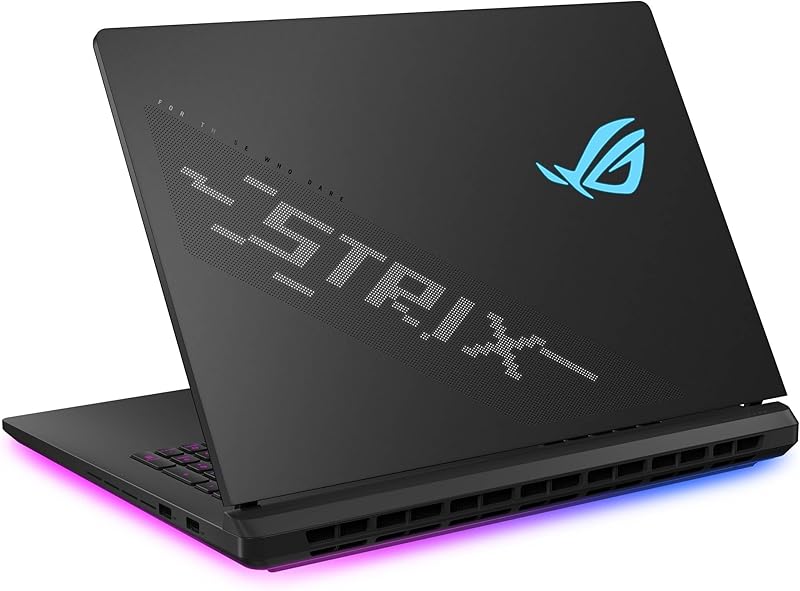
The ROG Strix Scar 16 carries an aggressive physical profile that reflects its immense internal thermal and processing requirements. Weighing 6.3 pounds and measuring 0.93 inches thick with an expanded footprint, the Scar operates fundamentally as a mobile desktop replacement rather than a run-around travel companion. Carrying a heavy chassis alongside its high-wattage power supply creates substantial bulk that does not lend itself well to small airline tray tables or cramped lecture desks. However, Asus capitalizes on this larger chassis surface by introducing aesthetic and functional elements, including a full-surround 360-degree RGB light bar, customizable AniMe Vision on the exterior lid for animations or text, and a dedicated Stealth Mode that disables internal lighting when sitting in professional meeting environments.
When weighing the asus rog strix scar 16 or acer swift go 14 for college, personal transit routines dictate the winner. Students who spend their days walking across sprawling campus grounds will appreciate the featherlight build of the Swift Go 14. Setting down a heavy gaming rig inside a small lecture hall desk often proves clumsy, making the acer swift go 14 battery life and weight package significantly more appealing for routine lecture note-taking and collaborative library work. Shoppers cross-referencing an asus rog strix scar 16 vs zenbook 14 oled matchup will recognize a similar dynamic between transportable workstation muscle and travel-first utility.
Edge: Acer Swift Go 14. At 2.76 pounds and 0.59 inches thin, it offers vastly superior day-to-day portability and effortless transport compared to the 6.3-pound Asus frame.
Display Technology and Visual Quality
Display characteristics directly govern how you consume media, interact with operating system controls, and evaluate high-speed motion. The ROG Strix Scar 16 features an expansive 18-inch ROG Nebula HDR display with a 2.5K resolution (2560 x 1440) framed in a productivity-minded 16:10 aspect ratio. Utilizing cutting-edge Mini LED backlighting equipped with more than 2,000 localized dimming zones, this panel produces exceptional contrast ratios and highlights. Color coverage reaches 100% of the cinema-grade DCI-P3 gamut, while motion clarity is governed by a blistering 240Hz refresh rate and a rapid 3ms response time. Asus further equips this display with dual ACR anti-reflective layers, suppressing ambient glare in illuminated indoor spaces.
The Swift Go 14 takes a distinct approach focused on tactile interactivity and everyday content clarity. It features a 14-inch IPS display sporting a WUXGA resolution of 1920 x 1200 pixels, also utilizing a 16:10 aspect ratio that gives users additional vertical space for viewing documents, spreadsheets, and web pages. It covers 100% of the standard sRGB color spectrum, providing vivid, accurate colors for photo viewing, video streaming, and office presentations. Crucially, the Swift Go 14 incorporates full touchscreen capabilities, enabling users to tap, scroll, pinch, and navigate intuitive user interfaces directly on the glass surface.
The trade-offs between these visual setups align directly with their intended software applications. Readers consulting an asus rog strix scar 16 review to inspect the asus rog strix scar 16 display specs will observe that its 240Hz Mini LED panel provides unmatched visual fluidity and high-dynamic-range precision for high-framerate software and advanced grading. On the other hand, the Swift Go 14 trades high-refresh fluidity for touchscreen utility, which proves far more intuitive for annotating PDFs, signing documents, or scrolling through web feeds on the fly. Those exploring alternatives like the asus rog strix scar 16 vs proart p16 will note how premium display engineering caters to visual pros, but here the tactile convenience of touch remains exclusive to Acer.
Edge: Asus ROG Strix Scar 16. Its 2.5K Mini LED ROG Nebula HDR panel provides a massive 240Hz refresh rate, 2,000+ local dimming zones, and wider 100% DCI-P3 color coverage.
Thermal Architecture and Upgradability
Thermal management dictates whether a laptop sustains peak processing throughput or throttles down under continuous workloads. The ROG Strix Scar 16 is engineered around the comprehensive ROG Intelligent Cooling architecture. To tame the immense heat generated by the Core Ultra 9 processor and the 175W RTX 5090 GPU, Asus implements an end-to-end vapor chamber, a sandwiched heatsink design, and Conductonaut Extreme liquid metal applied directly to the chipset. A tri-fan configuration forces massive volumes of air through specialized exhaust channels, ensuring the system remains stable and prevents thermal throttling during extended sessions of sustained computational pressure.
In addition to advanced thermals, Asus provides practical long-term ownership perks via its tool-free access chassis. Users do not need a screwdriver to perform standard maintenance; sliding a latch on the bottom half of the chassis releases the bottom panel, granting direct access to modular RAM slots, dual PCIe SSD slots, and the cooling fans. A removable protective frame safeguards sensitive board components while enabling tech enthusiasts to clean dust or swap memory and solid-state drives effortlessly over time. This high degree of modularity prolongs the operational lifespan of the machine significantly.
The Swift Go 14 balances thermal regulation within a radically thinner frame using Acer’s TwinAir cooling technology. This setup deploys dual copper heat pipes, dual fans, and an air inlet keyboard designed to expel up to 10 percent more thermal energy than standard solid keyboards. While this design easily keeps the 15-watt class Core i7-1355U operating comfortably during office workflows and video streaming, internal expansion is strictly constrained. The 16GB of LPDDR5 memory is soldered directly onto the motherboard, meaning users cannot upgrade system memory after purchase, although the 512GB PCIe Gen 4 SSD remains replaceable.
Edge: Asus ROG Strix Scar 16. The vapor chamber cooling with liquid metal dissipates high thermal wattage effortlessly, while tool-free chassis access enables effortless RAM and storage expansion.
Connectivity, Peripherals, and Daily Usability
External port arrays and multimedia interfaces dictate how smoothly a notebook connects with external equipment, monitors, and workplace environments. The Swift Go 14 delivers an impressive suite of modern connections tailored for the modern hybrid professional. It provides two USB Type-C ports supporting USB4 and Thunderbolt 4, carrying up to 40 Gbps data bandwidth, external monitor support, and up to 100W USB Power Delivery. These are augmented by two USB 3.2 Gen 1 Type-A ports (one featuring convenient power-off charging), an HDMI 2.1 output with HDCP support, a dedicated microSD card reader, and an audio jack. Networking is handled via Killer Wireless Wi-Fi 6E AX1675 with Bluetooth 5.1 or above.
Where the Swift Go 14 genuinely shines for remote collaboration is its integrated camera setup. Acer includes a sharp 1440p QHD webcam featuring Temporal Noise Reduction (TNR) to preserve image clarity in sub-optimal ambient lighting. This is paired with Acer PurifiedVoice AI noise reduction and PurifiedView technology, which provides automatic framing, background blur, and gaze correction during remote video calls. These capabilities make the Swift Go an exceptional machine for executive conferencing and remote study groups.
The ROG Strix Scar 16 prioritizes ultra-high-speed peripherals and cutting-edge local networking. It integrates next-generation Wi-Fi 7 wireless connectivity alongside robust video output via dedicated HDMI and multi-protocol USB ports. Asus includes three months of complimentary PC Game Pass, giving users instant access to an expansive library of downloadable titles. While the Scar delivers ample external display output to feed high-refresh multi-monitor setups, it lacks the specialized QHD webcam intelligence and integrated microSD card flexibility found on the Swift Go 14. Those comparing options across the gaming space, such as an asus rog strix scar 16 vs tuf gaming a15, understand that Strix machines focus heavily on gaming performance metrics over office teleconferencing accessories.
Edge: Acer Swift Go 14. Dual Thunderbolt 4 ports with 100W power delivery, a microSD card reader, and an advanced 1440p QHD webcam create a superior package for hybrid remote work.
Pros and Cons
Asus ROG Strix Scar 16
Pros
- NVIDIA GeForce RTX 5090 dedicated graphics
- 5K Mini LED display with 240Hz refresh rate
- Tool-free access for RAM and SSD upgrades
- Massive 2TB PCIe Gen 4 solid-state drive
Cons
- Substantially heavier at 6.3 pounds
- Bulkier 0.93-inch thick chassis
View Asus ROG Strix Scar 16 on Amazon
Acer Swift Go 14

Pros
- Ultralight 2.76-pound aluminum chassis
- Sharp 1440p QHD webcam with AI noise reduction
- Convenient 14-inch touchscreen interface
- Dual Thunderbolt 4 ports with 100W charging
Cons
- Integrated Intel Iris Xe graphics limits gaming
- Non-upgradable soldered onboard memory
View Acer Swift Go 14 on Amazon
Who Should Buy Each One
Choose the Asus ROG Strix Scar 16 If
- You need the elite graphical capabilities of an NVIDIA GeForce RTX 5090 GPU running at full 175W power.
- You prioritize a 240Hz Mini LED display with over 2,000 local dimming zones for ultra-fluid visuals.
- You plan to upgrade your internal storage and RAM without needing screwdrivers or specialized tools.
- You require workstation-grade multi-core compute speeds via the Intel Core Ultra 9 275HX processor.
Choose the Acer Swift Go 14 If
- You need an ultraportable aluminum notebook weighing just 2.76 pounds that slips easily into any bag.
- You frequently participate in remote meetings and require a 1440p QHD webcam with AI noise cancellation.
- You prefer a hands-on touchscreen interface for navigating spreadsheets, reading documents, and browsing.
- You want dual Thunderbolt 4 ports that support standard 100W USB-C Power Delivery chargers.
Final Verdict
For most everyday computer users, students, and traveling professionals, the Acer Swift Go 14 represents the smarter, more practical computing solution. Its featherweight 2.76-pound chassis, crisp 14-inch touchscreen, dual Thunderbolt 4 connections, and clear 1440p QHD webcam provide everything required for responsive productivity without the physical burden of a heavy laptop bag. The Intel Core i7-1355U processor and 16GB of LPDDR5 memory provide reliable performance across everyday office tasks, video calls, and multimedia workflows, solidifying positive takeaways across any acer swift go 14 review.
However, when raw computational muscle and high-end visual fidelity take precedence, the Asus ROG Strix Scar 16 stands in a league of its own. Equipped with an Intel Core Ultra 9 275HX processor, a 175W RTX 5090 GPU, a 240Hz Mini LED display, and tool-free internal access, it handles intense rendering, complex simulation workloads, and high-framerate 3D gaming with effortless ease. If your computing needs require maximum hardware output rather than lightweight transit, the Scar delivers the desktop-grade horsepower necessary to justify its substantial physical presence, answering whether the platform is worth the trade-offs.
FAQ
Can the Acer Swift Go 14 handle modern gaming?
The Acer Swift Go 14 relies on integrated Intel Iris Xe Graphics with shared system memory, which is designed for multimedia streaming, light image editing, and casual low-demand titles. It lacks the dedicated graphics processing unit and high-wattage thermal infrastructure required to run modern, graphics-intensive games smoothly.
Can I upgrade the RAM and storage on the Asus ROG Strix Scar 16?
Yes. The Asus ROG Strix Scar 16 features tool-free internal access, allowing users to slide a latch on the lower chassis to access the internal hardware without tools. Both the DDR5 RAM modules and PCIe Gen 4 SSD drives can be easily removed, replaced, or expanded as storage demands increase over time.
Does the Acer Swift Go 14 support stylus input on its touchscreen?
The Acer Swift Go 14 features a 14-inch WUXGA touch-enabled IPS display designed for finger taps, swiping, and pinch-to-zoom navigation. The listing does not specify support for an active pressure-sensitive digital stylus pen.
What operating system comes preinstalled on these laptops?
The Asus ROG Strix Scar 16 comes preinstalled with Windows 11 Pro, offering advanced administrative and enterprise security features. The Acer Swift Go 14 comes equipped with Windows 11 Home, which provides standard consumer productivity, entertainment, and security capabilities.
Can the Acer Swift Go 14 be charged over USB-C?
Yes. The Acer Swift Go 14 features two USB Type-C ports with Thunderbolt 4 support that accommodate USB Charging and Power Delivery up to 100W, allowing users to recharge the laptop using standard compact USB-C power adapters.
Does the Asus ROG Strix Scar 16 have an integrated webcam?
The listing for the Asus ROG Strix Scar 16 does not specify built-in webcam hardware, focusing instead on high-end gaming components, its AniMe Vision lid display, 360-degree RGB lighting, and advanced internal cooling architecture.


