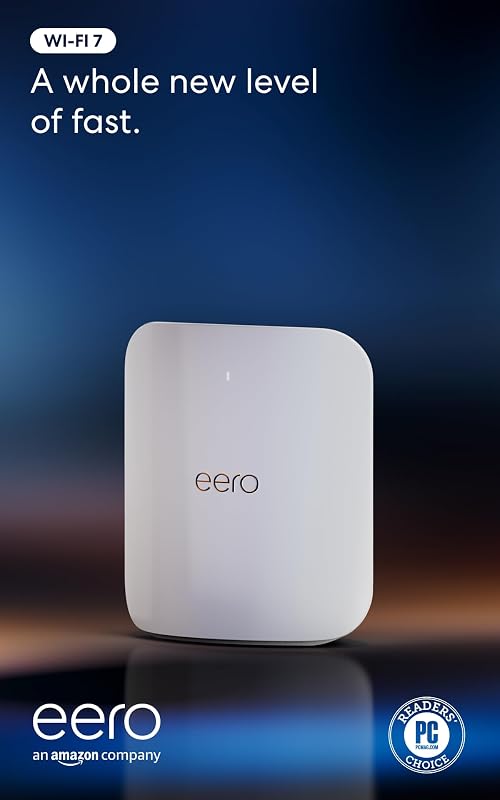
The fundamental dividing line between these two networking platforms is generational hardware capability: the Eero Max 7 introduces Wi-Fi 7 technology with dual 10 Gigabit Ethernet ports and ultra-wide 320 MHz channels, whereas the TP-Link Deco XE75 delivers tri-band Wi-Fi 6E connectivity utilizing standard gigabit Ethernet ports and 160 MHz channels.
Choose the Eero Max 7 if you have multi-gigabit fiber internet and want maximum wireless throughput for high-bandwidth client hardware. Choose the TP-Link Deco XE75 if you need an expansive, multi-node mesh system to cover a large floor plan on standard gigabit internet connections.


Eero Max 7 vs TP-Link Deco XE75 at a Glance
| Feature | Eero Max 7 | TP-Link Deco XE75 |
|---|---|---|
| Wi-Fi Generation | Wi-Fi 7 (IEEE 802.11a/b/g/n/ac/ax/be) | Wi-Fi 6E (802.11a/b/g/n/ac/ax) |
| Wireless Rating | BE20800 | AXE5400 |
| Frequency Bands | Tri-Band (2.4 GHz, 5 GHz, 6 GHz) | Tri-Band (2.4 GHz, 5 GHz, 6 GHz) |
| Channel Widths | 20, 40, 80, 160, 240, 320 MHz | Up to 160 MHz (HE160) |
| Maximum Physical Wireless Speeds | Up to 4.3 Gbps | Up to 2402 Mbps (6 GHz), 2402 Mbps (5 GHz), 574 Mbps (2.4 GHz) |
| Wired LAN Ports | Two 10 Gigabit Ethernet ports | Three Gigabit Ethernet ports per unit (9 total in 3-pack) |
| Spatial Streams | 10 (2×2/4×4/4×4 MU/SU-MIMO) | Not listed |
| Manufacturer Coverage Rating | Up to 2,500 sq. ft. (1-pack) | Up to 7,200 sq. ft. (3-pack) |
| Device Capacity | 250+ devices | 200 devices |
| Smart Home Radios | Thread, Matter, Zigbee controller, Bluetooth Low Energy 5.0 | Not listed |
| Manufacturer Warranty | 3-year limited warranty | 2-year warranty |
| Best For | Multi-gigabit internet plans and bleeding-edge local transfers | Whole-home coverage on gigabit and sub-gigabit connections |
Wireless Standards and Speed Performance
Wireless throughput defines the core difference between these two systems. The Eero Max 7 represents the newest networking standard, operating as a BE20800 Wi-Fi 7 router with support for IEEE 802.11be. In contrast, the Deco XE75 is an AXE5400 Wi-Fi 6E system operating across IEEE 802.11ax standards. While both routers utilize tri-band architecture across the 2.4 GHz, 5 GHz, and 6 GHz frequencies, the way they harness the clean 6 GHz spectrum is completely different. When comparing tp-link deco xe75 vs be85 or other next-generation equipment, Wi-Fi 7 brings massive channel width improvements that fundamentally alter real-world speed ceilings.
In terms of raw bandwidth, the Eero Max 7 supports channel widths of 20, 40, 80, 160, 240, and an expansive 320 MHz. The system reaches wireless transfer rates up to 4.3 Gbps, driven by a 10-stream 2×2/4×4/4×4 MU/SU-MIMO antenna design. The Deco XE75 maxes out at 160 MHz channel width (HE160) on both its 5 GHz and 6 GHz bands. TP-Link rates the Deco XE75 for theoretical throughput of 2402 Mbps on the 6 GHz band, 2402 Mbps on the 5 GHz band, and 574 Mbps on the 2.4 GHz band, combining for a total aggregate speed of 5,400 Mbps. Evaluating the Eero Max 7 vs Deco XE75 speed equation shows that the Max 7 delivers more than double the channel bandwidth on the 6 GHz spectrum.
The practical result of this disparity appears whenever client hardware transfers dense files or runs local network backups. Compatible Wi-Fi 7 client devices communicating with the Max 7 can access 320 MHz channels that effectively double data capacity over the 160 MHz limit of Wi-Fi 6E. For households evaluating an Eero Max 7 Wi-Fi 7 vs Wi-Fi 6E upgrade, the Max 7 establishes a far higher ceiling for peak transfer rates. The Deco XE75 still provides pristine 6 GHz airwaves unencumbered by legacy Wi-Fi 5 or 2.4 GHz interference, but its top-end wireless throughput cannot match the multi-gigabit headroom engineered into the Max 7.
Edge: Eero Max 7 because its 320 MHz channel width and Wi-Fi 7 standard yield dramatically faster maximum wireless transfer rates than the 160 MHz Wi-Fi 6E protocol.
Wired Networking and Backhaul Flexibility
A mesh router is only as strong as its backhaul connection, and the physical ports dictate how data moves between nodes and client terminals. The Eero Max 7 is engineered from the ground up for multi-gigabit physical connectivity, supplying two 10 Gigabit Ethernet ports on each unit. These ports accommodate wired line rates up to 9.4 Gbps, allowing the router to accept multi-gigabit internet inputs while simultaneously feeding local network switches, storage arrays, or secondary nodes without introducing a 1 Gbps bottleneck. Shoppers looking at an eero pro 6e vs tp-link deco xe75 comparison will note that the Max 7 leapfrogs both older platforms by eliminating multi-gigabit wired limitations entirely.
The Deco XE75 takes a more traditional approach to wired networking. Each node in the Deco XE75 3-pack includes three auto-sensing 10/100/1000 Mbps Gigabit Ethernet ports, resulting in nine total wired ports across the complete three-pack. While having three ports per node offers convenient physical connections for desktop computers, media players, and smart home bridges, each port is strictly capped at standard gigabit speeds. If your internet service provider offers downloads exceeding 1,000 Mbps, the Deco XE75 cannot ingest the surplus through its physical interface, limiting your wired devices to standard gigabit rates.
When analyzing the Deco XE75 vs Eero Max 7 backhaul dynamics, both systems offer intelligent alternative routing. The Deco XE75 dedicates its 6 GHz wireless band to node-to-node backhaul communication by default, shielding inter-router traffic from client network traffic, though users can toggle this band in the Deco app to operate as an open client network instead. The Max 7 uses patented TrueMesh intelligence to dynamically route backhaul across all three bands, sustaining multi-gigabit backhaul transfer rates whether linked through the airwaves or over a 10GbE copper drop. For high-speed infrastructure, the Max 7 provides unmatched wired bandwidth.
Edge: Eero Max 7 due to its dual 10 Gigabit Ethernet ports that support wired line speeds up to 9.4 Gbps, far exceeding the Deco XE75’s standard 1 Gbps ports.
Coverage Footprint and Multi-Pack Deployment
Mesh coverage depends heavily on the number of physical nodes deployed and how effectively their signal propagates through structural barriers. In this retail configuration, the Deco XE75 ships as a 3-pack engineered to blanket massive properties up to 7,200 square feet. By distributing three separate broadcast points across multiple floors or opposing ends of a home, the Deco system mitigates the natural signal degradation that occurs when high-frequency wireless transmissions pass through interior walls, ductwork, and furniture. As detailed in our netgear orbi rbk752 vs tp-link deco xe75 analysis, multi-node packaging fundamentally simplifies wide-area residential wireless design.
The Eero Max 7 package referenced here is a single standalone unit rated for up to 2,500 square feet of coverage, projecting an approximate 28-foot wireless radius. While the internal antenna structure inside the Max 7 is exceptionally powerful-leveraging 10 spatial streams with transmit beamforming and OFDMA to maintain clean signal delivery-a single broadcast source cannot overcome the physical limits of distance and dense building materials. Expanding the Max 7 footprint across a large multi-story home requires adding extra Max 7 or compatible Eero nodes to match the physical footprint that the Deco XE75 establishes straight out of the box.
This layout difference directly answers whether a TP-Link Deco XE75 review points toward better coverage value for expansive properties. For sprawling ranches, three-story homes, or structures with detached garages, the three distinct nodes of the Deco XE75 ensure that client devices maintain a short physical distance to the nearest access point. The Max 7 delivers higher density and speed within its 2,500-square-foot radius, but the Deco XE75 3-pack solves coverage dead zones across wide footprints immediately.
Edge: TP-Link Deco XE75 because the included 3-pack covers up to 7,200 square feet out of the box, compared to the 2,500 square feet of coverage provided by the single-unit Eero Max 7.
Smart Home Hub and Device Integration
Smart home architecture requires routers to manage dense device counts without saturating processing channels or introducing command latency. The Eero Max 7 acts directly as a unified smart home hub. Embedded inside its enclosure are dedicated radios for Thread, Matter, and Zigbee (functioning as a controller), alongside Bluetooth Low Energy 5.0. This specialized hardware enables the Max 7 to onboard and manage low-power home automation devices directly, eliminating the need to plug separate proprietary bridges into your router. Choosing between the Eero Max 7 or Deco XE75 for smart home networks often hinges on whether you plan to centralize your IoT equipment on a single radio platform.
The Deco XE75 supports connected smart environments by offering high client capacity alongside TP-Link HomeShield IoT device identification. The system works with Amazon Alexa, allowing owners to control guest network functions via simple voice commands. However, the Deco XE75 listing does not specify internal Thread, Matter, or Zigbee controller radios. Smart sensors, switches, or lighting products relying on Thread or Zigbee mesh standards require their own dedicated manufacturer hubs plugged directly into the Deco XE75’s Ethernet ports.
Device density handling also tilts toward the Eero hardware. The Max 7 is rated to maintain simultaneous connections for 250+ devices, making it suitable for modern properties filled with smart bulbs, security sensors, streaming dongles, and smart appliances. The Deco XE75 accommodates up to 200 devices, which easily handles the average connected home but offers less operational headroom than the Max 7. Readers exploring smart home ecosystems via our tp-link deco xe75 vs google nest wifi pro comparison will recognize the operational simplicity of having smart home controllers integrated directly into the router.
Edge: Eero Max 7 due to its built-in Thread, Matter, and Zigbee controller radios and higher 250+ device connection capacity.
Gaming Latency, Network Management, and Security
Real-time gaming, augmented reality, and virtual reality place unique demands on network latency and queue management. Deciding on the Eero Max 7 or TP-Link Deco XE75 for gaming comes down to how each platform handles packet prioritization and congestion. The Max 7 listing highlights targeted optimizations for AR, VR, and cloud gaming applications that demand ultra-low latency and sustained throughput. Supported by Wi-Fi 7 efficiency enhancements, TrueMesh pathfinding, and high-spec internal hardware, the Max 7 focuses on minimizing bufferbloat and packet drops during competitive sessions.
The Deco XE75 manages latency using an AI-Driven Mesh algorithm combined with built-in Quality of Service (QoS) controls included in the free tier of TP-Link HomeShield. The AI-Driven Mesh system learns network traffic behaviors, client characteristics, and physical environmental layout to seamlessly steer client devices between nodes. For competitive gamers who prioritize bandwidth allocation, HomeShield QoS allows you to assign higher priority to gaming hardware over background downloads. As seen in our netgear orbi 970 vs tp-link deco xe75 analysis, built-in traffic shaping remains essential on gigabit networks.
Security and software management feature distinct approaches between both brands. TP-Link is a signatory of the CISA Secure-by-Design pledge, equipping the Deco XE75 with free core HomeShield tools: basic network security scans, IoT device identification, parental controls, QoS, and weekly/monthly reporting. Advanced ongoing protection requires an upgrade. The Eero Max 7 uses WPA3-Personal transition modes and handles setup through the eero app, offering optional subscriptions to eero Plus for advanced digital security and network threat shielding. For hardware protection, the Max 7 provides an industry-leading 3-year limited warranty, whereas TP-Link backs the Deco XE75 with a 2-year warranty and 24/7 technical support.
Edge: Eero Max 7 because its Wi-Fi 7 low-latency protocols, superior 3-year warranty, and TrueMesh intelligence deliver greater long-term resilience for gaming and cloud applications.
Pros and Cons
Eero Max 7
Pros
- Wi-Fi 7 with 320 MHz channel support
- Two 10 Gbps Ethernet ports
- Integrated Thread, Matter, and Zigbee hub
- Three-year limited manufacturer warranty
Cons
- Covers only 2,500 sq ft per unit
- Advanced security requires eero Plus subscription
TP-Link Deco XE75

Pros
- Three-pack covers up to 7,200 sq ft
- Nine total Gigabit Ethernet ports
- Dedicated 6 GHz wireless backhaul mode
- Free basic HomeShield security and QoS
Cons
- Wired ports limited to 1 Gbps
- Lacks integrated Thread and Zigbee radios
View TP-Link Deco XE75 on Amazon
Who Should Buy Each One
Choose the Eero Max 7 If
- You subscribe to multi-gigabit internet plans up to 10 Gbps and require 10GbE wired Ethernet ports to support those line speeds.
- You own or plan to acquire Wi-Fi 7 client devices capable of utilizing ultra-wide 320 MHz channels.
- You want an integrated smart home controller that communicates natively over Thread, Matter, and Zigbee protocols without extra bridges.
- You manage an extremely dense home network featuring over 200 connected smart devices, cameras, and streaming clients.
Choose the TP-Link Deco XE75 If
- You need to cover up to 7,200 square feet of living space across multiple floors right out of the box using a 3-pack system.
- Your internet connection is 1 Gbps or lower and matches standard gigabit Ethernet routing hardware.
- You want built-in Quality of Service (QoS), parental controls, and IoT security scans without mandatory paid security tiers.
- You want a dedicated wireless 6 GHz backhaul channel to eliminate dead zones and connection drops between distant rooms.
Final Verdict
When assessing whether the TP-Link Deco XE75 vs Eero Max 7 matchup yields a clear winner, the decision hinges on your home’s bandwidth infrastructure. For the vast majority of consumers shopping for cutting-edge performance, the Eero Max 7 is the superior technical platform. Its BE20800 Wi-Fi 7 rating, ultra-wide 320 MHz channel capability, 10 spatial streams, and pair of 10 Gigabit Ethernet ports ensure that your local network will not bottleneck next-generation fiber internet plans or data-heavy local transfers. It also serves as a robust smart home hub, backed by a generous three-year manufacturer warranty.
Conversely, the TP-Link Deco XE75 wins decisively on practical coverage per node. If you have a sprawling home and an internet service plan running at 1 Gbps or below, paying for 10GbE ports and Wi-Fi 7 radios that your devices cannot exploit is inefficient. The Deco XE75 delivers dependable tri-band Wi-Fi 6E performance, an AI-driven mesh backhaul, nine total gigabit ports, and comprehensive HomeShield network management that effortlessly eliminates dead zones across 7,200 square feet.
FAQ
Can the 6 GHz band on the TP-Link Deco XE75 be used for client devices instead of backhaul?
Yes. While the Deco XE75 defaults to using the 6 GHz band as a dedicated wireless backhaul link between nodes, the Deco app allows you to toggle this setting to Wi-Fi Network mode. This enables compatible Wi-Fi 6E smartphones, laptops, and client devices to connect directly to the 6 GHz spectrum.
Does the Eero Max 7 support wired speeds over 1 Gbps?
Yes. The Eero Max 7 is equipped with two 10 Gigabit Ethernet ports. These interfaces support internet connection plans up to 10 Gbps and wired local network data transfers up to 9.4 Gbps, making it fully compatible with multi-gigabit fiber services.
How many devices can each mesh system connect simultaneously?
The Eero Max 7 listing specifies support for 250+ connected devices on its network. The TP-Link Deco XE75 listing states that its tri-band system supports up to 200 connected devices across all three frequency bands.
Which mesh system includes built-in smart home hub radios?
The Eero Max 7 contains built-in smart home hub hardware supporting Thread, Matter, and Zigbee (functioning as a controller only), alongside Bluetooth Low Energy 5.0. The TP-Link Deco XE75 works with Amazon Alexa for voice commands, but its listing does not specify internal Thread or Zigbee hub radios.
What is the difference in channel width between Eero Max 7 and Deco XE75?
The Eero Max 7 supports channel widths up to 320 MHz (specifically 20, 40, 80, 160, 240, and 320 MHz), which is a signature capability of Wi-Fi 7. The TP-Link Deco XE75 supports channel widths up to 160 MHz (HE160) across its 5 GHz and 6 GHz bands.
What warranties are included with these mesh systems?
The Eero Max 7 comes with a 3-year limited warranty and dedicated support accessible via phone and email. The TP-Link Deco XE75 includes a 2-year warranty along with 24/7 technical support.


