The choice between these two desktop cameras comes down to whether your workflow demands native 4K capture paired with integrated physical privacy controls, or if dependable 1080p video with a brighter optical aperture satisfies your everyday broadcasting needs. Choosing between the Logitech C922x 1080p vs MX Brio 4K architecture represents a clear division between entry-level content creation and high-tier enterprise communication.
Choose the Logitech C922x if you need an accessible Full HD webcam optimized for standard streaming platforms, lightweight desktop setups, and versatile low-light light correction. Opt for the Logitech MX Brio if you require Ultra HD video resolution, advanced noise-reducing beamforming microphones, and an integrated hardware privacy dial built directly into a low-carbon aluminum chassis.


Logitech C922x vs Logitech MX Brio at a Glance
| Feature | Logitech C922x | Logitech MX Brio |
|---|---|---|
| Maximum Video Resolution | 1080p at 30 fps (or 720p at 60 fps) | 4K Ultra HD |
| Image Sensor Specification | 2 MP (1/2.8-inch) | Not listed (manufacturer’s largest sensor) |
| Lens Aperture | f/1.8 | f/4 |
| Microphone Configuration | Dual stereo microphones | Dual beamforming microphones with noise reduction |
| Physical Privacy Shutter | None | Integrated rotating lens dial |
| Enclosure Materials | Compact plastic housing | Low-carbon aluminum and 82% recycled plastic |
| Collaboration Features | 3-month XSplit VCam license | Show Mode and RightSight auto-framing |
| IT Management and Security | Not listed | Logitech Sync and secure boot architecture |
| Platform Certifications | Compatible with Zoom, Teams, Meet, Switch 2 | Certified for Zoom, Microsoft Teams, Google Meet |
| Best For | Standard streaming and everyday desktop calls | Executive video conferences and professional presentations |
Video Resolution and Image Sensor Performance
Resolution and raw sensor capability define how much detail, texture, and fidelity your audience sees during live video feeds. When evaluating Logitech C922x vs MX Brio video quality, the difference in pixel density creates distinct use cases. The C922x utilizes a 2 MP, 1/2.8-inch image sensor capable of delivering Full HD 1080p video at 30 frames per second or a smoother 720p broadcast at 60 frames per second. For users who prioritize motion fluidity over sheer pixel volume, the 60 fps mode at 720p provides stable footage for gaming overlays, though it lacks the fine text rendering and clean edge separation required for high-detail document sharing.
The MX Brio elevates visual fidelity by incorporating a dedicated 4K Ultra HD sensor paired with AI-powered face-based image enhancement. This advanced processing pipeline actively tracks facial features and recalibrates skin tones under difficult exposure conditions, ensuring the presenter does not wash out against bright office windows or uneven desk lamps. Readers exploring our logitech c920 vs mx brio analysis will note that the MX Brio delivers significantly crisper output, minimizing the digital noise and grain typically encountered on older 1080p webcams when scaling to large external monitors.
While the C922x incorporates automatic HD lighting adjustments to brighten dim environments, it relies on a fixed Full HD ceiling that cannot replicate the natural textures, hair detail, and sharp line definition produced by an Ultra HD sensor. When asking whether to deploy the Logitech C922x or Logitech MX Brio for Zoom calls where clarity conveys professionalism, the resolution uplift of the 4K sensor provides a noticeable competitive advantage.
Edge: Logitech MX Brio because its native 4K capture and AI-driven facial exposure deliver superior visual detail and cleaner skin tones.
Lens Optics, Aperture, and Low-Light Adaptation
A webcam optical stack governs light transmission and depth characteristics before data ever reaches the image sensor. The C922x features a custom five-element glass wide-angle lens with a fast f/1.8 maximum aperture. An f/1.8 optical design gathers a substantial amount of ambient light, allowing the camera to maintain a brighter baseline image without forcing the sensor to artificially amplify electronic gain. This optical advantage makes the unit remarkably forgiving in rooms with minimal lighting or uneven desktop lamps, preserving color vibrancy without demanding expensive studio lighting rigs.
The MX Brio takes a different engineering approach, employing a specialized zoom lens paired with a narrower f/4 maximum aperture. While an f/4 optical path restricts the amount of passive light passing through the glass compared to an f/1.8 aperture, the MX Brio offsets this limitation through its larger sensor footprint and faster autofocus response. The autofocus mechanism dynamically recalibrates focus depth as presenters shift position, maintaining sharp facial contours without the hunting artifacts common to entry-tier optics. However, in poorly lit environments without supplemental illumination, the narrower aperture requires the sensor to work harder to maintain exposure balance.
For creators reviewing the logitech c922x vs elgato facecam balance, the wide f/1.8 aperture on the C922x remains an exceptional hardware trait for casual desks lacking dedicated fill lights. While the MX Brio produces superior sharpness in controlled enterprise lighting, the raw light-gathering capability of the C922x glass optics gives it an unexpected edge in dim home office corners.
Edge: Logitech C922x because its bright f/1.8 glass lens gathers significantly more ambient light than the f/4 aperture on the MX Brio.
Privacy Controls and Physical Hardware Construction
Hardware security and physical build materials heavily influence the long-term reliability of workplace peripherals. A prominent limitation highlighted in any thorough Logitech C922x review is the complete absence of a built-in privacy shutter. Users who prioritize optical privacy must physically unplug the C922x or purchase third-party slip-on covers to guarantee the lens is obstructed when not in use. Its exterior housing is constructed from lightweight, compact black plastic measuring 2.8 inches deep by 1.71 inches wide, weighing 5.76 ounces.
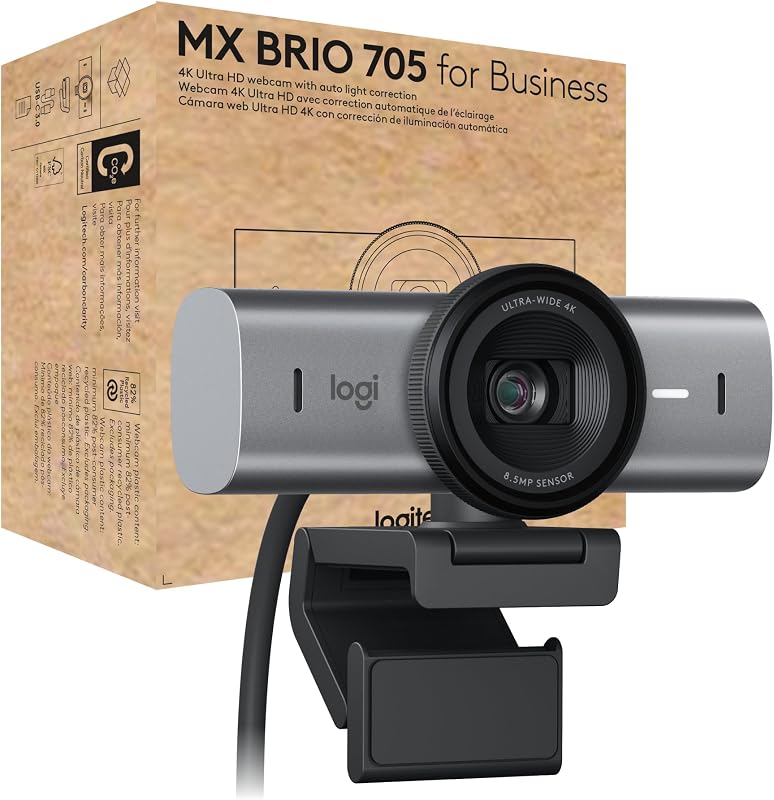
The MX Brio incorporates an integrated hardware privacy shutter operated by a tactile dial positioned directly on the outer lens ring. Turning the mechanical ring physically blocks the optical path, providing an unmistakable visual confirmation that video capture is impossible. This feature eliminates accidental broadcasting during remote work transitions and satisfies strict corporate security policies without requiring clumsy adhesive plastic covers.
Beyond privacy, the structural composition of the MX Brio demonstrates an enterprise-grade focus. The chassis is crafted from solid milled, low-carbon aluminum, with its plastic elements containing a minimum of 82% post-consumer recycled plastic. Weighing 6.1 ounces, the MX Brio sits with greater stability atop thin laptop screens and heavy external displays alike, resisting accidental displacement when adjusting monitor angles or repositioning cables.
Edge: Logitech MX Brio because of its premium milled aluminum construction and integrated mechanical privacy dial built directly into the lens ring.
Microphone Performance and Acoustic Noise Suppression
Audio intelligibility is just as critical as visual fidelity during collaborative sessions and live presentations. The C922x relies on dual omnidirectional microphones positioned on either side of the camera lens to capture stereo sound. This arrangement delivers natural, open audio reproduction within quiet environments, making it suitable for casual discussions or personal broadcasts where background noise is minimal. However, because the microphones capture sound across a wider stereo field, they inevitably pick up unwanted room reflections, mechanical keyboard clicks, and desktop vibrations.
The MX Brio upgrades audio capture by utilizing dual beamforming microphones engineered specifically to isolate human speech and dampen ambient background noise. The beamforming array focuses directional sensitivity toward the speaker mouth, attenuating peripheral room echo, distant chatter, and computer fan hum. Even if you shift sideways or lean back in your chair during an intense meeting, the dual microphones actively enhance vocal frequencies to maintain a consistent conversational volume.
Users comparing enterprise setups in our logitech mx brio vs elgato facecam comparison frequently notice that dedicated beamforming capsules alleviate the need for a bulky external USB microphone during routine conference calls. While dedicated content creators often rely on standalone XLR or USB condenser microphones, the integrated beamforming mics on the MX Brio provide a substantially cleaner standalone acoustic experience than the unshielded stereo mics of the C922x.
Edge: Logitech MX Brio because its dual beamforming array filters out ambient distractions while isolating the speaker voice.
Collaboration Features, Smart Framing, and Software Ecosystem
Software ecosystems dictate how seamlessly a webcam integrates into organizational infrastructure and specialized creative workflows. In a practical Logitech MX Brio review, the camera demonstrates extensive modern software integration via Logitech Sync, RightSight auto-framing, and Show Mode. Show Mode allows presenters to tilt the camera downward to instantly share sketches, physical notes, or product prototypes on their desk surface, automatically flipping the orientation so remote attendees see the content right-side up. RightSight auto-framing dynamically shifts the visual frame to keep you centered as you present, while Logitech Sync enables enterprise IT departments to push firmware updates and monitor deployment remotely.
The C922x relies on traditional desktop capture software alongside an included 3-month license for XSplit VCam. The XSplit software offers digital background replacement, removal, and blurring without requiring an actual physical green screen. This software bundle provides immediate value for personal content creators setting up a Twitch or YouTube stream. Furthermore, the listing highlights unique compatibility with the Nintendo Switch 2 new GameChat mode, giving the C922x specialized utility for console gamers that enterprise-oriented webcams rarely address.
For workplace productivity, however, the MX Brio holds official hardware certifications for Microsoft Teams, Zoom, and Google Meet, in addition to Chromebook certification. The C922x functions reliably across Windows, macOS, Chrome OS, and Android platforms, but it lacks centralized enterprise management tools and intelligent physical interaction features like Show Mode. When deciding whether to deploy the Logitech C922x or Logitech MX Brio for streaming versus executive meetings, the MX Brio provides a far more complete collaborative toolset.
Edge: Logitech MX Brio because of its innovative Show Mode, RightSight auto-framing, and enterprise IT management through Logitech Sync.
Pros and Cons
Logitech C922x

Pros
- Bright f/1.8 five-element glass lens
- Smooth 720p recording at 60 fps
- Includes 3-month XSplit VCam license
- Lightweight 5.76-ounce compact frame
- Nintendo Switch 2 GameChat support
Cons
- No integrated physical privacy shutter
- Maximum Full HD resolution limited to 1080p
- Omnidirectional mics pick up room noise
Logitech MX Brio
Pros
- Crisp 4K Ultra HD video resolution
- Integrated mechanical privacy dial shutter
- Low-carbon aluminum housing construction
- Dual noise-reducing beamforming microphones
- Show Mode for easy desk presentation
Cons
- Narrower f/4 maximum lens aperture
- Heavier 6.1-ounce desktop footprint
View Logitech MX Brio on Amazon
Who Should Buy Each One
Choose the Logitech C922x If
- You need a dependable Full HD camera for gaming streams, casual desktop recording, or console setups via the Nintendo Switch 2 GameChat mode.
- You operate in an office with limited ambient lighting and want the wide light-gathering benefits of an f/1.8 five-element glass lens.
- You want bundled background replacement capabilities out of the box using the included 3-month XSplit VCam software license.
- You prefer a lightweight, compact form factor that mounts easily without exerting heavy downward pressure on thin laptop lids.
Choose the Logitech MX Brio If
- You conduct high-stakes client presentations or executive board calls that require native 4K Ultra HD visual fidelity and AI-enhanced skin tones.
- You demand physical hardware privacy through an integrated, mechanical dial shutter rather than aftermarket plastic caps.
- You regularly demonstrate physical documents, sketches, or hardware prototypes during live calls using downward-tilting Show Mode.
- You work in open or noisy home environments that benefit from dual directional beamforming microphones with background noise suppression.
Final Verdict
Evaluating the Logitech MX Brio vs C922x highlights how modern webcam hardware has evolved from basic video inputs into intelligent collaboration hubs. The C922x remains an enduring benchmark for basic Full HD video calling and entry-level gaming streams. Its fast f/1.8 lens gathers substantial light, its 720p 60 fps mode handles fast motion cleanly, and its software bundle solves immediate background blurring needs. For individual creators and home users who only need reliable 1080p video, the C922x provides all necessary core features without unnecessary corporate complexity.
However, when evaluating if is Logitech MX Brio worth it for professional workspaces, the extensive hardware advantages justify the upgrade. The combination of native 4K capture, a milled aluminum enclosure, beamforming microphone noise reduction, Show Mode desk sharing, and an integrated physical privacy dial sets the MX Brio in a completely different performance class. For business leaders, remote educators, and design professionals who rely on visual authority and seamless collaboration tools every day, the MX Brio stands as the superior desktop investment.
FAQ
Does the Logitech C922x include a built-in privacy shutter?
No, the Logitech C922x does not come with an integrated privacy shutter or a physical lens cover in the box. Users who require guaranteed physical privacy when the webcam is idle must purchase a compatible third-party cover or disconnect the USB cable from their computer.
How does the privacy shutter on the Logitech MX Brio work?
The Logitech MX Brio features an integrated mechanical privacy shutter built directly into the housing. Rotating the textured dial on the outer lens ring physically slides an internal barrier across the glass lens, providing clear visual confirmation that video capture is obstructed.
Can the Logitech C922x broadcast at 60 frames per second?
Yes, the Logitech C922x can broadcast at 60 frames per second, but only when operating at 720p resolution. When operating in Full HD 1080p mode, the camera records and streams at a maximum frame rate of 30 frames per second.
What makes the Logitech MX Brio Show Mode useful for meetings?
Show Mode allows users to tilt the MX Brio camera downward toward their desk surface to present physical documents, sketches, or product prototypes. The onboard software automatically inverts and levels the image so remote meeting participants view the desk contents right-side up.
Which operating systems are compatible with these webcams?
The Logitech C922x supports Windows 7, Windows 8, Windows 10, macOS X 10.9 or higher, Chrome OS, and Android v5.0 or above, as well as the Nintendo Switch 2 GameChat mode. The Logitech MX Brio supports Windows, macOS, ChromeOS, and is officially certified for Chromebooks, Microsoft Teams, Zoom, and Google Meet.
Do these webcams require external microphones for clear audio?
Both webcams include integrated microphone solutions. The C922x features dual omnidirectional microphones that capture standard stereo sound, while the MX Brio features dual beamforming microphones designed to reduce ambient background noise and enhance speech clarity as you move.
Related reading: logitech c922x vs logitech brio 4k.