The single deciding factor between the Samsung 980 Pro and the Samsung 9100 Pro is interface bandwidth: the 980 Pro operates on mature PCIe 4.0 architecture with sequential reads up to 7,000 MB/s, while the 9100 Pro harnesses cutting-edge PCIe 5.0 lanes to reach transfer speeds up to 14,700 MB/s.
Mainstream gamers and PC builders seeking dependable, proven storage for PCIe 4.0 motherboards and console upgrades should select the 980 Pro. Creative professionals, AI engineers, and extreme workstation builders requiring maximum data throughput and multi-stream rendering should choose the 9100 Pro.
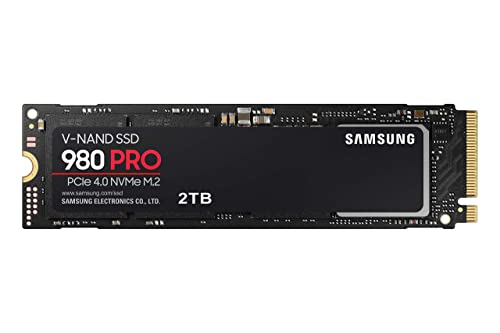

Samsung 980 Pro vs Samsung 9100 Pro at a Glance
| Feature | Samsung 980 Pro | Samsung 9100 Pro |
|---|---|---|
| Interface Standard | PCIe Gen 4×4, NVMe | PCIe Gen 5.0 x4, NVMe |
| Sequential Read Speed | Up to 7,000 MB/s | Up to 14,700 MB/s |
| Sequential Write Speed | Up to 5,100 MB/s | Up to 13,400 MB/s |
| Random Read / Write Speed | Not listed | Up to 1,850K / 2,600K IOPS |
| Controller Hardware | Samsung Elpsis Controller | 5nm In-House Controller |
| Thermal Dissipation Strategy | Nickel coating and heat spreader label | Advanced thermal control |
| Installed Cache Memory | 2 GB | 2 GB |
| Capacities Listed | 2 TB | 2 TB (options up to 8TB noted) |
| Console Compatibility | Sony PlayStation 5 | Sony PlayStation 5 |
| Best For | PCIe 4.0 desktops, laptops, and PS5 gaming | AI computation, 8K video, PCIe 5.0 workstations |
Sequential Read and Write Performance
Sequential read and write speeds dictate how rapidly a solid-state drive can ingest, duplicate, or stream massive contiguous data files. For video editors exporting multi-gigabyte video sequences, sound engineers bouncing orchestral sound libraries, or archivists moving disk images, sequential transfer limits define project turnaround times. A drive that saturates its interface bandwidth reduces idle time and keeps data pipelines completely unobstructed.
In this Samsung 980 Pro vs 9100 Pro speed comparison, the architectural gap between PCIe generations becomes immediately apparent. The 980 Pro delivers read speeds up to 7,000 MB/s and sequential writes up to 5,100 MB/s across its PCIe 4.0 x4 interface. In contrast, the 9100 Pro doubles that throughput, leveraging its PCIe 5.0 x4 connection to hit sequential reads up to 14,700 MB/s and sequential writes up to 13,400 MB/s, with Samsung test documentation showing 4TB configurations reaching up to 14,800 MB/s on compatible motherboards. When examining the broader evolutionary path of Samsung drives, such as in our samsung 980 pro vs 990 pro comparison, sequential throughput gains represent direct upgrades to raw data transit capabilities.
Doubling the sequential transfer rate cuts large-scale file duplication and data ingest times in half. Users frequently handling multi-hundred-gigabyte file transfers gain significant workflow acceleration from the 9100 Pro, whereas tasks involving smaller files or typical operating system routines will not observe a noticeable improvement from that extra ceiling.
Edge: Samsung 9100 Pro delivers more than double the sequential read and write speeds of the 980 Pro.
Thermal Control and Controller Architecture
High-speed NVMe controllers generate considerable thermal energy when executing prolonged read and write operations. If an SSD exceeds its safe thermal thresholds, dynamic thermal throttling engages, aggressively reducing transfer speeds to protect internal flash components. Efficient controller architecture and physical heat dispersion mechanisms are critical for maintaining sustained peak transfer performance.
The 980 Pro manages thermal dissipation using an established Elpsis controller paired with specialized physical engineering. Samsung incorporates a nickel coating directly on the Elpsis controller package alongside a heat spreader label applied to the NAND flash chips to facilitate heat dissipation in compact desktop and laptop enclosures. The 9100 Pro transitions to a next-generation 5nm controller architecture. According to official product specifications, this refined 5nm controller increases power efficiency by up to 49% compared to the 990 Pro, utilizing advanced thermal control to prevent performance degradation under intensive Gen 5 workloads. As detailed in our samsung 990 pro vs 9100 pro evaluation, shrinking controller manufacturing nodes helps regulate the severe thermal characteristics native to PCIe 5.0 bandwidth.
The practical consequence of these thermal profiles concerns system integration. The 980 Pro operates smoothly with standard motherboard heat spreaders or simple laptop thermal pads due to the modest power draw of PCIe 4.0. The 9100 Pro, despite its 49% controller efficiency improvement, moves substantially more data across PCIe 5.0 traces, necessitating adequate motherboard heatsinks or direct airflow to prevent thermal saturation during heavy write operations.
Edge: Samsung 9100 Pro features a far more modern 5nm controller that yields superior power efficiency under heavy operation.
AI Computing and Heavy Workstation Workloads
Sustained input/output operations per second (IOPS) and high-queue-depth data processing determine an SSD’s viability in demanding professional workloads. Machine learning model execution, local artificial intelligence generation, and massive database queries require consistent random read and write access rather than simple burst transfers. Drives built for modern creative pipelines must maintain responsive file indexing while processing concurrent background background operations.
The Samsung 9100 Pro specs directly target these high-stress environments. Samsung built the 9100 Pro specifically for AI computing, 4K/8K video rendering, and heavy multitasking, pairing it with Intelligent TurboWrite technology to produce random read speeds up to 1,850K IOPS and random writes up to 2,600K IOPS. The 980 Pro product listing references data analytics, graphics, and heavy-duty computing, but it lacks the dedicated AI workload focus and does not list equivalent million-plus IOPS metrics in its specification profile. Content creators weighing generational tiers might also study our samsung 980 pro vs 990 evo plus analysis, where workstation efficiency and newer controller features are examined across different hardware tiers.
For users operating local language models, compiling extensive code repositories, or editing uncompressed video streams, the 9100 Pro provides tangible productivity advantages. Its specialized data pipeline handles concurrent input/output requests with virtually zero lag, while the 980 Pro remains anchored to previous-generation random access ceilings.
Edge: Samsung 9100 Pro delivers exceptional random input/output performance optimized explicitly for artificial intelligence workflows and massive data rendering.
Gaming Load Times and PlayStation 5 Compatibility
Selecting the Samsung 980 Pro or 9100 Pro for gaming involves weighing raw theoretical bandwidth against real-world game engine execution. While synthetic benchmarks highlight vast disparities in sequential throughput, gaming performance relies primarily on quick random access times, rapid level decompression, and platform-specific storage interfaces.
Both models explicitly state compatibility with the Sony PlayStation 5 console as well as gaming PCs. However, determining whether you should use the Samsung 980 Pro or 9100 Pro for PS5 requires understanding console hardware limits. The PlayStation 5 internal expansion bay utilizes a PCIe 4.0 x4 interface. While the 9100 Pro functions in the console through PCIe backward compatibility, its speed is restricted to PCIe 4.0 limits, entirely negating its 14,700 MB/s speed advantage over the 980 Pro. For gamers who want to see how this older flagship balances against entry-level PCIe 4.0 options, our samsung 980 pro vs 990 evo breakdown shows that standard Gen 4 saturation meets every console gaming requirement.
On modern gaming PCs, DirectStorage technology increasingly routes compressed game assets directly from NVMe storage to GPU memory. While the 9100 Pro offers higher theoretical throughput for future DirectStorage implementations, current PC titles exhibit negligible loading differences between 7,000 MB/s and 14,700 MB/s drives because game asset decompression remains bound by CPU and GPU processing stages.
Edge: Samsung 980 Pro provides ideal real-world performance for PC gaming and the PS5 without forcing you to buy underutilized Gen 5 hardware.
Platform Requirements and System Compatibility
Integrating a high-speed NVMe solid-state drive requires examining the underlying host motherboard architecture. A drive cannot achieve its listed speed if the physical M.2 slot, chipset traces, or processor lanes lack the necessary specification to transmit data at full rated bandwidth.
Examining the Samsung 980 Pro vs 9100 Pro differences reveals stark contrasts in system requirements. The 9100 Pro demands a contemporary desktop motherboard featuring dedicated PCIe 5.0 x4 M.2 slots (such as AMD AM5 or recent Intel platforms) to attain its 14,700 MB/s throughput. In systems with PCIe 4.0 or PCIe 3.0 slots, the drive falls back to legacy bus speeds. The 980 Pro, on the other hand, operates at its full 7,000 MB/s potential across virtually all PCIe 4.0 desktop motherboards, gaming laptops, and mobile workstations released over the past several hardware generations. Builders transitioning from legacy architectures, as explored in our samsung 970 evo plus vs 980 pro guide, must account for these motherboard lane constraints before purchasing cutting-edge drives.
The 980 Pro also presents simpler physical and thermal integration inside compact spaces like ultrabooks or enclosed mini-ITX desktop builds. Because PCIe 5.0 drives operate at higher electrical frequencies, motherboards generally implement substantial aluminum heatsinks that may not fit inside slim laptop compartments. The 980 Pro retains full mechanical and thermal suitability for both desktop and portable PC enclosures.
Edge: Samsung 980 Pro wins on compatibility, running at peak performance across standard PCIe 4.0 laptops, desktops, and consoles.
Pros and Cons
Samsung 980 Pro

Pros
- Up to 7000 MB/s sequential read speed
- Nickel-coated Elpsis controller for thermal management
- Full compatibility with Sony PlayStation 5 consoles
- Broad support across standard PCIe 4.0 systems
Cons
- Sequential write speeds capped at 5100 MB/s
- Lacks next-generation PCIe 5.0 bandwidth ceiling
View Samsung 980 Pro on Amazon
Samsung 9100 Pro

Pros
- Up to 14700 MB/s sequential read speeds
- Random write performance reaching 2600K IOPS
- Power-efficient 5nm controller architecture
- Storage capacities scaling up to 8TB
Cons
- Demands PCIe 5.0 motherboard for maximum throughput
- Requires robust motherboard heatsink cooling
View Samsung 9100 Pro on Amazon
Who Should Buy Each One
Choose the Samsung 980 Pro If
- You need internal storage expansion for a Sony PlayStation 5 where Gen 5 transfer rates cannot be utilized.
- Your desktop motherboard or portable gaming laptop only features standard PCIe 4.0 M.2 slots.
- Your storage needs center around mainstream PC gaming, office productivity, and routine operating system duties.
- You need a low-profile M.2 2280 drive that operates reliably with standard heatsinks or laptop thermal pads.
Choose the Samsung 9100 Pro If
- You operate an advanced workstation dedicated to training local AI models, deep learning, or large dataset analysis.
- Your PC motherboard features dedicated PCIe 5.0 M.2 slots equipped with heavy-duty heatsinks capable of handling Gen 5 throughput.
- You render and scrub multi-stream 4K, 6K, or 8K uncompressed video where 14,700 MB/s transfer speeds prevent playback bottlenecks.
- You require extreme input/output capabilities with random read and write speeds up to 1,850K and 2,600K IOPS.
Final Verdict
When reviewing the Samsung 9100 Pro vs 980 Pro across practical computing tasks, the Samsung 980 Pro represents the most sensible selection for mainstream consumers, everyday PC builders, and console gamers. Reaching sequential reads of up to 7,000 MB/s, the 980 Pro saturates the practical performance boundaries of modern gaming, file browsing, and application launches. Because Sony PlayStation 5 consoles and mainstream laptops are engineered around PCIe 4.0 infrastructure, the 980 Pro provides top-tier responsiveness without requiring specialized cooling hardware or next-generation motherboard chipsets.
Conversely, the Samsung 9100 Pro is an extraordinary technological upgrade designed specifically for high-end creative professionals and computational power users. By doubling sequential read speeds to 14,700 MB/s, increasing sequential writes to 13,400 MB/s, and introducing a 5nm controller with up to 2,600K write IOPS, it sets a formidable standard for PCIe 5.0 hardware. If your daily production work includes training AI models, rendering massive video timelines, or manipulating gargantuan file sets on a PCIe 5.0 system, the performance gains of the 9100 Pro deliver unmatched productivity benefits.
FAQ
Can the Samsung 9100 Pro work in a PCIe 4.0 motherboard slot?
Yes, the Samsung 9100 Pro uses backward-compatible PCIe architecture and will function in PCIe 4.0 and PCIe 3.0 M.2 slots. However, running the drive in a PCIe 4.0 slot restricts its data transfer rate to the maximum ceiling of that bus, preventing it from reaching its advertised 14,700 MB/s read speed.
Which drive is better for expanding the Sony PlayStation 5?
The Samsung 980 Pro is the better choice for the PlayStation 5 console. While both drives are physically compatible with the console, the PS5 internal storage bay uses a PCIe 4.0 interface, meaning the advanced PCIe 5.0 bandwidth of the 9100 Pro cannot be utilized by the system.
Does the Samsung 9100 Pro require an integrated or motherboard heatsink?
Yes, PCIe 5.0 solid-state drives transfer data at high electrical frequencies that produce significant thermal energy. Although the 9100 Pro utilizes an efficient 5nm controller that improves power efficiency by up to 49% over previous generations, installing it under a robust motherboard heatsink is essential for preventing thermal throttling during sustained workloads.
Is Samsung 9100 Pro worth it for gaming?
For pure gaming builds, the 9100 Pro offers negligible real-world improvements over the 980 Pro. Modern game load times and DirectStorage asset streaming are generally limited by processing decompression bottlenecks rather than storage speeds once a drive exceeds 5,000 MB/s, making the 980 Pro fully sufficient for smooth gaming.
What software utility is supported for monitoring these drives?
Both the 980 Pro and the 9100 Pro are supported by Samsung Magician Software. This utility allows users to monitor drive health, inspect temperature levels, run diagnostic scans, manage encryption settings, and apply automated firmware updates to ensure operational reliability.
What storage capacity options exist for these two models?
The supplied product data lists both the 980 Pro and 9100 Pro in standard 2TB configurations. Additionally, the 9100 Pro listing highlights scalable capacity options reaching up to 8TB for users requiring massive high-speed storage pools.


