Choosing between two high-end PCIe Gen4 solid-state drives usually hinges on whether your workload demands uncompromising sustained write endurance or absolute peak transfer throughput. The fundamental divide in the Seagate FireCuda 530 vs Samsung 990 PRO comparison rests on durability versus raw transfer rates: the Samsung 990 PRO pushes Gen4 bandwidth to its theoretical ceiling with faster sequential and random speeds, while the Seagate FireCuda 530 delivers an extraordinary 1275 TBW endurance rating paired with a factory-engineered EKWB heatsink and dedicated data recovery coverage.
Creative professionals and heavy workstation users who write hundreds of gigabytes daily should choose the Seagate FireCuda 530 for its unmatched write longevity and bundled protection. Enthusiast gamers and general PC builders seeking maximum responsive load times and class-leading read rates should choose the Samsung 990 PRO.

Seagate FireCuda 530 vs Samsung 990 PRO at a Glance
| Attribute | Seagate FireCuda 530 | Samsung 990 PRO |
|---|---|---|
| Capacity Listed | 1 TB | 1 TB |
| Form Factor | M.2 2280 | M.2 2280 |
| Interface | PCIe Gen4 ×4, NVMe 1.4 | PCIe 4.0, NVMe |
| Sequential Read Speed | Up to 7300 MB/s | Up to 7450 MB/s |
| Sequential Write Speed | Up to 6000 MB/s | Up to 6900 MB/s |
| Random Read / Write | Not listed | Up to 1400K / 1550K IOPS |
| Endurance Rating (TBW) | 1275 TBW | Not listed |
| Thermal Solution | Low-profile heatsink by EKWB | Nickel-coated controller (slim PCI-SIG D8) |
| Bundled Software & Services | 3-Year Rescue Data Recovery Services | Samsung Magician Software |
| Hardware Encryption | Not listed | AES 256-bit Encryption |
| Best For | Heavy write endurance and out-of-the-box console cooling | Peak gaming transfer rates and desktop/laptop versatility |
Sequential and Random Speed Performance
Sequential throughput defines how rapidly an NVMe drive moves massive continuous files, such as multi-gigabyte video renders, disk images, or game installations. When evaluating FireCuda 530 vs 990 PRO speed, the Samsung 990 PRO holds the statistical lead at the upper boundary of the PCIe 4.0 interface. Samsung rates the 1TB drive for sequential reads up to 7450 MB/s and sequential writes up to 6900 MB/s. In contrast, any comprehensive Seagate FireCuda 530 review will point out that the FireCuda achieves an impressive 7300 MB/s read speed, but its sequential write ceiling sits lower at 6000 MB/s. While a 150 MB/s gap in read throughput is negligible in real-world application, the 900 MB/s write gap gives Samsung a noticeable advantage when ingesting massive blocks of data. If you are tracking the evolution of top-tier drives, see our seagate firecuda 530 vs crucial t705 breakdown to explore how Gen4 performance compares against newer standards.
Random access performance dictates the responsiveness of your operating system, background file operations, and level loading in modern video games. The Samsung 990 PRO review specs highlight an enormous leap in this metric, boasting up to 1400K IOPS random read and 1550K IOPS random write performance. Samsung notes this represents a 40% to 55% improvement over the prior-generation 980 PRO. The product specifications for the FireCuda 530 do not disclose random IOPS figures, focusing instead on its sustained sequential capabilities. In day-to-day computing environments where thousands of tiny read operations take place every second, the 990 PRO delivers snappier overall system responsiveness.
The practical result of this performance divergence appears during intensive multi-tasking. While both drives operate near the physical bandwidth limits of the four-lane Gen4 connection, Samsung extracts higher performance across both sequential write bursts and random input-output tasks. Seagate focuses on sustained, steady throughput across long durations rather than extreme peak burst figures, an approach also examined in our seagate firecuda 530 vs kingston kc3000 analysis.
Edge: Samsung 990 PRO provides significantly higher sequential write speeds and documented class-leading random IOPS.
Drive Endurance and Lifespan (TBW)
Solid-state drive longevity is measured in Terabytes Written (TBW), representing the total volume of data that can be written to the drive before the NAND flash cells degrade past reliable operation. The FireCuda 530 TBW endurance stands as the defining engineering benchmark of the drive. Seagate outfits the 1TB FireCuda 530 with high-density 3D TLC NAND capable of withstanding a staggering 1275 TBW, accompanied by a 1.8-million-hour Mean Time Between Failures (MTBF) rating. This level of endurance allows a user to rewrite a significant portion of the drive daily for years without exhausting the memory cells.
Conversely, the Amazon product listing for the Samsung 990 PRO does not specify an official TBW endurance figure or MTBF metric. While Samsung utilizes reliable internal flash architecture with intelligent thermal and write management, the lack of an advertised endurance rating on the listing leaves data-heavy workstation users without a confirmed manufacturer write limit. For comparison against other enterprise-grade or consumer solutions, our seagate firecuda 530 vs sk hynix bc901 overview details how drive life ratings vary significantly by intended design scope.
For users engaged in high-volume scratch-disk tasks, virtual machine management, continuous 4K/8K video editing, or heavy software compiling, endurance is not merely an abstract number-it directly dictates hardware lifespan. The Seagate FireCuda 530 is explicitly marketed for sustained abuse, meaning it will outlast typical desktop drives under grueling continuous write cycles that would prematurely wear down ordinary consumer storage.
Edge: Seagate FireCuda 530 crushes the category with a clearly stated, industrial-grade 1275 TBW rating and 1.8M hours MTBF.
Thermal Management and Heatsink Design
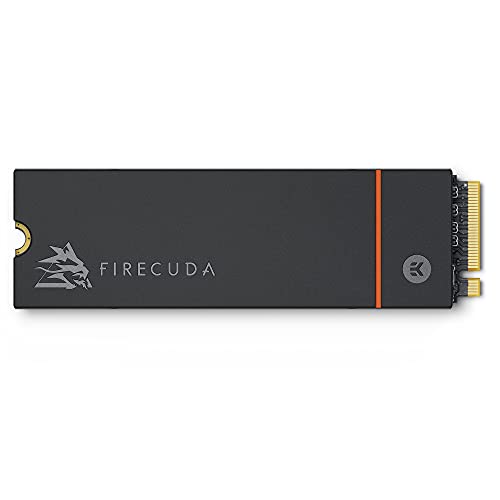
Modern Gen4 controllers generate significant heat when processing thousands of megabytes per second, making thermal dissipation essential to prevent thermal throttling. The physical approach to cooling is one of the starkest distinctions in the Samsung 990 PRO vs FireCuda 530 heatsink dynamic. Seagate includes a custom, low-profile aluminum heatsink developed specifically by custom-cooling specialist EKWB. This integrated heatsink increases overall heat dissipation surface area, enabling the drive to hold sustained peak performance for extended periods without needing a secondary motherboard shield.
The Samsung 990 PRO adopts an entirely different cooling strategy. Rather than incorporating a large block of finned aluminum, Samsung employs a nickel-coated controller alongside Smart Thermal Control technology. This maintains a slim, bare M.2 profile conforming to the PCI-SIG D8 specification. Samsung boasts up to a 50% improvement in performance per watt compared to the 980 PRO, managing thermal output at the silicon efficiency level. The slim form factor ensures it installs seamlessly into compact desktop slots, ultrabooks, and laptops that cannot accommodate an elevated heatsink block. Those interested in alternative cooling profiles can review our seagate firecuda 530 vs wd_black sn7100 piece.
Choosing between these two approaches depends entirely on your installation environment. If you want a complete, drop-in thermal solution with zero need to rely on motherboard heatsinks or thermal pads, Seagate provides superior out-of-the-box passive dissipation. However, if you are upgrading a laptop or an enclosure with rigid vertical clearance constraints, the slim profile of the 990 PRO offers universal fitment where the EKWB heatsink on the FireCuda 530 cannot physically go.
Edge: Seagate FireCuda 530 wins for high-load desktop and console environments due to its dedicated EKWB heatsink, though the Samsung 990 PRO remains more versatile for laptops.
Software Ecosystem and Data Security
Drive management and storage utility software allow users to maintain optimal firmware, run diagnostics, and monitor remaining drive health. Samsung has long established an industry-leading software utility in the form of Samsung Magician. The 990 PRO listing explicitly details support for Samsung Magician Software, which provides diagnostic scanning, performance benchmarking, firmware updates, and drive health monitoring. Furthermore, the 990 PRO features integrated hardware-level AES 256-bit encryption, securing critical personal or business data from unauthorized access without impacting processing speeds.
Seagate approaches data protection from a disaster-recovery standpoint rather than relying strictly on software utilities. The FireCuda 530 includes three full years of Rescue Data Recovery Services alongside its five-year limited warranty. If your drive suffers accidental data loss, physical damage, or mechanical corruption within that three-year window, Seagate’s specialized lab recovery team will attempt to recover your lost files at no additional service cost. The product listing does not indicate hardware encryption support for this specific FireCuda SKU.
This contrast establishes clear priorities. If you handle sensitive corporate files, trade secrets, or client data that require strict compliance and on-device AES 256-bit hardware encryption, the Samsung 990 PRO provides built-in enterprise-grade security. Conversely, if you are concerned about file corruption, unexpected hardware failure, or irrecoverable data loss on a workstation, the included three-year Seagate Rescue Data Recovery Services offer a safety net that Samsung does not match on its standard listing. Similar trade-offs are analyzed in our seagate firecuda 530 vs kingston fury renegade ssd comparison.
Edge: Tie; the Samsung 990 PRO excels in hardware encryption and management software, while the Seagate FireCuda 530 delivers peace of mind with three years of professional data recovery services.
Gaming Performance and Platform Compatibility
Evaluating FireCuda 530 vs 990 PRO gaming requires examining platform compatibility, console architecture, and direct file streaming. Both drives support next-generation gaming ecosystems, including full compatibility with the Sony PlayStation 5. For PlayStation 5 owners deciding between the Seagate FireCuda 530 or Samsung 990 PRO for PS5, physical installation is a primary factor. The FireCuda 530 with its low-profile EKWB heatsink is explicitly sized to fit directly inside the internal PS5 M.2 expansion bay, providing instant plug-and-play installation without purchasing an aftermarket thermal shield.
The Samsung 990 PRO is also listed as compatible with the PS5, PC, Mac, and laptop hardware platforms. For gaming rigs running Windows, Samsung highlights that up to a 65% improvement in random performance enables faster game asset loading, making it optimized for DirectStorage PC games. DirectStorage offloads asset decompression directly to the graphics card, making rapid random access and high burst throughput vital. While the FireCuda 530 operates well above Sony’s minimum read speed threshold with its 7300 MB/s rating, the 990 PRO delivers marginally faster burst potential at 7450 MB/s and tailored random load optimizations.
Platform breadth also slightly favors Samsung. The 990 PRO listing explicitly notes compatibility across Laptop, Mac, and PC environments, whereas the FireCuda 530 specifies Linux, PC, and Gaming Consoles. The slim design of the 990 PRO ensures it can slide into tight gaming notebook slots where thick heatsink-equipped drives cannot fit. For a look at how other value-oriented PCIe 4.0 options stack up for standard gaming builds, read our seagate firecuda 530 vs kingston nv3 overview.
Edge: Samsung 990 PRO edges out for PC gaming due to DirectStorage optimizations and laptop fit, though the FireCuda 530 is a smoother plug-and-play solution for the PS5.
Pros and Cons
Seagate FireCuda 530

Pros
- Massive 1275 TBW write endurance
- Factory-installed EKWB low-profile heatsink
- Includes 3-year Rescue Data Recovery Services
- 8 million hours MTBF rating
Cons
- Slower sequential write speed than 990 PRO
- Heatsink too thick for slim laptops
View Seagate FireCuda 530 on Amazon
Samsung 990 PRO

Pros
- Blazing 7450 MB/s sequential read speed
- Up to 1550K IOPS random write performance
- Slim PCI-SIG D8 size fits laptops
- Hardware-based AES 256-bit encryption support
- Advanced Samsung Magician software management
Cons
- Endurance TBW not listed in product data
- Lacks bundled data recovery services
View Samsung 990 PRO on Amazon
Who Should Buy Each One
Choose the Seagate FireCuda 530 If
- You write large volumes of data regularly and need class-leading 1275 TBW endurance.
- You want a pre-installed, low-profile EKWB heatsink that drops straight into a PS5 or desktop.
- You value three years of bundled Seagate Rescue Data Recovery Services for critical assets.
- You run a dedicated Linux or PC production workstation handling sustained multi-hour workloads.
Choose the Samsung 990 PRO If
- You want the fastest sequential read and write speeds available on the PCIe 4.0 standard.
- You demand top-tier random IOPS performance for DirectStorage gaming and swift system responsiveness.
- You need a slim M.2 drive adhering to PCI-SIG D8 that installs easily into laptops and notebooks.
- You require AES 256-bit hardware encryption managed through Samsung Magician software.
Final Verdict
The Samsung 990 PRO takes the crown as the overall performance leader for enthusiast PC gamers, everyday power users, and system builders. By driving sequential reads up to 7450 MB/s, sequential writes up to 6900 MB/s, and random access speeds up to 1550K IOPS, Samsung maximizes the capabilities of PCIe 4.0. Its energy-efficient nickel-coated controller and PCI-SIG D8 slim dimensions allow it to thrive inside laptops, desktops, and consoles alike, while Samsung Magician and AES 256-bit encryption keep your files tuned and secure.
However, the Seagate FireCuda 530 emerges as the undisputed victor for heavy-duty content creation, professional workstations, and write-intensive data environments. With an immense 1275 TBW endurance rating, a 1.8-million-hour MTBF, an integrated EKWB low-profile heatsink, and three years of Rescue Data Recovery Services, it provides sustained thermal stability and component reliability that standard consumer drives cannot match. If raw file endurance and out-of-the-box cooling take precedence over marginal burst speed increases, the FireCuda 530 is the superior investment.
FAQ
What is the main speed difference in FireCuda 530 vs 990 PRO speed?
The Samsung 990 PRO achieves faster peak speeds across both metrics, offering up to 7450 MB/s sequential read and 6900 MB/s sequential write. The Seagate FireCuda 530 reaches up to 7300 MB/s read and 6000 MB/s write. While read performance is comparable, Samsung provides a 900 MB/s lead in write throughput.
How does the FireCuda 530 TBW endurance compare to the Samsung 990 PRO?
The Seagate FireCuda 530 provides an advertised 1275 TBW endurance rating on the 1TB model along with a 1.8-million-hour MTBF. The product listing for the Samsung 990 PRO does not specify an official TBW endurance or MTBF rating, making Seagate the clear choice for verifiable write longevity.
Can I install the Seagate FireCuda 530 or Samsung 990 PRO for PS5?
Yes, both drives are compatible with the Sony PlayStation 5. The FireCuda 530 comes equipped with an EKWB low-profile heatsink designed to fit inside the PS5 expansion slot right out of the box. The Samsung 990 PRO model listed has a slim bare-drive profile, meaning console buyers may want to ensure adequate cooling inside the bay.
Does the Samsung 990 PRO include a heatsink like the FireCuda 530?
The Samsung 990 PRO model in this comparison uses a slim design with a nickel-coated controller and Smart Thermal Control to manage heat, meeting the PCI-SIG D8 specification. It does not include an elevated aluminum heatsink like the custom EKWB low-profile heatsink pre-installed on the FireCuda 530.
Is Samsung 990 PRO worth it for standard PC gaming?
Yes, the Samsung 990 PRO is built for gaming performance, delivering up to 65% faster random speeds compared to previous generation drives and high IOPS ratings that accelerate loading screens and future DirectStorage PC game assets.
What data recovery options come with each drive?
The Seagate FireCuda 530 includes three years of Rescue Data Recovery Services alongside a five-year limited warranty, covering professional lab recovery in the event of data loss. The Samsung 990 PRO listing does not offer data recovery services, relying instead on Samsung Magician software and AES 256-bit encryption for drive maintenance and security.