The decisive difference between the G.Skill Flare X5 DDR5 6000 and the G.Skill Ripjaws S5 DDR5 is column address strobe latency and firmware profile architecture: the Flare X5 provides tighter CL30 timings configured strictly for AMD EXPO systems, whereas the Ripjaws S5 runs at CL36 latency while carrying dual overclocking profiles for both Intel XMP 3.0 and AMD EXPO.
Builders putting together a dedicated AMD Socket AM5 system who want the tightest response times should choose the Flare X5, while desktop assemblers working on Intel motherboards or seeking cross-platform profile flexibility should select the Ripjaws S5.


G.Skill Flare X5 DDR5 6000 vs Ripjaws S5 DDR5 at a Glance
| Feature | G.Skill Flare X5 DDR5 6000 | G.Skill Ripjaws S5 DDR5 |
|---|---|---|
| Memory Generation | DDR5 | DDR5 |
| Advertised Transfer Speed | 6000 MT/s | 6000 MT/s |
| CAS Latency | CL30 | CL36 |
| Primary Timings | 30-38-38-96 | 36-36-36-96 |
| Overclocking Profile Support | AMD EXPO, JEDEC | Intel XMP 3.0, AMD EXPO, JEDEC |
| Rated Operating Voltage | 1.35V | 1.35V |
| Form Factor and Pins | UDIMM, 288-pin | UDIMM, 288-pin |
| Capacity Configuration | 32GB (2x16GB) | 32GB (2x16GB) |
| Validated Chipsets Listed | AMD X870, X670, B850, B840, B650, A620 | Intel Z890, Z790, Z690, B860, B760, B660, AMD X870, X670, B850, B840, B650, A620 |
| Item Weight | Not listed | 120 g |
| Best For | Dedicated AMD AM5 builders seeking tight CL30 timings | Intel system builders needing XMP 3.0 or cross-platform flexibility |
CAS Latency and Primary Memory Timings
Memory latency dictates the cycle delay between when a read command is issued by the memory controller and when the data is ready on the module pins. When comparing the Flare X5 CL30 vs Ripjaws S5 CL36, the Flare X5 carries a primary timing configuration of 30-38-38-96, while the Ripjaws S5 features 36-36-36-96. At an identical operating speed of 6000 MT/s, a Column Address Strobe rating of 30 requires fewer clock cycles to access data than a rating of 36. This timing advantage makes Flare X5 DDR5 6000 specs especially attractive for users aiming to extract the maximum responsiveness out of high-refresh desktop workloads.
In practice, running CL30 over CL36 reduces the access delay on recurring instructions. In real-world processing, examining Flare X5 vs Ripjaws S5 for gaming reveals that latency-sensitive titles often benefit from faster round-trip memory requests, specifically when frame rates rely heavily on CPU instruction fetch speeds. The Ripjaws S5 offsets its higher initial CAS delay with slightly tighter tRCD and tRP sub-timings at 36-36-36-96 compared to the Flare X5 rating of 30-38-38-96, but the initial read latency remains faster on the CL30 specification. Detailed analysis in our corsair vengeance ddr5 6000 cl30 vs g.skill flare x5 ddr5 6000 coverage confirms how meaningful CL30 baselines are for contemporary memory subsystems.
Opting for the tighter timings of the Flare X5 gives buyers the advantage of lower latency without needing manual adjustments beyond loading the predefined overclock profile. For users weighing a G.Skill Flare X5 DDR5 6000 review against general memory standards, the CL30 timing table represents an optimized tier for desktop performance.
Edge: G.Skill Flare X5 DDR5 6000 because its lower CL30 latency rating executes initial column read operations in fewer clock cycles than the CL36 specification of its counterpart.
Overclocking Profile Support and Firmware Integration
Overclocking profiles embedded on DDR5 memory modules allow compatible motherboards to automatically configure frequency, voltage, and primary timings without manual register entry. The Flare X5 comes programmed with a standard JEDEC default profile and an AMD EXPO (Extended Profiles for Overclocking) profile. Because its firmware focuses exclusively on AMD EXPO, it is structured specifically to communicate with AMD memory training algorithms during the system boot sequence.
By contrast, the Ripjaws S5 includes JEDEC default parameters alongside Dual OC Profile Support featuring both Intel XMP 3.0 and AMD EXPO. This dual-profile implementation allows the Ripjaws S5 to serve as a versatile solution for systems across hardware brands. An Intel builder can activate Intel XMP 3.0 directly in the UEFI, while an AMD builder using the same kit can activate AMD EXPO. Shoppers evaluating whether is G.Skill Ripjaws S5 DDR5 worth it frequently focus on this firmware flexibility, which mirrors versatility discussed in our g.skill flare x5 ddr5 6000 vs crucial pro ddr5 evaluation.
The operational cost of choosing the Flare X5 is the absence of an Intel XMP 3.0 profile in its product data. If installed in an Intel board, the Flare X5 relies on motherboard vendors offering cross-profile reading features or defaults to JEDEC speeds unless manually configured. The Ripjaws S5 eliminates this uncertainty by incorporating certified Intel XMP 3.0 right alongside AMD EXPO on the module EEPROM.
Edge: G.Skill Ripjaws S5 DDR5 because it features integrated dual-profile overclocking firmware covering both Intel XMP 3.0 and AMD EXPO environments.
Platform Architecture and Motherboard Chipset Validation
Memory stability relies heavily on platform qualification between the motherboard trace layout, the CPU memory controller, and the DIMM firmware. The product data for the Flare X5 specifies validation strictly for AMD chipsets, including AMD X870, AMD X670, AMD B850, AMD B840, AMD B650, and AMD A620. When deciding between G.Skill Flare X5 or Ripjaws S5 for AM5, the Flare X5 provides an exact focus on this AMD ecosystem.
The Ripjaws S5 lists official validation across a significantly broader spectrum of platforms. Its product data covers Intel Z890, Intel Z790, Intel Z690, Intel B860, Intel B760, and Intel B660, while simultaneously supporting the entire AMD stack: AMD X870, AMD X670, AMD B850, AMD B840, AMD B650, and AMD A620. For users inspecting Ripjaws S5 DDR5 Intel compatibility, this model provides guaranteed firmware handshakes across three generations of Intel desktop chipsets. This dynamic is also noted when examining workstation configurations in our g.skill trident z5 rgb ddr5 6000 vs ripjaws s5 ddr5 breakdown.
Choosing the Flare X5 locks the user into an AMD-oriented validation path. For a pure AMD build, this specialization is ideal, but the Ripjaws S5 delivers greater hardware versatility if components are ever migrated between Intel and AMD motherboards over time.
Edge: G.Skill Ripjaws S5 DDR5 because its listing explicitly validates hardware compatibility across multiple generations of both Intel and AMD desktop chipsets.
Kit Packaging, Installation Form Factor, and Hardware Design
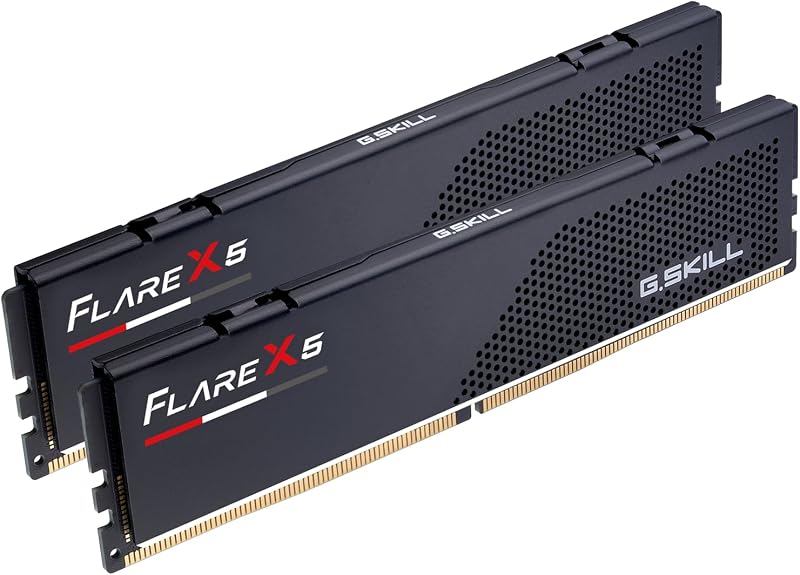
Both models share fundamental physical layout standards defined by JEDEC for desktop computer memory. Each kit comes configured as a dual-channel 32GB package consisting of two matched 16GB modules (2x16GB). Both kits feature non-ECC 288-pin desktop UDIMM layouts finished in matte black heatspreaders without protruding top bars or integrated lighting elements. The Ripjaws S5 listing specifies an item weight of 120 grams, while the listing for the Flare X5 does not specify weight.
G.Skill includes explicit warnings on both kits regarding matched pair integrity: neither memory kit should ever be mixed with other memory kits or individual modules. Both listings note that memory kits are sold as matched pairs engineered to run together, and mixing separate kits can cause system boot failure or operational instability. Builders looking into Flare X5 vs Ripjaws S5 Ryzen 7000 setups must maintain these paired modules in the designated dual-channel slots specified by their motherboard manuals. A similar matched module requirement is detailed in our g.skill flare x5 ddr5 6000 vs kingston fury renegade ddr5 analysis.
Because both products use compact matte black heatspreaders on standard 288-pin UDIMM circuit boards, physical installation across modern ATX, Micro-ATX, and Mini-ITX cases proceeds identically. Neither kit introduces clearance conflicts with oversized dual-tower CPU air coolers, as both rely on low-profile physical architecture.
Edge: Tie because both kits use identical 288-pin non-ECC desktop UDIMM form factors, matched 2x16GB configurations, and matte black low-profile heatspreaders.
Rated Operating Voltage and Default Startup Profiles
DDR5 memory operates at lower native voltages than previous generations, but overclocked profiles require elevated voltage to maintain stability at 6000 MT/s. Both the Flare X5 and the Ripjaws S5 share an identical rated operating voltage of 1.35V when running their automated high-speed profiles. At this voltage level, both kits supply sufficient power to the on-die circuitry to maintain stable operation at 6000 megabits per second.
Both product listings emphasize that memory kits boot initially at default JEDEC SPD speeds and standard baseline voltages upon initial system assembly. Users assembling a desktop must deliberately enter the motherboard BIOS to enable AMD EXPO or Intel XMP 3.0 to achieve the advertised 6000 MT/s speed and 1.35V target. Operating these kits outside manufacturer parameters or failing to enable the profile leaves the system running at baseline JEDEC speeds, a detail explored further in our corsair dominator titanium ddr5 vs g.skill flare x5 ddr5 6000 guide.
Since both products demand the same 1.35V power profile to reach 6000 MT/s, power consumption, heat generation, and thermal dissipation demands on motherboard VRMs are fundamentally identical between the two.
Edge: Tie because both models share the exact same 1.35V rated voltage requirement to achieve their 6000 MT/s operational speed.
Pros and Cons
G.Skill Flare X5 DDR5 6000
Pros
- Tighter CL30-38-38-96 primary timings
- Dedicated AMD EXPO overclocking profile
- Validated across AMD 600 and 800 chipsets
- Low-profile matte black heatspreaders
Cons
- Lacks native Intel XMP 3.0 profile
- Listing specifies no Intel chipset validation
View G.Skill Flare X5 DDR5 6000 on Amazon
G.Skill Ripjaws S5 DDR5

Pros
- Dual Intel XMP 3.0 and AMD EXPO support
- Broad validation across Intel and AMD chipsets
- High 6000 MT/s transfer speed
- Matte black low-profile form factor
Cons
- Higher CL36 column address strobe latency
- Slower cycle read response than CL30
View G.Skill Ripjaws S5 DDR5 on Amazon
Who Should Buy Each One
Choose the G.Skill Flare X5 DDR5 6000 If
- You are building a dedicated AMD Socket AM5 system powered by Ryzen 7000 or newer processors.
- You want the lowest latency possible out of the box with CL30-38-38-96 primary timings at 6000 MT/s.
- Your motherboard is based on an AMD X870, X670, B850, B840, B650, or A620 chipset.
- You prefer a dedicated AMD EXPO profile without needing Intel XMP 3.0 compatibility.
Choose the G.Skill Ripjaws S5 DDR5 If
- You are assembling an Intel desktop build based on Z890, Z790, Z690, B860, B760, or B660 chipsets.
- You need the flexibility of dual overclocking profiles with both Intel XMP 3.0 and AMD EXPO stored on module firmware.
- You prioritize broader motherboard chipset validation across both Intel and AMD platforms over sub-nanosecond CAS latency.
- You plan to migrate or share your 32GB DDR5 memory kit between Intel and AMD desktop systems in the future.
Final Verdict
For PC builders assembling an AMD AM5 desktop, the G.Skill Flare X5 DDR5 6000 is the superior selection. Its tighter CL30-38-38-96 timing configuration operates with fewer clock cycles of latency than the CL36 specification of the alternative, providing a direct responsiveness benefit for memory-sensitive gaming and desktop workloads. With firmware tailored directly around AMD EXPO and qualification across AMD 600 and 800 series chipsets, it represents the ideal drop-in solution for AMD platforms.
Conversely, the G.Skill Ripjaws S5 DDR5 is the necessary choice for any user assembling an Intel-based computer. With native Intel XMP 3.0 and AMD EXPO dual-profile support, validated compatibility across Intel 600, 700, and 800 series chipsets, and dependable 6000 MT/s throughput at CL36-36-36-96, the Ripjaws S5 delivers platform flexibility that the Flare X5 does not offer.
FAQ
Can G.Skill Flare X5 DDR5 6000 run on an Intel motherboard?
The Flare X5 listing only lists validation for AMD platforms including X870, X670, B850, B840, B650, and A620. While it may boot to standard JEDEC defaults on an Intel desktop, it lacks an Intel XMP 3.0 profile, so reaching 6000 MT/s requires manual memory tuning or an Intel board capable of translating AMD EXPO profiles.
Does G.Skill Ripjaws S5 DDR5 support AMD EXPO?
Yes, the Ripjaws S5 model F5-6000J3636F16GX2-RS5K includes Dual OC Profile Support featuring both Intel XMP 3.0 and AMD EXPO profiles, allowing automated one-click overclocking on compatible AMD and Intel motherboards.
What is the difference between CL30 and CL36 at 6000 MT/s?
The CAS latency indicates the number of clock cycles required for the RAM to deliver requested data. At 6000 MT/s, the Flare X5 completes this initial step in 30 clock cycles, whereas the Ripjaws S5 requires 36 clock cycles, giving the Flare X5 lower initial access latency.
Can I combine two separate 32GB kits to make 64GB?
No, the product listings for both the Flare X5 and Ripjaws S5 explicitly state not to mix memory kits. Memory kits are sold in matched pairs tested to function together, and combining two separate kits can lead to stability issues, lower operating speeds, or boot failure.
Do these memory kits run at 6000 MT/s automatically when plugged in?
No, both memory kits boot at default JEDEC SPD speeds when installed at standard BIOS settings. You must enter your motherboard BIOS and activate the AMD EXPO or Intel XMP profile to run the memory at its advertised 6000 MT/s speed and 1.35V voltage.
What color are the heatspreaders on these memory modules?
Both the Flare X5 and the Ripjaws S5 kits featured in these listings come finished in a matte black non-RGB heatspreader design.
What voltage do both memory kits require at their rated speed?
Both the G.Skill Flare X5 DDR5 6000 and the G.Skill Ripjaws S5 DDR5 operate at 1.35 volts when running their advertised 6000 MT/s overclocked memory profiles.


