Choosing between the Dell S2725QS and the Asus ROG Swift PG32UQX comes down to backlighting technology and display performance intent. The Dell S2725QS uses a traditional edge-lit IPS panel capped at 350 nits to deliver crisp, comfortable visuals for everyday desktop tasks, while the Asus ROG Swift PG32UQX uses a full-array Mini-LED backlight with 1,152 dimming zones reaching a peak brightness of 1400 nits for true high-dynamic-range rendering.
Choose the Dell S2725QS if you need a compact, space-conscious 27-inch 4K workstation monitor built for all-day office comfort and smooth desktop navigation. Choose the Asus ROG Swift PG32UQX if you want an expansive 32-inch gaming powerhouse capable of elite HDR contrast and hardware-driven frame synchronization.


Dell S2725QS vs Asus ROG Swift PG32UQX at a Glance
| Feature | Dell S2725QS | Asus ROG Swift PG32UQX |
|---|---|---|
| Screen Size | 27 inches | 32 inches |
| Native Resolution | 3840 x 2160 (4K UHD) | 3840 x 2160 (4K UHD) |
| Display Technology | In-Plane Switching (IPS) LED | Mini-LED LCD with Quantum Dot |
| Refresh Rate | 120Hz | 144Hz |
| Peak Brightness | 350 nits | 1400 nits |
| HDR Certification | HDR Ready | VESA DisplayHDR 1400 |
| Local Dimming Zones | Not listed | 1152 independent FALD zones |
| Variable Refresh Rate | AMD FreeSync Premium | NVIDIA G-SYNC ULTIMATE |
| Color Gamut | 99% sRGB | 98% DCI-P3 (150% rating listed) |
| Integrated Extra Display | Not listed | LiveDash OLED hardware info bar |
| Best For | Daily office productivity and casual 4K use | Enthusiast HDR gaming and visual production |
Backlight Technology and HDR Performance
The backlight architecture defines the fundamental contrast and illumination differences between these two screens. The Dell S2725QS relies on standard LED illumination delivering a typical brightness of 350 nits and a static contrast ratio of 1500:1. While its contrast is slightly higher than baseline IPS screens, it relies on global edge lighting without dedicated dimming segments. For standard office spreadsheets, web reading, and brightly lit home offices, this backlighting approach produces even illumination without light blooming around dark windows.
By contrast, Asus PG32UQX Mini-LED local dimming elevates visual contrast into a completely different tier. Armed with 1,152 independent full-array local dimming (FALD) zones and an astounding peak brightness of 1400 nits, the PG32UQX controls illumination across tiny isolated clusters. This physical separation allows the display to render deep black shadows directly alongside blinding specular highlights, meeting the stringent VESA DisplayHDR 1400 standard. As detailed in our asus rog swift pg32uqx vs samsung odyssey neo g7 32 breakdown, hardware local dimming changes how HDR content feels in a way software-level HDR cannot match.
If you evaluate Asus ROG Swift PG32UQX HDR 1400 performance against the basic HDR readiness of the Dell screen, the difference in dynamic range is stark. The Dell simply lacks the hardware zones and luminous power to display true HDR highlights, resulting in tonemapped images that look similar to standard dynamic range. The Asus provides punchy, cinema-grade luminance, making bright explosions, neon signs, and sunbeams stand out with visceral physical intensity.
Edge: Asus ROG Swift PG32UQX because its 1,152-zone Mini-LED backlight and 1400-nit luminance deliver authentic DisplayHDR 1400 performance that standard IPS backlights cannot match.
Refresh Rate and Gaming Synchronization
Motion clarity and adaptive sync stability dictate how responsive these panels feel during fast-paced interactions. The Dell S2725QS 120Hz 4K configuration offers double the refresh rate of older 60Hz office panels, paired with AMD FreeSync Premium to eliminate screen tearing. Dell also specifies an ultra-low response time of 0.03 milliseconds in its listing data, producing rapid pixel transitions that keep scrolling text legible and casual action sequences crisp.
The Asus PG32UQX pushes motion further with a 144Hz refresh rate backed by an internal NVIDIA G-SYNC ULTIMATE processing module. This specialized hardware module provides variable refresh rate compensation across the entire frequency range, zero-latency overdrive tuning, and certified HDR variable refresh operation. Readers browsing our gigabyte mo32u24 vs asus rog swift pg32uqx analysis will recognize that dedicated G-SYNC ULTIMATE processors maintain exceptional sync stability under heavy graphics rendering loads.
When deciding on the Dell S2725QS or Asus ROG Swift PG32UQX for gaming, your target platform determines the victor. The Dell provides an agile 120Hz window that works smoothly with modern consoles and everyday desktop GPUs through open-standard FreeSync. However, the Asus was engineered specifically for high-tier enthusiast rigs where the extra 24Hz of headroom and dedicated G-SYNC module ensure artifact-free rendering during heavy frame drops.
Edge: Asus ROG Swift PG32UQX due to its higher 144Hz refresh rate and specialized NVIDIA G-SYNC ULTIMATE processor.
Color Accuracy and Visual Reproduction
Color space coverage determines whether a monitor can accurately display wide-gamut media and professional creative assets. The Dell S2725QS covers 99% of the sRGB color gamut, using standard In-Plane Switching technology to maintain broad 178-degree horizontal and vertical viewing angles. For general web content, office documents, and standard video streaming, sRGB coverage ensures natural color tones without oversaturating everyday interface elements.
The Asus ROG Swift PG32UQX incorporates Quantum Dot technology with a wide DCI-P3 98% color gamut, alongside a factory color calibration report included directly in the box. Quantum-dot enhancement enables true 10-bit color depth capable of rendering over one billion colors for silky smooth gradients and richer primary tones. As explored in our asus rog swift pg32uqx vs lg 27up850 comparison, wide-gamut color mapping is vital for HDR color grading and mastering work.
In terms of pixel density, the 27-inch Dell screen concentrates 3840 x 2160 pixels into a tight 163 pixel-per-inch grid, yielding sharper desktop text than the 32-inch Asus panel’s roughly 138 pixels per inch. However, when evaluating the Dell S2725QS or Asus ROG Swift PG32UQX for productivity involving print preparation, cinema grading, or wide-gamut digital imaging, the PG32UQX offers superior depth and professional color verification.
Edge: Asus ROG Swift PG32UQX for its wide 98% DCI-P3 Quantum Dot gamut and factory color calibration report.
Desk Ergonomics and Footprint
A monitor’s physical footprint determines how comfortably it integrates into your daily working environment. The Dell S2725QS is built around a compact, minimalist aesthetic with an ash white finish and ultra-thin bezels. Measuring 7.89 inches deep, 24.08 inches wide, and 15.3 inches high, the Dell weighs a manageable 14.3 pounds. This modest profile sits comfortably on shallow writing desks and leaves plenty of room for keyboards, notebooks, and work documents.
The Asus ROG Swift PG32UQX presents an aggressive, industrial form factor requiring substantial workspace. Its substantial stand creates a depth of 19.84 inches, spanning 28.62 inches wide and weighing a heavy 24 pounds. Placing the PG32UQX on a standard 24-inch desk will push the display surface very close to your eyes, leaving minimal clearance for peripherals. Similar footprint considerations appear in our gigabyte m27up sa vs asus rog swift pg32uqx overview for users with space constraints.
The Asus chassis also incorporates a LiveDash OLED display positioned on the front deco bar. This built-in secondary screen displays real-time hardware telemetry such as CPU and GPU temperatures or customized user icons. While the Asus provides unique enthusiast flair, the Dell offers practical, unobtrusive office integration that takes up less than half the desk depth.
Edge: Dell S2725QS because its compact 7.89-inch depth, 14.3-pound weight, and ultra-thin bezels fit easily onto standard workspaces.
Eye Comfort and Built-In Features
Long working hours require features that minimize sensory fatigue and streamline everyday usability. The Dell S2725QS includes an improved ComfortView Plus hardware solution certified by independent testing. This feature reduces blue light emissions to 35 percent or lower without altering or degrading onscreen color accuracy, making it easy on the eyes during extended document reading sessions.
Audio integration also sets the Dell apart for standard office workflows. Dell engineered the internal sound quality on the S2725QS to deliver spacious audio with greater output power, deeper frequency response, and a wider decibel range than its predecessors. This built-in sound system allows users to take video calls and listen to media without taking up valuable desk space with dedicated external speakers.
The Asus ROG Swift PG32UQX targets hardware utility rather than integrated sound, omitting internal speakers entirely in favor of an extensive accessory package and multi-port connectivity hub. The Asus box includes a DisplayPort cable, ROG HDMI cable, USB-A to B uplink, color calibration report, tripod screw adapter, replaceable LED light covers, and a 3-month Adobe Creative Cloud subscription. While the Asus brings generous enthusiast accessories, the Dell provides a cleaner all-in-one daily computing setup.
Edge: Dell S2725QS for its built-in ComfortView Plus blue light reduction and integrated upgraded audio system.
Pros and Cons
Dell S2725QS

Pros
- Crisp 163 PPI pixel density
- Fluid 120Hz 4K refresh rate
- Built-in upgraded speaker system
- ComfortView Plus low blue light
- Compact 7.89-inch stand depth
Cons
- Modest 350-nit brightness ceiling
- No local dimming zones
- Gamut limited to 99% sRGB
Asus ROG Swift PG32UQX
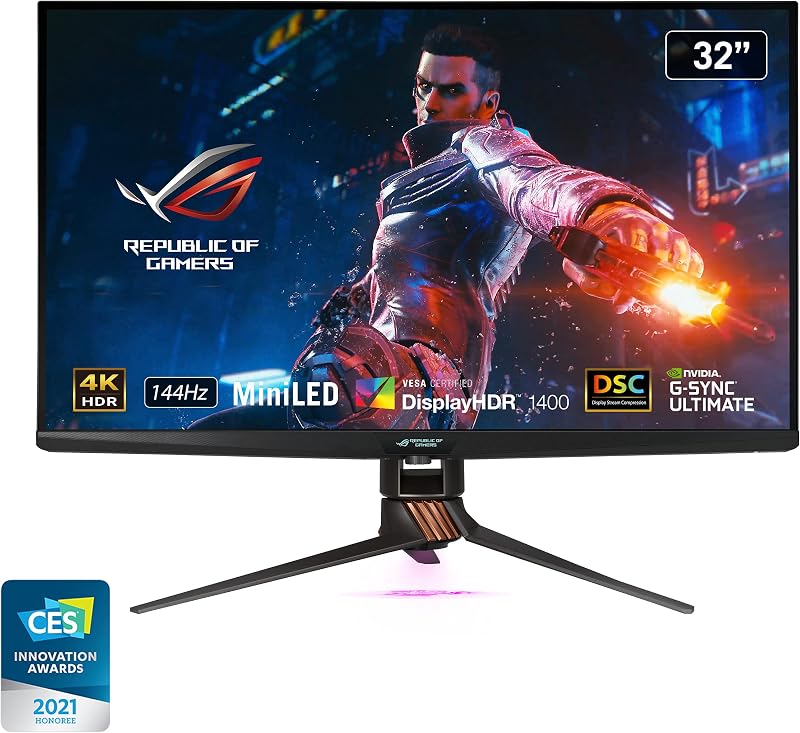
Pros
- 1152 Mini-LED local dimming zones
- Blinding 1400-nit peak HDR brightness
- Hardware NVIDIA G-SYNC ULTIMATE processor
- 98% DCI-P3 Quantum Dot color
- LiveDash OLED hardware info bar
Cons
- Heavy 24-pound desk footprint
- Deep 19.84-inch stand clearance required
- No integrated speakers listed
View Asus ROG Swift PG32UQX on Amazon
Who Should Buy Each One
Choose the Dell S2725QS If
- You want a compact 27-inch 4K screen with sharp 163 PPI text clarity for spreadsheets and reading.
- You need ComfortView Plus hardware blue light reduction to protect your eyes across long work shifts.
- You have a standard or shallow desk that requires a modest 7.89-inch physical stand depth.
- You want built-in upgraded speakers that eliminate the clutter of external desktop soundbars.
Choose the Asus ROG Swift PG32UQX If
- You demand class-leading DisplayHDR 1400 performance powered by 1,152 Mini-LED local dimming zones.
- You run a high-end gaming PC and want native NVIDIA G-SYNC ULTIMATE hardware frame processing.
- You require a wide 98% DCI-P3 Quantum Dot color gamut with an included factory calibration report.
- You want hardware system monitoring through the integrated LiveDash OLED status bar.
Final Verdict
Any comprehensive Dell S2725QS review shows that Dell crafted this 27-inch display for practical daily utility. Its 120Hz refresh rate brings fluid motion to everyday navigation, while the 4K resolution provides exceptional text clarity. Supported by ComfortView Plus eye protection, an upgraded internal audio setup, and a slim 14.3-pound profile, the Dell S2725QS represents the ideal choice for home offices, productivity stations, and users who want high pixel density without dealing with a massive desk footprint.
When considering whether an Asus ROG Swift PG32UQX review justifies its place on your desk, the question of is Asus ROG Swift PG32UQX worth it depends entirely on your HDR ambitions. With its 1,152-zone Mini-LED array, 1400-nit peak output, Quantum Dot color vibrancy, and hardware G-SYNC ULTIMATE engine, the PG32UQX delivers visual power that basic IPS screens cannot approach. If your priority is uncompromising HDR gaming and wide-gamut media mastering on a grand 32-inch canvas, the Asus stands as the clear winner.
FAQ
Is Dell S2725QS worth it for standard office productivity?
Yes. The Dell S2725QS provides 4K UHD resolution on a 27-inch panel, resulting in sharp 163 PPI text rendering. It features ComfortView Plus to limit harmful blue light emissions to 35 percent or less, built-in upgraded speakers for calls, and a smooth 120Hz refresh rate that keeps window scrolling fluid throughout the workday.
How does Asus PG32UQX Mini-LED local dimming work?
The Asus PG32UQX uses a Full Array Local Dimming backlight equipped with 1,152 individual Mini-LED zones. An onboard controller adjusts the brightness of each zone independently based on onscreen content. This allows dark portions of an image to drop to deep black levels while adjacent highlights reach a blinding 1400 nits, producing authentic VESA DisplayHDR 1400 contrast.
Can the Dell S2725QS display HDR content?
The Dell S2725QS includes HDR readiness, meaning it accepts HDR metadata and processes high-dynamic-range input signals. However, because it relies on standard edge-lit LED backlighting with a 350-nit brightness rating and no local dimming zones, it cannot reproduce the extreme highlights or deep black levels seen on dedicated HDR displays like the PG32UQX.
Does the Asus ROG Swift PG32UQX include built-in speakers?
The listing data for the Asus ROG Swift PG32UQX does not specify integrated stereo speakers. Asus designs this flagship monitor for gaming and production setups where users typically rely on dedicated desktop speakers or gaming headsets connected to external audio interfaces.
What does the LiveDash OLED display do on the Asus PG32UQX?
The LiveDash OLED display is a small utility screen built into the front lower bezel of the monitor. It can be configured to show useful hardware telemetry such as CPU temperatures, GPU frequencies, and fan speeds, or set to display custom user icons and graphics.
Which monitor has better color coverage for photo editing?
The Asus ROG Swift PG32UQX offers superior color coverage for creative work. It incorporates Quantum Dot technology covering 98% of the DCI-P3 color spectrum, provides true 10-bit color depth, and ships with an individual factory color calibration report. The Dell S2725QS covers 99% of the narrower sRGB color space, making it better suited for standard web-based graphics.


