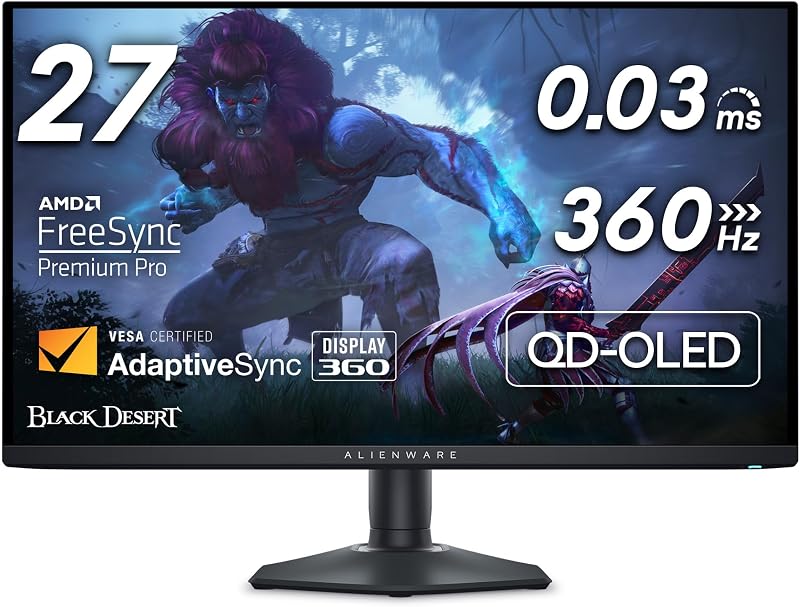
The core distinction separating these two premium displays comes down to focused competitive precision versus versatile dual-resolution hardware. The Alienware AW2725DF utilizes a 27-inch QD-OLED panel locked to a native 2560×1440 resolution at 360Hz, targeting esports enthusiasts who demand uncompromised motion clarity and rapid target acquisition without scaling artifacts. In contrast, the LG 32GS95UE provides a larger 32-inch 4K UHD OLED screen running natively at 240Hz, while integrating a VESA-certified Dual Mode switch that shifts output to 1080p at 480Hz for ultra-high-frame-rate titles.
Gamers dedicated strictly to competitive multiplayer titles and ranked matchmaking should choose the Alienware AW2725DF for its balanced pixel density and native high refresh rate. Players seeking breathtaking visual fidelity in story-driven adventures alongside the flexibility to downscale for competitive twitch shooters should select the LG 32GS95UE.

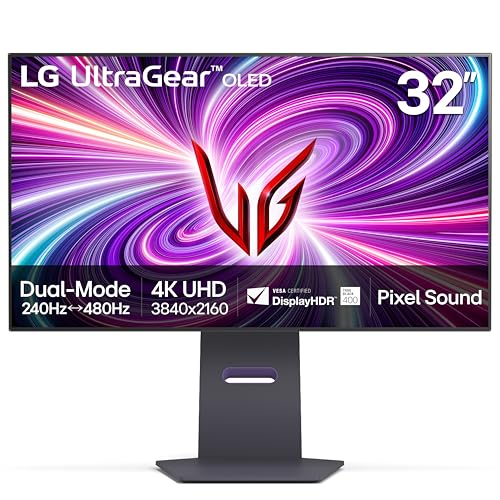
Alienware AW2725DF vs LG 32GS95UE at a Glance
| Feature | Alienware AW2725DF | LG 32GS95UE |
|---|---|---|
| Screen Size | 27 inches (26.7-inch viewable) | 32 inches (31.5-inch viewable) |
| Panel Technology | QD-OLED | OLED |
| Native Resolution | 2560 x 1440 (QHD) | 3840 x 2160 (4K UHD) |
| Refresh Rate | 360Hz Native | 240Hz Native (4K) / 480Hz Dual Mode (FHD) |
| Response Time | 0.03 ms (gray-to-gray) | 0.03 ms (gray-to-gray) |
| Contrast Ratio | 1.5 million:1 | 1.5 million:1 |
| Color Gamut | DCI-P3 99.3% (Delta E<2) | 98.5% |
| Variable Refresh Rate | AMD FreeSync Premium Pro, VESA AdaptiveSync | NVIDIA G-SYNC Compatible, AMD FreeSync Premium Pro |
| Integrated Audio | Not listed | Pixel Sound (CSO, woofer, DTS Virtual:X) |
| Stand Adjustability | Height, Tilt, Swivel, Pivot | Height, Tilt, Swivel |
| Manufacturer Warranty | 3-year Advanced Exchange Service | 2-year limited (parts, labor, panel) |
| Best For | Dedicated esports and fast-paced competitive shooters | Hybrid 4K immersion and high-framerate competitive play |
Resolution, Screen Size, and Visual Immersion
Display real estate and pixel density fundamentally dictate how you experience virtual environments and process competitive information. The AW2725DF features a 26.7-inch viewable QD-OLED display running at 2560×1440 resolution. With a pixel pitch of 111 pixels per inch, it produces crisp rendering without requiring excessive GPU render overhead. This 27-inch form factor allows competitive gamers to survey the entire screen without excessive peripheral eye movement, making minimaps and crosshairs easy to track during intense firefights. While ultrawide alternatives like the alienware aw3423dwf vs aw2725df cater to wrap-around sightlines, this 16:9 standard remains the tournament-preferred baseline.
The 32GS95UE takes an entirely different approach to visual delivery with its 31.5-inch 4K UHD screen offering 3840×2160 pixels. With a tight 0.18 pixel pitch, the panel resolves minute textures, distant foliage, and distant atmospheric details that softer resolutions simply obscure. The expansive 32-inch screen occupies a substantial portion of your natural field of view, drawing you deeply into sprawling open-world single-player titles. When evaluating an Alienware AW2725DF review against modern 4K competitors, the visual jump from 1440p to native 2160p presents an immediate upgrade in fidelity and geometric edge definition.
The physical footprint on your desk also mirrors these panel differences. The AW2725DF measures 23.98 inches wide and 15.99 inches high, weighing 13.9 pounds. In contrast, the 32GS95UE demands serious real estate at 28.1 inches wide, 24.6 inches high, and a hefty 19.8 pounds. Driving 4K at high frames also requires top-tier graphics processing power. If your desktop space is limited or your system cannot push stable 4K frames, the dense 1440p frame of the Alienware monitor represents a balanced, highly manageable footprint.
Edge: LG 32GS95UE provides greater visual immersion through its expansive 32-inch screen and superior 4K pixel resolution.
Refresh Rate and Motion Clarity
In high-speed competitive titles, refresh rate and pixel transition speeds dictate your tracking accuracy and ability to spot moving targets. Both panels feature an instantaneous 0.03 millisecond gray-to-gray response time courtesy of their self-emissive OLED diodes, effectively eliminating the ghosting and inverse smearing common to legacy LCD panels. When analyzing alienware aw3423dw vs aw2725df for frame pacing, the AW2725DF sets an elite benchmark with a continuous, native 360Hz refresh rate at 1440p.
The comparison becomes intricate when evaluating the AW2725DF vs 32GS95UE refresh rate options. The 32GS95UE features a specialized Dual Mode hardware toggle. In standard operation, it delivers 4K visuals at a smooth 240Hz refresh rate. By activating Dual Mode, the monitor drops its resolution to 1080p Full HD while ramping the refresh rate up to an astonishing 480Hz. This 480Hz output pushes frame intervals down to just over two milliseconds, creating extraordinary fluidity during erratic tracking scenarios in games like Counter-Strike or Overwatch.
Comparing LG 32GS95UE vs AW2725DF motion clarity reveals a fundamental trade-off. The AW2725DF sustains its clean 360Hz motion clarity while preserving the sharp visual integrity of native 1440p. When the 32GS95UE engages its 480Hz mode, stretching a 1920×1080 image across a 32-inch surface noticeably reduces image sharpness and pixel density. For esports competitors who refuse to compromise visual clarity for frame speed, the Alienware display offers the superior balance, whereas the LG display wins on raw temporal frequency alone.
Edge: LG 32GS95UE takes the lead for raw speed due to its 480Hz Dual Mode peak refresh rate.
Color Performance and Panel Technology
Underlying panel chemistry sets these two OLED variants apart in color volume, highlight reproduction, and subpixel composition. The AW2725DF uses Quantum Dot OLED (QD-OLED) technology. This architecture pairs a blue OLED emitting layer with printed quantum dot color converters to produce pure red and green primary colors. The listing confirms a stellar 99.3% coverage of the DCI-P3 color space, paired with factory calibration achieving Delta E<2 accuracy. In content creation workflows and color-critical gaming, the QD-OLED implementation delivers saturated, vibrant tones even in high-luminance scenes.
The 32GS95UE relies on LG’s specialized UltraGear OLED panel architecture, featuring a 98.5% color gamut specification. Both displays carry VESA DisplayHDR True Black 400 certification alongside a 1.5 million-to-1 contrast ratio. Because both monitors control light at the individual pixel level, dark scenes display perfect, inky blacks without backlighting halos, edge bleed, or blooming. Similar to wide-aspect panels highlighted in the alienware aw2725df vs samsung odyssey oled g8 overview, OLED contrast provides breathtaking separation between shadowed corners and sparkling highlights.
Luminance metrics show clear distinctions in the technical listings. The AW2725DF lists a peak brightness specification of 1000, enabling striking specular highlights in HDR titles. The 32GS95UE lists a typical brightness figure of 275 cd/m2 and incorporates an Anti-Glare with Low Reflection matte coating to scatter ambient reflections in bright rooms. The AW2725DF also features a matte finish, yet its QD-OLED color volume maintains a slight advantage in deep color richness across broad gamuts.
Edge: Alienware AW2725DF wins on color fidelity due to its wider 99.3% DCI-P3 coverage, tight Delta E<2 accuracy, and QD-OLED saturation.
Competitive Gaming Features and Input Lag
Competitive players scrutinize every millisecond of input delay and rely on custom display overlays to gain tactical advantages. Evaluating AW2725DF vs 32GS95UE input lag reveals that both monitors keep signal processing delays to negligible levels. The 0.03ms response times on both models virtually eliminate display-side motion latency. At 360Hz on the AW2725DF, frame display intervals measure approximately 2.77 milliseconds, while the 32GS95UE running at 480Hz reduces frame display intervals to 2.08 milliseconds, giving lightning-fast visual feedback to twitch inputs.
Adaptive sync certifications differ slightly between the two models. The 32GS95UE holds official validation as NVIDIA G-SYNC Compatible and supports AMD FreeSync Premium Pro, making it an exceptional match for variable refresh setups on modern graphics cards. The AW2725DF supports AMD FreeSync Premium Pro and VESA AdaptiveSync, guaranteeing tear-free visuals without input stutter. Players comparing the alienware aw3423dwf vs lg 32gs95ue will appreciate the wide hardware ecosystem compatibility offered by both manufacturers.
When asking whether the Alienware AW2725DF or LG 32GS95UE for esports is the better investment, specific software features matter. Alienware outfits the AW2725DF with AlienVision on-screen overlays, offering hardware-level crosshairs, night-vision brightness boosts, and tactical zoom windows. The 32GS95UE counters with its VESA Certified Dual Mode switch, letting you jump from 4K fidelity down to 480Hz speed with zero external scaling software. If you play a mix of casual visual titles and cutthroat shooters, LG’s hardware flexibility provides distinct operational utility.
Edge: Tie. The Alienware provides competitive 1440p AlienVision tools, while the LG delivers ultra-low frame latency at 480Hz with certified G-SYNC support.
Ergonomics, Audio, and Physical Build
Physical construction, desktop ergonomics, and integrated hardware dramatically influence long-term comfort. The AW2725DF comes equipped with a fully articulated stand supporting height adjustment, tilt, swivel, and full pivot rotation into portrait orientation. Its sleek monitor head and minimal hexagonal base take up minimal space on a mousepad-heavy desk, leaving plenty of room for wide, aggressive arm sweeps. It also includes 3-zone AlienFX customizable RGB lighting and operates with a rated power consumption of 27.6 watts.
The 32GS95UE features an impressive technological party trick: Pixel Sound. Rather than routing tinny audio through down-firing speaker grilles, the monitor’s internal actuators vibrate the OLED panel directly to project sound outward toward the user. Backed by DTS Virtual:X and a dedicated woofer, this screen-emitted audio delivers clear directional positioning without needing desktop speakers. Stand adjustments cover height, tilt, and swivel, but lack the 90-degree pivot found on the Alienware. Readers exploring the alienware aw3423dw vs lg 32gs95ue will note the distinct desk presence of LG’s 32-inch chassis.
Connectivity on the 32GS95UE is robust, offering modern HDMI 2.1 and DisplayPort 1.4 ports capable of driving 4K up to 240Hz natively. The AW2725DF features HDMI, DisplayPort, and USB 3.2 Gen1 connectivity. Warranty terms also highlight an important operational difference: Alienware provides a 3-year Advanced Exchange Service warranty, whereas LG backs the 32GS95UE with a 2-year limited warranty covering parts, labor, and the OLED panel.
Edge: Alienware AW2725DF wins on build ownership peace of mind with a full pivot stand and a longer 3-year advanced exchange warranty.
Pros and Cons
Alienware AW2725DF
Pros
- Native 360Hz refresh rate at 1440p
- Rich QD-OLED color with 99.3% DCI-P3
- Full stand adjustment with 90-degree pivot
- 3-year Advanced Exchange warranty
Cons
- Lacks 4K resolution support
- No built-in integrated speakers
- Fixed 27-inch screen size
View Alienware AW2725DF on Amazon
LG 32GS95UE

Pros
- VESA Certified Dual Mode 4K 240Hz or FHD 480Hz
- Immersive 32-inch 4K UHD screen
- Pixel Sound audio emitted from the display
- NVIDIA G-SYNC Compatible validated
Cons
- Lower 1080p sharpness when using 480Hz mode
- Shorter 2-year limited warranty
- Stand lacks portrait pivot capability
Who Should Buy Each One
Choose the Alienware AW2725DF If
- You primarily play fast-paced competitive esports titles like Valorant, Apex Legends, or Counter-Strike 2.
- You want native 1440p resolution running at a continuous 360Hz refresh rate without toggling scaling modes.
- You need full stand adjustability, including 90-degree pivot rotation for secondary productivity or streaming chats.
- You value the extended peace of mind that comes with a 3-year Advanced Exchange warranty.
Choose the LG 32GS95UE If
- You want a single display that excels at cinematic 4K 240Hz visuals and ultra-fast 480Hz competitive gaming.
- You desire a large 32-inch screen for maximum field-of-view immersion in story-driven RPGs and simulators.
- You prefer an integrated audio solution like Pixel Sound to keep your gaming desk clean and clutter-free.
- You own top-tier PC hardware capable of outputting high frame rates at 3840×2160 resolution over HDMI 2.1.
Final Verdict
For dedicated competitive gamers seeking pure performance without compromise, the Alienware AW2725DF represents the smarter overall package. Its 27-inch 1440p form factor remains the undisputed sweet spot for fast visual acquisition, its 360Hz QD-OLED panel provides stunning color accuracy alongside instant pixel response times, and its 3-year warranty safeguards your investment. By focusing purely on native 1440p performance, the AW2725DF delivers blistering motion clarity without requiring you to sacrifice screen resolution or tolerate soft 1080p upscaling.
On the other hand, the LG 32GS95UE emerges as the superior display if you demand an all-in-one hybrid solution. By pairing crisp 4K 240Hz visual immersion with an astonishing 480Hz Dual Mode option, LG bridges the gap between high-fidelity visual spectacles and high-tier competitive twitch shooters. If you have the desk space and graphics hardware to unleash its potential, the 32GS95UE justifies its place as an exceptionally versatile flagship monitor.
FAQ
Is LG 32GS95UE worth it over the Alienware AW2725DF for gaming?
The LG 32GS95UE is worth choosing if you split your time between visually demanding 4K titles and fast-paced competitive shooters. Its Dual Mode functionality provides the flexibility of 4K at 240Hz and Full HD at 480Hz in a single display. However, if your gaming library consists almost entirely of competitive esports titles, the Alienware AW2725DF is often the more efficient choice because it maintains native 1440p sharpness at 360Hz without downscaling to 1080p.
How does the Alienware AW2725DF vs LG 32GS95UE dual mode feature work?
The Dual Mode feature is exclusive to the LG 32GS95UE. It is a VESA-certified hardware function that lets users switch between native 4K UHD (3840×2160) at up to 240Hz and Full HD (1920×1080) at up to 480Hz via an on-screen or dedicated monitor toggle. The Alienware AW2725DF does not feature dual-mode hardware switching; it runs continuously at its native 2560×1440 resolution at up to 360Hz.
What are the primary warranty differences between Alienware and LG?
The Alienware AW2725DF includes a 3-year Advanced Exchange Service warranty from the manufacturer. In contrast, the LG 32GS95UE comes with a 2-year limited warranty that covers internal components, functional parts, labor, and the OLED display panel itself. Buyers prioritizing longer warranty coverage receive an additional year of protection with Alienware.
Can both monitors achieve their maximum refresh rate over HDMI?
The LG 32GS95UE features full HDMI 2.1 bandwidth, allowing it to achieve up to 240Hz at 4K and up to 480Hz at 1080p across both HDMI 2.1 and DisplayPort 1.4 connections. The Alienware AW2725DF listing specifies HDMI and DisplayPort connectivity, but reaching its maximum 360Hz refresh rate at native 1440p generally relies on its DisplayPort interface depending on your graphics card output capabilities.
Which monitor has better integrated audio?
The LG 32GS95UE is the clear winner for built-in sound because it features Pixel Sound technology. This system uses actuators located behind the OLED panel to project sound directly through the screen, supplemented by an integrated woofer and DTS Virtual:X processing. The Alienware AW2725DF listing does not specify integrated speakers, requiring users to rely on external speakers or gaming headsets.
Does the Alienware AW2725DF stand support portrait mode?
Yes, the Alienware AW2725DF stand offers full ergonomic adjustability, including height, tilt, swivel, and 90-degree pivot rotation into portrait orientation. The LG 32GS95UE stand provides height, tilt, and swivel adjustments, but does not feature portrait pivot rotation.


