The primary distinction between the Logitech G915 TKL and the Logitech MX Mechanical is their core design objective: the G915 TKL is an ultra-slim, low-latency gaming keyboard built with rapid 1 ms LIGHTSPEED wireless and dynamic RGB backlighting, whereas the MX Mechanical is a full-size productivity powerhouse engineered with quiet switches, an integrated numeric keypad, and multi-device pairing for office workflows. In this Logitech MX Mechanical vs G915 TKL comparison, choosing the right keyboard comes down to whether you prioritize competitive desk ergonomics and responsiveness or multi-computer office utility.
Gamers seeking lightning-fast wireless response times, expansive mouse movement space, and customizable per-key lighting should select the G915 TKL. Professionals, software engineers, and spreadsheet power users who require a dedicated tenkey number pad, quiet keystrokes, and simultaneous connectivity across multiple computers should choose the MX Mechanical.

Logitech G915 TKL vs MX Mechanical at a Glance
| Attribute | Logitech G915 TKL | Logitech MX Mechanical |
|---|---|---|
| Form Factor | Tenkeyless (90 keys, 4 sections) | Full-size (with integrated number pad) |
| Switch Types | Low-profile GL switches (Clicky, Tactile, or Linear) | Low-profile Tactile Quiet |
| Wireless Technology | 1 ms LIGHTSPEED wireless and Bluetooth | Logi Bolt receiver and Bluetooth LE |
| Multi-Device Support | 2 devices (LIGHTSPEED receiver and Bluetooth toggle) | Up to 3 devices (one-tap Easy-Switch) |
| Backlighting | LIGHTSYNC per-key RGB (16.8M colors) | Smart auto-adjusting backlighting |
| Battery Life | Up to 40 hours per charge | Up to 15 days (backlit) or months (backlight off) |
| Chassis Construction | Aircraft-grade aluminum alloy top plate | Metal top plate |
| Operating System Support | Windows, macOS | Windows, macOS, ChromeOS, iPadOS and more |
| Best For | Low-latency gaming and compact desk setups | Multi-device office productivity and data entry |
Form Factor and Desk Ergonomics
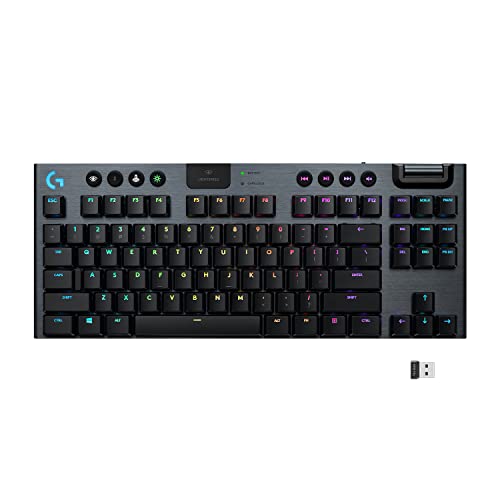
Physical form factor determines how comfortably your hands, wrists, and shoulders align during hours at your desk. The G915 TKL utilizes a tenkeyless layout that removes the traditional numeric pad, providing ninety keys organized across four distinct sections. By eliminating the number pad, the G915 TKL allows you to position your mouse significantly closer to the natural resting position of your right hand, avoiding excessive shoulder extension. When deciding between smaller keyboard layouts, understanding a 60% vs TKL keyboard can help clarify how tenkeyless frames preserve the dedicated arrow cluster and navigation column while removing the number pad. This additional mouse clearance is an immense advantage for low-sensitivity gaming setups where sweeping mouse strokes require unimpeded space.
In direct contrast, the MX Mechanical features a standard full-size chassis equipped with an integrated numeric keypad, a full arrow cluster, and a dedicated navigation block. For accountants, data analysts, and administrative professionals who routinely crunch numbers or navigate financial spreadsheets, having a dedicated number pad is indispensable for swift, error-free input. However, the wider profile of the MX Mechanical pushes the mouse farther to the right, which can contribute to postural strain over long workdays if your workspace is compact. Choosing between these two designs requires weighing the ergonomic benefits of a centered typing posture against the daily utility of a physical tenkey pad.
Both keyboards showcase premium metal construction designed to provide rigidity without excessive vertical bulk. Logitech constructed the G915 TKL with an aircraft-grade aluminum alloy top plate, resulting in an impossibly thin yet structurally rigid deck that resists flex under aggressive gaming inputs. The MX Mechanical matches this premium standard with a graphite-finished metal top plate that conveys stability and durability in corporate environments. Notably, the G915 TKL incorporates a dedicated storage compartment on its underside to hold the USB receiver during transit, giving it an extra edge in portability that the heavier, full-sized MX Mechanical cannot match.
Edge: Logitech G915 TKL because its tenkeyless layout opens up valuable desk surface and allows a more neutral arm position during extended sessions.
Switch Options and Typing Performance
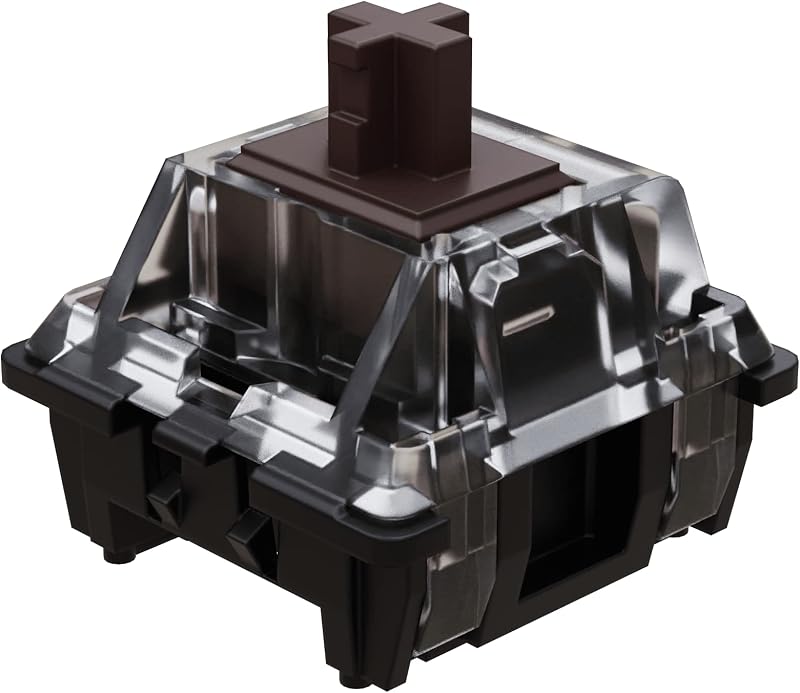
The mechanical switches underneath the keycaps define the tactile feel, actuation speed, and acoustic signature of every keystroke. In any detailed Logitech G915 TKL vs MX Mechanical switches comparison, switch design separates their intended audiences. The G915 TKL is built around Logitech low-profile GL mechanical switches, which deliver the precision, speed, and tactile satisfaction of traditional mechanical switches at half the vertical height. The G915 TKL listing highlights Clicky switches alongside options for GL Tactile-which features a discernible physical bump at actuation-and smooth GL Linear switches. Gamers researching competitive low-profile designs often look at comparisons like the Logitech G Pro X TKL vs G915 TKL to understand how low-profile key stems differ from traditional standard-height mechanical switches.
Conversely, the MX Mechanical listing features low-profile Tactile Quiet switches engineered specifically to reduce acoustic distraction. When considering the Logitech G915 TKL or MX Mechanical for typing in open-plan corporate offices, libraries, or late-night family settings, switch volume is a vital buying consideration. The Tactile Quiet switches on the MX Mechanical provide a crisp tactile bump that registers keystrokes accurately without generating loud bottom-out clatter or sharp clicking noises. This subtle feedback allows touch typists to maintain typing rhythm and precision without producing disruptive noise during conference calls or shared workspace routines.
The shorter travel distance of low-profile switches on both models reduces finger fatigue over lengthy typing and gaming marathons. However, typing feedback differs markedly between them. The G915 TKL provides a responsive, gaming-oriented key response with options tailored to personal preference, whether you crave the sharp click of the GL Clicky or the dampened actuation of GL Tactile. The MX Mechanical focuses entirely on a refined, muted tactile feel that feels grounded and deliberate for extended documentation writing. While both boards are pleasant to type on, the G915 TKL offers greater versatility by letting you choose the exact switch characteristic that fits your tactile preference.
Edge: Logitech G915 TKL because it provides three distinct low-profile switch variants compared to the single Tactile Quiet option on the MX Mechanical.
Wireless Connectivity and Multi-Device Support
Wireless reliability and data transmission speeds separate dedicated gaming hardware from general office accessories. The G915 TKL is powered by Logitech proprietary LIGHTSPEED wireless technology, which delivers a pro-grade 1 ms report rate via an included USB receiver. This level of responsiveness is completely indistinguishable from a high-end wired gaming connection, ensuring that every key input registers with instantaneous execution during critical matches. For auxiliary use, the G915 TKL also includes Bluetooth connectivity, allowing users to toggle quickly between their primary gaming machine and a secondary mobile device using dedicated hardware buttons situated along the top edge of the keyboard chassis.
On the other side of the spectrum, the MX Mechanical is designed from the ground up for multi-computer productivity. It pairs with up to three distinct devices simultaneously using either Bluetooth Low Energy or the included Logi Bolt USB receiver. Dedicated Easy-Switch keys allow users to transition between paired computers, laptops, or tablets with a single tap. Users shifting from office membrane boards, such as those weighing the Logitech G915 TKL vs MX Keys S, will appreciate that the MX Mechanical retains business-grade wireless flexibility alongside true mechanical keystrokes.
When evaluating the Logitech G915 TKL or MX Mechanical for gaming, the G915 TKL is the undisputed winner because its 1 ms LIGHTSPEED wireless eliminates input lag and prevents frame drops. However, when evaluating the Logitech MX Mechanical vs G915 TKL for programming, DevOps administration, or cross-platform design, the MX Mechanical holds a decisive operational advantage. Software engineers who simultaneously manage a corporate macOS notebook, a Windows development workstation, and a Linux server or tablet can navigate between all three environments effortlessly without swapping cables or re-pairing receivers.
Edge: Logitech MX Mechanical because it supports one-tap switching across three different devices and connects seamlessly via Logi Bolt and Bluetooth LE.
Battery Life and Power Efficiency
Battery runtime dictates how often you must tether a wireless keyboard to a charging cable. When examining Logitech G915 TKL vs MX Mechanical battery life, the two peripherals reflect completely different power management priorities. The G915 TKL listing specifies up to 40 hours of continuous game time on a single full charge with active lighting. To keep users informed during critical gaming sessions, the keyboard issues low battery warnings when power drops to 15 percent, alerting you via an onboard LED indicator and an on-screen pop-up notification within the Logitech G HUB software. Recharging the internal battery takes approximately 3 hours.
The MX Mechanical delivers battery endurance that leaves the G915 TKL far behind. The listing indicates that the MX Mechanical rechargeable battery lasts up to 15 days on a single charge with backlighting activated, and it can operate for multiple months with backlighting switched off. Logitech achieved this longevity through aggressive power-saving protocols, including intelligent proximity sensors that illuminate the keys only when your hands approach the deck and extinguish backlighting when the board is left idle. This makes the MX Mechanical an exceptionally dependable companion for busy professionals who frequently travel or dislike constant cable clutter.
Charging architecture also represents a practical consideration. Unlike wired gaming decks evaluated in matchups like the Logitech G915 TKL vs G413, both wireless keyboards require conscious power management to prevent unexpected battery drain. However, the MX Mechanical features a modern USB-C charging port, ensuring seamless compatibility with standard cables already present on most modern desks. While 40 hours of uptime on the G915 TKL is plenty for several days of intensive gaming, recharging every week contrasts sharply with the MX Mechanical, which you can use for weeks or months without reaching for a cable.
Edge: Logitech MX Mechanical because its power-saving design lasts up to fifteen days with lighting enabled and several months without backlighting.
Backlighting and Software Customization
Visual illumination and software personalization play a central role in customizing your workstation. The G915 TKL features per-key LIGHTSYNC RGB backlighting with full access to 16.8 million colors. Using the Logitech G HUB software suite, gamers can craft intricate color schemes, design animated lighting patterns, and synchronize RGB effects with on-screen action, streaming audio, and game states. For players exploring gaming aesthetics, exploring the Logitech G915 TKL vs G715 highlights how dedicated LIGHTSYNC hardware coordinates lighting across an entire desktop setup.
In contrast, the MX Mechanical takes a conservative, professional approach by offering smart white backlighting instead of multi-color RGB lighting. The smart backlighting automatically adjusts its luminance according to the ambient lighting levels in your workspace, ensuring that key legends remain clear in dim conference rooms without causing unnecessary glare or rapid battery drain. In any comprehensive Logitech MX Mechanical review, this intelligent ambient illumination is praised for delivering quiet, functional elegance that fits seamlessly into professional office environments where gaming lighting would feel out of place.
Physical media controls also highlight the distinct missions of these two keyboards. The G915 TKL features dedicated media control buttons paired with a precision-engineered, edgeless volume roller that allows instantaneous audio adjustments without tabbing out of an active application or game. The MX Mechanical handles media playback and volume control through secondary functions on the top function row rather than dedicated mechanical hardware. Furthermore, while the G915 TKL focuses on deep macro programming and color profiles via G HUB on Windows and macOS, the MX Mechanical prioritizes universal operating system support, operating reliably across Windows, macOS, ChromeOS, and iPadOS.
Edge: Logitech G915 TKL because LIGHTSYNC per-key RGB provides complete color customization, game audio reaction, and deep profile programming through G HUB.
Pros and Cons
Logitech G915 TKL

Pros
- Ultra-fast 1 ms LIGHTSPEED wireless connectivity
- Compact tenkeyless layout frees mouse space
- Per-key customizable LIGHTSYNC RGB backlighting
- Durable aircraft-grade aluminum alloy top plate
- Dedicated volume wheel and media control buttons
Cons
- Limited to 40 hours of battery life
- Lacks an integrated numeric keypad
- Pairs with fewer simultaneous wireless devices
View Logitech G915 TKL on Amazon
Logitech MX Mechanical

Pros
- Full-size layout with integrated numeric keypad
- Up to fifteen days of backlit battery life
- Pairs with three devices across multiple operating systems
- Tactile Quiet switches reduce typing noise
- Smart auto-adjusting backlighting for office environments
Cons
- Lacks reactive RGB color customization
- Single tactile switch option on listing
- Full-size footprint occupies more desk space
View Logitech MX Mechanical on Amazon
Who Should Buy Each One
Choose the Logitech G915 TKL If
- You play fast-paced competitive games and require a 1 ms LIGHTSPEED wireless connection to eliminate input lag.
- You want an ergonomic tenkeyless layout that frees up desktop area for broader mouse sweeps.
- You desire fully customizable per-key 16.8-million color RGB lighting that synchronizes with games and audio.
- You prefer hardware conveniences like a precision-engineered edgeless volume roller and dedicated media keys.
Choose the Logitech MX Mechanical If
- You work in shared office spaces or quiet rooms where Tactile Quiet mechanical switches prevent acoustic disruption.
- Your daily workflow involves regular spreadsheet navigation, numerical data entry, or bookkeeping that demands an integrated number pad.
- You actively switch between up to three computers across different platforms like Windows, macOS, iPadOS, and ChromeOS.
- You demand long battery life that lasts up to fifteen days with backlighting active or several months with LEDs turned off.
Final Verdict
In any comprehensive Logitech G915 TKL review, this compact deck emerges as the clear winner for players who prioritize responsive gaming performance, compact desk ergonomics, and per-key visual flair. Its pro-grade 1 ms LIGHTSPEED wireless technology eliminates latency, while its low-profile GL switches deliver snappy actuation at half the height of standard mechanical keys. With an aircraft-grade aluminum alloy top plate, a dedicated edgeless volume roller, and uncompromised tenkeyless mouse clearance, the G915 TKL is the definitive choice for competitive battlestations.
However, if you are asking is Logitech MX Mechanical worth it for professional workflows, the answer is an unambiguous yes. The MX Mechanical is purpose-built for multi-device productivity, offering seamless one-tap switching across three systems, whisper-quiet tactile switches, and an integrated numeric keypad for efficient number crunching. Paired with weeks of battery runtime and modern USB-C charging, the MX Mechanical delivers an unbeatable typing experience for office professionals, programmers, and multitaskers.
FAQ
Is the Logitech G915 TKL or MX Mechanical better for gaming?
The Logitech G915 TKL is significantly better for gaming because it incorporates pro-grade 1 ms LIGHTSPEED wireless technology, which matches the latency and responsiveness of wired connections. In contrast, the MX Mechanical connects via standard Bluetooth LE or a Logi Bolt receiver, which are optimized for office productivity rather than high-speed competitive gaming responsiveness.
Can the Logitech MX Mechanical connect to multiple computers at once?
Yes, the Logitech MX Mechanical can pair with up to three distinct devices simultaneously using either Bluetooth Low Energy or the included Logi Bolt USB receiver. Users can switch instantly between paired computers, laptops, or tablets by pressing the dedicated Easy-Switch buttons on the keyboard.
How does the battery life compare between the G915 TKL and the MX Mechanical?
The Logitech MX Mechanical provides substantially longer battery life, lasting up to 15 days on a single charge with backlighting turned on, or several months with illumination disabled. The Logitech G915 TKL delivers 40 hours of continuous game time on a full charge with lighting active and recharges in approximately 3 hours.
Which switches are quieter between the G915 TKL and the MX Mechanical?
The Logitech MX Mechanical is noticeably quieter because it is equipped with Tactile Quiet low-profile switches specifically engineered to reduce bottom-out noise in office environments. While the G915 TKL offers GL Tactile, GL Linear, and GL Clicky switch options, even its non-clicky switches produce more acoustic resonance than the MX Mechanical dampened switches.
Does the Logitech G915 TKL have a numeric keypad?
No, the Logitech G915 TKL is a tenkeyless keyboard, meaning it intentionally omits the traditional numeric keypad to create a smaller physical footprint. This design leaves 90 keys across four sections, providing extra desk room for wide mouse movements during gameplay.
What operating systems are supported by the Logitech MX Mechanical?
The Logitech MX Mechanical features broad multi-OS compatibility, officially supporting Windows, macOS, ChromeOS, iPadOS, and other modern operating systems. By comparison, the G915 TKL listing specifies compatibility with PC systems running Windows and macOS.