The fundamental dividing line between the Lenovo ThinkPad T14 and the Razer Blade 14 is the deliberate trade-off between enterprise deployment features and dedicated graphical computing power. While the ThinkPad focuses on secure enterprise manageability, power efficiency, and video conferencing hardware, the Razer Blade prioritizes high-wattage 3D processing, fast refresh rates, and raw graphical muscle in an ultra-dense aluminum chassis.
Choose the Lenovo ThinkPad T14 if your daily workflow revolves around enterprise security frameworks, all-day communications, and spreadsheet productivity. Choose the Razer Blade 14 if you need heavy-duty graphics acceleration for competitive gaming, visual rendering, and 3D simulation alongside standard compute tasks.

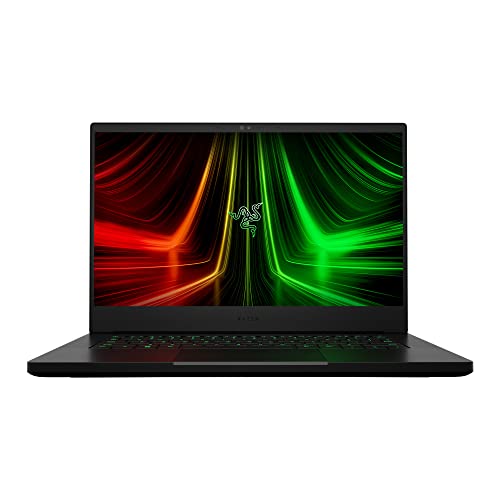
Lenovo ThinkPad T14 vs Razer Blade 14 at a Glance
| Attribute | Lenovo ThinkPad T14 | Razer Blade 14 |
|---|---|---|
| Processor | Intel Core Ultra 7 155U (Integrated AI up to 22 TOPS) | AMD Ryzen 9 6900HX (8 Cores, up to 4.9GHz) |
| Graphics | Integrated Intel Graphics | NVIDIA GeForce RTX 3070 Ti (100W TGP, 16GB VRAM) |
| System Memory | 32GB DDR5 | 16GB DDR5 (4800MHz) |
| Storage | 512GB SSD | 1TB PCIe x4 SSD |
| Display | 14-inch WUXGA (1920×1200) IPS, 400 nits, Anti-Glare | 14-inch QHD (2560×1440), 165Hz |
| Webcam | 5MP RGB with Physical Privacy Shutter | Front Camera (listing does not specify resolution) |
| Operating System | Windows 11 Pro | Windows 11 |
| Chassis Material / Color | Gray | CNC Aluminum, Anodized Black |
| Dimensions | 12.44″L x 8.81″W x 0.7″Th | 12.59″L x 8.66″W x 0.66″Th |
| Weight | Not listed | 3.9 pounds |
| Best For | Enterprise Business & Professional Productivity | Gaming, 3D Rendering & Visual Creation |
Graphics and Gaming Performance
The gap in visual rendering between these two machines represents entirely different design philosophies. The Razer Blade 14 features an NVIDIA GeForce RTX 3070 Ti Laptop GPU running at up to 100W Maximum Graphics Power with a boost clock reaching 1200MHz and 16GB of dedicated video memory. According to manufacturer benchmarks, this chip delivers up to 70% faster speeds than previous RTX 2070 SUPER mobile implementations and can output up to 100 frames per second at 1440p resolution. For gaming workloads, 3D modeling, and local machine learning tasks that require high-bandwidth hardware acceleration, this dedicated silicon operates in a different league entirely.
By comparison, the Lenovo ThinkPad T14 relies on integrated Intel Graphics paired with its Core Ultra processor architecture. The listing notes shared system memory rather than a discrete card with dedicated VRAM. While this setup easily drives multiple external 4K monitors through its HDMI 2.1 port and dual Thunderbolt 4 connections, it is not engineered for heavy gaming or hardware-accelerated 3D viewports. Those curious about comparing corporate ultraportables with gaming rigs can review our lenovo thinkpad t14 vs msi stealth 16 comparison to see how similar thermal profiles balance compute against rendering.
Evaluating Razer Blade 14 gaming performance against the ThinkPad makes the division unmistakable. When assessing ThinkPad T14 vs Blade 14 graphics performance, the Blade 14 offers full support for demanding real-time ray tracing, complex video production timelines, and modern triple-A gaming, whereas the ThinkPad is tailored strictly for 2D interfaces, presentations, and general office productivity.
Edge: Razer Blade 14, by virtue of its dedicated 100W NVIDIA GeForce RTX 3070 Ti graphics processor and 16GB of dedicated video RAM.
Processing Architecture and System Memory
Under the hood, these laptops pursue opposite paths regarding thread handling, clock frequency, and memory capacity. The Blade 14 runs on an AMD Ryzen 9 6900HX processor sporting 8 high-performance cores capable of boosting up to 4.9GHz. This chip is built to sustain demanding compute tasks, heavy game logic, and code compilation cycles without pulling back on performance. Backing this CPU is 16GB of DDR5 memory running at 4800MHz, which the listing notes is 50% faster than previous-generation memory when loading applications.
The ThinkPad T14 brings a modern business-first layout powered by an Intel Core Ultra 7 155U. Rather than burning high wattage for raw clock speed, this processor focuses on efficiency and modern acceleration, supplying up to 22 TOPS of AI performance across its CPU, GPU, and integrated NPU. Crucially, this ThinkPad configuration doubles the system memory to 32GB of DDR5 RAM. For software developers running multiple virtualization containers, database servers, and local development environments, memory ceiling often matters more than peak core clocks.
When choosing between the Lenovo ThinkPad T14 or Razer Blade 14 for programming, the decision depends on whether your workload is bottlenecked by RAM allocation or raw processor wattage. If your code compiles against local GPUs or requires high single-core sustained boosts, the Ryzen 9 has the advantage. However, for large multi-threaded toolchains, browser tab bloat, and enterprise containers, the 32GB memory footprint on the ThinkPad eliminates swapping. You can see similar workload trade-offs analyzed in our lenovo thinkpad t14 vs dell 16 plus evaluation.
Edge: Tie. The Blade 14 leads in raw multicore processing speed and boost clocks, while the ThinkPad T14 offers double the system memory capacity and a dedicated neural processing engine.
Display Quality and Visual Ergonomics
The screen specifications clearly reflect the intended audience for each chassis. The Razer Blade 14 comes equipped with a 14-inch QHD (2560×1440) display featuring a rapid 165Hz refresh rate. This panel delivers exceptionally crisp text and ultra-fluid animations, ensuring that gaming action remains tear-free and interface navigation feels instantaneous. For creative professionals who inspect fine details in high-resolution photography or vector artwork, the higher pixel density provides exceptional clarity.
The ThinkPad T14 approaches the visual experience through the lens of extended workday comfort. It features a 14-inch WUXGA (1920×1200) IPS panel. The 16:10 aspect ratio provides extra vertical screen real estate, displaying more lines of text, code, or spreadsheet rows before requiring a scroll. It also features an anti-glare coating and 400 nits of brightness, allowing users to work in brightly lit offices, coffee shops, or outdoors without fighting harsh reflections. Unlike the Razer, its refresh rate remains at a standard office baseline rather than high-frequency gaming speed.
Selecting between these panels comes down to resolution and motion fluidity versus workday ergonomics. The Blade 14 wins for sharp visuals and fluid movement, but the ThinkPad T14 provides anti-glare protection and a vertical aspect ratio built specifically to minimize visual strain across ten-hour work sessions.
Edge: Razer Blade 14, due to its sharper 1440p resolution and ultra-smooth 165Hz refresh rate.
Thermal Engineering, Battery Efficiency, and Chassis Design
Thermal dissipation dictates how much sustained performance a 14-inch laptop can deliver before heat limits its speed. The Razer Blade 14 integrates Next-Gen Vapor Chamber Cooling, upgraded with more exhaust fins, quieter fans, and a larger liquid capacity to manage the heat generated by the 100W GPU and 45W-class Ryzen 9 processor. Encased in a CNC aluminum unibody finished in anodized black with a backlit green logo, the chassis measures 0.66 inches thick and weighs 3.9 pounds, concentrating significant density into a compact footprint.
The Lenovo ThinkPad T14 relies on an advanced thermal system engineered for silence and sustained productivity rather than clearing high-wattage gaming thresholds. Paired with a U-series Intel Core Ultra processor, the machine consumes dramatically less power under standard loads, avoiding thermal throttling during back-to-back virtual conference calls or heavy spreadsheet calculations. The gray chassis measures 0.70 inches thick and 12.44 inches long, making it slightly narrower and marginally lighter in everyday transit than its high-powered counterpart, though the listing does not specify its exact weight.
When weighing ThinkPad T14 vs Razer Blade 14 battery life, thermal profiles tell the story. The low-power U-series architecture on the ThinkPad avoids the heavy idle draw of discrete gaming components, prioritizing battery longevity over raw computational throughput. For comparisons highlighting portable enterprise designs against power-hungry desktop replacements, explore our guide on the lenovo thinkpad t14s vs legion pro 7i.
Edge: Lenovo ThinkPad T14, owing to a power-conscious U-series processor design that maintains cooler, quieter operation during standard productivity tasks.
Enterprise Security and Video Collaboration
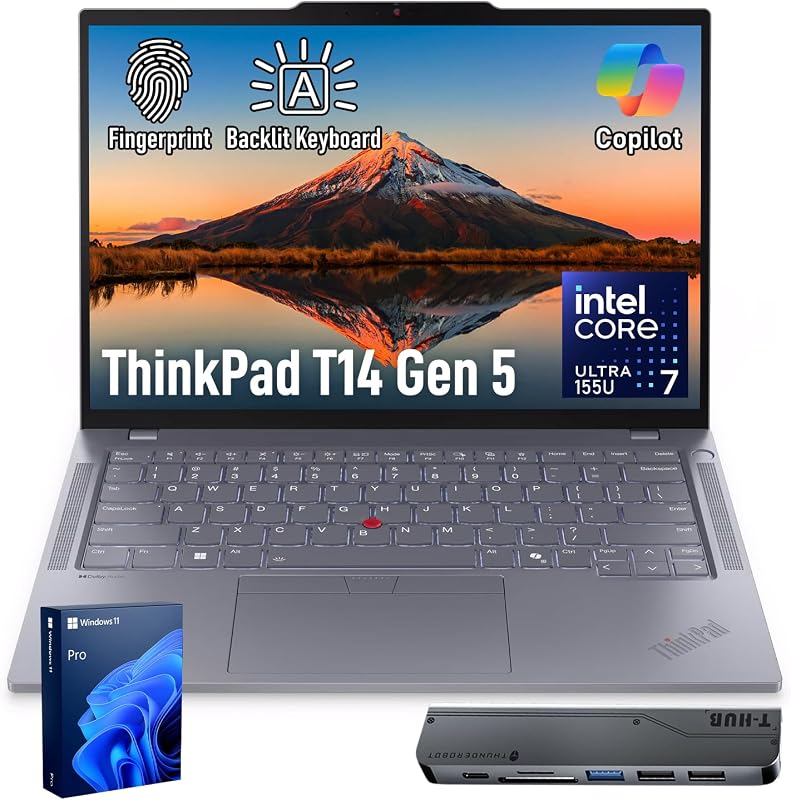
Remote workplace readiness requires hardware-level protections and quality audio-video equipment. The Lenovo ThinkPad T14 stands out here by offering Windows 11 Pro, Intel vPro management capabilities, and Lenovo ThinkShield security. For authentication, it incorporates a match-on-chip fingerprint reader to ensure biometric data stays isolated. Furthermore, the front-facing camera is a high-resolution 5MP RGB webcam accompanied by a physical webcam privacy shutter, giving users positive physical control over camera access between business calls.
The Razer Blade 14 runs standard Windows 11 and includes a front-facing camera, but its listing does not specify camera resolution or the presence of a hardware shutter. Its software and hardware stack are oriented around performance and media enjoyment, highlighted by THX Spatial Audio, 7.1 Codec support via HDMI, and customizable Razer Chroma RGB keyboard lighting. It lacks the deep enterprise management layers like vPro that corporate IT departments require for remote fleet deployment and hardware verification.
For those deciding between the Lenovo ThinkPad T14 or Razer Blade 14 for work, this divergence is critical. If your company enforces enterprise identity verification, fleet asset tracking, and strict camera security, the ThinkPad provides the exact certified feature set needed. For similar workplace trade-offs across different device classes, read our breakdown of the lenovo thinkpad t14s vs legion 5i.
Edge: Lenovo ThinkPad T14, featuring a 5MP webcam, physical privacy shutter, Intel vPro remote management, and ThinkShield hardware security.
I/O Ports and Peripheral Connectivity
Both laptops deliver modern external peripheral support across their 14-inch frames, but their port protocols diverge slightly. The ThinkPad T14 features two USB-C ports with Thunderbolt 4 support delivering up to 40Gbps bandwidth, two USB-A 5Gbps ports (including one always-on port for charging accessories while sleeping), an HDMI 2.1 port capable of driving external displays up to 4K at 60Hz, an audio combo jack, and Wi-Fi 6E with Bluetooth. The dual Thunderbolt 4 lanes make it exceptionally versatile for enterprise docks that carry power, networking, and multiple monitors through a single cable.
The Razer Blade 14 also carries an expansive port selection for a gaming laptop, featuring two USB-C ports, two USB-A ports, an HDMI 2.1 port, a 3.5mm combo jack, and Wi-Fi 6E. It also supports 7.1 audio codec passthrough via HDMI. While it matches the port count and display output generation of the ThinkPad, the listing notes standard USB-C rather than certified Thunderbolt 4 branding, which is typical for AMD-based systems of this hardware generation.
Both machines support a broad catalog of external mice, keyboards, displays, printers, and storage drives. However, the ThinkPad gains a slight technical advantage thanks to certified 40Gbps Thunderbolt 4 architecture and an always-on USB charging port.
Edge: Lenovo ThinkPad T14, due to dual Thunderbolt 4 ports offering 40Gbps throughput and versatile docking station compatibility.
Pros and Cons
Lenovo ThinkPad T14
Pros
- 32GB DDR5 system memory
- 5MP webcam with physical privacy shutter
- Dual 40Gbps Thunderbolt 4 ports
- Intel vPro and ThinkShield enterprise security
- Anti-glare 400-nit 16:10 display
Cons
- Integrated Intel Graphics limits gaming
- Smaller 512GB internal SSD storage
- Standard 60Hz display refresh rate
View Lenovo ThinkPad T14 on Amazon
Razer Blade 14

Pros
- Dedicated NVIDIA RTX 3070 Ti graphics
- Fast 165Hz QHD gaming display
- Spacious 1TB PCIe x4 SSD storage
- Next-Gen vapor chamber cooling
- High-boost 8-core AMD Ryzen 9 CPU
Cons
- Heavier chassis at 3.9 pounds
- Lower system memory at 16GB DDR5
- Lacks physical webcam privacy shutter
Who Should Buy Each One
Choose the Lenovo ThinkPad T14 If
- You work in an enterprise environment requiring Intel vPro manageability, match-on-chip fingerprint security, and Windows 11 Pro.
- You spend hours on video calls and need a 5MP webcam with an integrated physical privacy shutter.
- You run memory-heavy multitasking, development containers, or extensive browser suites that benefit from 32GB of DDR5 RAM.
- You prioritize a glare-free 16:10 display with 400 nits of brightness tailored for reading documents and writing code.
Choose the Razer Blade 14 If
- You want high-performance PC gaming capability powered by an NVIDIA GeForce RTX 3070 Ti GPU with 16GB of dedicated video memory.
- You demand a high-resolution QHD panel running at a 165Hz refresh rate for fluid visuals and competitive gameplay.
- You perform 3D rendering, video editing, or GPU-accelerated computing driven by an 8-core AMD Ryzen 9 6900HX processor.
- You prefer a CNC-milled aluminum chassis with customizable Chroma RGB lighting and advanced vapor chamber cooling.
Final Verdict
A comprehensive review of the Lenovo ThinkPad T14 specs confirms its standing as a consummate corporate workhorse. By integrating a power-efficient Intel Core Ultra 7 processor, a massive 32GB allocation of DDR5 RAM, enterprise-grade ThinkShield security, and an exceptional 5MP webcam, it directly targets the needs of business professionals, developers, and remote workers. If your laptop serves strictly as a tool for communication, enterprise software, office tasks, and coding, the ThinkPad delivers the stability, ergonomic comfort, and fleet security you need without unnecessary hardware overhead.
Conversely, reviewing the Razer Blade 14 shows why it remains a benchmark for ultraportable gaming machines. Adding an RTX 3070 Ti GPU and an AMD Ryzen 9 6900HX processor into a 14-inch unibody frame creates an immensely capable machine for users who refuse to compromise on visual horsepower. If you are asking whether the Razer Blade 14 is worth it, the answer is an emphatic yes for users who split their time between serious gaming, content creation, and creative studio workloads. For pure office productivity, choose the ThinkPad T14; for dual-purpose gaming and graphics supremacy, choose the Blade 14.
FAQ
Can the Lenovo ThinkPad T14 run modern PC games?
The ThinkPad T14 features integrated Intel Graphics rather than a dedicated graphics card. While it can handle light casual games and basic 2D titles, it is not built to run demanding modern 3D games, which require the discrete GPU power found on machines like the Blade 14.
Does the Razer Blade 14 have a webcam privacy shutter?
The Razer Blade 14 product listing mentions a front-facing camera, but it does not specify a physical webcam privacy shutter. If hardware-level camera blocking is a priority for your security setup, the ThinkPad T14 includes an integrated physical shutter.
How much storage do these laptops include out of the box?
The Razer Blade 14 comes with a 1TB PCIe x4 solid-state drive, providing ample room for large game installations and visual project files. The Lenovo ThinkPad T14 configuration listed includes a 512GB solid-state drive, which is tailored for business applications and cloud-synced document storage.
Which laptop is better suited for programming and software development?
The right choice depends entirely on the nature of your projects. The ThinkPad T14 includes 32GB of DDR5 RAM, which offers plenty of headroom for running virtual machines, Docker containers, and complex local stacks. However, if your development work involves local game engines, CUDA acceleration, or GPU-heavy simulation, the Blade 14 and its RTX 3070 Ti graphics card are significantly better equipped.
Do both laptops support Wi-Fi 6E connectivity?
Yes, both the Lenovo ThinkPad T14 and the Razer Blade 14 feature built-in Wi-Fi 6E connectivity, allowing both systems to connect to modern 6GHz wireless bands for low-latency networking and faster transfer speeds.
Can I connect multiple external monitors to these laptops?
Yes. The ThinkPad T14 includes an HDMI 2.1 port supporting up to 4K at 60Hz alongside two 40Gbps Thunderbolt 4 ports that easily connect to external docking stations and displays. The Blade 14 also provides a built-in HDMI 2.1 port and two USB-C connections capable of driving high-resolution external monitors.
What operating system comes pre-installed on each machine?
The Lenovo ThinkPad T14 comes with Windows 11 Pro, which includes enterprise management, remote desktop features, and business encryption tools. The Razer Blade 14 comes pre-installed with standard Windows 11.


