When choosing between the Synology DS224+ and the Synology DS423+, the primary deciding factor comes down to physical drive bay expansion and dedicated solid-state caching versus a streamlined, energy-efficient footprint. While both network-attached storage systems share the exact same quad-core Intel processor and base architecture, the DS423+ doubles your available mechanical drive slots and includes dual M.2 NVMe SSD bays to accelerate intensive data workloads.
Select the DS224+ if you want an efficient personal cloud for straightforward file synchronization, photo indexing, and desktop backups with minimal electricity overhead. Choose the DS423+ if you manage expanding multi-terabyte media libraries, plan to run multiple virtual machines, or need the fault tolerance and throughput advantages of a four-bay storage pool.


Synology DS224+ vs DS423+ at a Glance
| Specification | Synology DS224+ | Synology DS423+ |
|---|---|---|
| Drive Bays | 2 Bays (Supplied with 8TB / 2 x 4TB HDDs) | 4 Bays (Supplied with 32TB / 4 x 8TB HDDs) |
| M.2 NVMe SSD Slots | Not listed | 2 x M.2 2280 NVMe (Supplied with 1TB / 2 x 500GB SSDs) |
| Processor | Intel Celeron J4125 4-Core 2.0GHz (Up to 2.7GHz Turbo) | Intel Celeron J4125 4-Core 2.0GHz (Up to 2.7GHz Turbo) |
| Memory | 6GB DDR4 non-ECC SODIMM | 6GB DDR4 non-ECC SODIMM |
| LAN Ports | 2 x RJ-45 1GbE (Link Aggregation / Failover) | 2 x RJ-45 1GbE (Link Aggregation / Failover) |
| USB Ports | 2 x USB 3.2 Ports | 2 x USB 3.2 Ports |
| Internal File Systems | EXT4, Btrfs | EXT4, Btrfs (Advanced LUN iSCSI Service) |
| Operational Power Usage | As low as 15 watts | Not listed |
| Drive Assembly State | Chassis and drives packaged in sealed box | Drives and memory included separately (installation required) |
| Best For | Personal data backup and efficient photo management | Massive media archives, virtualization, and multi-user caching |
Drive Bays and Storage Scalability
The fundamental physical divide in the ds224+ vs ds423+ drive bays comparison defines how each unit handles long-term storage growth. The DS224+ provides a two-bay layout outfitted with two 4TB hard drives, providing an 8TB total raw capacity. In a two-bay enclosure, implementing data redundancy requires mirroring via RAID 1 or Synology Hybrid RAID with single-drive protection. This halves your usable capacity, leaving you with 4TB of protected space. When you outgrow that volume, your only recourse is replacing both drives sequentially with higher-capacity disks.
In contrast, the DS423+ arrives equipped with four drive bays loaded with four 8TB hard drives, creating an expansive 32TB raw storage foundation. A four-bay array introduces enterprise-style redundancy options like RAID 5 or single-drive fault tolerance across multiple disks, which preserves a much higher ratio of usable storage relative to raw capacity. Furthermore, if you expand workloads over several years, a four-bay unit lets you add or swap drives gradually without rebuilding your entire storage architecture from scratch. Shoppers exploring broader four-bay alternatives can review our synology ds423+ vs qnap ts-464 comparison to see how alternative architectures handle multi-disk scaling.
Another operational distinction lies in setup. The DS224+ comes in a sealed box with its storage ready to operate, while the DS423+ listing indicates that hard drives and memory upgrades are included separately and require physical installation into the drive sleds. For users demanding maximum storage potential, the initial assembly effort on the DS423+ translates to quadrupled out-of-the-box storage volume.
Edge: Synology DS423+ because its four drive bays and 32TB included storage deliver four times the capacity and superior RAID flexibility compared to the two-bay DS224+.
SSD Caching and Data Responsiveness
When assessing synology ds423+ nvme cache vs ds224+ capabilities, the two systems diverge sharply in how they manage high-frequency input and output operations. The DS423+ incorporates dual M.2 2280 NVMe SSD slots pre-populated with two 500GB solid-state drives, giving you a dedicated 1TB NVMe caching tier. This architecture allows the system to store frequently accessed data and database indexes on high-speed solid-state memory, bypassing the mechanical latency of spinning hard drive platters.
The DS224+ does not feature M.2 NVMe slots in its specifications. Any file indexing, thumbnail generation, or transactional data on the two-bay server relies solely on the installed SATA hard disk drives backed by system RAM. While the DS224+ listing specifies enhanced indexing performance for Synology Photos and Synology Drive compared to prior generations, it cannot match the random read and write acceleration provided by dedicated solid-state drives when dozens of applications or users request small files simultaneously. Those weighing NVMe tiers against premium enterprise platforms can evaluate the synology ds423+ vs ds923+ comparison for deeper context on cache utilization.
For demanding use cases such as hosting containerized applications, maintaining active iSCSI targets, or serving as a network video recorder handling multiple camera streams, the NVMe cache on the DS423+ prevents mechanical drives from thrashing. If your network traffic consists purely of sequential large-file backups like weekly disk images, caching offers less noticeable gain, but for responsive server tasks, the hardware difference is substantial.
Edge: Synology DS423+ because it includes dual M.2 NVMe slots equipped with 1TB of solid-state cache that the DS224+ completely lacks.
Hardware Specifications and Core Architecture
A side-by-side evaluation of synology ds224+ vs ds423+ specs reveals identical underlying processing brains inside both units. Both systems are powered by the Intel Celeron J4125 quad-core processor, running at a base clock of 2.0GHz with turbo boost speeds reaching 2.7GHz. This shared architecture ensures that single-threaded task execution, basic script execution, and standard background maintenance run at equivalent computing speeds on either device.
Memory capacity is similarly uniform across both models. Each unit comes supplied with 6GB of DDR4 non-ECC SODIMM memory, giving you ample headroom beyond standard baseline network storage requirements. This shared 6GB allocation allows both the DS224+ and DS423+ to comfortably run the Synology DiskStation Manager operating system, host integrated data management suites, manage desktop backups, and execute file sharing tasks without encountering severe memory bottlenecks under normal domestic loads. To see how this hardware holds up against higher-tier multi-bay units, examine our synology ds224+ vs ds923+ breakdown.
External connectivity follows the same blueprint on both enclosures. Each chassis provides two RJ-45 1GbE network ports with support for Link Aggregation and Failover, allowing you to combine ports for increased multi-client throughput or maintain continuity if one network line drops. Both servers also include two USB 3.2 ports for connecting external backup drives or storage accessories, meaning neither machine holds an edge in peripheral connectivity.
Edge: Tie because both models feature the identical Intel Celeron J4125 quad-core processor, 6GB DDR4 memory, and identical dual 1GbE network interfaces.
Home Server, Virtualization, and Media Capabilities
Deciding between the ds224+ or ds423+ for home server duties involves weighing workload breadth against server resources. Both systems run Synology DSM, providing access to robust administrative utilities like Security Advisor, centralized file management, and comprehensive data syncing. However, the DS423+ listing explicitly highlights its readiness for virtual machine and container storage, domain controllers, email servers, and large-scale surveillance deployments. The combination of four SATA channels and solid-state caching allows the DS423+ to juggle these server responsibilities simultaneously without bogging down disk queues.
When selecting the ds224+ or ds423+ for plex or general multimedia duties, video handling requires close inspection. The Celeron J4125 processor inside both servers features hardware video processing capabilities, and the DS224+ listing confirms its capability as a 4K multimedia server. Both units can stream high-definition family video libraries and catalog massive photo collections through Synology Photos. However, the DS423+ listing points out its suitability for editing high-quality video directly from network storage, aided by its larger disk stripe width and NVMe caching tier. Home builders comparing compact streaming solutions might also consider the synology ds224+ vs qnap ts-464 for alternate media server hardware paths.
If your home server goals center primarily on backing up laptops, safeguarding mobile camera rolls, and serving 4K content to smart televisions in a single household, the DS224+ handles the workload cleanly. If you plan to spin up Docker containers, host enterprise-style network services, or manage a high-camera-count network video recorder, the DS423+ provides the broader architectural ceiling needed to keep those services responsive.
Edge: Synology DS423+ because its multi-drive throughput, dedicated caching, and explicit support for virtual machines make it a superior multi-purpose home server.
Power Consumption and Physical Footprint
Examining synology ds224+ vs ds423+ power consumption highlights a significant advantage for users looking to minimize utility impact. Network storage appliances operate continuously around the clock, making baseline electrical draw an ongoing operational factor. The DS224+ listing specifically highlights operational power usage as low as 15 watts. With only two 3.5-inch hard drives to spin and no auxiliary NVMe hardware drawing continuous power, the DS224+ is optimized for an exceptionally gentle electrical profile.
While the DS423+ listing does not specify its exact operational wattage, running four 8TB mechanical hard drives alongside two M.2 NVMe SSDs inevitably demands more electrical power than a two-drive setup. Each additional mechanical hard drive contributes constant spindle motor draw and intermittent actuator power during read/write cycles. Users building an eco-conscious home lab will find that powering four drives requires noticeably more energy over an entire year than maintaining a lean two-disk enclosure. For another perspective on low-overhead file servers, check our synology ds423+ vs qnap ts-233 review.
Physical volume and operational placement also favor the DS224+. Both units share metal construction and tower server form factors (with rack mount compatibility noted in listing specifications), but the DS224+ takes up considerably less desk or shelf space due to its two-bay width. Fewer spinning hard drives also mean less mechanical vibration and lower noise output in quiet environments like bedrooms or home offices.
Edge: Synology DS224+ because it demonstrates operational power consumption as low as 15 watts and produces a smaller physical footprint with half the mechanical drives.
Pros and Cons
Synology DS224+
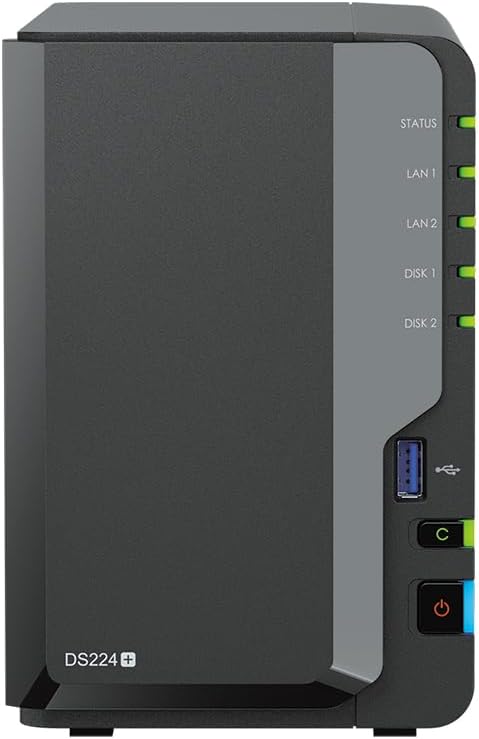
Pros
- Operational power usage as low as 15 watts
- Compact two-bay desktop footprint
- Quad-core Celeron J4125 processor with turbo
- 6GB DDR4 memory pre-installed
- Dual 1GbE ports with link aggregation
Cons
- Limited to two SATA drive bays
- No M.2 NVMe SSD cache slots listed
- Lower total raw storage capacity
View Synology DS224+ on Amazon
Synology DS423+

Pros
- Four SATA drive bays with 32TB capacity
- Dual M.2 NVMe slots with 1TB cache
- Explicit support for virtual machine storage
- Same powerful quad-core Celeron J4125 CPU
- Dual 1GbE LAN with failover support
Cons
- Drives and memory require manual installation
- Higher overall operational power draw
- Larger desktop footprint than 2-bay units
View Synology DS423+ on Amazon
Who Should Buy Each One
Choose the Synology DS224+ If
- You need a dedicated personal backup destination with an included 8TB storage configuration ready in a sealed box.
- Low continuous power consumption is your top priority, and you want operational usage as low as 15 watts.
- Your storage needs are moderate and you do not require high-speed M.2 NVMe caching pools for multi-user database tasks.
- You want a compact black metal tower that fits into cramped living or office spaces with minimal noise.
Choose the Synology DS423+ If
- You require expansive initial storage and long-term scalability across four drive bays loaded with 32TB of capacity.
- You plan to run virtual machines, Docker containers, email servers, or manage high-bandwidth video editing workflows.
- You want fast random file access and database acceleration powered by 1TB of included M.2 NVMe solid-state caching.
- You intend to deploy an extensive network video recorder surveillance setup handling numerous high-resolution cameras.
Final Verdict
For the typical home user whose primary objectives are centralizing photo collections, running automated desktop backups, and streaming personal 4K media, the DS224+ represents the smarter, more practical investment. It incorporates the identical Celeron J4125 quad-core processor and 6GB DDR4 memory configuration found in its larger counterpart, delivering swift navigation across DSM and efficient file indexing. In any standard synology ds224+ review, its standout virtue is delivering full-featured Synology software tools while keeping energy consumption down to an impressive 15 watts.
However, when asking is ds423+ worth it for power users, creative professionals, and data hoarders, the answer is an undeniable yes. In the broader synology ds423+ vs ds224+ landscape, the DS423+ is not merely larger; it fundamentally changes your operational headroom by providing four drive bays, 32TB of raw mechanical capacity, and dual M.2 NVMe caching slots. A thorough synology ds423+ review reveals that if your ambitions encompass running virtual machines, hosting container suites, or managing heavy multi-client workloads, the hardware scalability of the DS423+ is worth every bit of extra footprint.
FAQ
Does the Synology DS224+ include M.2 NVMe SSD slots?
No, the listing for the DS224+ does not specify any M.2 NVMe SSD slots. If you require solid-state caching to accelerate random read and write operations, the DS423+ includes two M.2 2280 NVMe slots pre-loaded with a 1TB SSD caching array.
Can both the DS224+ and DS423+ handle 4K multimedia streaming?
Yes, both models are powered by the quad-core Intel Celeron J4125 processor, and the DS224+ listing specifically highlights its role as a 4K multimedia server. Both devices run Synology DSM, enabling smooth local and remote media delivery to smart TVs, mobile apps, and personal computers.
Do hard drives come pre-installed inside both NAS chassis?
The DS224+ listing describes a chassis packaged in a sealed box with its 8TB (2 x 4TB) storage configuration. In contrast, the DS423+ listing notes that its 32TB (4 x 8TB) hard drives and memory upgrades are included separately and require user installation into the sleds before initial startup.
What network connection speeds do these Synology servers support?
Both the DS224+ and the DS423+ are equipped with two RJ-45 1GbE network ports. Both models support Link Aggregation for combined bandwidth across multiple clients as well as network Failover protection to prevent downtime if one cable disconnects.
How much system memory comes installed on the DS224+ and DS423+?
Both models come supplied with 6GB of DDR4 non-ECC SODIMM memory according to their product specifications. This provides ample capacity for running DSM applications, desktop backup suites, and background data management services.
Which internal file systems do these network storage devices support?
Both the DS224+ and the DS423+ support internal file formatting in EXT4 and Btrfs. The Btrfs file system provides advanced data protection capabilities, and the DS423+ listing specifically highlights Btrfs support for Advanced LUN iSCSI services.