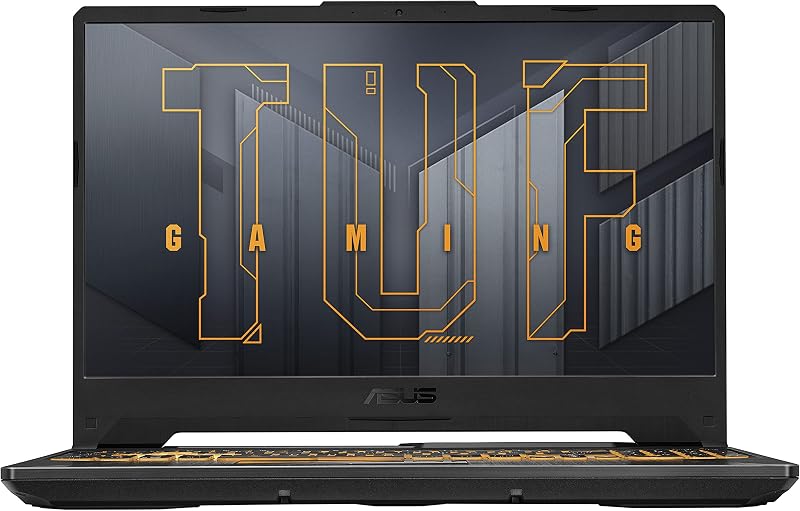
Choosing between the Asus TUF Gaming A15 and the Acer Swift Go 14 comes down to a fundamental choice between dedicated graphics performance in a heavy-duty chassis and ultraportable productivity with a high-accuracy touchscreen. The TUF Gaming A15 delivers a dedicated discrete GPU, a high-refresh 144Hz display, and robust thermal hardware built for demanding 3D processing, while the Swift Go 14 packages a color-accurate 16:10 touch panel, 16GB of system memory, and advanced webcam hardware into an aluminum frame that weighs under three pounds.
Gamers, 3D animators, and users requiring sustained graphical throughput should choose the Asus TUF Gaming A15, whereas mobile professionals, frequent commuters, and university students needing all-day portability should opt for the Acer Swift Go 14.


Asus TUF Gaming A15 vs Acer Swift Go 14 at a Glance
| Feature | Asus TUF Gaming A15 | Acer Swift Go 14 |
|---|---|---|
| Display Size & Type | 15.6-inch FHD (1920 x 1080), 144Hz, Anti-Glare | 14-inch WUXGA (1920 x 1200) IPS Touchscreen, 100% sRGB |
| Processor | AMD Ryzen 5 7535HS | 13th Gen Intel Core i7-1355U |
| Graphics Processing Unit | NVIDIA GeForce RTX 3050 Laptop GPU (4GB, up to 70W TGP) | Intel Iris Xe Graphics (Integrated) |
| Installed RAM | 8GB DDR5-5600MHz | 16GB Onboard LPDDR5 |
| Storage Capacity | 512GB PCIe 4.0 NVMe SSD | 512GB PCIe Gen 4 SSD |
| Weight | 7 pounds | 2.8 pounds (2.76 pounds listed) |
| Webcam & Microphones | Front-facing HD Camera | 1440p QHD Camera with TNR & PurifiedVoice AI |
| Chassis Durability | MIL-STD-810H Military Standard | Aluminum Thin-and-Light Chassis (0.59 inches thin) |
| Connectivity Standards | Wi-Fi 6 | Killer Wireless Wi-Fi 6E AX1675, Bluetooth 5.1 |
| Best For | High-refresh gaming and GPU-accelerated computing | Mobile productivity, executive travel, and video collaboration |
Graphics and Gaming Performance
The primary architectural divergence between these two notebooks centers on visual computing power. The Asus TUF Gaming A15 is equipped with a dedicated NVIDIA GeForce RTX 3050 Laptop GPU featuring 4GB of dedicated memory and a total graphics power rating of up to 70W using Dynamic Boost. A dedicated graphics card operates with its own high-speed memory pool and discrete silicon, allowing it to calculate complex 3D geometry, compute real-time lighting pipelines, and process texture mapping independently of the main processor. Coupled with a 15.6-inch 144Hz display that features Adaptive-Sync technology, the TUF Gaming A15 prevents screen tearing and minimizes input lag during fast-paced motion.
In contrast, the Acer Swift Go 14 relies on integrated Intel Iris Xe Graphics. Integrated graphics do not possess dedicated video RAM; instead, they allocate a portion of the system’s shared LPDDR5 memory pool to process video and desktop graphics. In any comparison of an RTX 3050 vs Intel Iris Xe laptop, the dedicated GPU offers a profound advantage in raw polygon throughput, specialized shader computation, and hardware-level video encoding. While the Swift Go 14 effortlessly drives desktop multitasking, 4K media playback, and light casual titles, it lacks the hardware rasterization pipeline necessary for modern high-fidelity 3D games. Anyone analyzing an asus rog strix scar 16 vs tuf gaming a15 comparison will recognize the TUF lineup’s dedication to graphics performance over ultra-lean portability.
When asking whether to pick the Asus TUF Gaming A15 or Acer Swift Go 14 for gaming, the choice is clear. The TUF Gaming A15 includes the specialized thermal and graphics hardware required to render modern titles at fluid frame rates, making full use of its high-refresh 144Hz screen. The Swift Go 14 is built for media consumption rather than 3D rendering workloads, capping display output at standard refresh rates without variable refresh synchronization.
Edge: Asus TUF Gaming A15 because its dedicated NVIDIA GeForce RTX 3050 GPU and 144Hz Adaptive-Sync display provide true hardware-accelerated 3D gaming performance.
Portability, Chassis, and Weight
Physical footprint and portability create another stark contrast between these two devices. The Acer Swift Go 14 is engineered from the ground up as an Intel Evo verified thin-and-light laptop. It features a sleek aluminum chassis that measures just 0.59 inches thick and records an overall weight of only 2.76 pounds (listed in specifications at 2.8 pounds). This featherweight construction makes it effortless to slide into a slim messenger bag or backpack, allowing mobile professionals and students to carry it across large campuses or through airport terminals without fatigue. It also incorporates an eco-conscious OceanGlass touchpad and a clean silver finish that fits seamlessly into corporate boardrooms.
On the other hand, the Asus TUF Gaming A15 carries a listed item weight of 7 pounds and utilizes a traditional, reinforced clamshell chassis finished in Graphite Black. A significant portion of this mass comes from the internal cooling architecture, dedicated thermal heat pipes, dual fans, and structural reinforcement necessary to survive harsh operating conditions. The TUF A15 undergoes rigorous MIL-STD-810H testing, exposing sample units to drops, excessive vibration, extreme humidity, and intense temperature swings to ensure structural survivability. It also features a spill-resistant keyboard design to guard against accidental desk mishaps.
Evaluating the Acer Swift Go 14 vs Asus TUF A15 weight makes it apparent that everyday mobility is entirely on Acer’s side. Commuters who walk miles daily will feel every ounce of the TUF’s 7-pound footprint, whereas the Swift Go 14 practically disappears inside a bag. Those who frequently explore ultraportable alternatives, like looking at an asus rog strix scar 16 vs acer swift go 14 matchup, understand that true ultraportable usability requires shedding bulk, which the Swift Go 14 achieves masterfully.
Edge: Acer Swift Go 14 because its 2.8-pound aluminum frame and 0.59-inch thickness offer vastly superior daily portability compared to the 7-pound chassis of the Asus.
Display Quality and Touchscreen Usability
Visual presentation on these laptops targets two completely different types of computing tasks. The Swift Go 14 integrates a 14-inch IPS display with a 1920 x 1200 resolution. This 16:10 aspect ratio provides extra vertical screen real estate compared to standard widescreen monitors, allowing you to view more lines of code, read longer sections of text, or review spreadsheets without scrolling endlessly. Crucially, the Acer panel covers 100% of the sRGB color space, ensuring vivid color accuracy and rich visual depth for graphic design, photo curation, and digital presentations. It also features a responsive touchscreen layer, enabling intuitive tap, pinch, and swipe navigation directly on the glass.
The Asus TUF Gaming A15 emphasizes speed and motion clarity over color coverage and touch capability. It features a 15.6-inch Full HD (1920 x 1080) panel operating at a fast 144Hz refresh rate. In fast-moving environments, 144Hz refreshes the image more than twice as fast as a standard 60Hz display, rendering fast panning shots and sudden camera turns with pinpoint sharpness. Its anti-glare coating reduces harsh reflections under overhead fluorescent lighting, while Adaptive-Sync matches the panel’s refresh cycles to the RTX 3050 GPU’s frame generation.
Choosing between these two panels depends entirely on your daily tasks. If your work involves reading documents, editing images, or presenting content using intuitive touch gestures, the Swift Go 14 provides superior sharpness, deeper color fidelity, and productivity-focused screen proportions. If your focus centers on competitive gaming where split-second reaction times matter, the TUF Gaming A15’s fluid 144Hz panel is the superior tool. However, for general productivity and multimedia accuracy, Acer’s 100% sRGB color coverage and touch layer provide a more versatile visual experience.
Edge: Acer Swift Go 14 because its 16:10 aspect ratio, 100% sRGB color gamut coverage, and responsive touchscreen make it more practical for creative work and daily productivity.
Processor Architecture and Multitasking Memory
Under the hood, these laptops leverage contrasting processing philosophies tailored to their specific market segments. The Asus TUF Gaming A15 houses an AMD Ryzen 5 7535HS processor. AMD’s “HS” tier designates processors tuned for high-wattage computing within performance laptops, delivering sustained clock speeds across multi-threaded computational workloads such as code compilation and 3D rendering. To support this silicon, Asus includes 8GB of DDR5-5600MHz system memory and a 512GB PCIe 4.0 NVMe solid-state drive operating over a high-bandwidth PCIe bus.
Conversely, the Acer Swift Go 14 runs on a 13th Gen Intel Core i7-1355U processor. Intel’s “U” series chips prioritize power efficiency and burst responsiveness, maximizing operational battery life while handling heavy productivity tasks with ease. What sets the Swift Go 14 apart in daily performance is its inclusion of 16GB of onboard LPDDR5 memory alongside its 512GB PCIe Gen 4 SSD. Having 16GB of RAM gives users twice the working memory capacity of the TUF configuration. This headroom prevents system slowdowns when juggling dozens of open browser tabs, data-heavy spreadsheets, presentation decks, and background office software simultaneously.
While the Ryzen 5 7535HS can draw more continuous power for prolonged rendering tasks, the 8GB RAM ceiling on the TUF Gaming A15 poses an immediate bottleneck for intensive multitasking out of the box. Anyone writing an objective Asus TUF Gaming A15 review must acknowledge that modern operating systems and heavy productivity suites quickly consume 8GB of memory. By providing 16GB of high-speed LPDDR5 RAM as standard equipment, the Swift Go 14 ensures a smooth, stall-free operating environment for demanding workflows.
Edge: Acer Swift Go 14 because its generous 16GB LPDDR5 memory configuration delivers superior multitasking headroom over the 8GB memory included on the Asus.
Webcam, Connectivity, and Interface Ports
Modern workflow flexibility requires a robust suite of communication tools and connection standards. The Acer Swift Go 14 shines brightly in executive and remote-work environments thanks to its built-in 1440p QHD webcam. This high-resolution camera utilizes Acer’s Temporal Noise Reduction (TNR) technology to produce clean, sharp video feeds even in dimly lit rooms. Furthermore, Acer PurifiedView integrates AI-driven background blur, automatic framing, and gaze correction, while Acer PurifiedVoice utilizes AI noise reduction to strip background chatter from your microphone. For connectivity, the Swift Go 14 features two USB Type-C ports supporting USB4 and Thunderbolt 4 with up to 40 Gbps data transfer and 100W Power Delivery, two USB 3.2 Gen 1 Type-A ports (one supporting power-off charging), an HDMI 2.1 port, a microSD card reader, Killer Wi-Fi 6E AX1675, and a power-button fingerprint reader with Windows Hello certification.
The Asus TUF Gaming A15 provides a functional but more standard connectivity configuration. It includes a front-facing HD camera suitable for basic video check-ins, an integrated TrackPoint in addition to the touchpad, HD audio processing, and Wi-Fi 6 wireless networking. While the listing notes standard USB interfaces, HDMI connectivity, and a dedicated headphone jack, it lacks the state-of-the-art dual Thunderbolt 4 bandwidth, advanced 1440p video calling suite, and biometric fingerprint security present on the Acer.
For remote work and business travel, the Swift Go 14 offers an exceptional advantage. The combination of 100W USB-C Power Delivery, dual 40 Gbps Thunderbolt 4 ports for multi-monitor docking stations, and a sharp 1440p QHD webcam creates a complete mobile workstation. In contrast, the TUF Gaming A15 relies on an HD-resolution camera and standard port distribution that cater primarily to basic gaming peripherals rather than high-speed modern docks. Readers comparing general-purpose laptops in our asus tuf gaming a15 vs zenbook 14 oled overview will see a similar trend where productivity-oriented machines dominate peripheral versatility.
Edge: Acer Swift Go 14 because of its superior 1440p QHD AI webcam, dual Thunderbolt 4 ports with 100W charging, and integrated fingerprint reader.
Thermal Engineering and Cooling Systems
Managing heat generation is critical for sustaining hardware stability and preventing component throttling. The Asus TUF Gaming A15 is specifically built to exhaust the significant heat produced by both an AMD HS-series processor and a 70W discrete NVIDIA RTX GPU. To handle this thermal load, Asus engineered a cooling module driven by a pair of 84-blade Arc Flow Fans. These specialized fans utilize variable thickness blades to maximize airflow volume while minimizing acoustic turbulence and fan whine, keeping the system cool under extended gaming and rendering sessions without excessive distraction.
The Acer Swift Go 14 utilizes a customized ultraportable thermal system named TwinAir cooling. Because thin aluminum chassis have less internal volume to disperse heat, Acer implemented dual copper heat pipes paired with a specialized air-inlet keyboard. According to manufacturer lab data, this keyboard design expels up to 10% more heat than traditional laptop keyboards, venting warmth away from the primary typing deck while maintaining quiet fan profiles suitable for quiet library environments and corporate meeting spaces.
While Acer’s TwinAir engineering is impressive for a chassis measuring just 0.59 inches, physical volume remains the ultimate arbiter of thermal dissipation. The larger, thicker chassis of the TUF Gaming A15, combined with its high-capacity 84-blade Arc Flow Fans, allows it to dissipate far higher wattage over extended periods. Users interested in heavy-duty cooling architectures explored in our asus rog zephyrus g14 vs tuf gaming a15 evaluation know that thick gaming chassis provide unmatched sustained heat dispersion.
Edge: Asus TUF Gaming A15 because its larger chassis volume and dual 84-blade Arc Flow Fans can dissipate significantly more thermal energy during sustained heavy workloads.
Pros and Cons
Asus TUF Gaming A15
Pros
- Dedicated NVIDIA GeForce RTX 3050 GPU
- Fast 144Hz display with Adaptive-Sync
- MIL-STD-810H military-grade structural toughness
- Dual 84-blade Arc Flow Fans cooling
Cons
- Substantially heavier chassis at 7 pounds
- Comes with only 8GB system memory
- Standard HD webcam without advanced AI framing
View Asus TUF Gaming A15 on Amazon
Acer Swift Go 14

Pros
- Ultralight 2.8-pound aluminum chassis
- Vibrant 100% sRGB touchscreen display
- Generous 16GB LPDDR5 system memory
- Sharp 1440p QHD webcam with PurifiedView
- Dual Thunderbolt 4 ports with 100W charging
Cons
- Integrated Intel Iris Xe graphics only
- Standard 60Hz display refresh rate
- Lower thermal headroom for continuous high wattage
View Acer Swift Go 14 on Amazon
Who Should Buy Each One
Choose the Asus TUF Gaming A15 If
- You play modern 3D games and require the dedicated graphical muscle of an NVIDIA GeForce RTX 3050 GPU.
- You play fast-action titles and need a 144Hz high-refresh display with Adaptive-Sync to eliminate visual stuttering.
- You need a rugged laptop tested to MIL-STD-810H standards with a spill-resistant keyboard for harsh environments.
- You require a thermal system featuring dual 84-blade Arc Flow Fans designed for sustained high-wattage computing.
Choose the Acer Swift Go 14 If
- You prioritize extreme mobility and want an aluminum notebook weighing only 2.8 pounds and measuring 0.59 inches thin.
- You need 16GB of onboard LPDDR5 system memory to handle heavy office multitasking, large spreadsheets, and multi-tab browsing.
- You frequently conduct professional video conferences and require a 1440p QHD webcam with AI noise reduction and framing.
- You want a color-accurate 100% sRGB touch screen with a productive 16:10 aspect ratio and dual Thunderbolt 4 ports.
Final Verdict
For the vast majority of everyday users, office professionals, and mobile students, the Acer Swift Go 14 is the better overall purchase. It delivers an outstanding thin-and-light computing experience backed by Intel Evo certification, a bright 14-inch 16:10 touchscreen with 100% sRGB coverage, a sharp 1440p QHD webcam, and cutting-edge connectivity including dual Thunderbolt 4 ports. Furthermore, its inclusion of 16GB of fast LPDDR5 memory gives it a significant edge over standard 8GB machines for multitasking, all packaged into a sleek 2.8-pound aluminum chassis that can be carried anywhere effortlessly.
However, if your computing life centers on gaming or dedicated 3D processing, the Asus TUF Gaming A15 is the undisputed champion between the two. The Acer’s integrated graphics simply cannot compete with the dedicated NVIDIA GeForce RTX 3050 GPU and 144Hz Adaptive-Sync display on the Asus. While the TUF A15 is substantially heavier at 7 pounds and ships with only 8GB of system RAM, its military-grade MIL-STD-810H durability and high-capacity dual Arc Flow cooling fans make it a dependable workhorse for gamers who prioritize frame rates and graphical horsepower over featherweight mobility.
FAQ
Between the Asus TUF Gaming A15 or Acer Swift Go 14 for gaming, which laptop performs better?
The Asus TUF Gaming A15 performs substantially better for gaming due to its dedicated NVIDIA GeForce RTX 3050 Laptop GPU and 144Hz Adaptive-Sync display. The Acer Swift Go 14 relies on integrated Intel Iris Xe Graphics, which are designed for casual media consumption and standard productivity rather than high-performance 3D gaming.
Which model is better suited: Asus TUF Gaming A15 or Acer Swift Go 14 for college?
When deciding on the Asus TUF Gaming A15 or Acer Swift Go 14 for college, the Acer Swift Go 14 is generally the superior choice for most students. Weighing just 2.8 pounds with a 0.59-inch aluminum frame, it is vastly easier to carry between lectures. It also includes 16GB of RAM for multi-tab research, a 1440p QHD webcam for remote study groups, and a color-accurate 16:10 touchscreen. The Asus TUF A15 is only preferable for students majoring in game design, 3D modeling, or those who want their primary machine to double as a dedicated gaming rig.
How does the Acer Swift Go 14 vs Asus TUF A15 weight compare for travel?
There is a massive physical difference in the Acer Swift Go 14 vs Asus TUF A15 weight. The Acer Swift Go 14 weighs approximately 2.8 pounds (listed at 2.76 pounds), making it an ultralight clamshell suitable for one-handed handling and compact bags. The Asus TUF Gaming A15 is listed at 7 pounds, reflecting its heavy-duty cooling modules, larger 15.6-inch form factor, and MIL-STD-810H reinforced build.
Is Acer Swift Go 14 worth it for remote business professionals?
Anyone reading an Acer Swift Go 14 review will find that it is exceptionally well-suited for remote work. With its 1440p QHD camera featuring Temporal Noise Reduction, AI-driven PurifiedVoice background cancellation, biometric fingerprint login, and two Thunderbolt 4 ports supporting 100W charging and external multi-display setups, it provides an executive-grade remote conferencing and docking setup.
Is Asus TUF Gaming A15 worth it if you do not play video games?
If you do not play 3D games or run GPU-accelerated applications like video rendering or CAD modeling, the Asus TUF Gaming A15 is difficult to justify. Its 7-pound weight and 8GB memory configuration make it far less practical for general office productivity than an ultraportable like the Swift Go 14, unless you specifically require its MIL-STD-810H ruggedized construction and spill-resistant keyboard for harsh job site environments.
Does the Acer Swift Go 14 display support touch input?
Yes, the 14-inch WUXGA (1920 x 1200) IPS display on this Acer Swift Go 14 model is a fully integrated touchscreen. It allows users to tap, swipe, and interact directly with on-screen content, while providing full 100% sRGB color gamut coverage for creative accuracy.
Can the Acer Swift Go 14 charge over USB Type-C?
Yes, the Acer Swift Go 14 includes two USB Type-C ports that support USB4, Thunderbolt 4, and USB Power Delivery up to 100W. This allows users to charge the laptop rapidly using standard high-wattage USB-C power adapters without needing a proprietary barrel charger.


