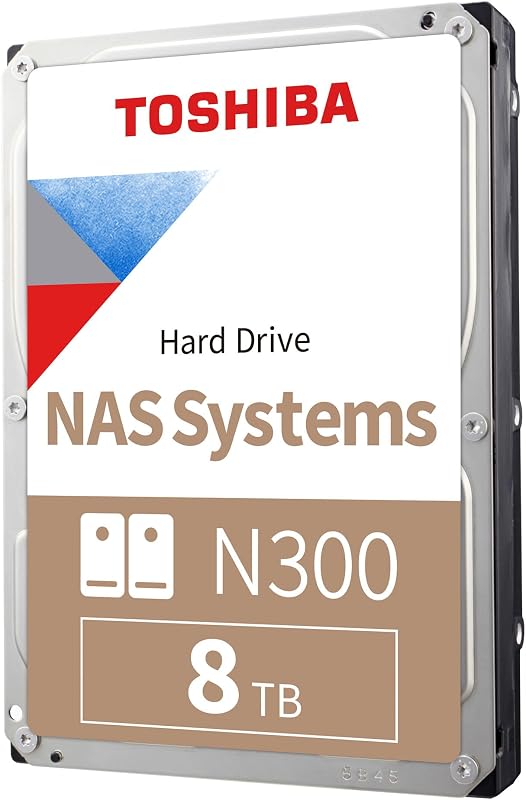
The fundamental dividing line between a NAS drive and a desktop drive centers on operational duty cycle and physical multi-drive vibration tolerance. Dedicated network drives feature specialized controller firmware, rotational vibration dampening, and continuous mechanical endurance engineered to operate inside multi-bay arrays twenty-four hours a day, whereas desktop storage drives emphasize direct-attached plug-and-play simplicity, intermittent usage profiles, and desktop interface convenience.
Builders assembling a central media repository, network backup target, or multi-user RAID server should choose a NAS drive. Individual computer users seeking straightforward local file backups, portable multi-device connectivity, or simple external storage expansion should select a desktop drive.




NAS Drive vs Desktop Drive at a Glance
| Attribute | NAS Drive | Desktop Drive |
|---|---|---|
| Hardware Interface | SATA 6.0 Gb/s | USB 3.0 / USB-C |
| Operating Duty Cycle | Continuous 24×7 Environment | Intermittent / On-Demand |
| Multi-Bay Chassis Support | Up to 8 Bays | Standalone Single Enclosure |
| Annual Workload Rating | Up to 180 TB/year | Not listed |
| Mean Time Between Failures | 1,000,000 Hours (IronWolf) | Not listed |
| On-Board Cache Size | 64 MB to 256 MB | 8 MB (Expansion) |
| Rotational Spindle Speed | 5400 RPM to 7200 RPM | Not listed |
| Magnetic Recording Format | CMR (Conventional Magnetic Recording) | Not listed |
| Integrated Recovery Services | 3-Year Rescue Services (IronWolf) | Rescue Data Recovery (Expansion) |
| Best For | Multi-bay network storage, RAID arrays, central media servers | Direct PC backup, external device expansion, simple archiving |
Multi-Bay RAID Support and Vibration Tolerance
Hard drives installed within shared network storage enclosures encounter severe mechanical stress that isolated desktop drives never face. In multi-bay towers or rackmount chassis, multiple rotational disks spin side-by-side inside a compact metal frame. This density creates sympathetic rotational vibration, where microscopic vibrations from one disk transfer through the chassis to adjoining units. Without physical balancing mechanisms and specialized sensors, these vibrations force drive heads off their data tracks, introducing read-write latency, data recalculations, and premature physical wear.
NAS hard drives are engineered explicitly to withstand these tight multi-disk environments. The Seagate 8TB IronWolf is purpose-built for enclosures housing up to eight drive bays, utilizing mechanical balancing and vibration-mitigating hardware to ensure smooth operation with minimal noise and physical wear. Similarly, the Western Digital 4TB WD Red Plus supports systems scaling up to eight bays while utilizing Conventional Magnetic Recording (CMR) technology. Using CMR prevents the catastrophic write degradation that occurs when rebuilding striped or mirrored storage arrays, making these drives well-suited for configurations explored in our 2 bay vs 4 bay nas deployment comparison.
In contrast, desktop drives are designed solely for solitary operation on an office desk or inside an individual workstation chassis. Units such as the Seagate 8TB Expansion Desktop Hard Drive house their disks inside isolated external casings that do not incorporate multi-drive rotational vibration mitigation. If multiple external desktop drives are removed from their shells and stacked together into a shared array, the lack of multi-bay vibration compensation can compromise track accuracy and lead to intermittent drive drops. For environments where multiple drives must spin concurrently in close quarters, network-ready storage hardware remains essential.
Edge: NAS drive delivers essential multi-bay rotational vibration dampening and CMR consistency required for stable RAID enclosures.
Workload Endurance and Continuous 24×7 Operation
Operational duty cycles highlight the primary mechanical and thermal divide in any desktop drive vs NAS drive comparison. Desktop storage is engineered around typical personal computer schedules, where the machine powers on, handles intermittent file saves or brief backup routines, and then enters standby or powers off overnight. NAS units operate under entirely different expectations: they must remain powered, thermally regulated, and accessible across a network twenty-four hours a day, seven days a week, serving simultaneous requests from multiple computers, mobile phones, or streaming devices.
The endurance engineering of network-targeted storage is reflected in formal operational ratings. For example, WD Red Plus carries an official NAS drive 24×7 workload rating of 180 TB per year, calculated by annualizing total data transfers against 8,760 continuous power-on hours. Further validating its long-term network reliability, the Seagate IronWolf specifies a Mean Time Between Failures (MTBF) of 1,000,000 hours alongside three years of included Rescue Data Recovery Services. These numbers reflect drive bearings, platters, and actuator arms designed to sustain ongoing thermal loads and continuous multi-user read-write activity without mechanical failure, a dynamic detailed in our nas vs external hard drive operational evaluation.
Desktop drives do not publish continuous annualized workload endurance ratings because their components are selected for intermittent duty. While an external hard drive functions reliably when performing periodic scheduled desktop backups, leaving consumer-grade desktop hardware under constant multi-user read-write loads accelerates mechanical fatigue. When evaluating long-term NAS drive vs desktop drive reliability, users demanding an always-on repository for multiple computers need hardware built to handle non-stop access cycles without overheating or degrading platter surfaces.
Edge: NAS drive provides transparent 24×7 endurance ratings, 180 TB/year workload capacities, and 1,000,000-hour MTBF metrics.
Interface, Connectivity, and Setup Simplicity
Connectivity is the category where desktop units demonstrate their greatest practical advantage over internal bare drives. Standard network storage drives are component parts featuring bare SATA 6.0 Gb/s interfaces. They possess no built-in power supply, no enclosure, and no external data ports. Operating a bare NAS drive requires mounting it into an internal PC drive bay or securing it inside an independent NAS enclosure, followed by configuring storage pools, network subnets, and user permissions across a local area network.
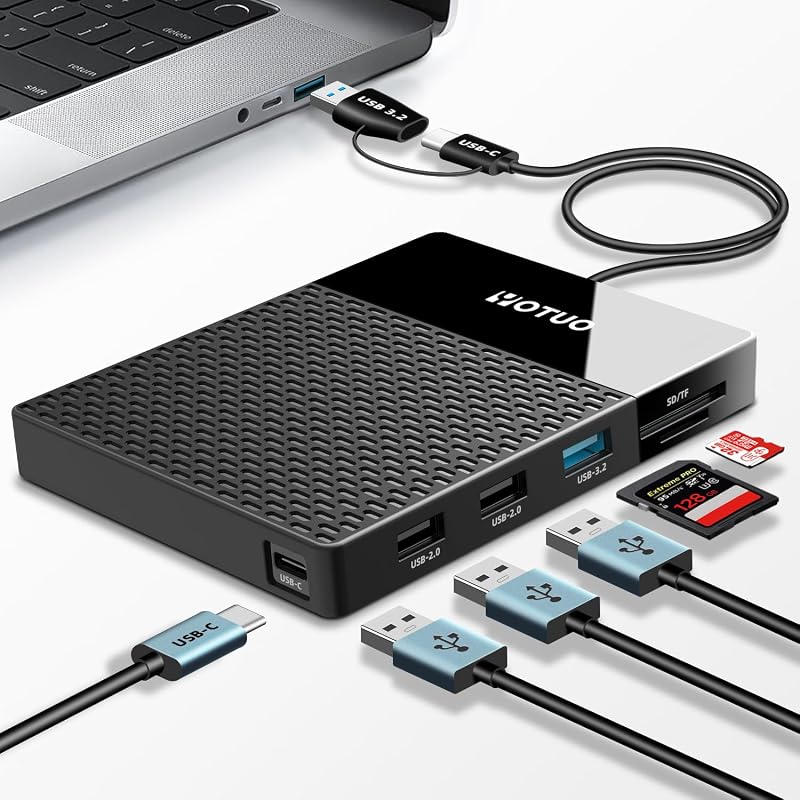
Desktop drives prioritize immediate plug-and-play operation directly out of the packaging. The Seagate Expansion connects directly to any computer through an included 18-inch USB 3.0 cable and an 18W external power adapter, functioning instantly on Windows and Mac operating systems with basic drag-and-drop file management. Moving beyond basic storage, hybrid desktop devices like the YOTUO 1TB External Hard Drive incorporate a 7-in-1 multiport hub featuring USB-C, USB 3.2, USB 2.0, an SD card slot, and a TF card slot. Powered through a 5W bus connection, the YOTUO unit bridges multiple interfaces, supporting Windows, Mac, Linux, Android, and USB-C iPhones while eliminating peripheral adapters.
This stark difference in connectivity dictates how quickly data can be organized. A user who unboxes a desktop drive can immediately transfer files from a laptop, gaming console, or smartphone without opening a hardware chassis or assigning an IP address. Conversely, preparing a bare SATA drive for use demands compatible enclosure hardware and basic technical assembly. When examining whether a desktop drive review justifies choosing direct-attached hardware, the friction-free installation of external USB connections remains difficult to beat for single-workstation desks.
Edge: Desktop drive offers instant out-of-the-box USB connectivity, integrated multiport docking options, and universal cross-device operation.
Firmware Tuning, Error Recovery, and RAID Rebuilding
The internal operating instructions programmed into a drive controller dictate how storage media responds during critical read errors and drive maintenance events. When an everyday desktop hard drive encounters a damaged sector, its internal firmware enters deep recovery loops, repeatedly attempting to read the affected sector for thirty seconds to several minutes. While this extended recovery attempt is helpful for an isolated PC user trying to rescue a single corrupted family photograph, it causes catastrophic failures inside a striped or mirrored network array.
In a multi-drive array, RAID controllers expect connected disks to respond within a tight window of approximately seven to eight seconds. If a desktop drive locks up during a lengthy deep-recovery process, the RAID controller assumes the drive has crashed entirely, dropping it from the storage pool and degrading the entire volume. NAS-specific drives avoid this risk through specialized firmware. WD Red Plus utilizes NASware firmware, which communicates directly with host storage controllers to manage error recovery timeouts and prevent premature RAID drops. This firmware ensures compatibility across ZFS, ext4, and Btrfs file systems during intensive array rebuilds, similar to the multi-drive behaviors examined in our seagate ironwolf 8tb vs barracuda 4tb review.
Seagate IronWolf takes controller management further with its integrated IronWolf Health Management (IHM) system. IHM continuously analyzes environmental metrics including thermal fluctuation, operating vibration, and interface communication to alert administrators before fatal hardware crashes occur. Desktop drives such as the Seagate Expansion offer basic operating system compatibility and include data recovery coverage, but they lack array-aware error recovery protocols and proactive network health telemetry. If a drive fails inside a network environment, rebuilding the data array stresses the remaining disks heavily; without array-tuned firmware and CMR recording, that rebuild process carries a substantial risk of secondary drive failure.
Edge: NAS drive features specialized NASware and IronWolf Health Management firmware designed specifically to navigate RAID error recovery.
Cache Architecture and Sustained Throughput Performance
Data transfer performance between these storage categories reflects different architectural goals. When evaluating throughput, users must look beyond raw theoretical interface bandwidth and examine physical spindle speeds and internal cache capacities. While both SATA 6.0 Gb/s and USB 3.0 or USB 3.2 interfaces provide multi-gigabit data pipelines, mechanical disks are physically bounded by the rotational speed of their platters and the size of their memory buffers.
NAS internal drives incorporate large high-speed memory caches to manage simultaneous data streams generated by multiple network users. The Seagate IronWolf features a 7200 RPM spindle speed combined with a generous 256 MB cache, achieving sustained read speeds up to 210 MB/s and media transfer rates of 180 MB/s. The WD Red Plus operates within a 5400 RPM performance class with a 64 MB cache, offering steady throughput optimized for quiet operation and lower operating temperatures, an architectural balance highlighted in our seagate barracuda 4tb vs toshiba n300 8tb comparison.
Desktop external drives often utilize smaller cache allocations and lower sustained transfer ceilings. The Seagate Expansion lists an 8 MB cache memory alongside a rated read speed of 120 MB/s and a media speed of 15 MB/s. While a 120 MB/s read speed handles individual video playbacks and occasional file copying smoothly, the smaller 8 MB cache struggles during heavy concurrent multi-file operations. The YOTUO external drive provides 5 Gbps bus connectivity across its USB 3.0 interface, but its primary utility lies in versatility and docking ports rather than high-capacity enterprise throughput. When large sequential data sets or concurrent multi-client requests demand sustained speed, the larger cache pools and higher spindle speeds of dedicated network drives pull clearly ahead.
Edge: NAS drive provides up to 256 MB of cache and 7200 RPM spindle speeds capable of sustaining 210 MB/s read transfers.
Pros and Cons
NAS Drive

Pros
- Built for multi-bay RAID enclosures
- Continuous 24×7 operational duty cycle
- Annual 180 TB workload rating
- High-capacity 256 MB cache options
- Integrated health management and CMR recording
Cons
- Requires internal SATA bay or NAS enclosure
- Demands network configuration for remote sharing
View Western Digital 4TB WD Red Plus on Amazon
Desktop Drive
Pros
- Instant USB drag-and-drop setup
- Integrated multiport docking on compact units
- Universal operating system plug-and-play compatibility
- Includes external connection cables and power supplies
Cons
- Lacks multi-bay rotational vibration dampening
- No continuous 24×7 workload endurance rating
- Smaller 8 MB cache on desktop drives
View YOTUO 1TB External Hard Drive USB on Amazon
Who Should Buy Each One
Choose the NAS Drive If
- You are configuring a multi-bay network storage enclosure, media server, or ZFS array that requires up to 8-bay vibration dampening.
- Your storage system operates in a continuous 24×7 environment serving uninterrupted data transfers across multiple household or office users.
- You need the reassurance of a documented 180 TB/year workload endurance rating and a 1,000,000-hour MTBF hardware standard.
- You require array-aware firmware like NASware or IronWolf Health Management to prevent drive dropouts during RAID rebuilding.
Choose the Desktop Drive If
- You need an immediate plug-and-play external storage solution that connects via USB 3.0 or USB-C without internal installation.
- You want simple drag-and-drop manual archiving for individual laptop or desktop workstation backups.
- You require multifunction desktop connectivity, such as the built-in 7-in-1 multiport hub and card reader on the YOTUO drive.
- You store content intermittently and power down your external storage when your personal computer is not in active use.
Final Verdict
When choosing between storage technologies, the NAS drive stands out as the definitive selection for shared data environments, continuous network availability, and multi-bay safety. Drives like the Seagate IronWolf and WD Red Plus are tailored to overcome the physical challenges of heat, vibration, and multi-client access that degrade lesser hardware. With verified 180 TB/year workload ratings, up to 256 MB caches, CMR recording architectures, and dedicated RAID error recovery firmware, a NAS drive ensures that critical multi-user pools and streaming setups remain stable without unexpected array rebuild failures.
However, an external desktop drive remains the smarter, more practical choice for personal workstations and standalone external storage. Devices like the Seagate Expansion and YOTUO external hub bypass the complexity of network administration, drive cages, and network configuration, offering direct USB drag-and-drop file management out of the box. If your goal is backing up a single workstation or expanding laptop connectivity rather than managing an always-on networked pool, a reliable desktop drive delivers all the utility you need with zero setup friction.
FAQ
Can I put an external desktop drive inside a multi-bay network enclosure?
While some external desktop drives can physically be removed from their plastic enclosures and plugged into SATA backplanes, doing so is not recommended for RAID systems. Desktop drives generally lack rotational vibration dampening sensors, employ smaller caches, and use firmware that can trigger false drive drops during read error recovery. Installing desktop drives into a multi-bay chassis increases the risk of array degradation and premature mechanical failure under 24×7 workloads.
What is the significance of a NAS drive 24×7 workload rating?
A NAS drive 24×7 workload rating defines the volume of user data a drive can transfer over the course of a year while remaining continuously powered on. The WD Red Plus, for example, is rated for 180 TB per year based on 8,760 annual power-on hours. Standard desktop drives do not specify annualized continuous workload ratings because their internal components are engineered for intermittent daily personal computer usage rather than non-stop network read-write activity.
Which option should I select: a NAS drive or desktop drive for media server streaming?
For dedicated central media hubs streaming 4K video to multiple simultaneous clients, a NAS drive is strongly recommended. Drives like the Seagate IronWolf feature 7200 RPM spindle speeds, 256 MB caches, and sustained read speeds up to 210 MB/s, preventing stutter during concurrent streams. A desktop drive works adequately if connected directly to a single PC acting as a temporary host, but it lacks the thermal endurance and bandwidth buffering required for continuous shared streaming.
Is a desktop drive worth it for basic personal backups?
A desktop drive is worth it if you need straightforward, cost-effective backup storage for an individual computer. Models like the Seagate Expansion offer plug-and-play USB 3.0 connectivity and drag-and-drop functionality for Windows and Mac systems right out of the box. Paying for enterprise-grade network features is unnecessary if you simply need to archive photos, music, or system image backups from a single desktop or laptop machine.
Is a NAS drive worth it for a single-bay external enclosure?
A NAS drive is generally unnecessary if you are only using a single-bay external USB dock that powers down alongside your computer. The specialized firmware features of NAS drives-such as RAID error timing and multi-bay vibration dampening-provide no measurable benefit in a standalone, single-disk USB dock. A NAS drive becomes worth the investment only when drives are grouped into multi-disk arrays or kept running continuously on an active network.
Which storage format is superior when building a home server?
When selecting a NAS drive or desktop drive for home server builds, internal NAS drives are vastly superior. Home servers running software platforms like TrueNAS or unRAID depend on consistent drive responses and stable SATA interfaces. The CMR recording design, vibration resistance, and specialized NASware firmware found on network drives ensure that storage pools remain intact during heavy data scrubbing and disk rebuilds, whereas consumer desktop drives risk volume dropouts under identical server demands.