The single difference that decides the choice between these two machines is dedicated workstation computing power versus lightweight everyday mobility. The Asus ProArt P16 provides extreme performance with a dedicated graphics card and high-end workstation hardware engineered for production pipelines, whereas the Acer Swift Go 14 provides an ultraportable thin-and-light chassis built for responsive daily productivity and travel convenience.
Creative professionals, 3D animators, and high-end video editors should select the ProArt P16 for its heavy-duty processing capability. Mobile workers, writers, and active university attendees should select the Swift Go 14 for its effortless daily portability and comprehensive connectivity.
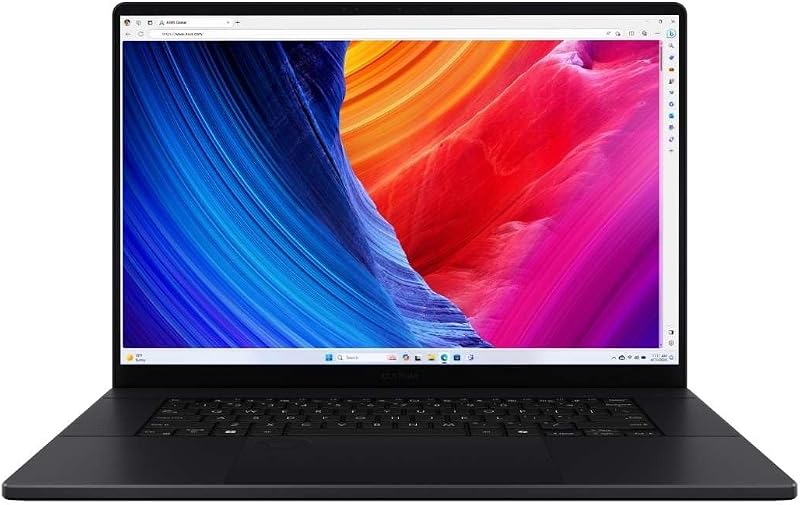
![HIDevolution [2025] ASUS ProArt P16 H7606WX Black 16" 4K 120Hz OLED Touch, 2.0 GHz Ryzen AI 9 HX 370, RTX 5090, 64 GB LPDDR5X RAM, 4 TB PCIe SSD, Windows 11 Pro](https://m.media-amazon.com/images/I/41BUZNaAIUL._SL500_.jpg "HIDevolution [2025] ASUS ProArt P16 H7606WX Black 16\" 4K 120Hz OLED Touch, 2.0 GHz Ryzen AI 9 HX 370, RTX 5090, 64 GB LPDDR5X RAM, 4 TB PCIe SSD, Windows 11 Pro")

Asus ProArt P16 vs Acer Swift Go 14 at a Glance
| Feature | Asus ProArt P16 | Acer Swift Go 14 |
|---|---|---|
| Processor | AMD Ryzen AI 9 HX 370 (12 cores, 24 threads, up to 5.1 GHz) | 13th Gen Intel Core i7-1355U |
| Graphics Processor | NVIDIA GeForce RTX 5090 (24 GB GDDR7) | Intel Iris Xe Graphics (Integrated) |
| Display Size and Type | 16.0-inch 4K (3840 x 2400) 120Hz OLED Touchscreen | 14.0-inch WUXGA (1920 x 1200) IPS Touchscreen (100% sRGB) |
| System Memory | 64 GB LPDDR5X | 16 GB LPDDR5 |
| Internal Storage | 4 TB (2 x 2 TB) M.2 PCIe 4.0 NVMe SSD | 512 GB PCIe Gen 4 SSD |
| Chassis Dimensions | 13.97 x 9.72 x 0.68 inches | 0.59 inches thin (length and width not listed) |
| Weight | 4.1 pounds | 2.76 pounds |
| Primary Video and USB Ports | HDMI, Wi-Fi 6E (additional port specs not listed) | 2x USB-C (Thunderbolt 4 / USB4), 2x USB 3.2 Gen 1, HDMI 2.1 |
| Operating System | Windows 11 Pro | Windows 11 Home |
| Biometrics and Security | Not listed | Power-button fingerprint reader with Windows Hello |
| Best For | Studio production and intensive 3D rendering | Everyday mobile multitasking and business travel |
Graphics and Processing Performance
Processing power dictates how effectively a laptop handles demanding software suites such as video rendering engines, 3D modeling environments, and compiled codebases. The Asus ProArt P16 is equipped with an AMD Ryzen AI 9 HX 370 processor featuring 12 cores, 24 threads, and boost clocks reaching up to 5.1 GHz with a 36 MB smart cache. It pairs this CPU with a flagship dedicated NVIDIA GeForce RTX 5090 graphics card containing 24 GB of GDDR7 memory. To sustain this hardware under sustained multi-threaded loads, builder HIDevolution integrates Thermal Grizzly Conductonaut liquid metal on the CPU and Gelid GC Extreme on the GPU. Evaluating asus rog strix scar 16 vs proart p16 highlights how dedicated workstation hardware handles prolonged computational stress.
In contrast, the Acer Swift Go 14 operates on a 13th Gen Intel Core i7-1355U processor backed by integrated Intel Iris Xe Graphics. The Swift Go 14 uses Acer TwinAir cooling, which incorporates dual copper heat pipes and an air-inlet keyboard designed to expel up to 10 percent more heat than conventional keyboards. While the Core i7 handles web tasks, office documents, and light photo adjustments seamlessly, the integrated graphics setup shares memory with the system rather than utilizing a dedicated pool. When looking at pure ProArt P16 RTX 5090 performance, the difference in export times, hardware ray tracing, and compute-heavy operations is substantial.
Choosing between these architectures comes down to workflow intensity. The dedicated 24 GB GDDR7 VRAM in the ProArt P16 allows users to process complex scenes and multi-stream timeline rendering without choking system memory. The Swift Go 14 avoids the thermal load and power requirements of a discrete card, remaining optimized for mainstream tasks rather than multi-layered media workflows.
Edge: Asus ProArt P16 due to its flagship 12-core AMD processor and dedicated 24 GB RTX 5090 graphics card.
Display Quality and Visual Workspace
Screen real estate and display technology establish how accurately creators can evaluate visual media and how comfortably users can arrange side-by-side application windows. The Asus ProArt P16 OLED display provides a 16.0-inch canvas with a 4K resolution of 3840 x 2400 in a 16:10 aspect ratio. It features a fast 120Hz refresh rate alongside touch functionality. OLED panels deliver true per-pixel black levels and vibrant dynamic range, allowing video editors and visual artists to monitor high-contrast content without backlight bleed. A similar focus on premium display panels appears in evaluations of the asus zenbook 14 oled vs proart p16.
The Acer Swift Go 14 provides a 14.0-inch IPS touchscreen display running at a WUXGA resolution of 1920 x 1200. Acer covers 100 percent of the sRGB color spectrum, providing dependable color accuracy for graphic design, web design, and general entertainment. The 16:10 aspect ratio on the Swift Go 14 offers extra vertical viewing area compared to standard 16:9 displays, which aids in reading long text files and spreadsheets. However, the listing does not specify a refresh rate above standard 60Hz, and the IPS panel relies on traditional backlighting rather than self-emissive pixels.
For fine creative details, the 4K OLED screen on the ProArt P16 delivers dramatically higher pixel density and smoother animation thanks to its 120Hz panel. The Swift Go 14 display provides sharp, reliable visuals that draw less system power, but it cannot match the extreme sharpness or dynamic contrast ratio of a 4K OLED workstation panel.
Edge: Asus ProArt P16 due to its higher-resolution 4K 120Hz OLED touch panel.
Form Factor, Chassis, and Portability
A laptop form factor determines where and how easily it can be deployed during daily travel, site visits, or commutes. The Acer Swift Go 14 is engineered explicitly for mobility, featuring an aluminum body measuring just 0.59 inches thin and weighing 2.76 pounds (also recorded as 2.8 pounds in spec documentation). It also integrates an eco-conscious OceanGlass touchpad designed for smooth navigation. Carrying the Swift Go 14 inside a backpack or messenger bag requires negligible effort, making it practical for frequent commuters who change workspaces throughout the day. Analyzing the asus rog strix scar 16 vs acer swift go 14 illustrates the significant physical divide between portable laptops and performance-first rigs.
The Asus ProArt P16 packages high-wattage components inside a clamshell chassis measuring 13.97 inches long, 9.72 inches wide, and 0.68 inches thick. It weighs 4.1 pounds, representing a noticeably heavier burden in a commuter bag. While 4.1 pounds is relatively slim for a machine housing an RTX 5090 and dual-fan liquid-metal cooling, the physical footprint of a 16-inch chassis requires larger bags and greater desk clearance.
If daily mobility and effortless carry are your highest priorities, the Swift Go 14 clearly wins. The ProArt P16 can certainly travel between home, office, and production sets, but its larger dimensions and extra pound-and-a-half make it a studio-centric workstation rather than a throw-in-your-bag companion.
Edge: Acer Swift Go 14 due to its sub-3-pound weight and slender 0.59-inch aluminum chassis.
Memory Capacity and Internal Storage
System memory and storage capacity determine how many large assets you can hold in rapid-access memory and how much raw footage or project data fits on internal drives. The Asus ProArt P16 comes pre-configured with 64 GB of onboard LPDDR5X RAM and a massive 4 TB of storage structured across two 2 TB M.2 PCIe 4.0 x4 NVMe SSDs. This expansive capacity allows video editors to cache multi-layer video sequences and keep multiple resource-heavy applications running simultaneously without paging to disk. Those exploring desktop-replacement class machines often review the asus proart p16 vs acer predator helios neo 16 when planning storage-heavy setups.
The Acer Swift Go 14 includes 16 GB of onboard LPDDR5 memory and a 512 GB PCIe Gen 4 SSD. For general personal computing, web research, document editing, and multimedia consumption, 16 GB of memory handles daily multitasking reliably. However, 512 GB fills up rapidly if you work with uncompressed video clips or substantial digital photo collections. The Swift Go 14 does include a built-in microSD card reader, which offers an easy avenue for external card-based file ingestion, but its base internal storage remains standard for modern everyday notebooks.
The 64 GB memory pool and 4 TB storage array on the ProArt P16 vastly exceed the baseline setup of the Swift Go 14. Users managing massive project files will quickly outgrow the 512 GB drive on the Acer without external storage, making the ProArt P16 far more ready for immediate creative production.
Edge: Asus ProArt P16 due to its quad-terabyte storage array and 64 GB memory capacity.
Battery Efficiency, Connectivity, and Communication Features
A laptop usability outside the office relies heavily on battery optimization, peripheral ports, and communication hardware. The Acer Swift Go 14 holds Intel Evo verification, confirming responsive performance, fast system wake, and rapid battery charging. While the listing does not specify exact runtime hours or battery watt-hour size, the Intel Evo label emphasizes mobile energy efficiency. Peripheral support on the Swift Go 14 is comprehensive: it features two USB Type-C ports supporting Thunderbolt 4, USB4 (up to 40 Gbps), and 100W USB Power Delivery, two USB 3.2 Gen 1 ports (one supporting power-off charging), an HDMI 2.1 port with HDCP support, and Killer Wi-Fi 6E AX1675 with Bluetooth 5.1. Those evaluating everyday mobility against larger machines often compare the asus tuf gaming a15 vs acer swift go 14 to understand balance points in port setups.
For communication, the Swift Go 14 integrates a 1440p QHD webcam with Acer Temporal Noise Reduction (TNR) alongside Acer PurifiedVoice AI noise reduction and PurifiedView tools (Background Blur, Automatic Framing, and Gaze Correction). It also adds a biometric fingerprint reader integrated into the power button with Windows Hello support. The Asus ProArt P16 listing specifies HDMI video output, Wi-Fi 6E, a backlit keyboard, and Windows 11 Pro, but it leaves details regarding webcam resolution, biometric sensors, and specific USB-C bus standards unlisted.
With verified high-speed Thunderbolt 4 connectivity, dual Type-C ports supporting 100W power delivery, a fingerprint reader, and a high-resolution 1440p conference camera, the Swift Go 14 provides superior convenience for remote meetings, office peripherals, and fast on-the-go charging.
Edge: Acer Swift Go 14 due to its dual Thunderbolt 4 ports, 1440p QHD webcam, and integrated fingerprint reader.
Pros and Cons
Asus ProArt P16
Pros
- NVIDIA RTX 5090 with 24GB VRAM
- 16-inch 4K 120Hz OLED touchscreen
- Expansive 4TB PCIe 4.0 SSD storage
- 64GB high-speed LPDDR5X memory
- 12-core AMD Ryzen AI 9 processor
Cons
- Heavier 4.1-pound chassis
- Larger desk and bag footprint
- Listing does not specify battery capacity
View Asus ProArt P16 on Amazon
Acer Swift Go 14

Pros
- Ultralight 2.76-pound aluminum chassis
- Dual Thunderbolt 4 USB4 ports
- Sharp 1440p QHD conference webcam
- Integrated fingerprint reader security
- 100 percent sRGB touch display
Cons
- Integrated Intel Iris Xe graphics only
- Modest 512GB internal SSD storage
- System memory capped at 16GB
View Acer Swift Go 14 on Amazon
Who Should Buy Each One
Choose the Asus ProArt P16 If
- You render complex 3D projects or edit high-bitrate video footage requiring dedicated NVIDIA RTX 5090 acceleration with 24 GB VRAM.
- You need an expansive 16-inch 4K 120Hz OLED touchscreen for color-critical media production.
- You manage massive application caches and local projects that demand 64 GB of system memory and 4 TB of fast PCIe 4.0 storage.
- You require Windows 11 Pro out of the box for enterprise workstation integration.
Choose the Acer Swift Go 14 If
- You prioritize carrying comfort and need a lightweight 2.76-pound laptop that slips easily into daily commute bags.
- You attend frequent online conferences and benefit from a 1440p QHD webcam with AI framing and noise reduction.
- You connect to multi-display docking setups using dual Thunderbolt 4 and USB4 ports with 100W power delivery.
- You want quick, secure biometric logins via a built-in power-button fingerprint reader.
Final Verdict
For individuals deciding between the Acer Swift Go 14 vs Asus ProArt P16, the overall winner depends entirely on whether your workload demands workstation compute power or mobile flexibility. The Asus ProArt P16 is the decisive winner for creative workflows, 3D modeling, and serious production tasks. Between its 12-core AMD Ryzen AI 9 processor, dedicated 24 GB GeForce RTX 5090 GPU, 64 GB of LPDDR5X RAM, and 4 TB SSD, it operates as a full-fledged mobile production studio with an immaculate 4K 120Hz OLED touchscreen.
However, the Acer Swift Go 14 is the superior option for users whose computing lives center on general productivity, business writing, university assignments, and regular travel. Weighing only 2.76 pounds with dual Thunderbolt 4 connections, a sharp 1440p QHD webcam, and an Intel Evo design, it handles daily tasks effortlessly without the bulk or heat of a studio workstation.
FAQ
Asus ProArt P16 or Acer Swift Go 14 for video editing?
The Asus ProArt P16 is the clear choice for demanding video editing. It includes a dedicated NVIDIA GeForce RTX 5090 with 24 GB of GDDR7 VRAM, 64 GB of memory, and a 4K 120Hz OLED display. While the Acer Swift Go 14 can perform basic timeline cutting on 1080p clips using its 13th Gen Intel Core i7 processor and 100 percent sRGB display, its integrated Intel Iris Xe Graphics and 16 GB shared memory are not intended for complex video encoding or multi-camera 4K projects.
Asus ProArt P16 or Acer Swift Go 14 for students?
For most academic paths, the Acer Swift Go 14 is the better choice. It weighs only 2.76 pounds, fits into standard backpacks, offers an Intel Evo build with fast charging, and includes a 1440p webcam for remote classes. The Asus ProArt P16 is only recommended for students enrolled in specialized disciplines like advanced computer animation, game design, or industrial architecture that strictly mandate heavy GPU compute power.
Is Asus ProArt P16 worth it for everyday productivity?
The ProArt P16 is generally overbuilt if your daily tasks consist primarily of web browsing, office document processing, and streaming media. Its high-end hardware, such as the 24 GB RTX 5090 graphics card and 4 TB dual SSD array, is designed for resource-heavy workloads, meaning everyday users would be carrying extra weight without utilizing its workstation capabilities.
Is Acer Swift Go 14 worth it for basic creative work?
The Swift Go 14 is well-suited for entry-level digital design, web publishing, and personal photo adjustments. Its 14-inch touchscreen features 100 percent sRGB coverage and a 1920 x 1200 resolution, providing vivid and accurate colors for two-dimensional visual media, provided projects do not require heavy 3D GPU acceleration.
How does the Asus ProArt P16 OLED display compare to the Acer Swift Go 14 screen?
The ProArt P16 features a 16-inch 4K (3840 x 2400) OLED touch panel with a 120Hz refresh rate, offering deep black levels, fine contrast, and fluid movement. The Swift Go 14 utilizes a 14-inch WUXGA (1920 x 1200) IPS touch panel running at standard refresh rates with 100 percent sRGB coverage. Both support touch inputs, but the ProArt P16 provides significantly higher pixel resolution, deeper contrast, and a larger working canvas.
What cooling systems do these laptops utilize?
The ProArt P16 relies on thermal enhancements installed by builder HIDevolution, using Thermal Grizzly Conductonaut liquid metal on the CPU and Gelid GC Extreme on the GPU to manage intense heat. The Swift Go 14 features Acer TwinAir cooling, utilizing dual copper heat pipes and an air-inlet keyboard engineered to dissipate heat during multi-application office workloads.