The fundamental dividing line between the TP-Link Deco XE75 and the TP-Link Deco BE85 comes down to total wireless throughput ceilings and physical port architecture: the Deco XE75 operates as an AXE5400 WiFi 6E mesh system limited to standard gigabit Ethernet ports, while the Deco BE85 functions as a BE22000 WiFi 7 mesh system outfitted with pro-grade dual 10 Gbps multi-gigabit interfaces. While both systems utilize the 6 GHz wireless frequency to bypass interference from legacy household clients, the Deco BE85 introduces generational advances such as 320 MHz channel widths, 4K-QAM modulation, and simultaneous multi-band data transfer that vastly surpass standard WiFi 6E networking capabilities.
Choose the Deco XE75 if you need dependable tri-band mesh coverage capable of saturating a standard gigabit broadband connection across an expansive living area. Choose the Deco BE85 if your home network requires multi-gigabit fiber routing, ultra-fast 10G wired backhauls, and next-generation WiFi 7 protocol support for heavy local data transfers.


TP-Link Deco XE75 vs Deco BE85 at a Glance
| Feature | TP-Link Deco XE75 | TP-Link Deco BE85 |
|---|---|---|
| Wi-Fi Generation | WiFi 6E (802.11ax) | WiFi 7 (802.11be) |
| Total Data Transfer Rate | Up to 5,400 Mbps | Up to 22,000 Mbps |
| 6 GHz Band Speed | Up to 2,402 Mbps (HE160) | Up to 11,520 Mbps |
| 5 GHz Band Speed | Up to 2,402 Mbps (HE160) | Up to 8,640 Mbps |
| 2.4 GHz Band Speed | Up to 574 Mbps | Up to 1,376 Mbps |
| Physical Ethernet Ports | 3x Gigabit (10/100/1000 Mbps) per node | 2x 10 Gbps, 2x 2.5 Gbps, 1x USB 3.0 per node |
| Backhaul Architecture | Dedicated or shared 6 GHz wireless backhaul | Simultaneous wireless plus wired backhaul |
| Antennas and Cooling | Internal antennas | 8 internal antennas, 2 internal cooling fans |
| VPN Support | The listing does not specify | VPN Client and Server supported |
| Maximum Upstream Rate | 2,700 Mbps | 10,000 Mbps |
| Best For | Gigabit internet connections and broad household coverage | Multi-gigabit fiber connections and extreme bandwidth workloads |
Wireless Speed and Bandwidth Capabilities
Wireless throughput forms the foundation of any mesh router comparison, determining how much data individual devices can draw concurrently without bogging down the network. When looking at TP-Link Deco WiFi 6E vs WiFi 7, the difference in spectrum capacity is dramatic. The Deco XE75 delivers an aggregate bandwidth of 5,400 Mbps across its three bands, splitting that total into 2,402 Mbps on 6 GHz, 2,402 Mbps on 5 GHz, and 574 Mbps on 2.4 GHz. In contrast, the Deco BE85 generates an astonishing 22,000 Mbps across its tri-band system, providing 11,520 Mbps on the 6 GHz band, 8,640 Mbps on the 5 GHz band, and 1,376 Mbps on the 2.4 GHz band.
This massive gap in Deco XE75 vs BE85 speed stems directly from WiFi 7 architecture. While the Deco XE75 relies on 160 MHz channel widths on its 5 GHz and 6 GHz bands, the Deco BE85 incorporates ultra-wide 320 MHz channels on the 6 GHz band alongside 4K-QAM modulation and Multi-Link Operation. Multi-Link Operation allows a compatible client device to transmit and receive data across multiple frequency bands at the exact same moment, slashing latency and maximizing aggregate throughput.
When analyzing modern top-tier mesh hardware, our eero max 7 vs tp-link deco be85 comparison demonstrates how high-frequency channel doubling transforms data distribution across dense environments. For households with standard streaming, video conferencing, and general browsing, the 5,400 Mbps pool of the XE75 offers ample headroom. However, for continuous large-file synchronization, local media server streaming, and dense multi-user data transfers, the BE85 provides unmatched wireless bandwidth.
Edge: TP-Link Deco BE85 wins by providing more than four times the total wireless capacity, 320 MHz channel widths, and WiFi 7 Multi-Link Operation.
Wired Connectivity and Port Architecture
Wired port configurations determine the maximum speed an incoming internet connection can deliver to the router, as well as the throughput available for local network clients like desktop computers and network-attached storage. In evaluating Deco XE75 vs BE85 specs, physical interface designs reveal fundamentally different performance tiers. The Deco XE75 comes configured with three auto-sensing Gigabit Ethernet ports per unit, offering 10/100/1000 Mbps capability on each node, yielding a combined total of nine gigabit ports across a three-pack system.
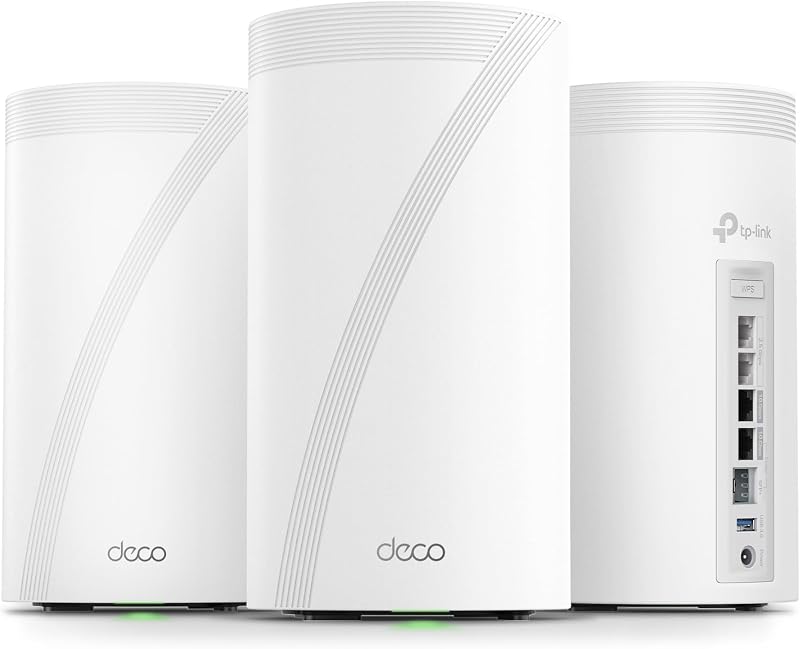
The Deco BE85 steps into enterprise territory by integrating pro-grade dual 10G WAN/LAN ports per unit-consisting of one standard RJ45 port and one SFP+ Fiber/RJ45 Ethernet combo port. Alongside these two 10 Gbps ports, each BE85 node adds two 2.5 Gbps Ethernet ports and a USB 3.0 port. The listing specifies a maximum upstream data transfer rate of 10,000 Mbps for the BE85, compared to 2,700 Mbps for the XE75. This allows the BE85 to ingest extreme fiber broadband tiers without creating a hardware bottleneck at the modem interface.
When assessing whether is Deco BE85 worth it from an infrastructure standpoint, look closely at your incoming broadband plan. Readers exploring high-bandwidth multi-gigabit routing can also review our netgear orbi rbk752 vs tp-link deco be85 breakdown to evaluate how pro-tier ports impact throughput. If your home network utilizes multi-gigabit switches, high-speed storage drives, or internet service exceeding 1 Gbps, the gigabit-capped ports of the XE75 will throttle potential speeds, whereas the BE85 provides complete end-to-end multi-gigabit pathways.
Edge: TP-Link Deco BE85 dominates wired networking with dual 10 Gbps ports, dual 2.5 Gbps interfaces, and USB storage expansion.
Mesh Backhaul Dynamics and Roaming Technology
In a mesh system, backhaul refers to the invisible transmission channel that nodes use to pass data back and forth to the primary router unit. The efficiency of this backhaul directly governs the speeds delivered by satellite nodes placed across the home. When evaluating Deco BE85 vs XE75 mesh mechanics, the two systems manage inter-node communication through distinct wireless and wired protocols. The Deco XE75 leverages an AI-Driven Mesh architecture that automatically learns client environments and user behaviors. By default, the XE75 dedicates its 6 GHz band to act as a wireless backhaul, ensuring stable node links away from legacy traffic, though users can switch this band to serve 6E client devices directly.
The Deco BE85 significantly upgrades this workflow by incorporating TP-Link simultaneous wireless plus wired backhaul technology. Rather than forcing the system to pick exclusively between an Ethernet cable or a wireless channel, the BE85 can aggregate both backhaul pathways at the same time. This capability takes full advantage of WiFi 7 protocol efficiency to ensure node-to-node links retain maximum throughput even when physical cables cannot be routed to every satellite location.
For additional perspective on backhaul performance across modern tri-band platforms, our eero pro 6e vs tp-link deco xe75 direct comparison outlines how dedicated 6 GHz channels stabilize multi-node clusters. To maintain this higher backhaul intensity without thermal degradation, the Deco BE85 incorporates two internal cooling fans alongside eight high-performance internal antennas. The XE75 relies entirely on passive cooling within its compact internal antenna enclosure.
Edge: TP-Link Deco BE85 wins due to its innovative simultaneous wireless plus wired backhaul aggregation and active internal cooling system.
Household Coverage and Client Capacity in Expansive Spaces
Blanketing an entire property with uniform signal strength requires strong radio propagation and sufficient internal hardware to manage simultaneous client sessions. In determining whether to choose the Deco XE75 or BE85 for large home applications, listed specifications present different strengths. The Deco XE75 three-pack explicitly advertises wireless coverage reaching up to 7,200 square feet. It is engineered to eliminate dead zones across broad single-level or multi-story structures while managing up to 200 connected devices via 512 MB of installed RAM memory.
The listing for the Deco BE85 emphasizes broad whole-home coverage driven by eight high-performance internal antennas and AI-Driven Seamless Roaming technology, though it does not publish a specific square footage number in its core specifications. The BE85 focuses heavily on client handling through advanced algorithms that create a unified network name, directing roaming devices to optimal bands and nodes without momentary disconnections or buffering.
Property owners deciding between mesh systems for sprawling layouts can also examine our netgear orbi rbk752 vs tp-link deco xe75 review for real-world context on tri-band multi-pack deployments. While the Deco BE85 delivers greater raw signal strength per node through its eight-antenna array, the Deco XE75 provides clear, verified manufacturer coverage claims for estates up to 7,200 square feet straight out of the box with its three included units.
Edge: TP-Link Deco XE75 takes the edge for verified residential coverage area with an official 7,200 square foot rating for the three-pack system.
Gaming Latency and Traffic Prioritization
Competitive online gaming demands minimal packet jitter, zero packet loss, and low overall latency rather than massive raw download speeds. When considering the Deco XE75 or BE85 for gaming, both devices include foundational features designed to stabilize interactive traffic. Both systems incorporate Quality of Service (QoS) controls through TP-Link HomeShield, enabling users to prioritize gaming consoles and gaming PCs over background downloads and general household streaming.
The Deco XE75 grants gaming hardware clean access to the newly opened 6 GHz band, shielding gaming sessions from the interference generated by legacy smart home gadgets and older WiFi 4 or WiFi 5 laptops. The listing for the XE75 specifically identifies its internal antenna location design for gaming compatibility, providing stable ping performance over both wireless and its gigabit Ethernet ports.
Gamers looking for maximum performance gains can also consult our eero max 7 vs tp-link deco xe75 analysis for additional latency benchmarking insights. The Deco BE85 elevates competitive play further through WiFi 7 Multi-RUs and Multi-Link Operation, which minimize latency spikes by dynamically routing gaming packets around congested channels. Coupled with dual 10 Gbps and dual 2.5 Gbps Ethernet interfaces, the BE85 delivers an uncompromising, ultra-low-latency wired gaming environment that outclasses standard gigabit routers.
Edge: TP-Link Deco BE85 holds the advantage for gaming through Multi-Link Operation latency reduction and multi-gigabit wired connections.
Network Management, Security, and Advanced Software Features
Underlying operating systems and software tools determine how easily homeowners can secure, monitor, and configure their local networks. A thorough TP-Link Deco XE75 review highlights TP-Link’s Cybersecurity Commitment: the device is a signatory of the U.S. Cybersecurity and Infrastructure Security Agency (CISA) Secure-by-Design pledge. The XE75 listing specifies an Advanced router firewall security level and operates on TP-Link Firmware with WPA, WPA2, and WPA3-Personal encryption support, managed via the Deco app or simple voice commands through Amazon Alexa.
A parallel TP-Link Deco BE85 review reveals a broader set of advanced network utilities suited for power users. Running on RouterOS according to its listing specifications, the BE85 natively supports both VPN Clients and VPN Servers. This allows individual devices across the home to route their traffic through remote VPN services without needing separate software installed on every phone, tablet, or PC. It also supports Access Point Mode and works with both Amazon Alexa and Google Assistant voice platforms.
Both models include the core TP-Link HomeShield security suite. This software provides essential security scanning, IoT device identification, basic parental controls, Quality of Service traffic scheduling, and weekly or monthly network health reports. However, the BE85 provides superior network-wide flexibility thanks to its onboard VPN handling and support for multiple smart voice ecosystems.
Edge: TP-Link Deco BE85 wins for software capabilities thanks to native VPN client and server support alongside dual voice assistant integration.
Pros and Cons
TP-Link Deco XE75

Pros
- Covers up to 7,200 square feet
- Tri-band WiFi 6E with clean 6 GHz channel
- Nine total gigabit Ethernet ports across three units
- CISA Secure-by-Design certified network engineering
Cons
- Capped at 1 Gbps wired Ethernet speeds
- The listing does not specify VPN server support
- Narrower 160 MHz maximum channel bandwidth
View TP-Link Deco XE75 on Amazon
TP-Link Deco BE85
Pros
- Blazing 22,000 Mbps aggregate WiFi 7 speed
- Dual 10G ports with SFP+ fiber combo
- Simultaneous wireless plus wired backhaul technology
- Ultra-wide 320 MHz channels with Multi-Link Operation
- Native VPN client and server integration
Cons
- The listing does not specify square foot coverage
- Requires internal cooling fans for thermal control
- Hardware exceeds standard sub-gigabit broadband capabilities
View TP-Link Deco BE85 on Amazon
Who Should Buy Each One
Choose the Deco XE75 If
- Your residential broadband subscription is 1 Gbps or below, making gigabit ports ideal without wasted bandwidth overhead.
- You need to cover up to 7,200 square feet of living area using a verified three-node configuration.
- You want a clear 6 GHz wireless channel to bypass older household devices without needing complex technical setup.
- You prioritize equipment built under CISA Secure-by-Design cybersecurity guidelines with an advanced firewall rating.
Choose the Deco BE85 If
- You subscribe to multi-gigabit fiber internet (2 Gbps, 5 Gbps, or 10 Gbps) that requires unthrottled routing hardware.
- You require 10 Gbps RJ45 or SFP+ fiber connections for fast network storage and heavy local file transfers.
- You own or intend to purchase WiFi 7 client devices that take advantage of 320 MHz channels and Multi-Link Operation.
- You want whole-home VPN client and server features configured directly on your primary router.
Final Verdict
For the vast majority of households operating on standard gigabit internet connections, the TP-Link Deco XE75 represents the most practical and well-balanced mesh investment. Its AXE5400 tri-band setup provides ample wireless throughput, the 6 GHz band cleanly eliminates interference from legacy electronics, and the three-pack covers up to 7,200 square feet. Unless your internet service exceeds 1,000 Mbps or you regularly transfer massive video libraries across local storage drives, the Deco XE75 satisfies modern 4K streaming, remote work, and smart home demands with exceptional reliability.
Conversely, the TP-Link Deco BE85 represents an enterprise-class leap forward for bandwidth-heavy households and early technology adopters. With its BE22000 WiFi 7 speed profile, dual 10G ports, dual 2.5G ports, simultaneous wired plus wireless backhaul, and integrated VPN server tools, it resolves bottlenecks that standard gigabit mesh routers cannot handle. If you have multi-gigabit fiber broadband and want future-proof hardware capable of handling massive multi-device workloads, the Deco BE85 stands as the undisputed performance champion.
FAQ
Can the TP-Link Deco XE75 and Deco BE85 work together in the same mesh network?
Yes, TP-Link Deco units feature broad cross-generational compatibility and can connect together under a single network name using the Deco app. However, if you mix these two models, satellite nodes will only operate within their own hardware specifications, meaning devices connected to a Deco XE75 node will be capped at WiFi 6E throughput and gigabit Ethernet speeds.
Does the Deco XE75 support WiFi 7 devices?
The Deco XE75 is backward compatible and will readily connect to WiFi 7 smartphones, laptops, and tablets across its 2.4 GHz, 5 GHz, and 6 GHz frequency bands. However, those devices will communicate using WiFi 6E protocols, meaning they cannot utilize WiFi 7 features like 320 MHz channel widths or Multi-Link Operation on that network.
Is the Deco BE85 worth it for an internet plan of 1 Gbps or less?
If your internet service plan does not exceed 1 Gbps and you do not run local 10 Gbps network-attached storage or high-speed local servers, the Deco BE85 provides far more speed and port capacity than your connection can use. In that scenario, the Deco XE75 is tailored to maximize gigabit broadband without paying for unused bandwidth headroom.
How do the 6 GHz bands differ between the Deco XE75 and Deco BE85?
While both systems use the 6 GHz band to eliminate congestion from older devices, the Deco XE75 delivers speeds up to 2,402 Mbps using 160 MHz channel widths. The Deco BE85 dramatically expands this band, reaching speeds up to 11,520 Mbps by leveraging ultra-wide 320 MHz channels and 4K-QAM modulation.
Can the Deco BE85 use wireless and wired backhaul at the same time?
Yes, the Deco BE85 features TP-Link simultaneous wireless plus wired backhaul technology. Unlike standard mesh systems that force you to select either Ethernet or wireless for backhaul communication, the BE85 can aggregate both connections concurrently to deliver faster speeds and superior link reliability between nodes.
Do both systems provide TP-Link HomeShield network protection?
Yes, both the Deco XE75 and Deco BE85 include free basic TP-Link HomeShield features. These tools include basic network security scans, IoT device identification, basic parental controls, Quality of Service traffic prioritization, and weekly or monthly network activity reports.